dsh-dictate
navneetset/dsh-dictate
Dictado de voz a texto en tiempo real en el compositor web de dsh mediante OpenRouter STT.
Instalar
dsh plugin --profile web add github:navneetset/dsh-dictateREADME
dsh-plugin-dictate
Live speech-to-text dictation for the DeepSeek Harness web UI. Click the microphone button in the composer tool row, speak, and your words appear in the prompt as you talk — mixable with normal typing, at your cursor, without touching what you already wrote.
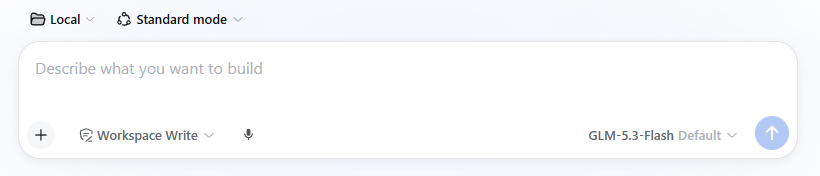
Transcription runs on OpenRouter's STT endpoint (/api/v1/audio/transcriptions). The API key stays server-side: the browser only POSTs audio segments to a local route this plugin registers inside dsh.
Install
Requires dsh ≥ 0.1.1-rc.1 and a running dsh web profile.
# from npm
dsh plugin --profile web add dsh-plugin-dictate

# or straight from this repo
dsh plugin --profile web add https://github.com/navneetset/dsh-dictate.git

# or a local checkout (link: — edits + rebuild show up on next restart)
dsh plugin --profile web add /path/to/dsh-dictate
dsh plugin add installs the package into the profile and appends it to the profile's bundle list, so one command activates both halves (host route + browser mic button). If pnpm complains about the workspace root (first-time setup on some profiles), add -w right after add. Restart dsh web and reload the page. Updating later: re-run the same add command to resolve the latest version.
Features
- Hands-free mode — tap the mic and talk continuously. Segments are cut on natural pauses (voice-activity detection) and inserted with ~1–2s lag; long continuous speech is force-split well before the 60s upstream ceiling.
- Push-to-talk mode — hold the mic button, release to transcribe. Better in noisy rooms.
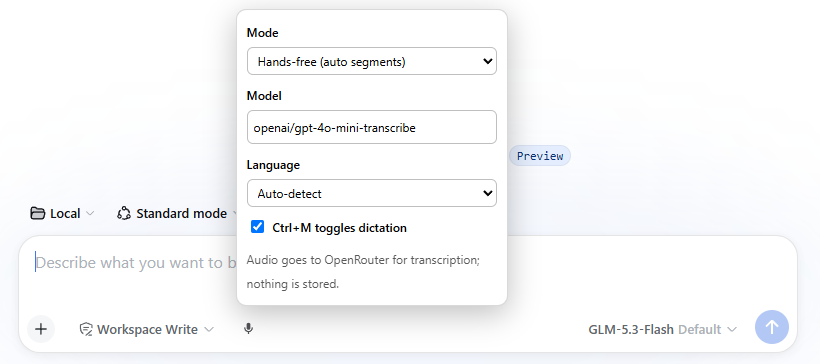
- Ctrl+M toggles dictation (configurable off in settings).
- Right-click the mic for settings: mode, STT model, dictation language, hotkey. Stored per browser in
localStorage, sent per request — nothing else to configure. - Default model:
openai/gpt-4o-mini-transcribe(cheap, fast). Also good:openai/gpt-4o-transcribe(best accuracy),openai/whisper-large-v3(strongest multilingual, notably Dutch). /dictateslash command prints a status/usage summary.
API key
The host half proxies transcription to OpenRouter and needs one of:
-
OPENROUTER_API_KEYenvironment variable (preferred — visible to the dsh process), or -
A plain value in the profile patch (
~/.dsh/profiles/web/cordis.patch.yml):- id: dictate config: apiKey: sk-or-v1-...
The env var wins when both are set. Without either, the mic button reports Missing OpenRouter API key on first use.
Config reference (host row config)
| Key | Default | Meaning |
|---|---|---|
apiKeyEnv | OPENROUTER_API_KEY | Env var name holding the OpenRouter key |
apiKey | — | Plain-value key fallback (env var preferred) |
endpoint | https://openrouter.ai/api/v1/audio/transcriptions | STT endpoint |
routePath | /dictate/transcribe | Local POST route the browser calls |
maxAudioBytes | 25000000 | Segment size cap (matches OpenRouter's limit) |
Privacy & security notes
- Audio is captured only while the button is active (recording or push-to-talk held); segments are transcribed in-memory and never written to disk.
- Every segment is sent to OpenRouter (a third party) for transcription — that's the point of the plugin; don't dictate secrets you wouldn't put through your LLM provider.
- The OpenRouter key never reaches the browser.
- This route is unauthenticated like the rest of the dsh webserver — if you bind dsh to your LAN, anyone on it can also reach this route (and transcribe on your OpenRouter account). Keep the firewall rule tight.
Troubleshooting
- No mic button — the plugin must be in the profile's bundle list (
dsh --profile web --dump-config | grep dictate) and dsh restarted; the page reloaded. Check the browser console for[dsh-dictate]warnings. Missing OpenRouter API key— set the env var or config value above, restart dsh web.Microphone permission denied— allow mic access for the page (browser address bar → site settings).- Wrong language / garbled text — set Language in the mic settings; auto-detect needs a clear first sentence.
- Text lands in the wrong spot — insertion goes to the composer's current draft end; dictation and typing interleave best by speaking first, then editing.
- Debug —
window.__dshDictatein the browser console:.state(controller phase),.prefs(active settings), and.inserter('text')to test insertion without the mic.
Scope / limitations
- Web UI only (
dsh web). The terminal (TUI) surface has no client-plugin slots for this; not supported. - OpenRouter's transcription endpoint is not streaming: text arrives in segment-sized chunks (~1–2s behind speech), not word-by-word.
- No TUI, no audio history, no voice commands — it types into the prompt, that's all.
Developing
npm install
npm run build   # builds lib/index.js (host) + dist/client.js (browser)
The profile install is a pnpm link: to this repo when installed from a local path — rebuild here, restart dsh web, reload the page. The client bundle is a window.__ModuleLoader__.load({ id, factory }) envelope whose module exports inject/apply (a Cordis client plugin); the host module exports the standard Cordis name/inject/Config/apply.
License
MIT
Plugins relacionados
dsh-web-ui (dsh-tool-describe-image)
zhu1090093659/dsh-web-ui
modlens
liustack/modlens
ipollowork
devin-axis/ipollowork
dsh-vision-router
ysr666/dsh-vision-router