gord-dsh-worktree
nightosong/gord-dsh-worktree
Git worktrees para DeepSeek Harness: aísla el trabajo paralelo en su propio directorio y rama. Incluye Fast mode (快速模式).
Instalar
dsh plugin --profile web add github:nightosong/gord-dsh-worktreeREADME
gord-dsh-worktree
Git worktree management for DeepSeek Harness — isolate parallel work in its own directory and branch. It also ships Fast mode (快速模式) as an agent preset and an opt-in patch that lets read-only tool calls run concurrently. A lightweight task attention tray keeps running and unseen chats within reach.
Features
- Create worktrees — an isolated checkout and branch in one atomic command, from the agent
(
worktree_list,worktree_create,worktree_status,worktree_remove,worktree_prune,worktree_relocate) or from Settings → Worktrees. - Start a session in a worktree — the New Session row carries a working-location picker: stay in the current worktree, or create a fresh one and open the session inside it.
- Review changes — the right sidebar's Changes tab shows the uncommitted diff of the session's own directory: every changed file with its counts, and the selected file's patch.
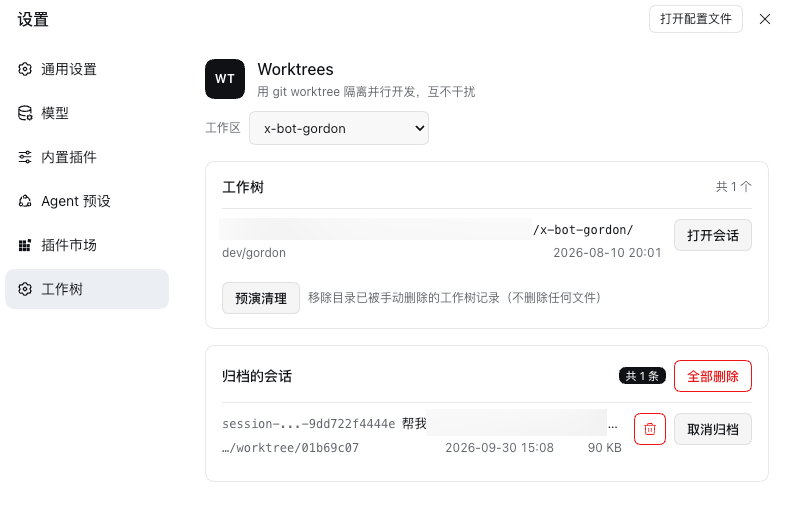
- Manage archived sessions — Settings → Worktrees lists every session archived on this machine, with Unarchive per row, a delete icon, and Delete all for the set.
- Double-click to rename — rename a session from its sidebar row, without the menu.
- Fast mode (快速模式) — a slim agent preset available in the picker after installation. It batches independent calls while preserving necessary clarification, bounded waits and focused regression tests; relevant background results must be collected before reporting completion. It interprets obvious input errors using context without substituting named paths or resources. It reads before the first edit, reuses known versions after native edits, and rereads after external changes. Authorized boundary evaluations on your own endpoint remain engineering tasks with their content and refusal limits intact.
- Concurrent read-only tool calls — an opt-in patch for
bash,globandgrep, so a step that batches reads overlaps them instead of running them one after another. - Session hover card — hovering a session names the workspace it runs in at the top (the workspace
title:
checkout-service, orcheckout-service · ed466e1afor a worktree of it) with the branch of its below. - Task attention tray — floats below the conversation's right-hand turn index. Hover to see running,
waiting and ended-but-unseen chats; opening a chat successfully dismisses that phase's reminder. The
main number is the task total; the badge counts waiting and unseen tasks. Drag
to remember a position, reset to the index, and leave to close after 200ms. It reuses status subscriptions
without polling or loading chat content. Requires
uiSession.sessionStatus(checked on0.2.0-rc.2); hosts without that capability do not show the tray.

Task attention tray · new in 0.6.0
Keep an eye on parallel chats without opening each one. The blue button sits below the conversation's right-hand turn index; hover to expand the list and move away to close it. With no tasks to show, it hides.
| Indicator | Meaning |
|---|---|
| Main number | Chats currently included in the tray |
| Small badge | Waiting chats plus ended-but-unseen chats |
| Needs attention | A chat is waiting for input or approval |
| Ended, unseen | A run has stopped and you have not viewed it; this does not indicate success |
| Running | A background chat is working |
Click a row to open its existing chat. A reminder disappears only after navigation succeeds; viewing a chat through the sidebar also acknowledges it. A later completion, new run or new request can appear again. Drag the button to save a position on this device; ↺ returns it below the turn index. On a crowded screen, it moves beside the index and keeps clear of the message composer.
The tray reuses native status subscriptions: no polling, chat-log loading or animated effects. Closed
panels do not render rows; open panels show at most 20 rows per page. These choices keep background work
small, but do not constitute a measured memory benchmark. Reminders reflect the current window's native
status; they are not a persistent or cross-window notification inbox. Requires uiSession.sessionStatus
(checked on 0.2.0-rc.2); older hosts without this capability keep the other plugin features.
The images below render the actual plugin component with simulated sessions, rather than a live DSH session. The first shows the button and badge; the second shows the expanded task list.


Where worktrees live
New worktrees get an independent worktree/<code> branch from HEAD, including detached HEAD.
Branches checked out elsewhere are refused. Existing shared-branch worktrees are left untouched; switch
each to its own branch before parallel development. Deletion safety includes ignored files such as
.env, which require explicit consent to discard.
A worktree is created inside its own project, at <project>/.dsh/worktrees/<code>: the directory really
being inside the project is what lets each sidebar nest it under that project. It still never pollutes the
project's git status or its diffs, because the plugin adds /.dsh/worktrees/ to that repository's own
.git/info/exclude. A different parent can be configured (defaultParent).
Worktrees made by an earlier release, which lived in the shared $DSH_HOME/worktree/, keep working: Move
into project in Settings → Worktrees, or worktree_relocate from the agent, moves them in and leaves a
symlink at each old path so anything pointed there still resolves.
Sidebar nesting
Both shells fold a worktree under its project. dsh web gets there through the patch this plugin puts into
the browser bundle, which it re-applies on load (or by hand: npm run patch:sidebar). The desktop app has
that nesting natively in its workspace tree grouping, and the Worktrees page offers that switch wherever
the client store has one. The desktop cannot be patched — its shell lives inside the signed app bundle — so
that switch, not a patch, is how its sidebar nests.
A tree also draws a folder line for the worktree itself, which the patched web sidebar does not. The
matching checkbox, Hide worktree rows (sessions stay), is on by default and removes exactly those lines:
their sessions move out to the project's own indent, and a worktree with no live session keeps its row,
because that row is the only way to reach its own + and … actions. It is display only — the workspace
itself is untouched, and unchecking the box brings every line back.
Install
dsh plugin --profile web add gord-dsh-worktree@0.6.0
Or install from GitHub:
dsh plugin --profile web add github:nightosong/gord-dsh-worktree
Then restart dsh web (a reload is enough once the bundle is on the layer stack) and open
Settings → Worktrees. Nothing else needs editing: the package declares dsh.bundle.patch, so the CLI
adds it to the profile's bundle stack itself.
Fast mode arrives with it — the same patch declares the fast agent preset, so the preset picker has
快速模式 without a profile file being edited. If the profile's own cordis.patch.yml already declares a
preset-fast row (the hand-written way), delete that row: the bundle layer merges first, and two rows with
the same id mount the preset twice, which the loader does not refuse. Which preset new sessions start in
stays a user choice (agent-preset-registry in the profile patch); the bundle never sets it. The flip side
of that split: this bundle is what declares Fast mode, so if you uninstall the plugin, change or remove that
default: fast row as well — otherwise it names a preset that no longer exists.
The concurrency patch is the one opt-in step, because it edits core tool packages rather than the plugin's own composition:
cd /path/to/gord-dsh-worktree
npm run patch:concurrency     # --check to inspect first, --revert to undo
It needs a dsh web restart, it is idempotent, and it stays manual by design: it touches dsh-tool-bash and
dsh-tool-fs-search, which the desktop app can never carry, so leaving it out keeps both hosts scheduling
read-only calls the same way. A DSH upgrade restores those files — re-run it after one, and use
npm run check:concurrency to see where it stands: patched, original, outdated for an older
classifier, or unknown when the build moved on. Rerun the patch to update an older classifier; unknown
builds are refused without writes.
For a remote hostname or a reverse proxy, configure exact public origins in
allowedOrigins: ["https://dsh.example.com"]. Direct IP access validates the request host and port.
Across DSH versions
The declared range covers stable 0.1.x releases from 0.1.5 and stable 0.2.x, plus explicit prerelease
opt-ins for 0.1.5 from rc.1, 0.1.6, 0.1.7 and 0.2.0, including desktop 0.2.0-rc.2. Other
prerelease bases and 0.3.x are excluded. Earlier tested builds include 0.1.5-rc.1, 0.1.6-alpha.2 and
0.1.7-rc.2; widening metadata does not mean every later build has been fully tested. Glyph export
names, session navigation and plugin settings changed across the earlier builds, with these fallbacks:
| Interface | 0.1.5 / 0.1.6 | 0.1.7 on | What the plugin does |
|---|---|---|---|
| Glyph export names | IconTrashOutline16 and friends, size-suffixed | IconTrashOutlineRegular and friends, weight-suffixed | Tries both names, draws nothing if neither exists, and never hands React an undefined element type |
| Session navigation | sessions.open(id) | uiWorkspace.openSession(id); sessions.open is gone | Reveals through the workspace view, falls back to the old call when there is none |
| Plugin settings namespace | settings.register(ns, schema) | no such method; the profile's own form model replaces it | Registers a namespace only where that method exists, and reads the entry's config directly otherwise |
Both uiWorkspace and settings are read optionally (ctx.get), so a profile composed without a workspace
view, or without settings, loses one feature rather than failing to apply.
Two features added in 0.3.0 need more than the floor does, so the minimum is per feature rather than per
package: Fast mode needs 0.1.7 (a preset is an @deepseek-ai/dsh-agent-preset composition row, and
0.1.7 replaced the $DSH_HOME/.agent-presets discovery), and the concurrency patch needs 0.1.7,
because it matches those core files exactly.
In detail
docs/internals.md covers the design: the worktree lifecycle, the patch contracts, the archive and its storage, and the configuration keys — 中文版.
License
MIT
Plugins relacionados
dsh-web (dsh-git-graph)
zhu1090093659/dsh-web
plannotator
backnotprop/plannotator
dsh-web-ui (dsh-git-graph)
zhu1090093659/dsh-web-ui
codex-guard (dsh)
akimiya-z/codex-guard