dsh-image-scope
olivine13/dsh-image-scope
Adds a pixel-coordinate viewer to the sidebar image preview: hover coordinates, one adjustable dashed rectangle with start/end/size labels, edge snapping, and true-pixel measurements across zoom.
Instalar
dsh plugin --profile web add github:olivine13/dsh-image-scopeREADME
dsh-image-scope
A pixel ruler for the DeepSeek Harness (DSH) sidebar image preview. Hover to read the pixel under the pointer, drag one dashed rectangle to measure a region, and keep every measurement in true image pixels at any zoom level.
Built for development and design checks: compare screenshots, verify spacing, measure icon sizes, or inspect a single pixel.
Screenshot
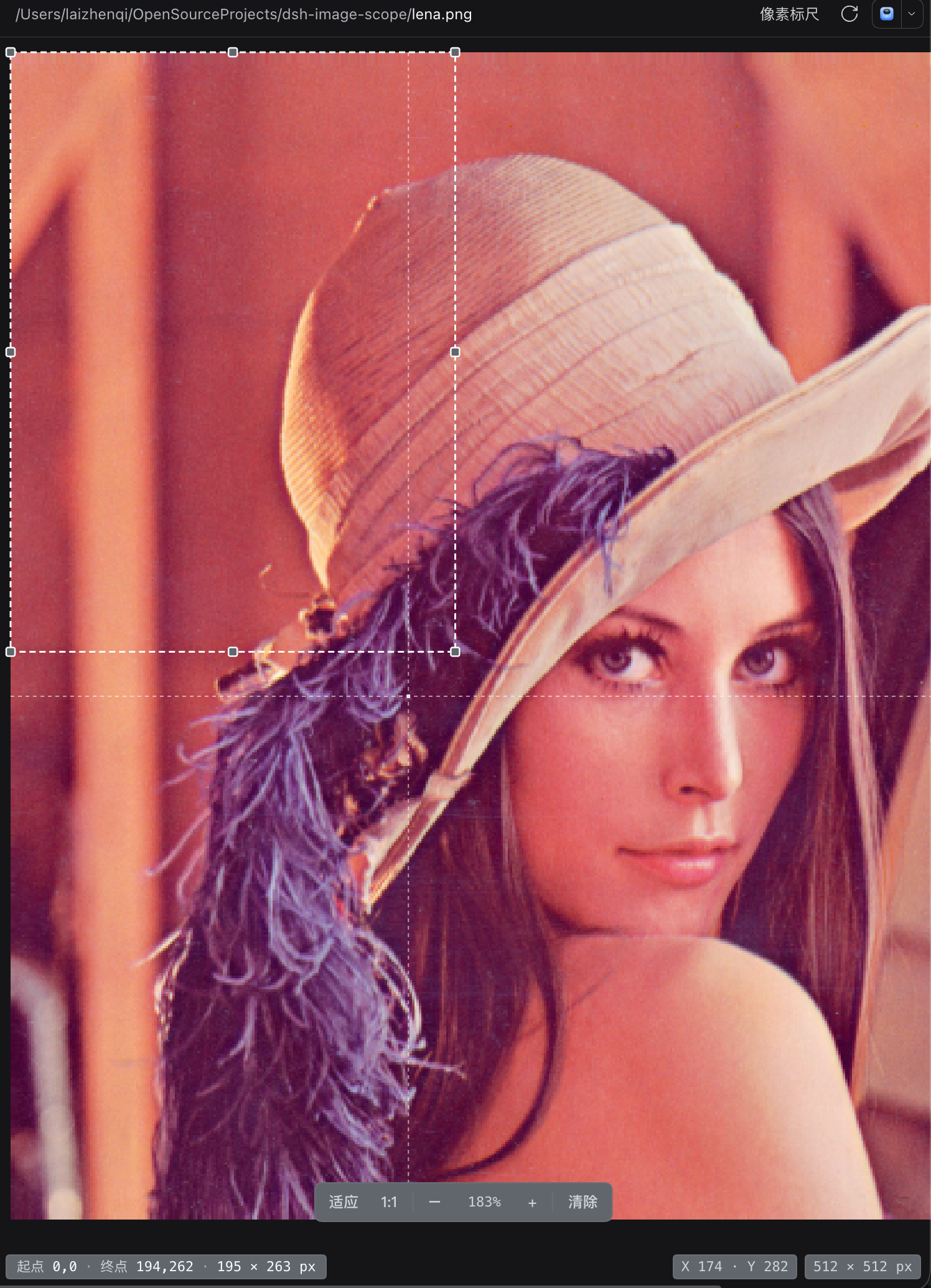
A dashed selection from (0,0) to (194,262), measured as 195 × 263 px in the bottom-left bar. The pointer is at X 174 / Y 282; the image is 512 × 512 px and is being viewed at 183%. Measurements stay in image pixels at any zoom.
Features
- Hover coordinates — the bottom-right bar shows X/Y, with a crosshair and a highlighted pixel cell.
- One measuring rectangle — drag to draw a dashed box; drag inside it to move, or use the eight handles to resize. Every edge snaps to the image bounds.
- Readable measurements — the bottom-left bar shows the start pixel, end pixel, and
width × heightin whole image pixels. - Keyboard — Ctrl+D (⌘D on macOS) clears the box while the viewer has focus; Esc cancels a draw, move, or resize in progress.
- Zoom-aware — Fit / 1:1 / − / + and Ctrl/⌘ + wheel (or trackpad pinch). Wheel zoom is anchored at the pointer and toolbar zoom at the viewport center; coordinates and sizes stay in image pixels, not screen pixels.
- Pixel-accurate rendering — images switch to pixelated rendering at 150% and above.
- Keeps the built-in viewer — the stock Image viewer is still available in the viewer dropdown.
- Configurable — colors, font sizes, box metrics, and overlay styles live in
config.json.
Install
dsh plugin add dsh-image-scope
Add --profile <name> if you are not on the default profile. You can also install it from Plugins → Discover once the marketplace entry is published.
Usage
- Open an image in the right sidebar (PNG, JPEG, GIF, WebP, BMP, ICO, or SVG).
- Pick Pixel Scope in the viewer dropdown if it is not already selected. It is the default viewer for images.
- Move the pointer over the image to read coordinates.
- Drag to draw the dashed rectangle.
- Drag inside the rectangle to move it; drag a corner or edge handle to resize it. Edges snap to the image boundaries.
- Press Ctrl+D / ⌘D, click Clear, or draw a new box to replace it.
Coordinates are zero-based from the top-left pixel. Width and height count whole pixels, including both ends, so a box from x=100 to x=199 is 100 px wide.
Configuration
Edit config.json in the plugin package. The sections are:
| Section | What it controls |
|---|---|
font | font families, font sizes, line heights |
canvas | canvas background and text color, scroll padding, focus ring |
selection | dashed box stroke, width, dash pattern, fill, fill opacity |
crosshair | hover crosshair color, opacity, width, dash |
pixel | hovered pixel cell outline |
handle | the eight resize handles: size, radius, fill, stroke |
selectionInfo | bottom-left measurement bar: position, width, spacing, padding, colors |
hud | bottom-right hint/size bar: position, width, spacing, colors |
toolbar | zoom toolbar and its buttons, value, separator |
status | loading and error text |
The Host reads the file on each page boot and injects it into the browser. After editing, refresh the page. A page that was already open before the plugin was first enabled uses an embedded default style until it is refreshed; the injected file wins afterwards. If edits still do not apply after a refresh, restart DSH once so the Host half reloads.
Compatibility
- DSH:
>=0.2.1-rc.5 <0.3.0-0 || >=0.2.2-rc.1 <0.3.0-0(tested on0.2.1-rc.5) - No build step, no runtime dependencies, no install scripts.
The viewer uses the document-preview extension point and the sidebar.right.tab.document slot. If the built-in document preview is unavailable, the viewer is not mounted.
Privacy
Everything runs locally. The plugin reads only its own config.json and the image bytes the preview already provides; it does not send data anywhere and does not access credentials.
Development
Plain JavaScript, no build step.
| Path | Purpose |
|---|---|
client.js | browser viewer, config merge, generated stylesheet |
index.js | Host half that injects config.json into the page |
config.json | colors, sizes, boxes, overlay |
test/math-test.mjs | pixel mapping, snapping, hit-testing, move/resize tests |
npm test
License
MIT
Plugins relacionados
dsh-web (dsh-task-board)
zhu1090093659/dsh-web
dsh-web (dsh-web-all)
zhu1090093659/dsh-web
dsh-TUI
ccch1mneyyy/dsh-tui
dsh-web-ui (dsh-task-board)
zhu1090093659/dsh-web-ui