dsh-ux-plus
plyflai/dsh-ux-plus
Paquete UX para el chat web DSH. Cada función tiene su propio interruptor inmediato en Settings → UX Plus. Tamaño de fuente y ancho de lectura en Settings → General → Chat area. El menú de sesión copia su ID o crea otra sesión que hereda la conversación con el modelo elegido. Filas de espacios y sesiones por actividad reciente, auto-repliegue tras 24 horas inactivas y etiquetas de antigüedad. Las tarjetas ask_user_question resueltas quedan abiertas. La lista se genera desde su propio registro de funciones y crece al añadir mejoras, sin un recuento fijo.
Instalar
dsh plugin --profile web add github:plyflai/dsh-ux-plusREADME
 dsh-ux-plus
Small interface improvements for the DSH Web chat. Each feature has its own switch under Settings → UX Plus and applies instantly.


English · 简体中文
Targets the Web UI of DeepSeek Harness 0.2.1-rc.1.
New in 0.4.0 — the tab tells you what's happening
The whale favicon keeps its shape and carries three signals while you sit on another tab:
- whale breathes — something is computing
- green whale — a run finished and you haven't opened it
- blinking orange dot — something waits for your click
The signals are independent and compose freely; plain whale when nothing is up. Details →
Features
| Feature | What it does | Preview |
|---|---|---|
| Attention favicon | The tab icon breathes while anything computes, turns green for finished-and-unread, blinks an orange dot while something awaits your click. | — |
| Workspace recency order | What is live right now sits in one green-backed Active block with status dots; the history stays hidden below it behind the host's own "Expand N more sessions" button; idle workspaces collapse themselves and show their age on hover. | 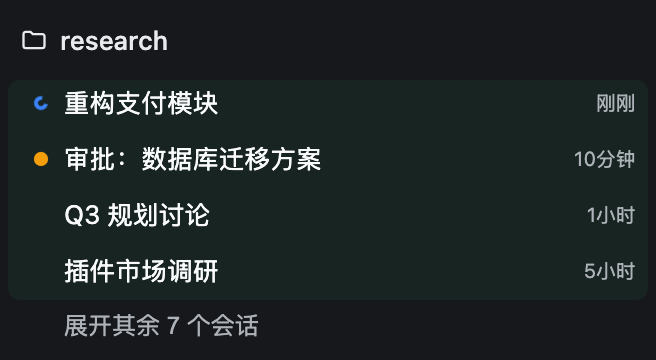 |
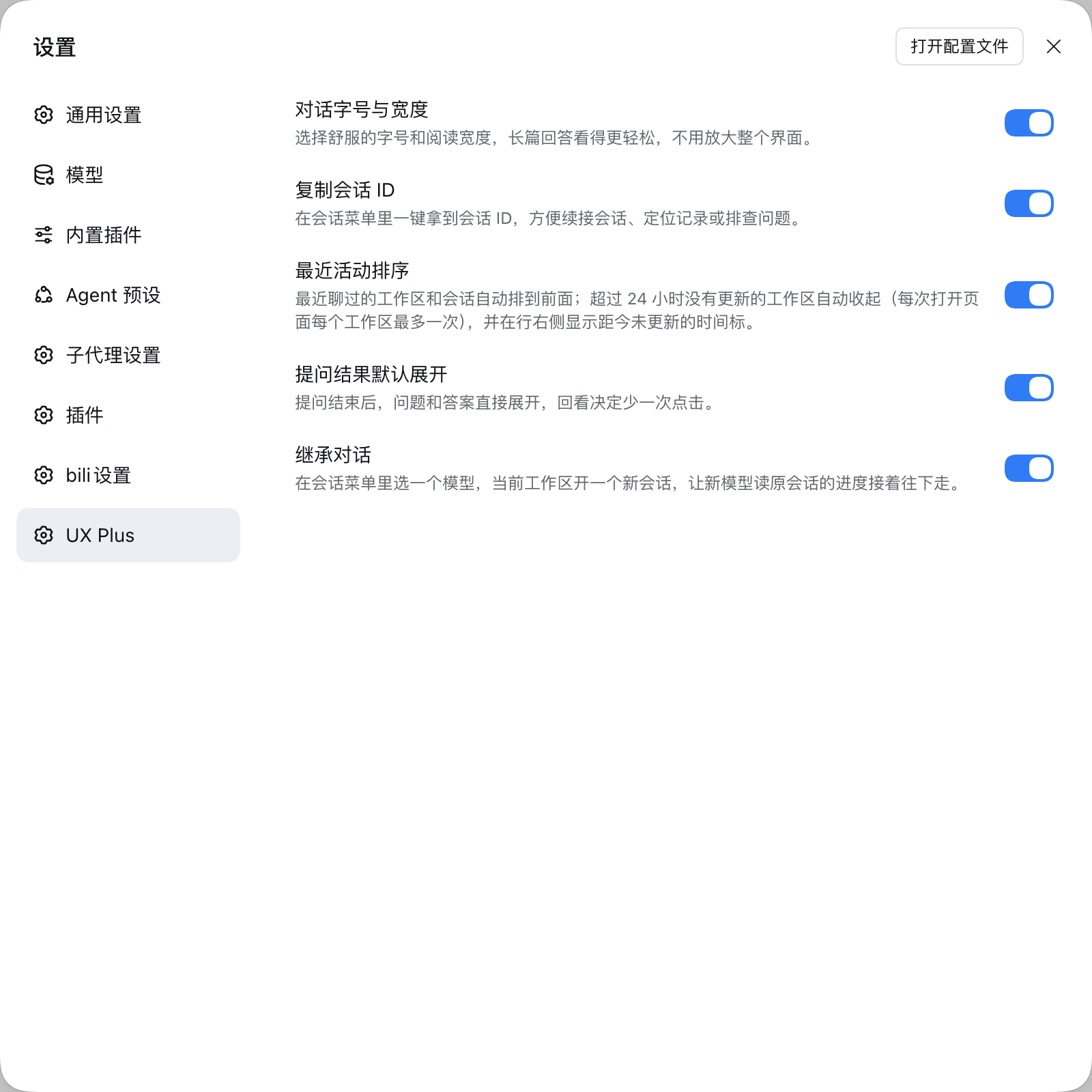
| Conversation typography | Pick a comfortable font size and reading width for the chat area — without zooming the whole interface. | 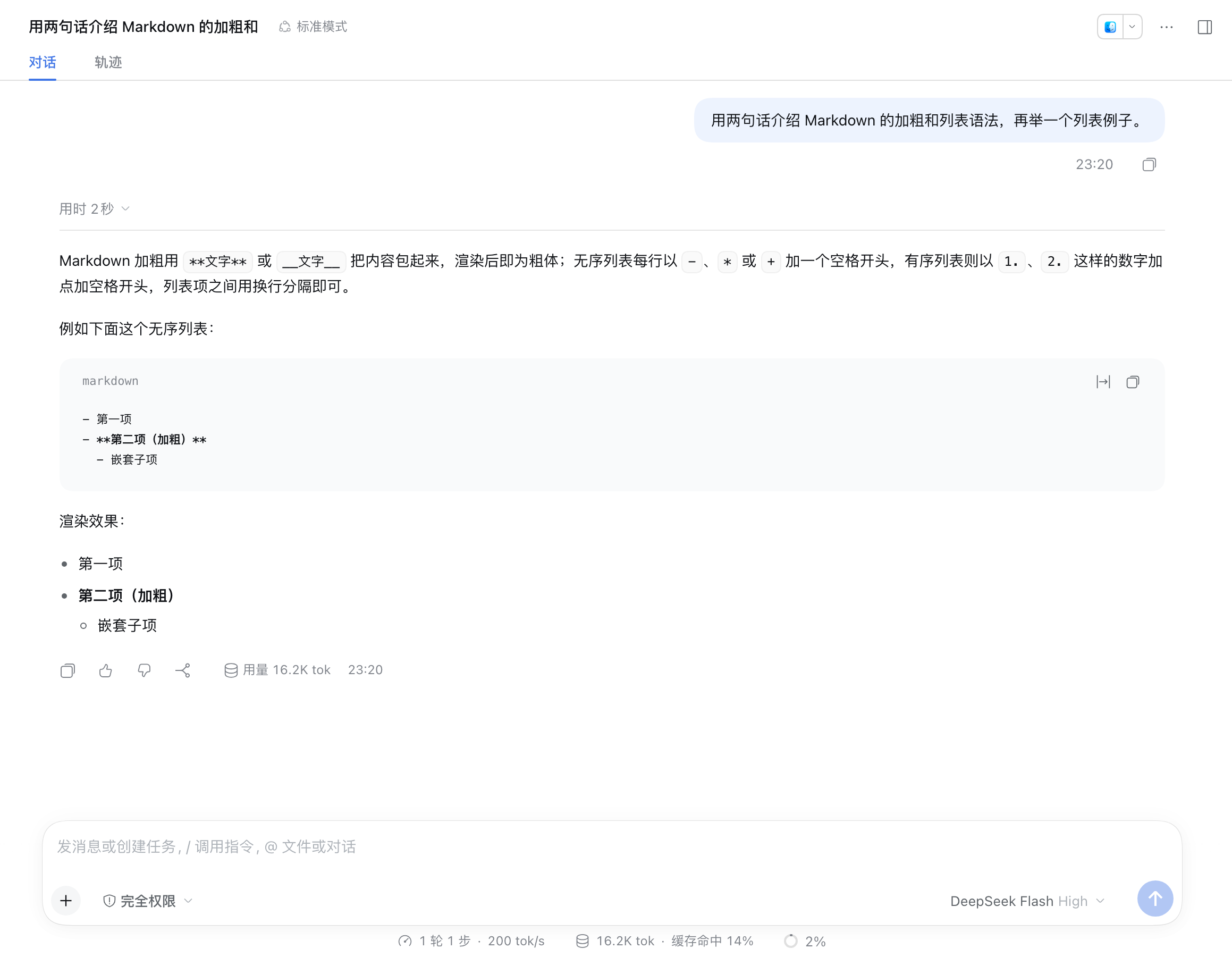 |
| Session ID menu | Copy a session's ID from its row menu — for --session resumes and log digging, no text selection. | 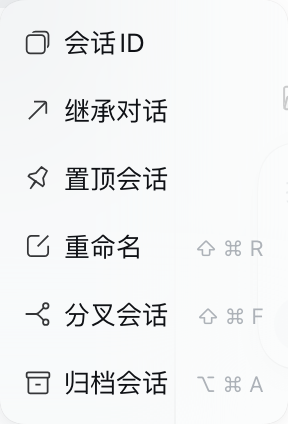 |
| Inherit conversation | Pick a model in the session menu: a new session in the same workspace reads the old conversation and carries on. | 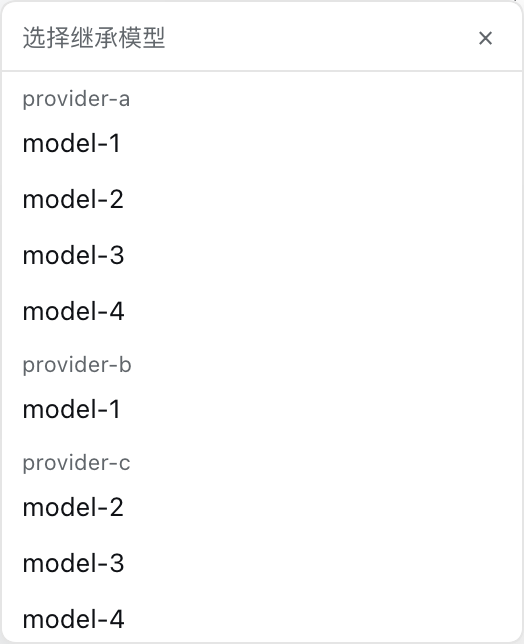 |
| Ask question expanded | Finished question cards stay expanded — checking a decision costs one less click. | — |
Feature details
Attention favicon
The tab icon stays the host's whale. This feature only tints it, breathes it, or adds one dot — and only while there is something to say.
| Tab signal | Meaning |
|---|---|
| whale breathes (slow fade) | any counted session is computing |
| green whale | a finished session has not been opened — exactly when the workspace list shows its green dot |
| blinking orange dot | something is waiting for your click (approval, question, plan review) |
| plain whale | nothing is up; the host's icon is restored untouched |
The breath has a 35% opacity floor and the blink is asymmetric, so a background tab throttled to ~1 tick/s still shows the alert on whatever frame it freezes on; returning to the tab restarts the cycle from the visible frame. Subagent and blank sessions never light the tab. Both host themes (light / dark) are kept; if the host's whale cannot be re-tinted, the feature quietly does nothing. Switching off leaves no residue.
Workspace recency order
Most recent first — the project you were just in stays at the top. Visual order only; the host's sort settings and data are untouched.
Active block. Running, or touched within 24 hours: one continuous green-backed band of compact 26px rows, each led by its status dot — orange breathing (awaiting you), blue spinner (running), solid green (finished, unread). A workspace header carries up to three pure-colour dots while that attention is hidden from view; the counts stay in its tooltip.
History stays hidden. No fold bar of its own — the host's own "Expand N more sessions" button is the one control, pinned directly below the Active block. One press opens the section: every row appears, the button returns to the list's native bottom, and the section reads exactly like the host's own expanded list. 收起 folds it back.
|
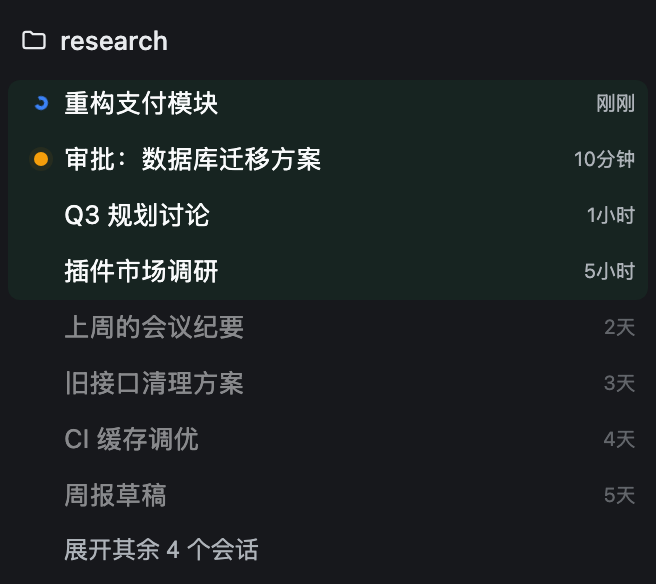 |
Idle tidying. A workspace with no activity for over 24 hours collapses once when the page opens, and shows its age on hover (now / Nm / Nh / Nd). Workspaces holding a running or awaiting session are never auto-collapsed.
Reordering pauses while your pointer is in the list or a menu is open — and pierces on your own actions: view-option changes and the expand button restyle on the click's own frame. Rows glide (FLIP, off under prefers-reduced-motion), zones re-check on a timer so rows fall asleep across the 24-hour line, and a section that briefly sees rows it cannot explain keeps its last consistent look instead of flickering.
Conversation typography
The chat area defaults to 14px. Bump the font size and narrow the reading width under Settings → General → Chat area — conversation content only, never the whole interface.
Session menu: Session ID & Inherit conversation
Each session row's overflow menu gains two items, before the native Pin / Rename entries:
- Session ID — copies the ID to the clipboard, for
--sessionresumes and log digging. - Inherit conversation — a model picker opens at the click position. Pick a model and the plugin creates a new session in the same workspace, switches it to that model, posts an inheritance prompt ("summarize and carry on, weighting the latest turns"), and jumps there. The original session is untouched. Good for finishing a long session on a pricier model, or continuing elsewhere when a provider rate-limits.
Ask question expanded
When an ask_user_question card finishes, the question and its answer stay expanded — reviewing a decision costs one less click.
Settings
Settings → UX Plus: six independent switches, on by default, applied instantly.
Install
Requires Node.js ≥ 22, pnpm on PATH, and a DSH Web profile.
dsh plugin --profile <name> add github:plyflai/dsh-ux-plus
Restart the profile afterwards. Toggle each feature under Settings → UX Plus (on by default, instant). Conversation font size and width live under Settings → General → Chat area.
Compatibility
- Web UI (browser) only — not the terminal TUI.
- Every feature mounts on public host extension points; no host source is modified, and each feature can be switched off individually.
- Host upgrades may shift internal DOM and slot contracts; file an issue if something breaks.
Development
npm install
npm test        # node --test, incl. static assertions on the built artifact and injected deps
npm run build   # tsdown emits lib/client.js (classic script, committed to the repo)
- Each feature is a private
features/<name>/module (host + client halves) registered in the feature lists ofsrc/index.jsandsrc/switches.js— not a standalone plugin. - The client bundles into a single classic script injected into
window.__ModuleLoader__; external dependencies are strictly limited to the module seeds the host provides, enforced by the build script. - Every push to main appends one entry to the update log below and syncs CHANGELOG.md.
Update log
The three most recent entries; full history in CHANGELOG.md.
- v0.4.5 · 2026-10-18 — Icon is now a die-cut sticker: no background tile, just the whale and the UX+ mark with a white edge tracing the combined silhouette (the mark keeps its own halo). No behaviour change.
- v0.4.4 · 2026-10-18 — Icon polish: the white edge now frames the whole tile instead of outlining the UX+ letters; the inline README icon grows to 44px. No behaviour change.
License
MIT © 2026 plyflai
Plugins relacionados
dsh-web (dsh-task-board)
zhu1090093659/dsh-web
dsh-web (dsh-web-all)
zhu1090093659/dsh-web
dsh-web-ui (dsh-task-board)
zhu1090093659/dsh-web-ui
dsh-web-ui (dsh-web-ui-all)
zhu1090093659/dsh-web-ui