dsh-plugin-openai-quota
pythoner1984/dsh-plugin-openai-quota
One-line notice at the top edge of the DSH window with your DeepSeek balance, the ChatGPT/Codex five-hour and weekly remaining quota and their reset times, and how many quota-reset cards are left plus the nearest expiry; the reset-card part links to the ChatGPT usage page in your browser.
Instalar
dsh plugin --profile web add github:pythoner1984/dsh-plugin-openai-quotaREADME
dsh-plugin-openai-quota
English · 简体中文 · Changelog · Issues
A one-line quota notice for DeepSeek Harness (DSH). It sits at the top edge of the Web UI, stays out of the way, and never opens a panel:
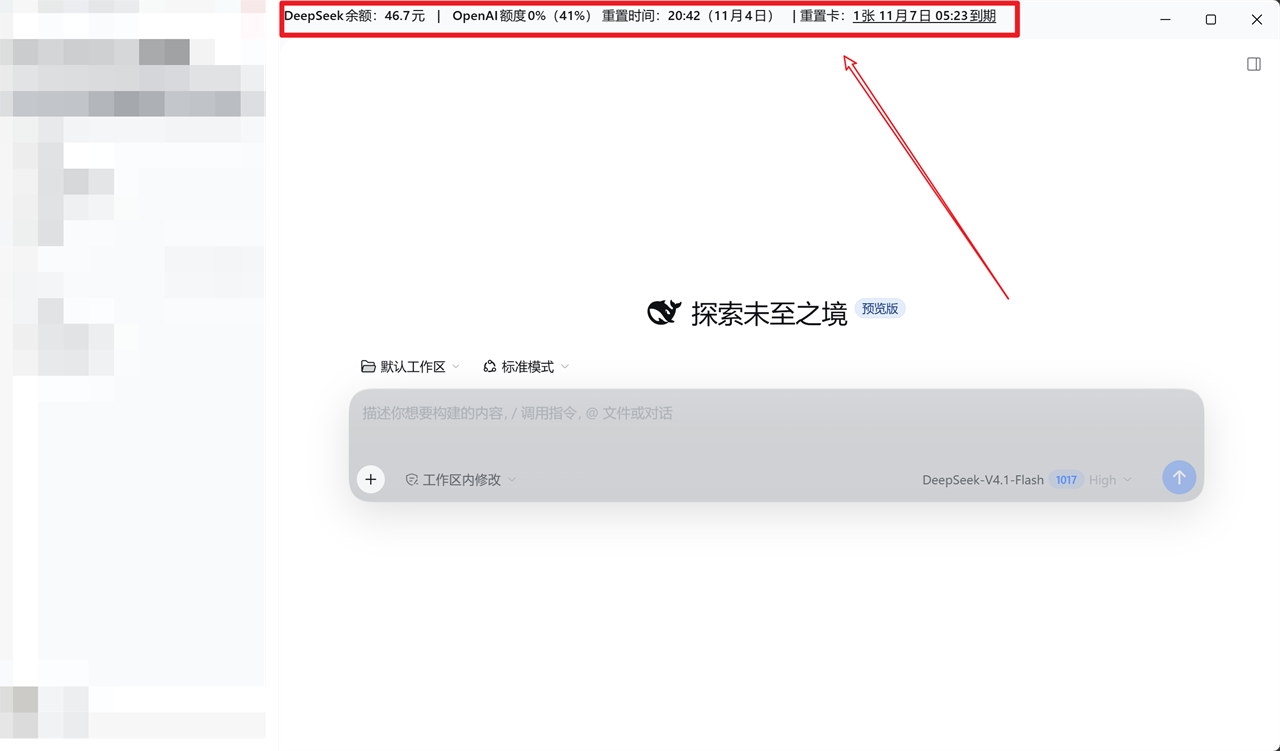
A live DSH window (sidebar redacted). The notice runs along the top edge: DeepSeek balance, the current and weekly ChatGPT quota with their reset times, and the nearest reset-card expiry. The numbers are whatever your account reports at that moment:
DeepSeek余额:65.2元 | OpenAI额度26%(80%) 重置时间:12:10(11月7日) | 重置卡:1张 11月7日 05:23到期
Everything comes from accounts you are already signed in to. No API key is created, copied, or stored by this plugin.
What it shows
| Segment | Source | Notes |
|---|---|---|
| DeepSeek balance | DSH deepseekAccount.getBalance() | CNY wallet, one decimal |
| OpenAI current quota + reset time | GET https://chatgpt.com/backend-api/wham/usage → rate_limit.primary_window | remaining % of the 5-hour window, reset time in HH:mm |
| OpenAI weekly quota + weekly reset | same response → rate_limit.secondary_window | remaining % of the weekly window, reset date |
| Reset cards | GET https://chatgpt.com/backend-api/wham/rate-limit-reset-credits | nearest expiry of the cards that are still available and supported by your plan |
Clicking the reset-card segment opens the ChatGPT usage page in the operating system's default browser. The plugin only tells you about reset cards — it never redeems one.
How it works
- Host half (
index.js) reads the existing ChatGPT OAuth grant from DSH's credential store (llm-pi-ai/openai-codex), calls the twochatgpt.com/backend-api/wham/*endpoints, reads the DeepSeek balance through the officialdeepseekAccountservice, and serves four authenticated routes. - Client half (
client.js) registers oneshell.overlayentry (id: openai-quota,order: 600), fetches/openai-quota/summary, and renders a fixed, click-through, non-interactive status line. It refreshes every 15 minutes, and immediately when the page becomes visible again.
| Route | Method | Purpose |
|---|---|---|
/openai-quota/summary | GET | everything the notice renders |
/openai-quota/usage | GET | raw quota windows only |
/openai-quota/health | GET | redacted self-check (see Troubleshooting) |
/openai-quota/reset-card/open | POST | opens the usage page in the default browser |
Requirements
- DeepSeek Harness with the Web UI (desktop app or
dsh web). - A ChatGPT/Codex sign-in already configured in DSH — this is what supplies the OpenAI quota.
- Optional: a signed-in DeepSeek account for the balance segment. Without it the balance renders as
—.
Install
Clone the repository somewhere permanent, then install it as a local bundle with the DSH Plugin Manager:
git clone https://github.com/pythoner1984/dsh-plugin-openai-quota.git
plugin_manager install_bundle target: <absolute path to the clone>
After a git pull, reinstall the bundle (or restart DSH) so the new code is loaded.
Or insert it into your own Cordis composition:
- insert:
    - id: openai-quota
      name: 'dsh-plugin-openai-quota'
Removing the bundle removes the overlay entry; no state is left behind.
Configuration
None. The refresh interval, timezone (Asia/Shanghai), and target URLs are constants so the plugin cannot be pointed at another host or turned into an open redirect. Fork the repo if you want different values.
Security and privacy
- No admin key, ever. The plugin reuses the OAuth grant DSH already holds; it never asks for an
sk-…key. - Credentials stay Host-side. The browser only ever sees percentages, timestamps, and card counts — the access token never leaves the Host process.
- Every route sits behind the local trust check (
connection.requestRejection) and fails closed: no connection service →503 local-auth-unavailable, rejected call →401/403, guard throws →403 local-auth-failed. - Method allowlists per route, so a browser
GETcannot trigger the opener (405 method-not-allowed). - No request input reaches the browser command. The URL is a Host constant and is passed as its own
spawnargument; nothing from the request is interpolated into a shell. - Minimal upstream payload. Account email, plan type, and credit details are dropped on the Host before anything is returned.
Known limits
- The
chatgpt.com/backend-api/wham/*endpoints are internal to the ChatGPT web app. They can change or disappear at any time; the notice degrades to—/暂不可用instead of breaking the UI. - In the desktop app the shell hands
window.opento the default browser and returns no window handle, so the usage page opens at the top — the notice cannot scroll it to the reset-card section. When the GUI runs in a real browser tab, the plugin re-navigates that tab with a text-fragment directive and does land on the reset-card section. - Reset times are always rendered in
Asia/Shanghai, not the local timezone of the machine. - The quota windows are reported as ChatGPT labels them (
primary_window= 5-hour,secondary_window= weekly). If your plan exposes different windows, the labels simply follow the data.
Troubleshooting
GET /openai-quota/health returns a redacted snapshot:
{
  "ok": true,
  "plugin": "dsh-plugin-openai-quota",
  "version": "1.8.0",
  "routes": { "usage": true, "summary": true, "health": true, "openResetCard": true },
  "credentialConfigured": true,
  "openaiReachable": true,
  "usageError": null,
  "windows": { "primary_window": true, "secondary_window": true },
  "resetCredits": { "status": "ready", "count": 1, "nextExpiresAt": "2026-11-06T21:23:57.312Z" }
}
| Symptom | Meaning |
|---|---|
credentialConfigured: false | No ChatGPT sign-in found for llm-pi-ai/openai-codex; sign in to ChatGPT in DSH first |
usageError: "upstream-http" + upstreamStatus: 401 | The OAuth grant expired — sign in again |
usageError: "upstream-unreachable" | Network/proxy blocked chatgpt.com |
windows.primary_window: false | The upstream response changed shape; the notice shows — |
Notice shows 读取失败 | The summary route failed or the browser lost the local auth cookie |
| Clicking the reset card does nothing | The notice sits inside the desktop window's drag strip; the link already sets -webkit-app-region: no-drag, so report an issue with your DSH version |
Development
npm test # node --test, 22 assertions over both halves
| File | Role |
|---|---|
index.js | Host half: credentials, upstream fetch, routes, opener |
client.js | Client half: overlay registration, rendering, refresh, open-in-browser |
host.test.mjs | route registration/rollback, trust checks, reset-card parsing, opener arguments |
client.test.mjs | rendering states, reset-card text, click behaviour in browser vs desktop shell |
cordis.patch.yml | composition patch that inserts the plugin |
locale/{zh,en}.json | Plugin Manager metadata |
The client half is plain ESM wrapped in window.__ModuleLoader__.load; tests load it with new Function and a fake React, so no bundler is needed.
License
MIT — see LICENSE. Unofficial project; not affiliated with OpenAI or DeepSeek. Use at your own risk.
Plugins relacionados
DeepSeek-Balance-Whale-Widget
meteornox/deepseek-balance-whale-widget
dsh-context
bowenliang123/dsh-context
dsh-cost-meter
han-1413141/dsh-cost-meter
dsh-damage-pulse
wssfk12138/dsh-damage-pulse