dsh-turnbar
rex178178/dsh-turnbar
Navegación de turnos estilo vídeo para la interfaz web: barra de progreso con mapa completo y tarjetas flotantes de herramientas/archivos/tokens, navegación por arrastre, búsqueda en la conversación con ⌘K, avance con ⌘↑/⌘↓ y retorno con Esc. El registro de eventos permite ir más allá de la ventana cargada. Plugin de doble mitad en el slot oficial composer.dock.
Instalar
dsh plugin --profile web add github:rex178178/dsh-turnbarREADME
dsh-turnbar



A progress bar for your agent conversations.
Long agent sessions are productive — until you need to find that one requirement
you mentioned 80 turns ago. Native scrollbars make you guess and re-scroll.
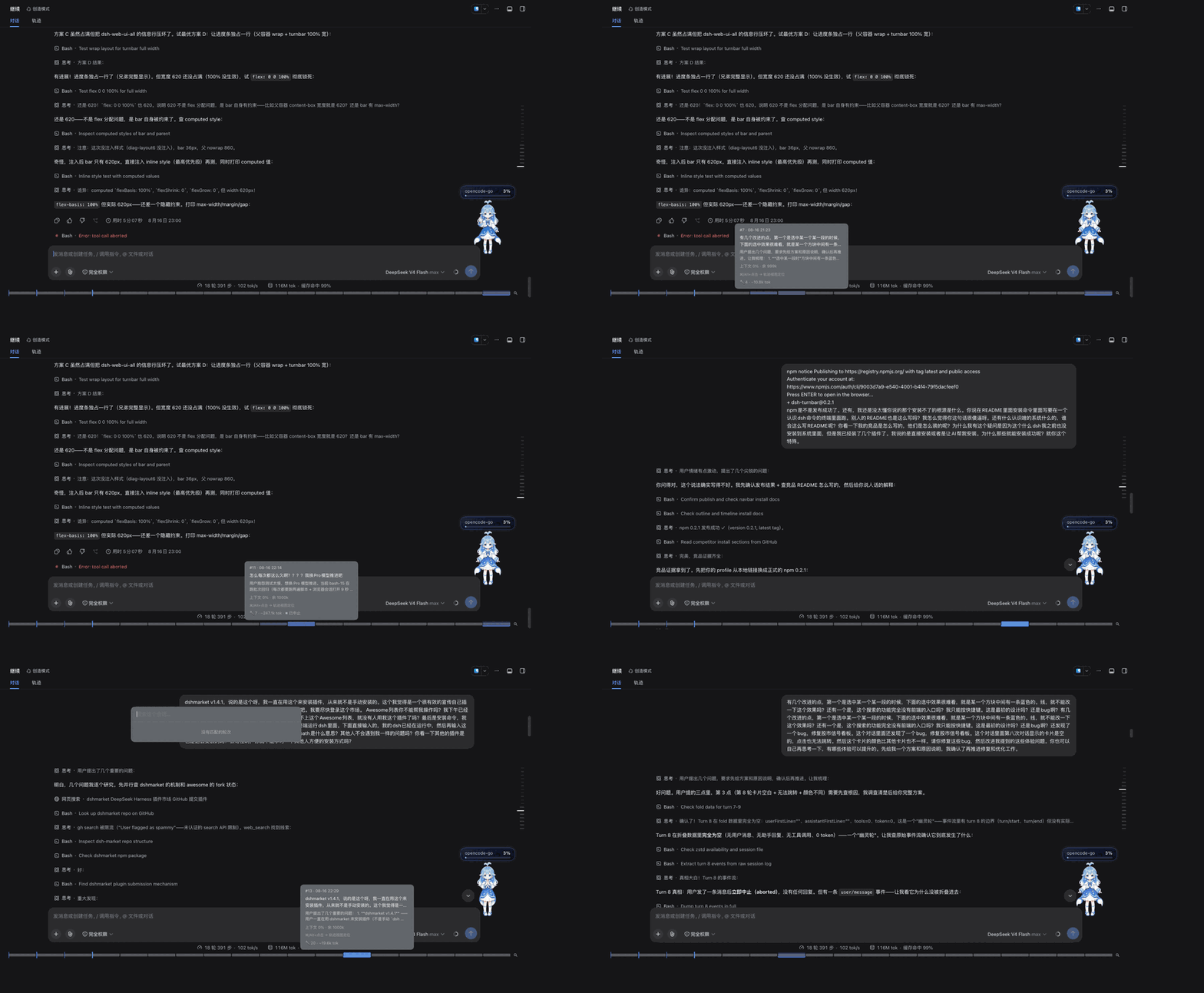
dsh-turnbar gives your DeepSeek Harness chat a video-style progress bar: hover to
preview any turn, drag to scrub, click to jump, Esc to come back.

Install
Three ways, pick one:
① Plugin market (easiest): open dshmarket inside dsh, search "turnbar", one click.
② Command line: open your macOS Terminal app and paste:
dsh plugin --profile web add dsh-turnbar
This runs in the Terminal app, not in the dsh chat box. If your terminal doesn't
know the dsh command (dsh --version says command not found — you never installed
dsh globally, e.g. you use a desktop build or let your AI launch it), install it first:
npm install -g @deepseek-ai/dsh
③ Ask your AI: just tell your agent "install dsh-turnbar for me" — it runs the same command on your machine, exactly how you've been installing your other plugins.
Restart dsh afterwards. Zero config; historical sessions are backfilled automatically and the bar always shows the whole conversation.

Features
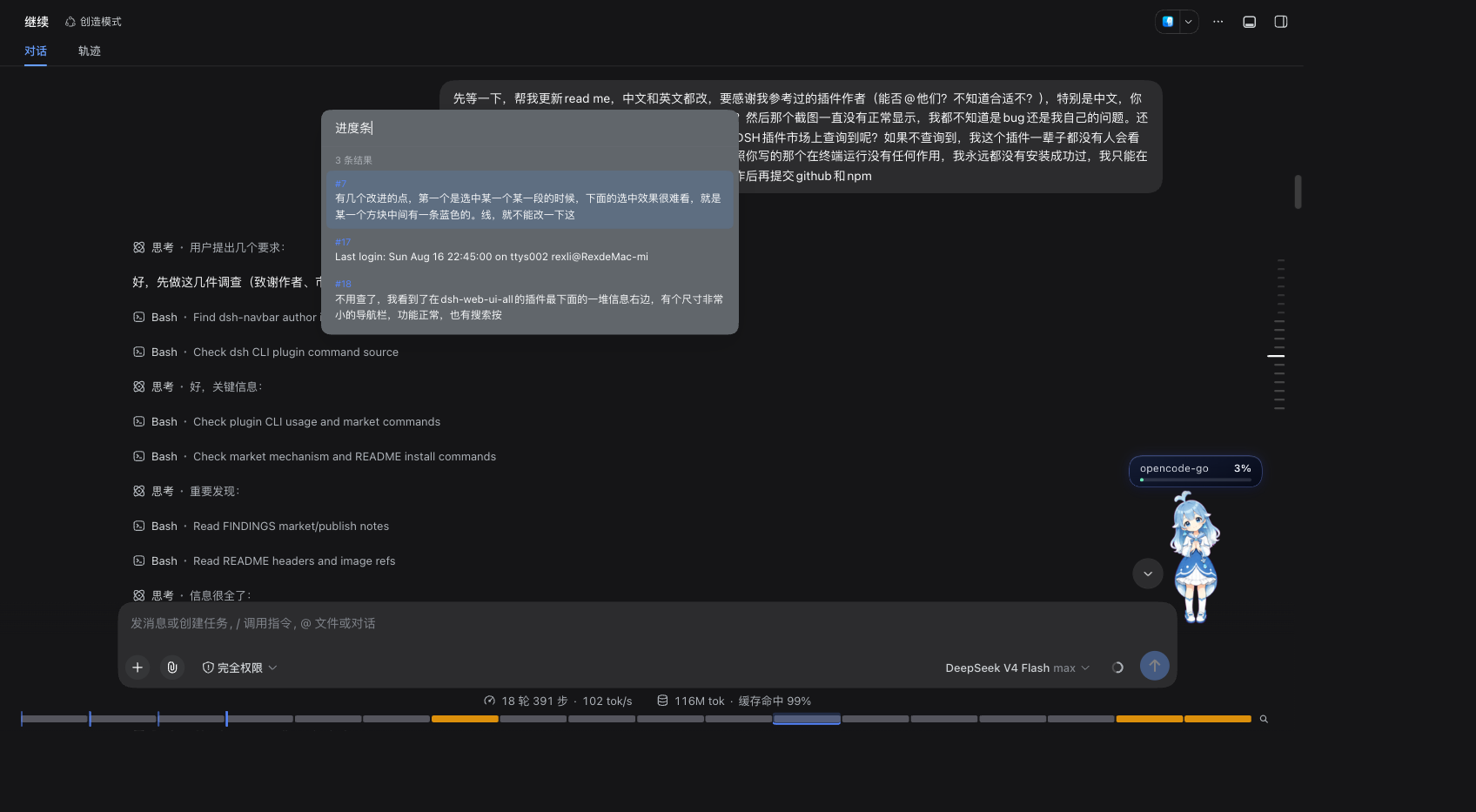
- 🎚 Full-map progress bar — every turn is a segment; the playhead highlights the segment you're reading. 150+ turns aggregate into ≤40 groups so the bar never becomes a mess.
- 🖼 Hover preview cards — see who said what before you jump: the turn's first lines, tool-call count, file edits, token usage, and steering messages. Terminated empty turns are dimmed and labeled 「该轮已终止,无对话内容」instead of pretending to have content.
- 🔎 In-conversation search — the magnifier button at the bar's right edge or
⌘Kopens it. Search everything the agent said or you said, across the whole session (including history beyond what's loaded); results show a count, arrow keys scroll the highlight into view, Enter lands the pick on the bar. Results are also drawn on the bar itself — matching turns glow amber, so a query like "TypeScript" shows you at a glance where in the conversation it lives (v0.3). - ⛽ Context fuel gauge — hover any turn to see the context window occupancy
at that moment ("上下文 62% · 余 38k"), with color escalation at 80%/95%.
When the latest turn passes those thresholds, the bar's tail edge glows amber,
then red — you notice the tank is nearly empty without even hovering (
v0.3). - 📑 Chapter ticks —
/goalrounds are marked as thin ticks on the bar, so a long session gets visible "milestones" without any manual bookkeeping (v0.3). - 🧭 Trajectory view jump —
⌘/Alt+ click a segment opens the official Trajectory view and scrolls to that turn's row, centered and highlighted. Falls back to a normal in-chat jump when trajectory is unavailable (v0.3). - ⤴ Click / drag to jump — click a segment to land in ≤300 ms; press and drag to scrub through turns like a video timeline. Jumps across unloaded history page it in automatically.
- ⌨️
⌘↑/⌘↓— hop one turn at a time from where you're reading; empty turns are skipped automatically. - ↩ Esc to return — after any jump,
Esc(or the toast) takes you back to exactly where you were. - 🧩 Graceful degradation — if your dsh version changes APIs, dsh-turnbar hides itself instead of breaking your session.
Why yet another navigation plugin?
The turn-navigation space filled up fast: dsh has shipped a native turn rail
since 0.1.2, and a couple of dozen community plugins now hang previews, search
and bookmarks off it. Almost all of them are rails, drawers, or dot chains — a
list of messages you click through. dsh-turnbar is the only one shaped like a
video player: the whole session is a single always-visible full-width bar,
sitting beside the native rail rather than replacing it.
Hover previews and click-to-jump are table stakes by now, so this table only carries what actually separates the closest few — including the rows where they are ahead of us:
| dsh-turnbar | native rail | dsh-milestone | dsh-message-rail | dsh-jumpbar | dsh-codex-timeline | dsh-navbar | |
|---|---|---|---|---|---|---|---|
| Form | full-width bar (bottom dock) | built-in vertical rail | dot timeline (right) | left rail (Codex-style) | right-edge minimap strip | enhances the native rail | right-edge dot chain |
| Whole session in one view | ✅ one bar | ❌ | ⚠️ dots + separate full list | ⚠️ full index, pages in on click | ⚠️ minimap of messages | ❌ | ❌ |
| Drag scrub | ✅ drag across the bar | ❌ | ⚠️ wheel-scroll on dots | ❌ | ✅ drag on the strip | ❌ | ❌ |
| Hover card: tools / files / context | ✅ | ❌ turn number only | ❌ time, duration, TTFT, tokens | ❌ text + time | ❌ text | ❌ content, time, tokens | ❌ |
| Context fuel gauge (% of window, 80/95% warnings) | ✅ | ❌ | ❌ | ❌ | ❌ | ❌ | ❌ |
Chapter ticks (/goal milestones) | ✅ | ❌ | ❌ | ❌ | ❌ | ❌ | ❌ |
| Search hits drawn on the map | ✅ amber segments, map kept | ❌ | ⚠️ filters the dots | ❌ | ❌ | ⚠️ result list | ❌ |
| Cross-session search / bookmarks | ❌ | ❌ | ✅ both | ❌ | ❌ | ⚠️ bookmarks | ❌ |
Esc returns you to where you were | ✅ | ❌ | ❌ clears the search instead | ❌ | ❌ | ❌ | ❌ |
| Upgrade safety | ✅ official slot, both persistence generations | — it is dsh | ✅ | ✅ | ✅ | ❌ pinned to 0.1.2-alpha.3 | ✅ |
Being straight about it: cross-session search and #msg= deep-link bookmarks are
dsh-milestone's, and we
don't have them yet; trajectory-view jump is shared with
dsh-chat-outline. Still only
here: the full-width map itself, the context fuel gauge, /goal chapter ticks,
and Esc-return. All of these plugins are MIT and genuinely useful — dsh-turnbar
just goes further on the feel: it's a video player, not a list. See also
Companions below.
Companions
- dsh-rewind — roll the conversation back to an earlier turn (jump over, then rewind).
- dsh-turn-fold — collapse tool-call storms; its per-turn stats pair well with our preview cards.
Acknowledgements
Built on paths others paved first — with gratitude:
- @vlln's dsh-navbar — the hover-preview / click-to-jump DOM patterns and the wheel+scrollTop jump recipe;
- @YesSanSan's dsh-conversation-outline —
the host↔client same-origin JSON bridge pattern and its invaluable
PLUGIN_DEV_NOTES.md; - the DeepSeek Harness team — official slots, session event streams, and persistence APIs that let this plugin take the paved road end to end, zero patches.
Compatibility
Tested against dsh 0.1.5-rc.1 (web profile, handle-based persistence
open/read/close) and 0.1.0-rc.7 (one-step inspect/readRaw persistence).
Both persistence generations are auto-detected at runtime, so history backfill
works on either. Works with the official web UI's conversation.composer.dock
slot; no patches, no UI hacks — which is the point: upgrading dsh does not
require uninstalling dsh-turnbar first. Plugins that hook in deeper pay for
it: dsh-codex-timeline now
enhances the built-in rail and supports exactly one dsh build
(0.1.2-alpha.3), so its README carries a version matrix and a per-version
install. Different trade-off, stated plainly.
Coexists with other plugins that share the same composer.dock slot —
dsh-web-ui-all and its
included dsh-live-stats / dsh-aionui-panel. A built-in co-existence CSS layer
(v0.2.2+) forces the dock into a wrapping row so the TurnBar always owns its own
full-width line while the official StatsLine sits beside any third-party entries,
so the bar is never squeezed sideways. Single-turn sessions now show a one-segment
progress bar too (only brand-new 0-turn sessions stay hidden).
| dsh version | status |
|---|---|
| 0.1.5+ (web, handle-based persistence) | ✅ full features |
| 0.1.0-rc.5 – 0.1.1-rc.x (web, inspect/readRaw) | ✅ full features (legacy chain) |
| older / non-web profiles | plugin stays inert; nothing breaks |
Roadmap
- Next: task-boundary chapters (beyond
/goal), bookmarks, trajectory ↔ chat round-trip polish.
Development
pnpm install
pnpm test        # vitest (fold logic, card model, host-half degradation)
pnpm build       # tsdown: lib/index.mjs (node half) + lib/client.js (web half)
Architecture: a dual-half plugin — the node half folds the session/event
firehose into per-turn records (persisted sidecar), serves them over
/plugins/dsh-turnbar/state; the web half renders the bar into the official
composer dock slot. All dsh API contact is confined to src/platform/dsh/.
Support
If dsh-turnbar makes your long sessions easier to navigate, a ⭐ on GitHub helps other dsh users find it.
License
MIT — same as dsh.
Plugins relacionados
dsh-web (dsh-task-board)
zhu1090093659/dsh-web
dsh-web (dsh-web-all)
zhu1090093659/dsh-web
dsh-TUI
ccch1mneyyy/dsh-tui
dsh-web-ui (dsh-task-board)
zhu1090093659/dsh-web-ui