dsh-codex-connect
shuind/dsh-codex-connect
Streamlined, refactored fork of dsh-codex-connect, maintained independently alongside dsh-codex-harness: connects ChatGPT OAuth and OpenAI Codex models to DSH with strongest-first model grouping, a simplified settings UI, web search with accuracy reference, GPT-Image-2.6 generation/editing, and native compaction. Registers the same openai-codex provider, so it cannot be installed alongside upstream dsh-codex-connect.
Instalar
dsh plugin --profile web add github:shuind/dsh-codex-connectREADME
@shuind/dsh-codex-connect
给 DeepSeek Harness(DSH)用的 ChatGPT OAuth / Codex 模型提供方插件:免 API Key 使用 ChatGPT 订阅接入 openai-codex 模型,支持多账号切换(含多个 Team 账号)、实时配额查看、会话速度切换,以及按需开启的联网搜索、GPT Image 2.6 生图/改图与 Codex 原生上下文压缩。
本仓库是 dsh-codex-connect 的精简重构分支,独立于上游,与 @shuind/dsh-codex-harness 一起维护。移除了独立代理与已废弃实验模块,重构了设置页,并按 shared / platform / features / client 分层维护。
互斥说明:本包与原版
dsh-codex-connect注册同一个openai-codex模型提供方(id: llm-openai-codex),不能同时安装。
当前版本 0.2.0 适配 DeepSeek Harness 0.2.2-rc.1–0.2.2-rc.5(engines.dsh: >=0.2.2-rc.1 <=0.2.2-rc.5,已在 0.2.2-rc.5 上完整验证)。
安装
从插件市场 / npm 安装
在 DSH 的 插件 → 添加插件 中输入 @shuind/dsh-codex-connect(或在插件市场直接安装),安装后按提示重启 DSH 即可。
也可以在 Web profile 下通过 CLI 安装:
dsh plugin --profile web add @shuind/dsh-codex-connect
从原版
dsh-codex-connect迁移:若此前安装过无 scope 的dsh-codex-connect并保存过设置,卸载时 DSH 不会自动清理 profile 的cordis.patch.yml。换装本包后如出现「此 dsh profile 无法使用插件设置」,请打开对应 profile 的cordis.patch.yml,将id: llm-openai-codex下的name: dsh-codex-connect改为name: "@shuind/dsh-codex-connect"(或删除该旧条目)后重启 DSH。
授权登录
- 打开 设置 → 模型 → Openai-Codex → 授权(或 设置 → 插件 → Codex Connect),在浏览器中完成 ChatGPT 登录。
- 远程浏览器无法直连
localhost回调端口时,可展开页面中的回调 URL 表单粘贴完整跳转地址完成授权;也可以在主机终端运行dsh-codex-connect login。 - OAuth 凭据独立保存在
$DSH_HOME/.openai-codex-auth.json,不会读写~/.codex/auth.json;安装插件不会改动原有默认模型或搜索路由。
界面预览
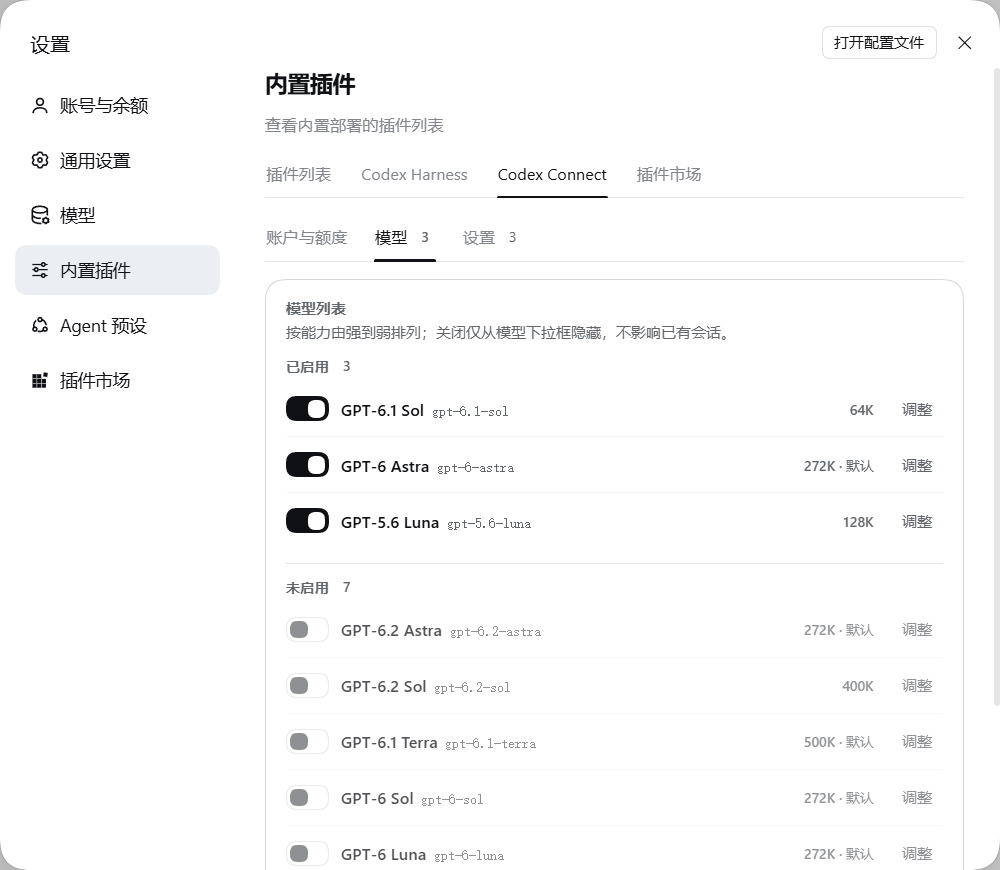
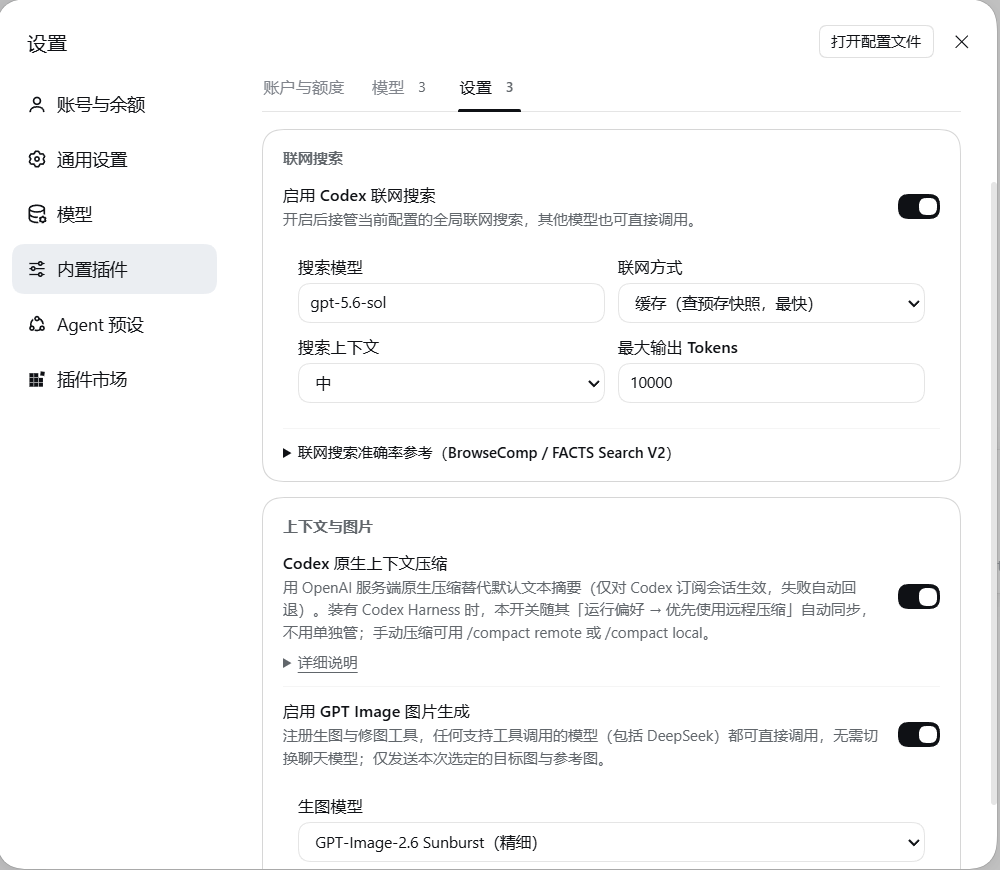
| 模型列表 | 功能设置 |
|---|---|
 |  |
功能概览
- 多账号与实时配额:
- 支持保存最多 16 个 ChatGPT 账号并手动切换当前账号;账号变更只作用于后续新请求,不影响进行中的回合。
- 在设置页与输入框右侧实时展示
5h/7d额度窗口及重置时间。
- 模型列表与本地上下文预算:
- 内置最新 Codex 模型目录(含
gpt-6.2-astra、gpt-6.2-sol、gpt-6.1-sol等),按能力由强到弱排列,分为「已启用 / 未启用」两组,可随时控制模型选择器可见性。 - 支持按单个模型调整客户端上下文预算(隐藏模型仍保留其配置)。
- 内置最新 Codex 模型目录(含
- 会话速度切换(Standard / Fast):
- 输入框右侧可直接切换当前 Codex 对话的速度档位。
- 按需开启的可选能力(默认全部关闭):
- Codex 联网搜索(
enableSearch):开启后临时接管当前配置的全局联网搜索,其他模型也可直接调用;停用后自动恢复原路由。内置可折叠的 BrowseComp / FACTS Search V2 准确率参考与一键选用。 - GPT Image 图片生成与编辑(
enableImageGeneration):注册生图与修图工具,任何支持工具调用的模型(包括 DeepSeek)都可直接调用,无需切换聊天模型;支持GPT-Image-2.6 Flare(默认,快速)与GPT-Image-2.6 Sunburst(精细),并保留自定义模型名入口。 - Codex 原生上下文压缩(
enableNativeCompaction):使用 OpenAI 服务端原生压缩替代默认文本摘要(仅对 Codex 订阅会话生效,失败自动回退)。装有dsh-codex-harness时随其「运行偏好 → 优先使用远程压缩」自动同步,无需单独管理。
- Codex 联网搜索(
- 静默更新提醒与 CLI 工具:
- 优先查询 npm(
@shuind/dsh-codex-connect),查不到时回退 GitHub Releases;同时校验目标版本engines.dsh是否适配当前 DSH,不适配时明确提示且同一版本仅提醒一次。 - 提供独立 CLI:
dsh-codex-connect <doctor|login|logout|status|trust-origin|trusted-origins|untrust-origin>。
- 优先查询 npm(
与 dsh-codex-harness 配合
本插件保持独立插件形态,与 @shuind/dsh-codex-harness 一起维护并直接联动:
dsh-codex-harness会自动识别openai-codex提供方,将模型目录、逐模型上下文上限、Fast档位、联网搜索和原生压缩交由本插件处理。- 在
dsh-codex-harness的「运行偏好 → 优先使用远程压缩」中切换开关时,会自动同步更新本插件的原生压缩设置;手动压缩支持/compact remote与/compact local。 - 输入框右下角的上下文容量按钮与
dsh-codex-connect的逐模型预算设置直接联动。
更多说明
- 安装、升级与离线部署:INSTALL.md
- 配置项、远程授权与故障排查:docs/reference.zh.md / docs/reference.md
- 架构与边界设计:docs/design.zh.md / docs/design.md
- 版本兼容与迁移:MIGRATION.md · VERSIONING.md
License
Plugins relacionados
dsh-our-free-model
ebony-vinyl/dsh-our-free-model
dsh-routing-suite
yjh051108/dsh-routing-suite
dsh-connect-workbuddy
dingminhua/dsh-connect-workbuddy
dsh-workbuddy-connect
corrinehu/dsh-workbuddy-connect