dsh-spring-boot-launcher
simplifyourlife/dsh-spring-boot-launcher
该项目是一个Deepseek Harness的插件,目前是作为Maven Spring Boot 项目的专用启动器。它提供 Agent 工具和 Web 管理面板,用同一套进程管理逻辑完成项目检查、Profile 选择、启停、状态查询和日志查看。A dedicated DSH launcher for discovering, starting and managing Maven Spring Boot services on Windows.
Instalar
dsh plugin --profile web add github:simplifyourlife/dsh-spring-boot-launcherREADME
DSH Spring Boot Launcher
让 DeepSeek Harness 像 IDE 一样发现、启动和管理 Maven Spring Boot 服务




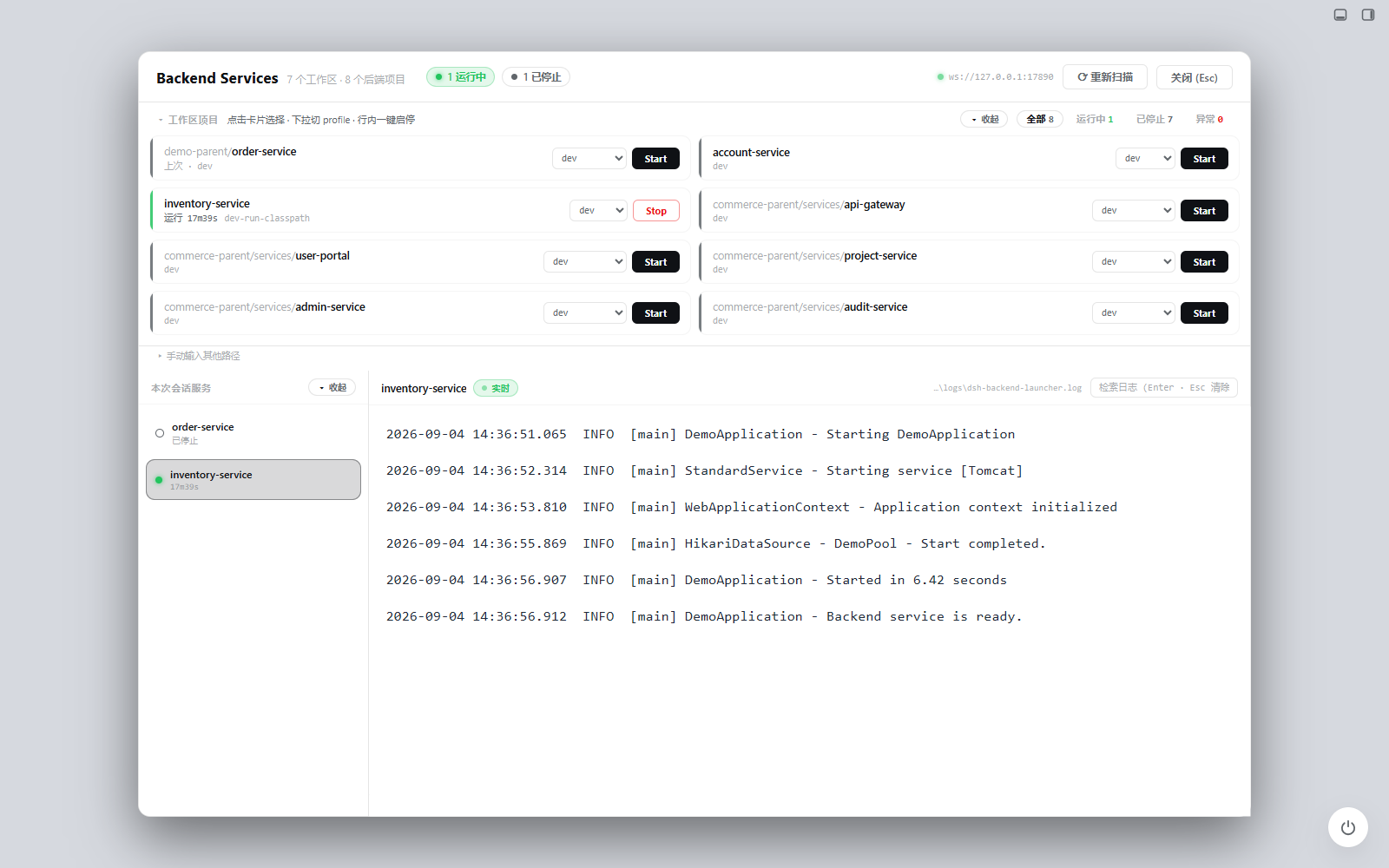
DSH Spring Boot Launcher 是面向 Maven Spring Boot 项目的专用启动器。它提供 Agent 工具和 Web 管理面板,用同一套进程管理逻辑完成项目检查、Profile 选择、启停、状态查询和日志查看。
当前版本为
0.1.0/ Alpha,支持从 GitHub 安装,尚未发布 npm 公共包,也不承诺稳定 API。真实项目启停和日志能力已在 Windows 11、PowerShell 7 环境验证。
功能
- 发现项目:识别 Maven 工程及多模块结构中的 Spring Boot 应用。
- 检查运行条件:解析入口类、Spring Profile、端口、JDK 和构建产物状态。
- 集中启停:在管理面板中选择 Profile,启动或停止由插件托管的服务。
- 实时日志:通过 WebSocket 查看日志,并写入项目的
logs/dsh-spring-boot-launcher.log。 - 运行模式决策:根据源码和构建产物的新旧程度选择
jar-run、direct-classpath或编译后启动。 - 多模块处理:优先复用工作区兄弟模块产物,并处理常见 classpath 冲突。
- 原生认证:复用 DSH 登录状态和同源 HTTP/WS 通道,不建立第二套令牌系统。
兼容性
| 能力 | 当前状态 |
|---|---|
| Windows 11 + PowerShell 7 | 已验证 |
| Maven + Spring Boot | 已验证 |
| Maven 多模块 Spring Boot | 已验证 |
| Gradle Spring Boot | 当前不支持 |
| Linux / macOS | 尚未验证,不属于当前支持范围 |
| 其他服务类型 | 不属于本项目定位 |
“尚未验证”不代表确定无法运行,但在完成真实环境验证前不会宣传为受支持平台。
快速开始
在已安装 DSH CLI 的环境中执行:
dsh plugin --profile web add github:simplifyOurLife/dsh-spring-boot-launcher
完整重启 DSH,再刷新已登录的本机页面。已有 Agent 会话可能保留旧工具列表;如未看到 spring_boot_* 工具,请新建会话。
仓库只发行一个 dsh-spring-boot-launcher bundle;下面两个目录是内部实现:
dsh-spring-boot-launcher/       Host:项目检查、启动决策、进程与日志
dsh-spring-boot-launcher-ui/    Client:Spring Boot Services 管理面板
源码开发所需的单一 Junction 和 DSH 加载配置见 插件使用说明。
侧栏出现 Spring Boot 后,可以在面板中扫描工作区、选择 Profile 并启动服务,也可以让 Agent 调用以下工具:
| 工具 | 用途 |
|---|---|
spring_boot_inspect | 检查入口类、JDK、Profile 和启动模式 |
spring_boot_start | 准备并启动 Spring Boot 服务 |
spring_boot_status | 查询已托管服务状态 |
spring_boot_logs | 读取服务日志 |
spring_boot_stop | 停止已托管服务 |
示例:
检查 D:\workspace\demo-service,说明推荐的启动模式。
使用 dev profile 启动这个 Spring Boot 服务,端口设为 8081。
查看最近 100 行日志。
停止刚才启动的服务。
工作原理
Agent 工具 ─────┐
                ├─> Spring Boot 进程引擎 ─> ctx.shell ─> Maven / JVM
Web 管理面板 ───┘               │
                                └─> 内存日志缓冲 + 项目日志文件
管理面板通过 DSH 已认证的 /spring-boot-launcher HTTP 路径和 /spring-boot-launcher/ws WebSocket 获取状态及日志。Host 与 UI 不开放额外监听端口。
安全边界
- 只启动可信工程。Maven 构建脚本和 Spring Boot 进程以当前用户权限运行,不是隔离沙箱。
- 控制通道只允许 DSH 本机回环、同源且已登录的请求。
- 日志可能包含应用输出的凭据或业务数据,公开 Issue 前必须脱敏。
- 插件不会主动终止未确认归属的端口占用进程。
完整说明和报告方式见 SECURITY.md。
开发与测试
在仓库根目录运行:
npm ci --ignore-scripts --no-audit --no-fund
npm test
测试使用临时 Maven 工程和宿主替身,不要求本机安装 DSH、Maven 或 JDK,也不会执行 Java 或前端 build。Windows CI 配置位于 .github/workflows/test.yml。
已知限制
- 端口占用只能说明存在监听进程,不能证明它属于当前项目。
- 跨 DSH 会话的进程恢复、复杂 Maven 属性继承和更多配置格式仍需完善。
- Gradle 与 Linux/macOS 尚未进入当前支持范围。
- 现阶段通过 GitHub 源码安装根 bundle,尚未发布 npm 公共包。
参与贡献
欢迎提交脱敏的最小复现、问题说明和回归测试。请先阅读 CONTRIBUTING.md,不要提交真实业务工程、访问凭据或未经审查的日志和截图。
许可证
Apache License 2.0。项目名称中的 DSH / DeepSeek Harness 仅用于说明集成对象,不表示官方背书。
Plugins relacionados
archify (deepseek-harness)
tt-a1i/archify
WeKnora (dsh-weknora)
tencent/weknora
weknora
tencent/weknora
BrowserSkill (dsh-plugin-browserskill)
tencent/browserskill