dsh-storage-insight
superchen061220/dsh-storage-insight
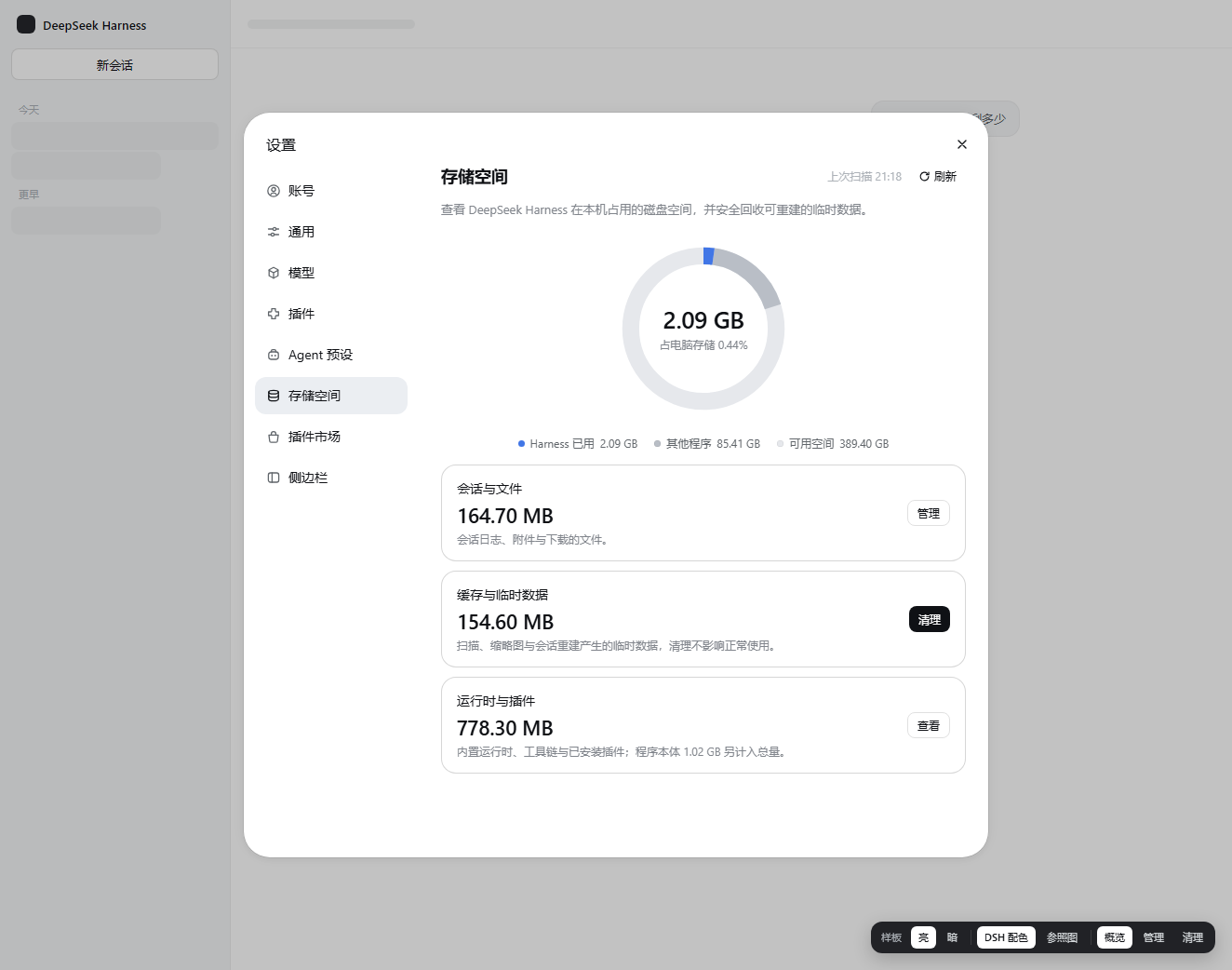
A Storage settings page for DeepSeek Harness: a donut of what dsh occupies on this machine (install, sessions, attachments, runtimes, plugins, temp), a drill-down that lists archived sessions and can delete them, and a clean action that only touches rebuildable caches. Deleting to the system Recycle Bin and Open folder are Windows-only; scanning works everywhere. Host routes accept loopback connections only and are CSRF-guarded; nothing leaves the machine.
Instalar
dsh plugin --profile web add github:superchen061220/dsh-storage-insightREADME
dsh-storage-insight
Storage Insight for DeepSeek Harness — 看一眼 dsh 到底在你机器上占了多少空间,然后只清理可以重建的缓存。
A settings page that answers three questions: how much does dsh use, where does it go, and what can I safely reclaim.
安装 / Install
推荐:在 dsh 的 插件 页搜索 dsh-storage-insight 安装并启用(插件管理器会同时处理依赖和启用状态)。
命令行(profile 名通常是 web;桌面版是 desktop):
dsh plugin --profile web add dsh-storage-insight          # npm(推荐,快)
dsh plugin --profile web add github:superchen061220/dsh-storage-insight   # GitHub 源(备选)
⚠️ 在已存在的 profile 里,
dsh plugin add只安装依赖,不会把插件登记进dsh.profile.bundles; 装完还需要在 插件 页把它启用(或让插件管理器执行一次启用)。全新 profile 首次安装时会自动登记。 这是 dsh 自身的行为(bundles是加载清单),不是本插件的问题。
装完重启 dsh,打开 设置 → 存储空间。
npm 源需要能访问 registry.npmjs.org;GitHub 源需要能访问 github.com。 两者都不通时,可以下载仓库后本地安装:
dsh plugin --profile web add "C:\path\to\dsh-storage-insight"。
它显示什么
总量        1.95 GB      安装 1.02 GB · 临时 0.14 GB
会话与文件   166 MB       会话日志 + 附件
缓存与临时   155 MB       投影缓存、缩略图、临时目录
运行时插件   1.78 GB      内置运行时、工具链、插件依赖、程序本体
占用比例     0.45%       相对整块磁盘
- 环形图:Harness 占用 / 其他程序 / 可用空间
- 会话与文件 → 管理:按工作区分组、附件按类型、已归档会话(可删除)
- 缓存与临时 → 清理:先列表预览,确认后才动手
只删这些,不删那些
| 会清理 | 条件 |
|---|---|
%TEMP%\dsh-acl-skill-*、dsh-plugin-* | 24 小时内没改动 |
<.dsh>\cache(缩略图/派生图) | 可再生,删除后自动重建 |
<.dsh>\logs | 仅 7 天前的文件 |
| 明确不碰 | 原因 |
|---|---|
sessions/、attachments/ | 你的数据,只能通过「管理」里逐条删除已归档会话 |
dsh-spill-*、dsh-subprocess-* | 旧会话里"完整输出见 <路径>"的引用会失效 |
dsh-workspace-changes-* | 旧会话的变更差异会失效(dsh 自己会回收) |
| 运行时、工具链、插件依赖、程序本体 | 运行必需,删除会直接坏掉 |
删除会话走系统回收站(Windows),可从回收站还原;系统回收站不可用时落到 <.dsh>\.trash\sessions。
安全设计
- 只扫描三个本地根:
DSH_HOME、安装目录、系统临时目录;不联网 - 不跟随符号链接/junction,不越出根目录
- 所有接口要求
x-storage-insight: 1请求头,挡住跨站表单伪造(CSRF) - 删除只允许已归档会话;未归档的会话一律拒绝
- 扫描 15 秒硬上限,超时返回已完成部分并标注"不完整"
- 写
workspace.json前自动备份到<.dsh>\.storage-insight\backup\
隐私
- 不联网:host 侧没有任何网络请求;页面只请求同源相对路径(
storage-insight/api/*),无外部字体、图片或埋点 - 不上传:没有遥测、没有错误上报、没有账号关联
- 只读元数据:扫描读的是文件名、大小、修改时间;会话标题从本地日志的
session/title事件解析 - 接口仅限本机:
/storage-insight/api/*只接受回环地址(127.0.0.1 / ::1)的连接。dsh 若被绑定到0.0.0.0或放在反向代理后,这些接口直接返回403 loopback-only,避免别人读到你的绝对路径与会话标题 - 防跨站:浏览器发起的跨站请求一律 403(CSRF),任意网页无法偷偷触发删除
- 写操作有边界:只写
workspace.json(写前自动备份到.dsh\.storage-insight\backup\)与回收站/.trash;不碰凭据、不碰配置
兼容性
- 需要 dsh Web(0.1.x / 0.2.x),设置面板存在
settings.section槽位 - 扫描和统计在所有平台都可用;路径在运行时解析(
DSH_HOME→ 安装目录 → 系统临时目录),不写死任何绝对路径 - 系统回收站与"打开所在目录"仅 Windows:其他平台删除会退到
<.dsh>\.trash\sessions,界面文案会相应变化 - 会话标题需要 Node ≥ 22 的 zstd 支持;更老的运行时只会退化为显示短 id,不影响其他功能
- 依赖 dsh 自身的
workspace.json结构(archivedSessionIds/tables.workspaces[].sessionIds)。dsh 改结构时,归档列表会退化为"只按磁盘目录列出",不会崩
开发
node test-host.mjs     # host 逻辑(假 ctx 驱动真实扫描)
node test-client.mjs   # client 冒烟(伪造 module loader + React)
node test-render.mjs   # 用真实快照渲染组件(需要 dsh 在跑)
English
Install from npm: dsh plugin --profile web add dsh-storage-insight (or from GitHub: github:superchen061220/dsh-storage-insight).
Storage Insight adds a Settings → Storage page to DeepSeek Harness: a donut of disk usage, three categories (conversations & files, cache & temp, runtime & plugins), a drill-down that lists archived sessions you can delete, and a clean action that only touches rebuildable caches.
Nothing leaves your machine; the plugin scans only $DSH_HOME, the dsh install directory and the system temp folder.
License
MIT
Plugins relacionados
deepseek-harness
deepseek-ai/deepseek-harness
dsh-market
dsh-market/dsh-market
dsh-web (dsh-plugin-manager)
zhu1090093659/dsh-web
dsh-web
zhu1090093659/dsh-web