dsh-ego-browser
tianyi666666/dsh-ego-browser
Gives the agent four tools for the ego lite browser installed on the machine — run an ego-browser script in the real signed-in profile, open a URL and read its visible text and accessibility snapshot, list task spaces, and print the CLI usage guide — picking a CLI build that matches the running ego lite version.
Instalar
dsh plugin --profile web add github:tianyi666666/dsh-ego-browserREADME
dsh-ego-browser
English | 中文
Bridges the DeepSeek Harness agent to the ego lite browser installed on this computer, so agent work happens in the profile you already use and stay signed in to.
Tools
| Tool | What it does |
|---|---|
ego_browser_run | Runs a complete ego-browser Node script in your browser: task spaces, page.goto, page.snapshot, page.click, page.fill, page.screenshot, page.evaluate, page.fetch, downloads, uploads. Output returns as text plus parsed KEY=value fields. |
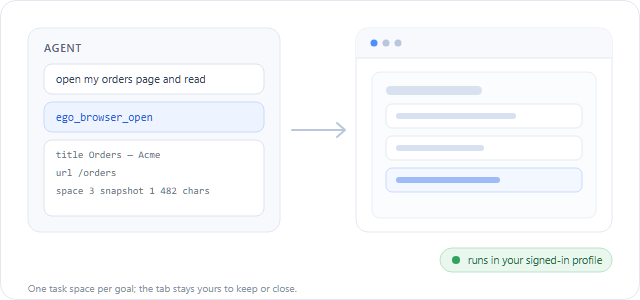
ego_browser_open | Opens one URL in a task space and returns the title, the visible page text, and the accessibility snapshot. |
ego_browser_spaces | Lists the existing task spaces with ids, names, and ownership, so a later run can reuse one. |
ego_browser_guide | Prints the CLI usage guide that matches the installed version — the authoritative list of TaskSpace and Page methods to call from a script. |
Requirements
- ego lite installed and running (lite.ego.app). The plugin drives the real
browser through the
ego-browserCLI; it does not launch a second browser. - A CLI matching the running browser. ego lite installs one CLI per version, and a build of another
version cannot reach the running browser. The plugin reads the running version from the
mojo.CitroLabs.ego.<version>pipe, tries that build first, and falls back to the newest installed one, then toego-browseronPATH. - Full access when ego lite runs elevated or behind the sandbox relay. ego-browser relays through a
medium-integrity helper; from a low-integrity sandbox a call can report
medium-integrity relay failedorFailed to connect to ego_cli bootstrap. SetcliPathand rerun the call with Full access.
Install
dsh plugin --profile <profile> add https://github.com/TianYi666666/dsh-ego-browser
Or add this directory in Plugins → Add plugin from the desktop app. The bundle appears as Ego browser bridge in the plugin list and can be switched off like any other plugin; switching it off removes all four tools and touches no browser state.
The install spec is the GitHub URL on purpose. Bare
add dsh-ego-browserresolves against npm, where that name belongs to a different, unrelated project (omdsh-dev/dsh-ego-browser, GPL-3.0, 35 tools). This plugin is not published to npm; use the repository URL so you get these four tools and not that one.
Options
| Option | Default | Meaning |
|---|---|---|
cliPath | auto | Absolute path to the ego-browser executable. The EGO_BROWSER_CLI environment variable works too. |
timeoutMs | 120000 | Default per-script timeout. |
maxOutputChars | 20000 | Output cap returned to the model. |
Usage
Ask the agent in plain language — "open my order page and read the status" — and it picks the tool. A
script for ego_browser_run looks like this:
const task = await taskSpace('invoice check')
const page = task.page('p1')
await page.goto('https://example.com/orders', { timeout: 45000 })
console.log('TITLE=' + (await page.title()))
console.log(await page.snapshot())
await task.finish({ keep: [] })
Keep one task space per goal, and finish it with await task.finish({ keep: [] }) unless the tab should
stay open for the user. ego_browser_guide prints the rest of the API: selectors, refs, screenshots,
downloads, dialog handling, and CDP.
Notes and limitations
- Scripts are fed over stdin, so multi-line bodies and non-ASCII text survive every shell.
- Only a bootstrap/relay failure falls through to the next candidate CLI; a script that ran and threw keeps its own output so the error stays diagnosable.
- Tool calls run with the plugin's own permissions; nothing here narrows what the agent may do in the browser profile you are signed in to.
- Windows and macOS paths are both detected; a non-standard install needs
cliPath.
License
MIT
Plugins relacionados
archify (deepseek-harness)
tt-a1i/archify
WeKnora (dsh-weknora)
tencent/weknora
next-ai-draw-io (dsh-plugin)
dayuanjiang/next-ai-draw-io
AiToEarn (dsh-plugin-aitoearn)
yikart/aitoearn