dsh-btw
wlv-zedd/dsh-btw
Dock interactivo de asistente lateral para hacer preguntas rápidas con /btw sin interrumpir el ciclo activo del agente, ver su estado de razonamiento en tiempo real y recorrer el historial por páginas.
Instalar
dsh plugin --profile web add github:wlv-zedd/dsh-btwREADME
dsh-btw-plugin



DeepSeek Harness Side-Assistant Dock Ask quick side questions without interrupting or polluting the active agent loop.

Features
-
Instant Non-Blocking /btw Command: Type
/btw <question>in the chat bar. The input clears instantly (0ms) and executes in the background without disturbing the main agent run. -
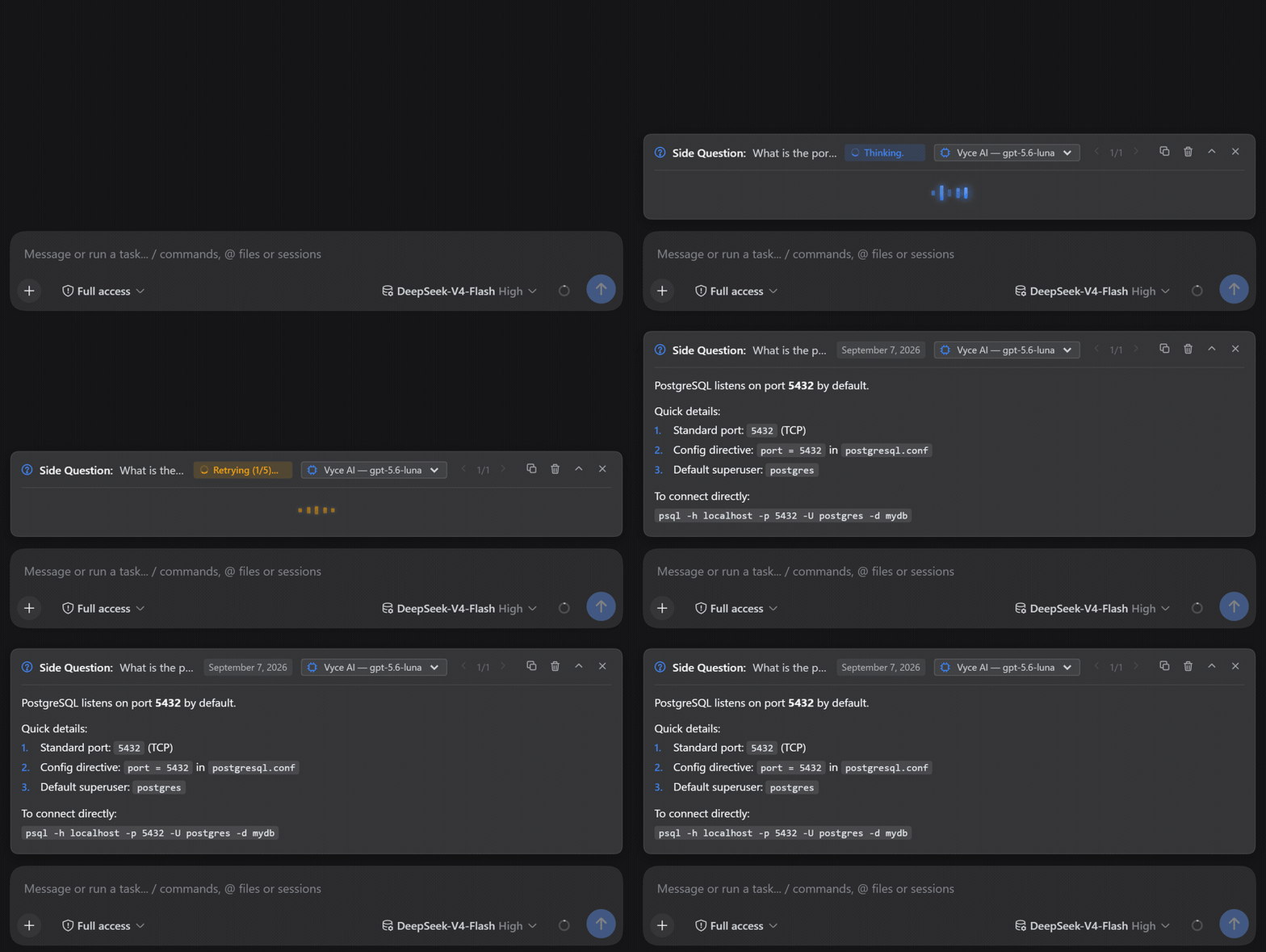
Docked Floating Banner Above Composer: Appears right above the message input with a live Quantum Equalizer animation, Markdown rendering, pagination (
< 1/5 >), and collapse/expand toggle. -
Quantum Equalizer Visualizer: Five animated pill bars pulse in theme blue while your answer is being generated. During an automatic retry, all bars and the status badge switch to amber so you can always see the current state at a glance.
-
Smart Auto-Retry (5 Steps): On transient model errors the plugin retries up to 5 times with fast bursts (1 s → 1.5 s → 2 s → 2.5 s → 3 s, ~10 s total). The status badge shows
Retrying (X/5)...in amber so you are never left wondering. -
Active Session & Loop Context Awareness: Inherits the active session model dynamically and extracts recent turn history (
session.deriveMessages(), active workspace) so/btwknows exactly what you and the main agent are working on without interrupting execution. -
Accuracy-First System Prompt: Six concise positive instructions guide the model to preserve exact nouns, synthesize session history faithfully, and answer directly — no defensive over-constraints that cause hallucinations.
-
Rich Markdown Rendering: Bold, italic, inline code, numbered lists (rendered as real
1.2.numbers in theme blue), and bullet points — all without markdown tables cluttering the compact card. -
Isolated JSON Storage: Persists session Q&A history in
~/.dsh/storages/btw-history.jsonwithout modifying or polluting other plugins.
Installation
Option 1: Via DSH Plugin Market (Recommended)
Install directly in the DSH Web UI via Settings → Plugin Market (search for dsh-btw), or run:
pnpm dsh plugin add @wlv-zedd/dsh-btw-plugin
Option 2: Manual npm & Cordis Config
Install dsh-btw-plugin into your DeepSeek Harness environment:
pnpm add @wlv-zedd/dsh-btw-plugin
Enable the plugin in your cordis.yml (or via cordis.patch.yml):
# cordis.yml
plugins:
  @wlv-zedd/dsh-btw-plugin:
    # Optional: specify a dedicated model, or omit to auto-inherit active session model
    # model: deepseek:deepseek-chat
Usage
In the Web Chat Interface
Type /btw followed by your question:
/btw What is the port number of PostgreSQL?
/btw What is the difference between TCP and UDP?
- Floating Banner: The question immediately displays above the composer with the Quantum Equalizer pulsing. Once resolved, the rich Markdown answer appears.
- Pagination (
< 1/5 >): Cycle through previous side questions in the active session using<and>. - Action Controls:
- Copy: Copies the answer to clipboard.
- Delete: Removes the question from session history.
- Collapse / Expand: Toggles the answer view to keep your workspace tidy.
- Dismiss [X]: Closes the floating banner.
Support & Community Perks



License
MIT © WLV-ZEDD
Plugins relacionados
dsh-web (dsh-task-board)
zhu1090093659/dsh-web
dsh-web (dsh-web-all)
zhu1090093659/dsh-web
dsh-TUI
ccch1mneyyy/dsh-tui
dsh-web-ui (dsh-task-board)
zhu1090093659/dsh-web-ui