dsh-ladder-superagents
yukikaze-ai/dsh-ladder-superagents
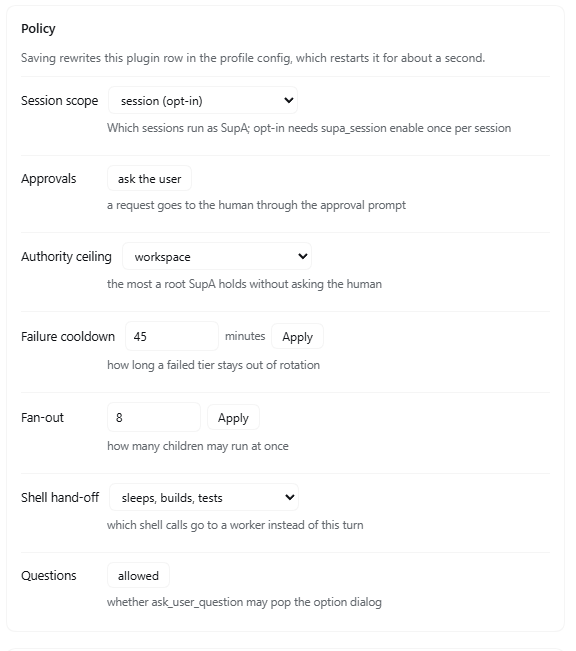
Ranks models in a ten-slot ladder, routes each subagent by a 1-10 difficulty, and falls back a tier when one fails. Windows only; applies to sessions that opt in. Subagents can also launch local agent CLIs (Codex verified, nine others experimental), and a subagent granted full authority runs its CLI with --dangerously-skip-permissions, --yolo or --force. Run records go to .dsh-supa/ in the workspace.
Instalar
dsh plugin --profile web add github:yukikaze-ai/dsh-ladder-superagentsREADME
dsh-ladder-superagents

English · 中文
0.1 is Windows-only. CLI discovery,
.cmdlaunching and path handling are written for Windows. On macOS and Linux the llm tiers work, the CLI tiers do not.os: ["win32"]inpackage.jsonsays so.Of the ten CLI drivers, only codex is verified. kimi, claude, gemini, qwen, cursor, opencode, aider, copilot and goose are implemented from each CLI's documented invocation but were never run against a working account — claude in particular needs a paid Claude subscription, and kimi needs a Kimi account. Treat all nine as experimental.
Approval behaviour is inherited: the plugin answers no approval request by itself.
autoApprove: trueis an explicit opt-in, not a default.
A DeepSeek Harness bundle that turns selected sessions in the profile into a SupA
session, following the concept of
deepseek-ai/dsh-superagent-prototype.
Package id: dsh-ladder-superagents.
The prototype's idea, reduced to three properties per session:
| Property | Prototype mechanism | This plugin |
|---|---|---|
| Never blocked | The router decides; Executors report instead of waiting | Approvals are decided in-process; a broken thing is diagnosed and repaired before anyone is asked; asking is reserved for what a repair cannot obtain (a credential, a payment, a decision on something irreversible) |
| Owns all context | Ticket records, scoped orchestrator_read | A workspace ledger (.dsh-supa/context.jsonl) every session can read/write, injected as a live digest into the system prompt |
| Decides the child's context | Mandate + scoped Inputs handed to an Executor | supa_spawn builds a context pack from the parent's selection; the child pulls more with supa_context_request and the parent answers with supa_context_supply |
What it registers
Tools (every session):
| Tool | Purpose |
|---|---|
supa_context | write / read / search / list / digest the shared ledger |
supa_spawn | Start a child with a brief plus an explicit context selection (ledger ids/tags, files, last N messages, extra text) |
supa_context_request | Child → parent: ask for context it was not given |
supa_context_supply | Parent → child: deliver that context (wakes the child if idle) |
supa_status | Mode, ledger path/size, open todos, live children |
supa_report | Child → parent: enqueue a progress/result record into the parent's inbound queue without waking it |
supa_inbox | Parent: peek / drain / stats its inbound queue, grouped per child lane; drain takes optional ids so the SupA keeps the useful records pending and drains the rest |
supa_authority | Parent: set a direct child's authority (workspace / full); clamped to the parent's own level |
supa_models | Manage the ladder: list, scan (read codex debug models, optionally pin each model with a real call), add, remove, move, route |
System prompt: a SupA session charter section, plus a supa:state context with
the recent ledger digest and open todos.
Runtime behavior:
approval/requestis answeredallowed-oncefor SupA sessions, and every grant is appended to the ledger asauto-approval.ask_user_questionis allowed by default: when a decision is genuinely the user's, the SupA pops the options instead of guessing. SetdenyBlockingQuestions: trueto make that tool fail with a "decide and record" directive instead.- A turn ending
blockedis woken with a "do not wait" nudge (at most 3 per 10 minutes per session; the counter decays, so it cannot loop forever). - Optional: a turn ending
completedwith open todos wakes again (continueOnOpenTodos, off by default).
Configuration
Set on the supa row in the bundle's cordis.patch.yml:
| Key | Default | Meaning |
|---|---|---|
enabled | true | Master switch |
mode | session | session = opt-in per session via supa_session enable; all = every session; root = only sessions without a parent; preset = only listed presets |
presets | [] | Preset ids for mode: preset |
ledgerDir | .dsh-supa | Ledger directory, relative to the session working directory |
autoApprove | false | Inherit the harness policy. true makes SupA answer every approval itself |
denyBlockingQuestions | false | Refuse ask_user_question instead of letting it ask |
continueWhenBlocked | true | Wake a blocked turn |
maxBlockedNudges | 3 | Nudges per nudgeWindowMs |
nudgeWindowMs | 600000 | Decay window for the nudge counter |
continueOnOpenTodos | false | Also continue while todos are open |
maxTodoNudges | 6 | Nudges per window for the todo trigger |
spawnProvider | spawn | ctx.subagents provider used by supa_spawn |
childPreset | '' | Agent preset for children; empty inherits the parent |
retryOnFailure | true | Re-spawn one tier weaker when a routed child stops on error/max-tokens/refusal |
maxRouteRetries | 2 | Stop descending after this many retries |
tierAttempts | 2 | Attempts on the same tier before it is marked and its slot freed |
tierRetryDelayMs | 1200 | Pause before retrying the same tier |
codexCommand | '' | Absolute path to the codex CLI; empty discovers ~/.codex/plugins/*/codex.exe then ~/.cargo/bin/codex.exe |
cliTimeoutMs | 900000 | Kill a codex run after this long |
maxCliResultChars | 8000 | Cap on the result queued back to the parent |
maxPackBytes | 24000 | Context pack cap |
maxFileBytes | 8000 | Per-file cap |
maxFiles | 6 | Files per pack |
maxTranscriptMessages | 30 | Upper bound for transcript_messages |
maxTranscriptChars | 700 | Per-message cap in the transcript |
promptDigestNotes | 8 | Ledger lines in the prompt digest |
Install
dsh-ladder-superagents is a DeepSeek Harness bundle: a package whose package.json
declares dsh.bundle.patch. Installing it into a profile inserts its plugin
row (Host half) and its Client half.
git clone https://github.com/Yukikaze-Ai/dsh-ladder-superagents.git
Then, from the Harness you want it in, install the cloned directory as a bundle
with the Plugin Manager's "install from a directory" action and point it at the
checkout. The Host and Client halves activate together: the tools appear in
every session, the charter joins the next prompt assembly, and Settings gains a
SupA settings page. No rebuild step — the Client module is plain JavaScript loaded
through the Harness module loader.
After installation the tools appear in every session, and the charter is part of the next prompt assembly.
Turning it on in a session
mode: session is the default, so nothing is enabled automatically. A session
becomes a SupA when you say so, and the setting is remembered per session:
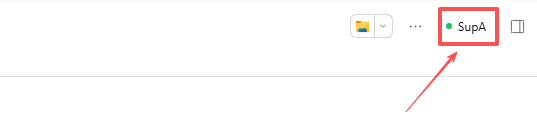
- The pill. The session header carries a quiet
SupAcontrol: a green dot means this session is a SupA, grey means it is off. Click it to switch. - The tool. Inside the conversation,
supa_session enabledoes the same andsupa_session statusreports where the session stands. - Switching off is a soft stop. New spawns are refused, but children already running keep working; their reports stay in the queue and surface the next time you switch it on.
Topology: star, with a queue on every edge
            ┌──────────── SupA (parent) ────────────┐
   spawn ──▶│  inbound queue: one file, N lanes     │
            │  drained deliberately, not per-event  │
            └───▲──────────▲──────────▲─────────────┘
                │lane A    │lane B    │lane C
            child A     child B     child C      (no A↔B, A↔C, B↔C edge)
- No lateral edges. A child can only reach its direct parent (the harness
enforces adjacency on
send_message), and the pack charter states it. - One inbound queue per SupA.
supa_reportappends a record to<ledger>/inbox/<parent>.jsonland injects one line into the parent's inbox without waking it. The parent'ssupa_inboxdrains the queue; ordering is preserved per lane. - One wake per batch. Only an idle parent is woken, once per
coalesceMswindow, with a pointer ("N reports across M lanes"), never one wake per child event. A busy parent simply finds the reports in its next step. - Two regimes. With a live-subagent cap the parent is the scheduler: the
cap belongs on
supa_spawn, and pending assignments wait in the parent's queue. Without a cap every child is an independent lane with its own queue and its own context, and nothing is shared between lanes except the ledger.
What is already native and needs no plugin code: agent.inbox (durable
next-turn/next-step queue per session), adjacency on send_message, and
ctx.subagents activation management. What this plugin adds: the durable
per-lane queue, coalesced wake, and drain semantics the model can reason about.
Authority flows down, never up
Every session holds a level: workspace (default) or full.
- A request inside the level is granted once and audited in the ledger.
- A child's request above its level is refused and parked in the parent's
queue as a
permissionrecord. The parent answers withsupa_authorityand tells the child to retry; it can never grant more than it holds itself. - A root's request above its level goes to the human through the normal approval prompt. That is the only human gate left, and it exists only for privilege escalation — never for ordinary work.
Difficulty routing
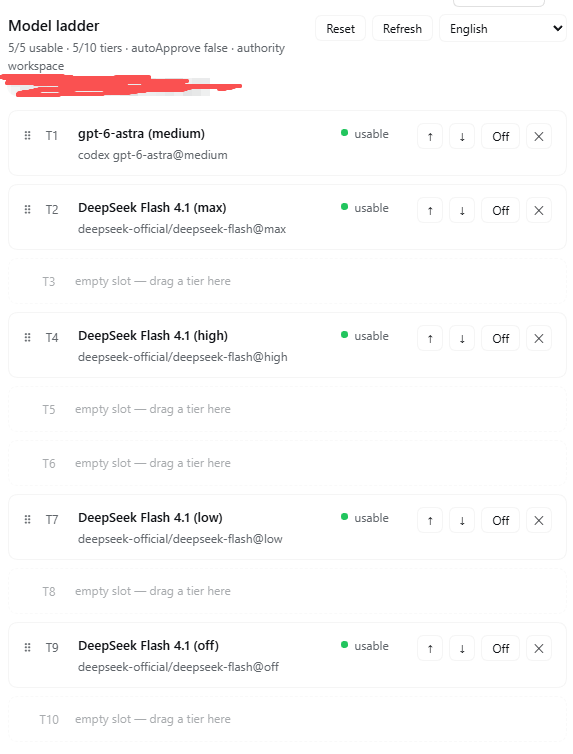
The SupA scores a task 1-10; supa_spawn with difficulty: 7 picks the tier.
- The ladder lives in
.dsh-supa/models.json: an ordered array, strongest first, each entry{ id, label, provider, model, reasoningEffort, ceiling, enabled }. ceilingis the hardest score that tier is expected to handle. The router takes the weakest tier whose ceiling still covers the score — a 2-point task never burns the strongest model — and falls back to the strongest available tier only when nothing covers it.- Thinking levels are separate rows, not a second axis. One model's levels are
consecutive tiers:
Flash MAX = 7,Flash high = 5,Flash low = 3,Flash none = 1. The ranking stays one total order, so "which is stronger" and "which is the third one" always have one answer. - Availability is the live
llmservice (resolveCallConfig, cached 60s), so an unavailable tier is skipped and the next one down is used — the "degrade one step at a time" rule. - A failed attempt retries the same tier once (
tierAttempts) before it is treated as a model problem: then the route is marked in.dsh-supa/failures.jsonand the tier stays in the ladder disabled and red. It is the user who deletes it, and Retry on that row probes it once: green re-enables it, red keeps it out. When every route in the ladder is marked, the weakest slot is replaced by the built-indeepseek-official/deepseek-flash@highso the pool can still route. If a user switched tiers off by hand instead, nothing is replaced — that is a deliberate choice, not a broken route. - An empty ladder means children inherit the parent route, unchanged.
- A tier may be an external CLI instead of a Harness route:
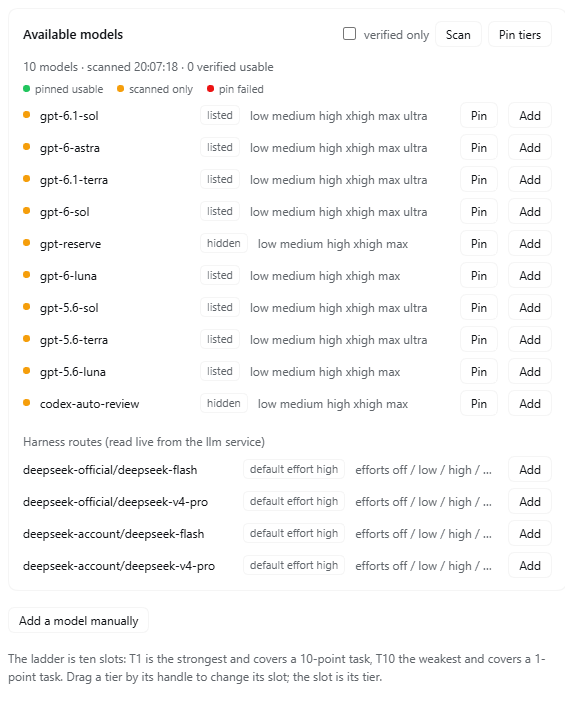
kind: "codex"runscodex execas a child process, feeds the same context pack on stdin, maps the authority ceiling to-s workspace-write | danger-full-access, and queues the CLI's last message back as aresultrecord on lanecli. It is not a Harness session — no session id, nosupa_context_request. supa_models scanreads every entry of the Codex catalog (codex debug models, no session created) and caches it in.dsh-supa/codex-models.json, hidden models included — a hidden model can still be pinnable and a tier may name it.supa_models pintests configurations, not models: one real call per (model, effort) pair, cached undermodel@effort. Pass a model to test every effort it supports, or omit it to test the ladder's codex tiers. A cached success is reused unlessforceis set. Every pin consumes that model's tokens/usage, which is why scan and pin are separate actions.supa_models route difficulty 7is a dry run; it costs nothing.
The requested sidebar is the editor for exactly this file: reorder rows, toggle
availability, edit ceilings, add tiers. Until it exists, supa_models is the
same surface with the same validation.
CLI drivers
A cli tier names a driver; the driver owns the flags, the plugin owns the
plumbing (spawn, stdin, timeout, result queue, degradation).
| driver | binary | non-interactive form | prompt |
|---|---|---|---|
codex | codex (auto-discovered) | codex exec | stdin |
kimi | kimi | kimi -p "<prompt>" | argument |
claude | claude | claude -p | stdin |
gemini | gemini | gemini -p "<prompt>" | argument |
qwen | qwen | qwen -p "<prompt>" | argument |
cursor | cursor-agent | cursor-agent -p "<prompt>" | argument |
opencode | opencode | opencode run "<prompt>" | argument |
aider | aider | aider --message "<prompt>" --yes | argument |
copilot | copilot | copilot -p "<prompt>" | argument |
goose | goose | goose run -t "<prompt>" | argument |
Exercised on this machine: codex, kimi. The rest are documented
invocations, not run here — a wrong flag fails loudly and can be fixed with the
tier's command field.
Windows vs macOS
- An npm-installed CLI on Windows is a
.cmdshim, whichspawncannot execute directly. The launcher detects.cmd/.batand runs through the shell with argument quoting. - Executable lookup walks
PATHwith.exe/.cmd/.baton Windows and the bare name elsewhere; a tier's explicitcommandalways wins. - Prefer stdin drivers on Windows: a command line is capped near 32k characters, so a 24 KB context pack passed as an argument is risky. The argument drivers are fine for short briefs.
- Config homes differ (
%USERPROFILE%\.codexvs~/.codex,%APPDATA%vs~/.config), which is why the codex binary is discovered from its install root rather than assumed to be onPATH.
Settings page
The bundle ships a Client half that registers a dsh-ladder-superagents page in the
Settings panel (settings.section, order 25). It shows the ladder of the
selected workspace — position, label, route, ceiling, per-tier availability —
and edits it in place: reorder with ↑/↓, enable/disable, remove, and add a tier
(llm route or cli driver). A workspace picker appears when the profile owns
more than one workspace.
The page has no host RPC dependency; it uses two same-origin routes the Host half registers:
| Route | Purpose |
|---|---|
GET /supa/state?cwd= | Workspaces, ladder, availability, drivers, config summary |
POST /supa/action | move, enable, remove, add — returns the new state |
Both operate on <cwd>/.dsh-supa/models.json, the same file supa_models
edits, so the tool and the page never disagree.
Below the ladder is the Codex catalog block. Scan reads every catalog entry
(hidden ones included) and costs nothing. Pin tiers tests the ladder's codex
tiers; each model row has its own Pin that tests every effort that model
supports. Both pinning paths send one real call per model+effort configuration
and cache the verdict as model@effort, so the warning beside the buttons is
literal: they consume each model's tokens/usage.
License
MIT — see LICENSE.
Risks you should know
- Approval behaviour is inherited by default. Setting
autoApprove: truegrants every approval request, including sandbox escalation. That is what "never blocked" costs. Turn it off and the SupA simply cannot escalate; it gets a deterministic rejection instead. - A
codextier is a plain child process, not a Harness session: neither the approval system nor the authority bookkeeping governs it. The authority ceiling is mapped onto codex's own-sflag, and that is the entire control. - A CLI tier with
fullauthority disables that CLI's own guard.claudegets--dangerously-skip-permissions,geminiandqwenget--yolo,cursor-agentgets--force. Those processes run outside the Harness approval system, so the authority ceiling is the only thing stopping them. Leave CLI tiers onworkspaceauthority unless you mean it. - The ledger lives in the workspace (
.dsh-supa/) so it travels with the repo. Add it to.gitignoreif you do not want it committed. - The charter applies to every session in
mode: 'all'. Usemode: 'session'(the default) so a session opts in withsupa_session enable.
Contributing
Bugs and reproductions are the most useful contribution. Read
CONTRIBUTING.md for the local loop and the rules this
codebase learned the hard way, then pick something from
ROADMAP.md — the Windows-only port and the routing tests are both
marked good first issue.
Release notes live in CHANGELOG.md.