dsh-bundle-presets
zy-wang-0304/dsh-bundle-presets
Named bundle-set presets for the Plugins page: save the active bundle list, edit a preset with switches, preview the difference before applying, switch through the plugin manager, and undo the last switch. Its HTTP routes have no DSH access check, so a web page open in your browser could call them.
Instalar
dsh plugin --profile web add github:zy-wang-0304/dsh-bundle-presetsREADME
dsh-bundle-presets
Named bundle-set presets for DeepSeek Harness. Save the bundle list a profile is running as a named set, edit that set with the same switches the plugin list uses, apply it in one click, and undo the last switch.


中文说明见 README.zh.md。
Screenshot
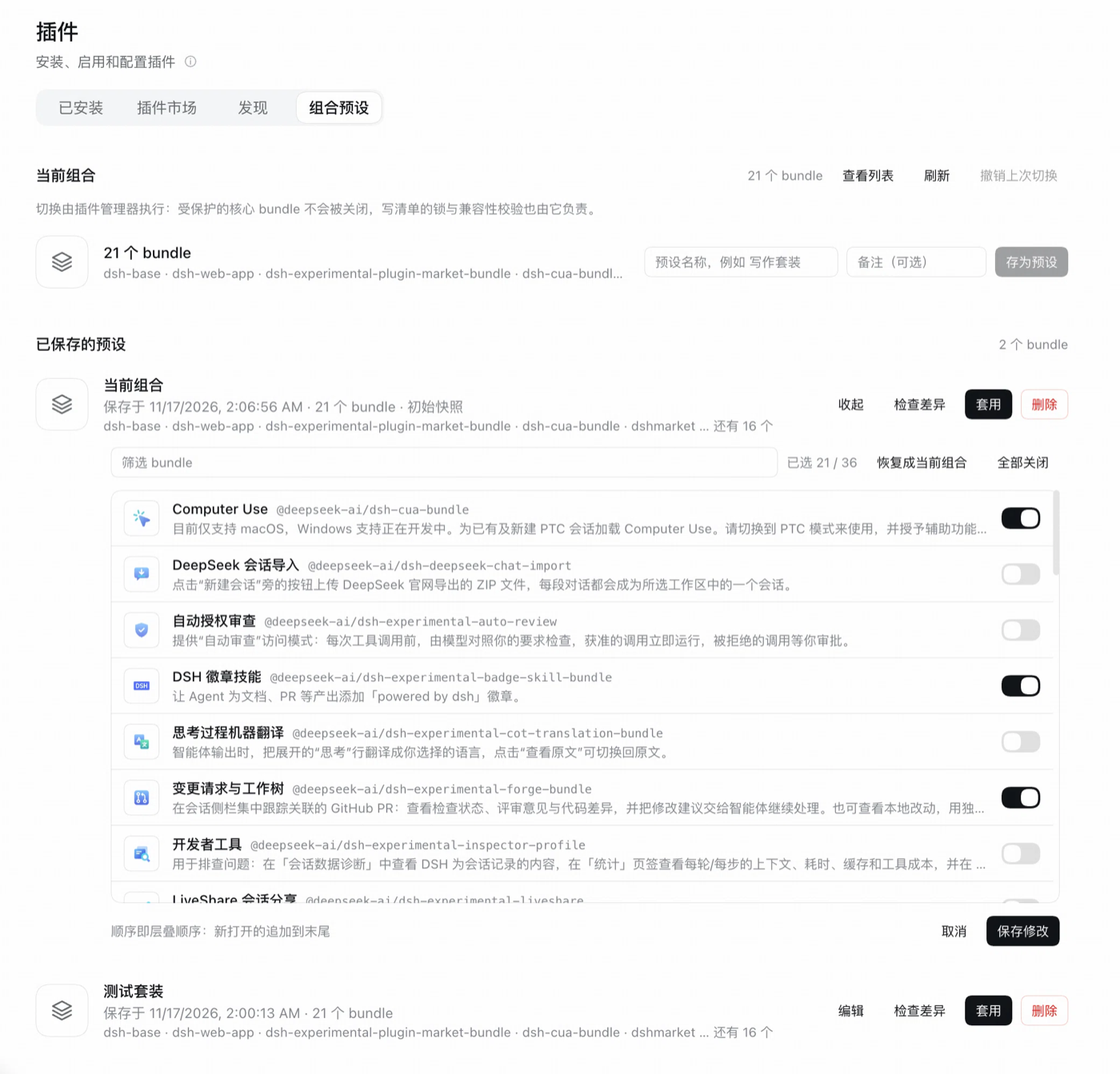
What it does
A preset is a named list of bundle package names from dsh.profile.bundles. The plugin adds a Presets tab to the Plugins page where you can:
- Save the current selection (what the profile is running right now, not a template).
- Edit a preset in place: every bundle in the profile is listed with its icon, localized title, package name, description and the native 36×20 switch.
- Preview the difference before applying: which bundles the preset would turn on or off.
- Apply it. Enables run first and disables second, so the browser bundle survives the transition.
- Undo the last switch; the snapshot is written only when the manifest actually changed.
- Overwrite an existing name only after an explicit confirmation (
409 name-existsfirst).
Switching goes through pluginManager.setBundleEnabled(), so it inherits the profile write lock, version-compatibility checks, HMR recomposition and the plugin manager's protected-bundle refusals. A switch is refused as a whole (409 unappliable, with per-bundle reasons) when any step could not run: a bundle whose files are missing or whose patch cannot be read, or a protected bundle that would have to be turned off. A step that already wrote the manifest and then failed to recompose is reverted immediately.
Install
dsh plugin --profile <your-profile> add dsh-bundle-presets
Or, in the app: Plugins → Add plugin → search dsh-bundle-presets. Restart the profile if your host has HMR off. The plugin needs a Web surface (web or desktop); headless, SDK and ACP profiles do not mount it.
Use
- Set the composition you want from the Installed tab as usual.
- Open Plugins → Presets, name the set, Save preset.
- Later, pick the preset and press Apply. Preview shows the difference first; Undo last switch goes back one step.
The Current set card lists the active bundles in layer order (read-only); edit a preset to change what a set contains.
Limits
- It switches the bundle composition of one profile. It does not switch profiles, sessions, settings or credentials.
- Presets store package names, not versions: after an upgrade or removal, missing entries are skipped and listed in the editor.
- The plugin manager appends newly enabled bundles, so an applied set can hold the same bundles in a different order; the "current" badge and the diff compare sets.
- Routes are
Host-fenced to loopback, so a deployment reached through a reverse proxy or a LAN address gets 403; add your own authentication before exposing it. - State lives in
<profile dir>/bundle-presets.jsonand is guarded by a cross-process lock.
Development
node tests/plan.test.mjs     # pure planning: diff, name rules, preflight refusals
node tests/routes.test.mjs   # real HTTP handlers with a stub plugin manager
Both run without touching a live profile.
License
MIT © ZY-WANG-0304
Plugins relacionados
deepseek-harness
deepseek-ai/deepseek-harness
dsh-market
dsh-market/dsh-market
dsh-web (dsh-plugin-manager)
zhu1090093659/dsh-web
dsh-web
zhu1090093659/dsh-web