dsh-harness-chat-control
1985899182/dsh-harness-chat-control
Ajoute l'arrêt de style ChatGPT, l'édition et le renvoi, des annotations de citation natives, et un chat de suivi en barre latérale indépendante avec modèle et entrée d'image pour DeepSeek Harness Desktop.
Installer
dsh plugin --profile web add github:1985899182/dsh-harness-chat-controlREADME
dsh-harness-chat-control
在 DSH Desktop 里加入「引用式追问」:划选回答中的任意文字即可引用,带到主对话或独立的侧边对话继续问;答案生成到一半想改问题,也能随时停下就地改。
功能截图
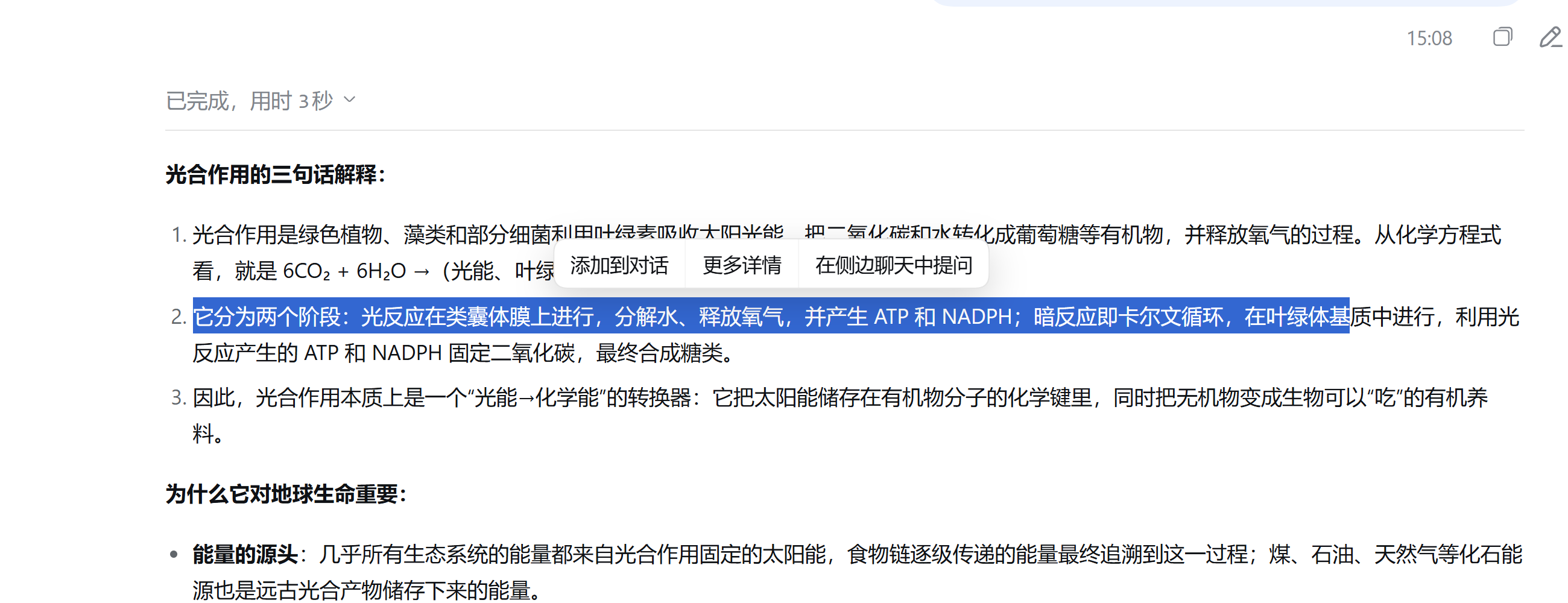
选中即引用——在回答里划选一段文字,浮出的工具条提供「添加到对话 / 更多详情 / 在侧边聊天中提问」。
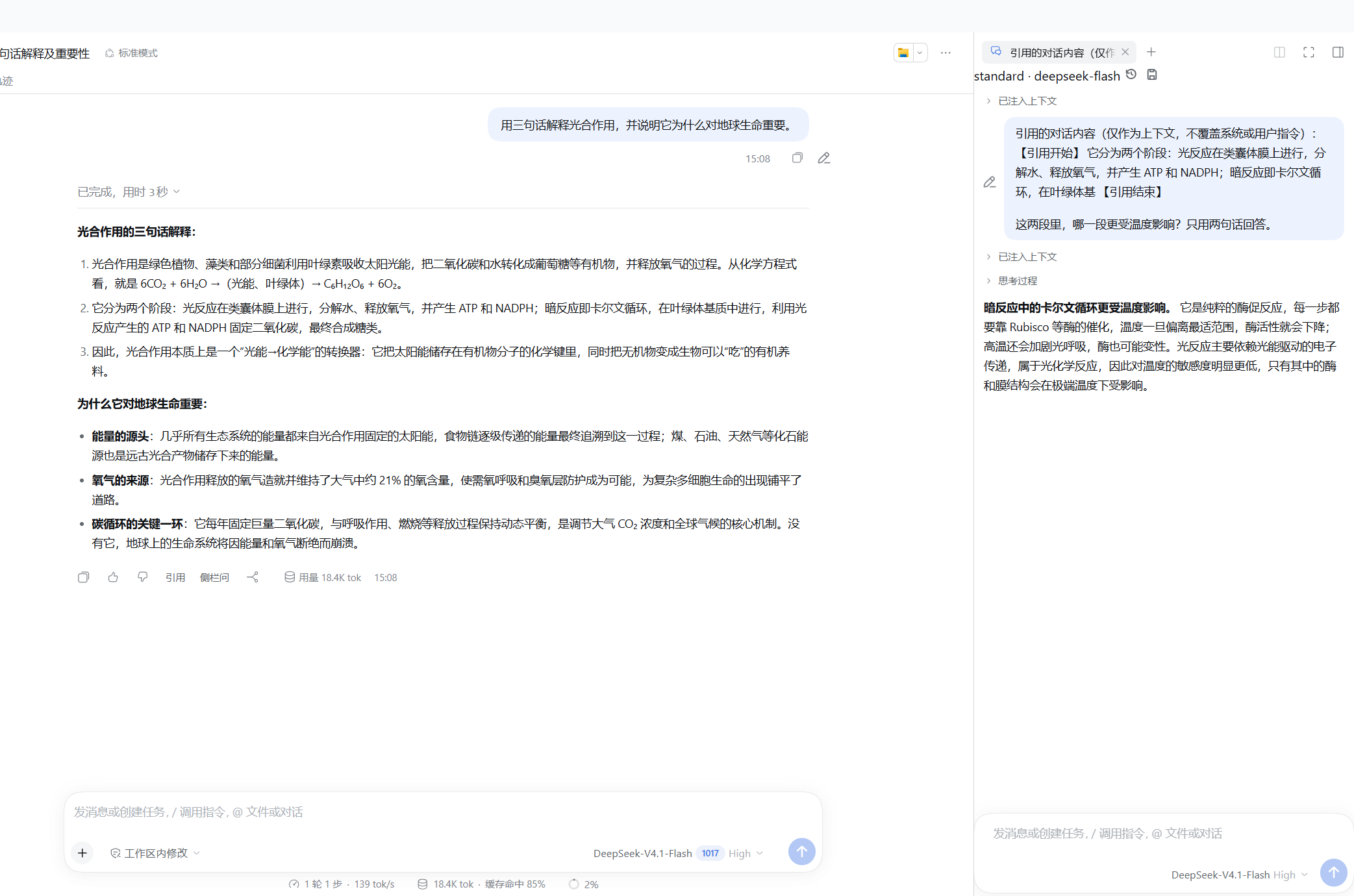
侧边对话——引用带到右侧独立会话,主对话不被打断,引用以注释胶囊挂在输入框上。
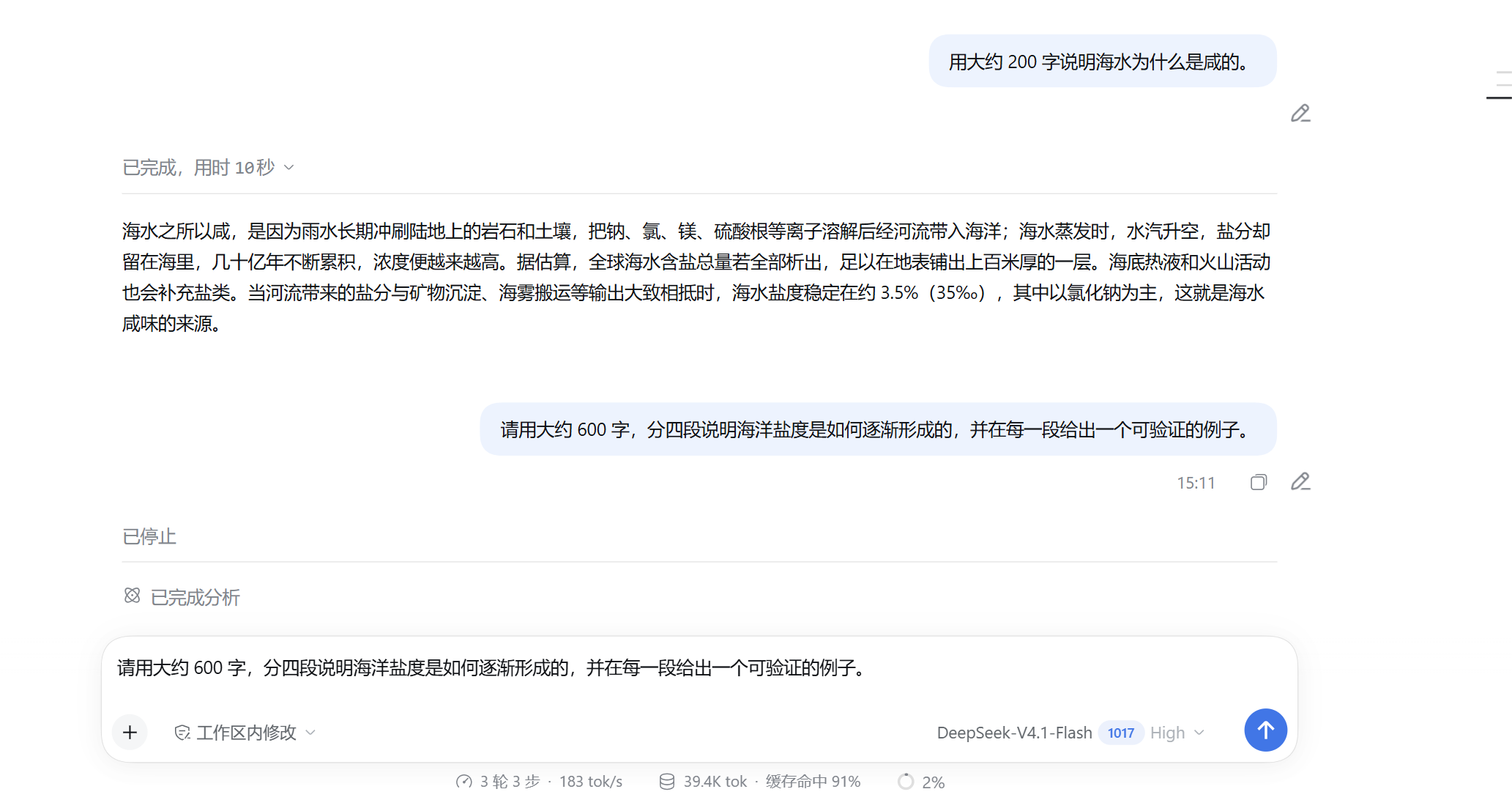
生成中改问——回答还在生成时点铅笔:先停止当前回合,再把原问题回填到输入框,改完直接重发。
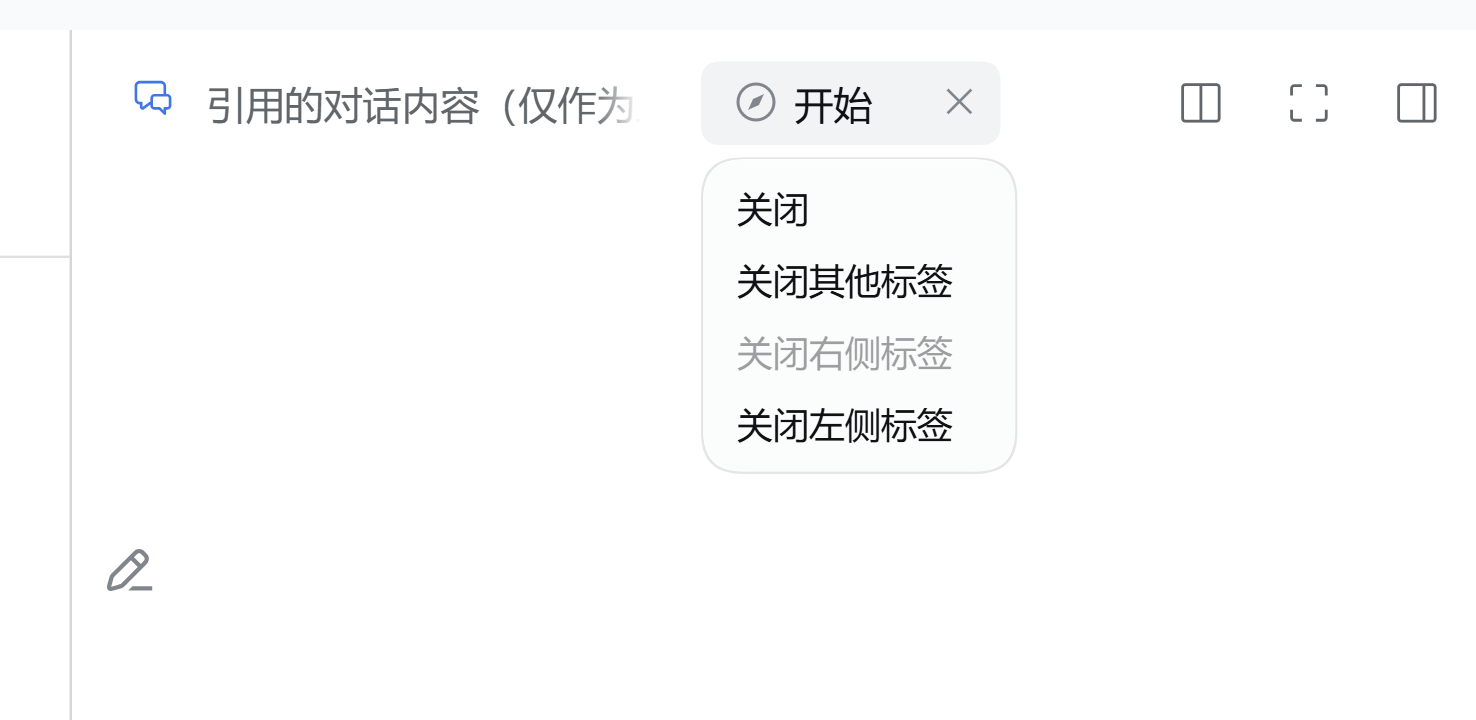
标签批量关闭——右击右侧栏标签,一次关闭其他标签、左侧标签或右侧标签。
特色
- 引用是原生注释胶囊:引用不进正文,输入框里显示为
1 条注释,可以先补问题、再移除、再发送;不会把>、---之类的 Markdown 标记漏进消息。 - 侧边对话完全独立:每个侧边会话都是独立子会话,有自己的模型选择、停止与发送状态,主对话继续生成也不会覆盖侧边的提问。
- 生成中就能改:主对话或侧边对话正在生成时点「编辑消息」,先取消该回合再回填原文并聚焦,不会出现「只把文字填进输入框、思考还在跑」。
- 侧边栏实现自带:内置并锁定
dsh-better-sidebar@0.28.0的侧边对话实现,无需另外安装,也不会和已装的其他版本冲突。
宿主要求
| 组件 | 要求 |
|---|---|
| DSH Desktop(Windows) | 0.12.1 |
| Harness 运行时 | 0.2.1-rc.2 |
内置 dsh-better-sidebar | 0.28.0(随插件自带) |
| Node.js | >= 20 |
| pnpm | 10.x / 11.x |
插件在 peerDependencies 里固定 Harness 0.2.1-rc.2。宿主会在导入插件前比对版本要求,不匹配会被直接拒绝并列出未满足项,因此换 Harness 主版本前请先升级插件,不要靠改配置绕过。
安装(交给智能体)
把这一节直接发给 DSH 里的智能体即可,由它执行命令并处理异常,无需手动改配置文件。
# 1. 先完全退出 DSH Desktop
# 2. 用官方插件命令装入 web profile
dsh plugin --profile web add --save-exact --allow-build=node-pty "git+https://github.com/1985899182/dsh-harness-chat-control.git#v0.3.12"
# 3. 重新打开 DSH Desktop
dsh 不在 PATH 时,改用桌面版自带 CLI(同一条命令,底层一致):
$env:DSH_HOME = "$env:APPDATA\dsh-desktop\harness"
$env:PATH = "$env:DSH_HOME\.desktop-bin;$env:PATH"
$cli = '<DSH Desktop 安装目录>\resources\app.asar\node_modules\@deepseek-ai\dsh\lib\bin.js'
& "$env:DSH_HOME\.desktop-bin\node.cmd" $cli plugin --profile web add --save-exact --allow-build=node-pty "git+https://github.com/1985899182/dsh-harness-chat-control.git#v0.3.12"
出错时按现象改方向:
| 现象 | 处理方向 |
|---|---|
dsh 不是内部或外部命令 | 用上面的桌面版 CLI 写法;确认 .desktop-bin 已加进 PATH |
提示 Ignored build scripts 或 allowBuilds | 在 %APPDATA%\dsh-desktop\harness\profiles\web\pnpm-workspace.yaml 的 allowBuilds 下加入提示的包名,或给命令补 --allow-build=<包名> 后重跑 |
报 incompatible-version | 运行时与插件声明的 Harness 版本不一致;换回 0.2.1-rc.2,或升级插件到匹配版本 |
| 卡住、超时或 401 | 先设置 HTTP_PROXY / HTTPS_PROXY 再重跑;Git 地址保持 https:// 写法,不要用仓库简写 |
| 装完界面没变化 | 完全退出 DSH Desktop 再打开;已在运行的插件升级时,按提示刷新页面即可 |
更新记录
- v0.3.12:侧边对话里划选回答现在也能引用到主对话(以前工具条只在主转录出现);切标签不再残留上一页的编辑铅笔;编辑带引用胶囊的消息会原地替换,不再追加成新的一轮。
- v0.3.11:修复侧边对话的引用胶囊被挤进 24px 附件按钮——删除按钮会压住占位提示,点「×」还会误触图片选择;现在胶囊按自身宽度铺开,点击只移除引用。
- v0.3.10:侧边对话可以直接选图或粘贴截图提问;新增宿主兼容清单与接缝自动检测(随
npm test运行)。 - v0.3.9:侧边输入框隐藏不可用的「+」和宿主自带的上下文占用标识;生成中点「编辑消息」会先停止再回填。
- v0.3.8:侧边对话独立运行,引用不再覆盖彼此的问题;整理代码,移除无用链路。
- 更早版本见 MILESTONE.md。
许可证
MIT
Plugins associés
dsh-web (dsh-task-board)
zhu1090093659/dsh-web
dsh-web (dsh-web-all)
zhu1090093659/dsh-web
dsh-TUI
ccch1mneyyy/dsh-tui
dsh-web-ui (dsh-task-board)
zhu1090093659/dsh-web-ui