dsh-render-engine
ch4acko3/dsh-render-engine
Structured syntax highlighting service for DeepSeek Harness Web plugins
Installer
dsh plugin --profile web add github:ch4acko3/dsh-render-engineREADME
DSH Render Engine
English | 简体中文
A small monorepo of browser-side rendering services for DeepSeek Harness Web plugins. It separates Shiki tokenization, stable syntax-highlight tokens, normalized diffs, diagnostic code frames, ANSI terminal output, and safe HTML rendering into seven independently publishable npm packages.
Renderer services, not a frontend
The seven published packages do not ship a page, panel, ChatView card, or other concrete frontend. They register reusable browser-side Cordis services such as ctx.codeRenderer, ctx.diffRenderer, and ctx.ansiRenderer. A downstream plugin chooses the host surface and interaction, calls the services with its own data, and receives normalized structures, stable tokens, or escaped theme-aware HTML that it can embed in that surface.
The ChatView cards shown below belong only to the private integration/consumer. They demonstrate one possible adapter built on the public services; they are not UI bundled with the published renderer packages.
See it in ChatView
The same persisted patch is expanded on both sides. Native DSH presents it as plain text; a downstream adapter can call dsh-diff-engine and dsh-diff-render to produce a structured, themed, syntax-aware review surface.
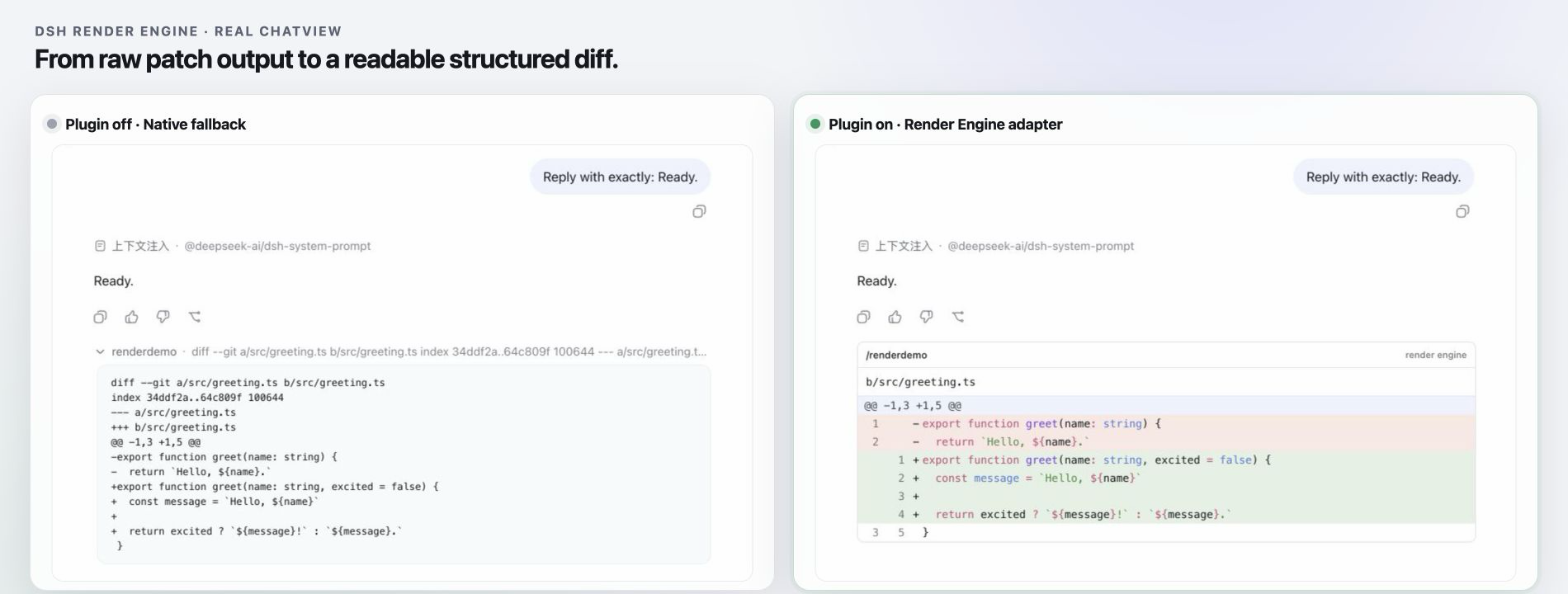
Both sides use the same persisted command output. The private integration consumer connects the public services to a real DSH conversation slot so their effect can be compared with the native fallback.
More real ChatView comparisons
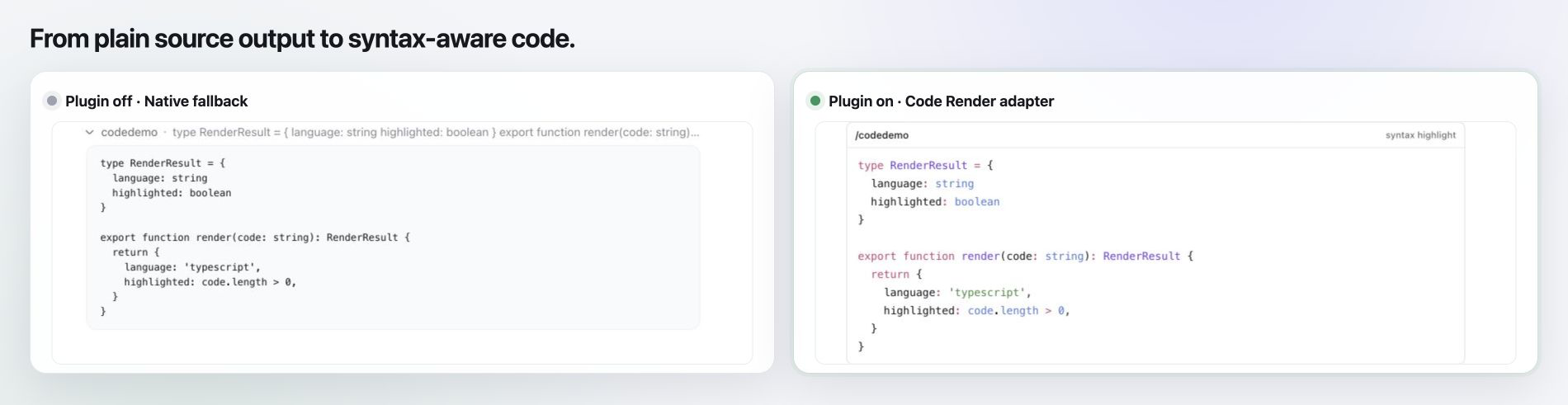
The same TypeScript source changes from an expanded plain-text command result into a compact syntax-highlighted code surface.
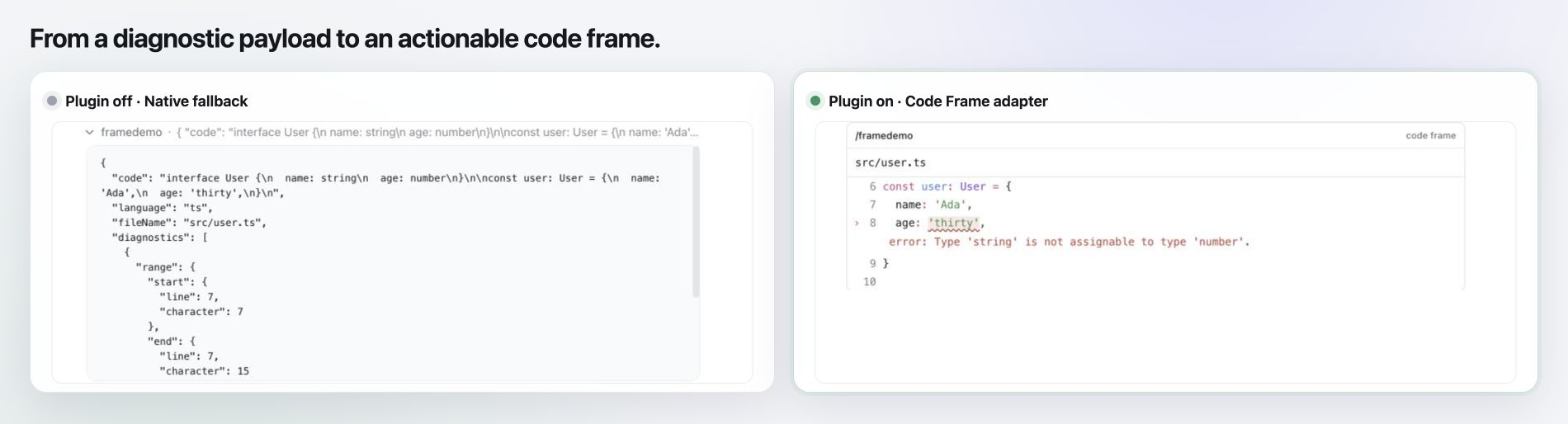
A raw diagnostic request becomes a focused code frame with source context, line numbers, an underlined range, and the error message beside the affected line.
ANSI control sequences are interpreted into readable terminal color and emphasis while preserving the original text.

Packages
| Package | Cordis service | Responsibility |
|---|---|---|
@ch4acko3/dsh-shiki | ctx.shiki | Owns one shared Shiki engine and the bundled language set. |
@ch4acko3/dsh-syntax-highlight | ctx.syntaxHighlighter | Converts source code into stable, theme-aware tokens with a plain-text fallback. |
@ch4acko3/dsh-code-render | ctx.codeRenderer | Converts highlight tokens into escaped HTML code blocks. |
@ch4acko3/dsh-code-frame-render | ctx.codeFrameRenderer | Renders source context with diagnostic ranges and messages. |
@ch4acko3/dsh-diff-engine | ctx.diffEngine | Normalizes complete file snapshots, DSH file diffs, and unified patches into one structured document. |
@ch4acko3/dsh-diff-render | ctx.diffRenderer | Renders normalized diffs as escaped HTML with source-language highlighting. |
@ch4acko3/dsh-ansi-render | ctx.ansiRenderer | Converts ANSI terminal output into escaped, self-contained HTML. |
The dependency direction is intentionally one-way:
dsh-code-render -------+--> dsh-syntax-highlight --> dsh-shiki
dsh-code-frame-render -+
dsh-diff-render ---------> dsh-diff-engine
        +-----------------> dsh-syntax-highlight
dsh-ansi-render             (standalone)
The repository root and integration/consumer are private. Only the seven packages under packages/ are intended for publication.
Features
- One lazily initialized Shiki engine shared by DSH Web plugins.
- Stable token data independent of Shiki's internal token shape.
- Original LF, CRLF, and CR line endings preserved across every service layer.
- CSS-variable colors that follow the DSH theme.
- Plain-text fallback for an absent or unsupported language hint.
- Escaped source text in the generated HTML.
- Three explicit diff inputs: complete files, DSH
FileDifffragments, and unified or Git patches. - One stable diff document with file, hunk, line, status, source-completeness, and summary data.
- Source-language token colors layered over semantic addition, deletion, context, and metadata rows.
- Diagnostic code frames with zero-based UTF-16 ranges compatible with LSP positions, without an LSP dependency.
- Safe ANSI SGR, 16-color, 256-color, true-color, and allowlisted hyperlink rendering.
- A private interactive preview for inspecting code, diagnostics, diffs, ANSI output, tokens, and HTML in a real DSH browser runtime.
Bundled languages: Bash, C, C++, CSS, Diff, Go, HTML, Java, JavaScript, JSX, JSON, Markdown, Python, Rust, SQL, TSX, TypeScript, and YAML. Common aliases such as sh, js, md, patch, py, rs, ts, yml, and zsh are accepted.
Requirements
- Node.js
^22.22.3 || >=24.11.1 - pnpm
11.19.0 - DeepSeek Harness
0.1.0-rc.8for loading the plugins in DSH Web
Local development
pnpm install
pnpm check
pnpm check builds every workspace package, runs TypeScript checks, and executes the unit tests.
Using the services
Declare only the service your plugin consumes. Cordis will load its dependencies through the package chain.
export const inject = ['codeRenderer']

export function apply(ctx) {
  const result = ctx.codeRenderer.render({
    code: 'const answer: number = 42',
    language: 'ts',
  })

  console.log(result.language)    // "typescript"
  console.log(result.highlighted) // true
  console.log(result.html)        // escaped, theme-aware HTML
}
Use the lower-level services when structured data is needed:
const raw = ctx.shiki.tokenize({ code, language: 'ts' })
const highlighted = ctx.syntaxHighlighter.highlight({ code, language: 'ts' })
ctx.shiki.tokenize() requires a supported language. ctx.syntaxHighlighter.highlight() and ctx.codeRenderer.render() accept an absent or unknown language and return a non-highlighted plain-text result.
Normalize and render complete files, DSH file-diff fragments, or a unified patch through the same document format:
const document = ctx.diffEngine.diff({
  kind: 'files',
  before: { path: 'app.ts', content: 'const value = 1\n' },
  after: { path: 'app.ts', content: 'const value = 2\n' },
})

const rendered = ctx.diffRenderer.render(document)
console.log(rendered.html)
The diff engine performs no file IO and runs no Git commands. Complete files retain their source snapshots for full-source syntax highlighting. Patch-only and DSH fragment inputs are highlighted with the source context available inside each hunk.
Render compiler, linter, test, agent, or LSP-compatible diagnostics through the same code-frame model:
const frame = ctx.codeFrameRenderer.render({
  code: 'const value = missing\n',
  language: 'ts',
  fileName: 'app.ts',
  diagnostics: [{
    range: {
      start: { line: 0, character: 14 },
      end: { line: 0, character: 21 },
    },
    message: 'Cannot find name "missing"',
    severity: 'error',
  }],
})

const terminal = ctx.ansiRenderer.render({
  text: '\u001b[1;31mERROR\u001b[0m build failed',
})
Code-frame positions use zero-based UTF-16 code-unit offsets. The renderer performs no source lookup or LSP communication. ANSI rendering is request-local and does not emulate terminal cursor state.
Local DSH preview
Build the workspace, add the seven services and the private preview consumer to a DSH Web profile, then start DSH Web:
pnpm build

dsh plugin --profile web add "file:$PWD/packages/shiki"
dsh plugin --profile web add "file:$PWD/packages/syntax-highlight"
dsh plugin --profile web add "file:$PWD/packages/code-render"
dsh plugin --profile web add "file:$PWD/packages/code-frame-render"
dsh plugin --profile web add "file:$PWD/packages/diff-engine"
dsh plugin --profile web add "file:$PWD/packages/diff-render"
dsh plugin --profile web add "file:$PWD/packages/ansi-render"
dsh plugin --profile web add "file:$PWD/integration/consumer"
dsh web
Open the URL printed by dsh web. The preview overlay lets you edit source code, choose a language, and switch between code, code-frame, diff, ANSI, token, and escaped HTML outputs. Run /codedemo, /framedemo, /ansidemo, or /renderdemo in ChatView to exercise the same services through native command slots. The integration consumer is for local verification only and must not be published.
Repository layout
packages/
  shiki/              Shared Shiki engine
  syntax-highlight/   Stable highlight-token service
  code-render/        Safe HTML renderer
  code-frame-render/  Diagnostic source-context renderer
  diff-engine/        Multi-input normalized diff engine
  diff-render/        Syntax-highlighted HTML diff renderer
  ansi-render/        Safe ANSI terminal HTML renderer
integration/
  consumer/           Private DSH browser probe and preview
Publishing
The Publish packages GitHub Actions workflow publishes one independently versioned package through npm Trusted Publishing (OIDC). No long-lived npm token is stored in GitHub. Each package must have its npm Trusted Publisher configured before its first release.
Releases are tag-driven:
- Update the package version and push the commit to
main. - Wait for CI to pass on that commit.
- Create and push a matching package Tag, for example
dsh-code-render@0.2.0.
Each Tag publishes only its named package, so the seven packages may use different versions. Stable tags publish to npm latest; prerelease tags such as dsh-code-render@0.2.0-next.0 publish to npm next. The workflow rejects unknown packages, malformed tags, tags whose commit is not on main, package-version mismatches, and versions that already exist on npm before publishing begins.
License
Plugins associés
dsh-web (dsh-task-board)
zhu1090093659/dsh-web
dsh-web (dsh-web-all)
zhu1090093659/dsh-web
dsh-web-ui (dsh-task-board)
zhu1090093659/dsh-web-ui
dsh-web-ui (dsh-web-ui-all)
zhu1090093659/dsh-web-ui