dsh-plugin-rea
czcdr/dsh-plugin-rea
Adapter tiers qui enregistre le serveur MCP upstream REA (Reverse Engineer Anything) dans DeepSeek Harness comme outils mcp__rea__*. La 2.x fournit son runtime (Node, REA CLI, JDK, Ghidra) dans <DSH_HOME>/plugins/rea-bundle et lance REA via un shim : une machine sans prérequis fonctionne après une configuration. La 1.x (branch v1, npm 1.0.6) ne fait que la configuration et exige REA/Ghidra déjà installés. L’analyse relève de l’upstream : binaires natifs (Hopper/Ghidra/IDA), apps JavaScript/Electron, assemblies .NET, sites Web, APK Android et appareils adb, firmware et captures de processus.
Installer
dsh plugin --profile web add github:czcdr/dsh-plugin-reaREADME
dsh-plugin-rea

English · 简体中文
Which version is this? 2.x — and
mainis it. 2.x provisions the runtime itself (Node, the REA CLI, a JDK, Ghidra) and then wires the row: install the plugin, runscripts/setup.mjsonce, restart dsh. 1.x is the older configuration-only adapter — it expectsreaon PATH and Ghidra installed by you — kept on thev1branch and on npm asdsh-plugin-rea@1.0.6. Full comparison: Two lines: 1.x and 2.x · upgrading: Upgrading from 1.x.
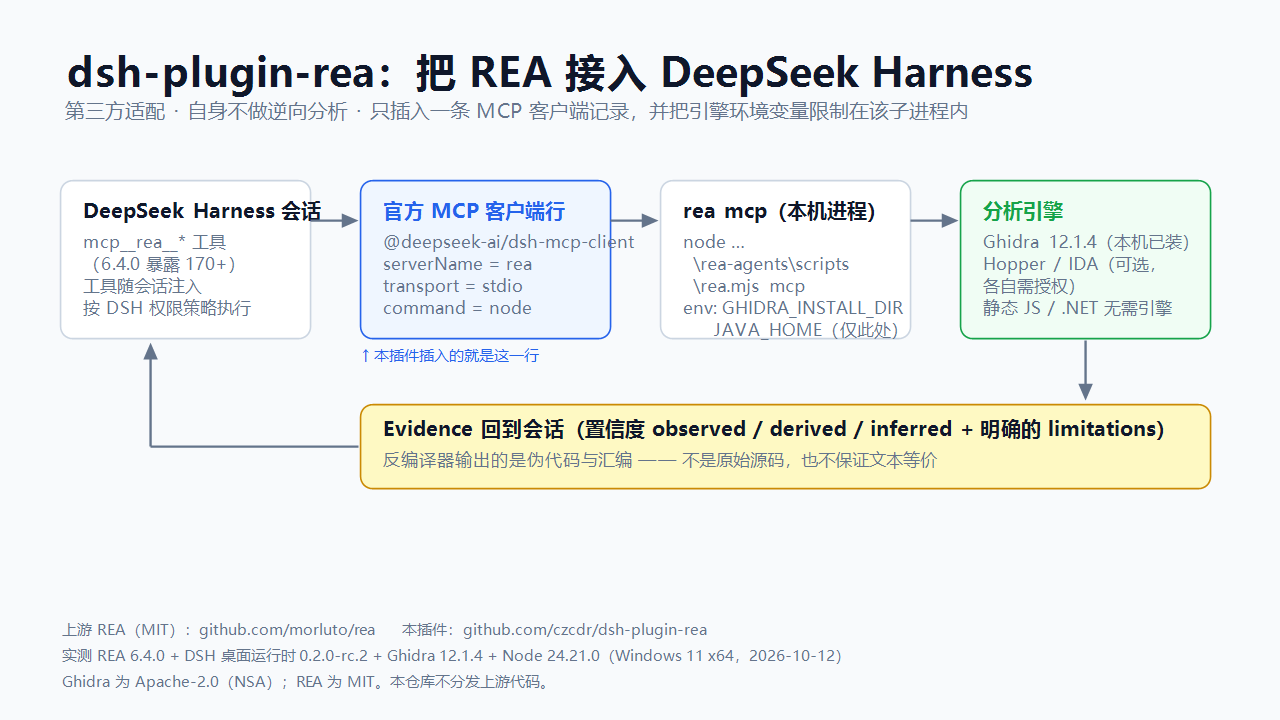
Brings the upstream REA — Reverse Engineer Anything MCP server into
DeepSeek Harness (dsh), so its tools show up in a session as mcp__rea__*.
What this is
A Cordis bundle with a provisioning layer. package.json declares dsh.bundle.patch, and that patch
inserts one row of the official MCP client plugin (@deepseek-ai/dsh-mcp-client). The row launches
bin/rea-shim.mjs with the running Node executable; the shim reads the machine-local state that
scripts/setup.mjs wrote and starts the REA CLI it provisioned. There is no analysis code here, and the
published patch contains no machine path.
Third-party adapter. This repository is not part of REA, ships none of REA's code, and is not maintained by REA's authors. It composes one configuration row and fetches upstream's own releases. Upstream: github.com/morluto/rea (MIT) · docs · rea.tools · npm package
rea-agents. REA's own problems go to its tracker; this plugin's problems go to this repository's issues.
It adds exactly three things: the tool registration under the mcp__rea__* names, the per-machine
engine environment (GHIDRA_INSTALL_DIR, JAVA_HOME, REA_ADB_PATH, REA_APKTOOL_COMMAND,
REA_JADX_MCP_JAR, REA_BROWSER_EXECUTABLE, …) scoped to that MCP child instead of the whole harness, and
the provisioning that puts those components on disk.
What it can and cannot do
The analysis is upstream's; this section only restates upstream's own contract so expectations are right.
- It cannot recover complete source code. For native binaries upstream returns pseudocode and assembly, for Android APKs decompiled methods, for JEB units pseudocode, and for JavaScript/Electron modules and their relations. Upstream's tool contract states the pseudocode "is decompiler output, not original source and not text-equivalent" to another provider's output.
- Not recoverable in practice: original identifier names, types, comments, macros and template expansion, build scripts and assets. Optimisation (inlining, reordering), symbol stripping, obfuscation, packing and VM protection only make the output worse.
- Every result carries confidence and limitations (
observed/derived/inferred, plus an explicit limitations list). Read them as evidence, never as recovered source. - Good for: understanding behaviour, locating an implementation, interoperability and compatible re-implementation, security review, migration reference. To obtain actual source code, use the legitimate route — the upstream repository, vendor authorisation, or the vendor's own SDK.
What provisioning cannot buy you. These are upstream host gates, not settings this plugin forgot:
| Capability | Gate |
|---|---|
| Hopper provider | macOS only |
| IDA provider | needs your own IDA and REA_IDA_MCP_CONFIG; REA never launches IDA |
firmware binwalk / unblob | Linux only |
| Wakaru JS recovery, pwntools ELF/recorded-crash paths | Linux x64 only |
| pwndbg / gdb core context | Linux, macOS |
| native mitmproxy captures | Linux (REA_MITMDUMP_COMMAND); HAR needs no engine |
| Apple toolchain (Mach-O, plist, asset catalog, LLDB) | macOS only |
capture_process_scenario | Linux/macOS PTY |
| apktool (Android resource decoding) | available only when REA_APKTOOL_COMMAND points at something Node can execute directly: upstream execFiles that command without a shell, and Windows cannot execute a .bat/.cmd that way (EINVAL). This bundle wires the official apktool.bat as upstream documents, so on Windows the launcher reports no version and the capability stays unavailable; JADX (a jar) is unaffected |
Two lines: 1.x and 2.x
2.x — this line, main | 1.x — v1 | |
|---|---|---|
| What it is | the adapter plus provisioning: it prepares Node, the REA CLI, a JDK and Ghidra, then wires the row | configuration-only adapter: one MCP row pointing at a rea you installed yourself |
| What you need first | nothing for the runtime — provisioning fetches what is missing (with --reuse it adopts an existing Ghidra/JDK instead) | Node.js on REA's engines, npm i -g rea-agents, and Ghidra 12.1.x for native analysis |
| First run | run scripts/setup.mjs (or the bootstrap) once, then restart dsh | nothing to run |
| The row launches | the running Node executable plus <DSH_HOME>/plugins/rea-bundle/bin/rea-shim.mjs, which reads that machine's state | cmd.exe /c rea mcp on Windows, rea mcp on macOS/Linux |
| Machine state | <DSH_HOME>/plugins/rea-bundle/ — bundle.json, vendor/, cache/ | your own REA and Ghidra installs |
| Install | dsh plugin --profile <profile> add dsh-plugin-rea (npm latest ≥ 2.0.0) | … add dsh-plugin-rea@1.0.6, or github:czcdr/dsh-plugin-rea#v1.0.6 |
Both lines ship the same patch shape — one insert row of @deepseek-ai/dsh-mcp-client — and offer the
same mcp__rea__* surface; they differ in who prepares the runtime. Moving from 1.x to 2.x takes two
commands: see Upgrading from 1.x.
Upstream also registers itself with dsh now (rea setup --client dsh); that route is essentially the
1.x model maintained upstream — configuration only, your own Node/REA/Ghidra. This bundle is the
zero-dependency route. Pick one of the three, and never keep two serverName: rea rows at once.
Install
Nothing to install first. On a bare Windows x64 machine:
powershell -ExecutionPolicy Bypass -File scripts\rea-bundle-bootstrap.ps1 -Reuse
-Reuse adopts a Ghidra/JDK you already have; omit it to download both (about 775 MB from the official
releases, checksum-verified). Then install the plugin for your profile:
dsh plugin --profile <profile> add dsh-plugin-rea
# or pin this release instead of tracking npm latest:
dsh plugin --profile <profile> add github:czcdr/dsh-plugin-rea#v2.0.0
On an Electron host (the DeepSeek Harness desktop app) the profile is owned by the application.
dsh plugin --profile desktop …is refused by the CLI (profile "desktop" is managed exclusively by the Electron application) — install or update through the in-app plugin manager instead. The CLI form above is for a profile you created yourself with the CLI under another name.
If Node is already installed, you can skip the bootstrap and run provisioning directly:
node scripts/setup.mjs --reuse # or --dry-run to see the plan first
Node, when you provide it instead of letting setup fetch one, must satisfy REA's engines —
^22.19.0 || ^24.11.0 || >=26.0.0 (check with node -v). A lower Node does not fail at install
time; the MCP row fails later, which reads as silence.
Installing the plugin first also works, but it takes two steps. The row resolves to
<DSH_HOME>/plugins/rea-bundle/bin/rea-shim.mjs, and that file is created by setup — so until the first
provisioning run the row exits with MODULE_NOT_FOUND, and nothing is there to start a background
provisioning (the harness itself is unaffected: failOnStartupError: false is deliberate). Run
node scripts/setup.mjs once; from then on the shim is in place, and every later missing state is picked up
by the shim itself, which provisions in the background.
Configure — nothing
The shipped row carries no machine path:
- insert:
    - id: mcp-rea
      name: '@deepseek-ai/dsh-mcp-client'
      config:
        serverName: rea
        transport: stdio
        command: !!js process.execPath
        args:
          - !!js "(process.env.DSH_HOME && process.env.DSH_HOME.trim() !== '' ? process.env.DSH_HOME : (process.env.USERPROFILE || process.env.HOME || '') + '/.dsh') + '/plugins/rea-bundle/bin/rea-shim.mjs'"
          - mcp
        env:
          ELECTRON_RUN_AS_NODE: '1'
        failOnStartupError: false
Three details in that row are load-bearing, and all three were bugs first:
- The
!!jsscalar is quoted. A bare scalar containing?and:is not one scalar: YAML reads it as an explicit key/value pair, so the loader receives a mapping where an expression belongs. Measured against the harness's own dialect (JSON_SCHEMAplus the!!jstype fromapp.asar), the unquoted form madeargs[0]into{"[object Object]": "..."}— an object the row cannot launch with. Quoting removes the ambiguity, and the JS string literals inside then use single quotes. - Forward slashes, never backslashes. A single-quoted YAML scalar keeps
\literal, and JavaScript then consumes it:'\plugins'is not a path but the BEL control character,'\rea-bundle'becomes a carriage return and'\bin'a backspace — the path is destroyed silently. Forward slashes work on Windows and on POSIX. - The
DSH_HOMEfallback is<home>/.dsh, not<home>. The shim,setup.mjsandbootstrap.ps1all resolve an unsetDSH_HOMEto<home>/.dsh/...; a fallback that stopped one level higher made the row point at a file provisioning never writes — invisible on any machine whereDSH_HOMEhappens to be set. - No
path/requirein a!!jsexpression:ctxis the loader scope, so the DSH_HOME fallback is written as plain concatenation.
npm run bundle:audit enforces the first three: it evaluates this exact expression with DSH_HOME unset, empty and set, and rejects a bare scalar that YAML would read as a mapping.
ELECTRON_RUN_AS_NODE only matters if the harness itself runs on Electron; it is harmless for a plain Node host, and stating it explicitly beats relying on it surviving the child-env scrub.
command is the running Node executable and args[0] is computed from DSH_HOME, so the same patch works
on Windows, macOS and Linux without a PATH entry. Everything machine-specific lives in
<DSH_HOME>/plugins/rea-bundle/bundle.json, written by setup and readable with:
node bin/rea-shim.mjs --shim-status      # resolved paths, versions, verification state
node bin/rea-shim.mjs --shim-print-env   # the environment the MCP child will see
Both commands answer with the same bundle whether you run them from the plugin directory (the checkout copy)
or from <DSH_HOME>/plugins/rea-bundle (the mirrored copy): the checkout resolves the location by the same
rule setup uses, while the mirror uses its own position — it cannot rely on DSH_HOME, which the harness
strips from an MCP child's environment.
Setting REA_BUNDLE_AUTO_PROVISION=0 disables the first-run background provisioning.
To pin a different launch command on this machine (for example your own globally installed rea), override
the row from the profile's own cordis.patch.yml — that file is machine-local and never published. Only one
row may use serverName: rea in a profile.
One REA registration only
Upstream REA 6.5.0 can register itself with DSH:
rea setup --client dsh
That writes a row with id: rea-mcp and serverName: rea into <DSH_HOME>/cordis.patch.yml. This
bundle's row is id: mcp-rea with the same serverName, and DSH rejects the later of two entries
that share a server name — so which REA row survives depends on load order. Use one, not both.
Which one? Upstream's is the configuration-only route: it expects Node on REA's engines,
rea-agents reachable, and a Ghidra/JDK you provisioned yourself. This bundle is the
zero-dependency route: it fetches Node, REA, JDK and Ghidra on first run. The patch shape and the
mcp__rea__* surface are the same either way.
The shim reports the conflict on startup when it can see that file — a custom DSH_HOME is hidden
from an MCP child, so it falls back to ~/.dsh there — and node bin/rea-shim.mjs --shim-status
lists it under duplicateRegistration.
Verify
Ask for a mcp__rea__* call — binary_session reports the engine checks
(configuration / installation / headless / native_decompiler / java), all of which should be
ok: true. Then open_binary a PE, binary_overview, and procedure_pseudo_code.
Provisioning itself ends with two probes: rea doctor --json (reported, with unmet checks named) and the
exact shim launch the MCP row will use.
Verified against
Author's machine, 2026-10-13 / 14 / 16:
| Component | Version |
|---|---|
REA (rea-agents) | 6.5.0 (207 tools) |
| DeepSeek Harness | desktop runtime 0.2.0-rc.2, with its bundled dsh CLI 0.1.7-rc.2 |
@deepseek-ai/dsh-mcp-client (row provider) | bundled by the harness |
| Ghidra | 12.1.4 |
| JDK | Temurin 21 (provisioned) / Microsoft OpenJDK 25.0.4 (adopted) |
| Node.js | 24.21.0 (REA engines: ^22.19.0 || ^24.11.0 || >=26.0.0) |
| Host | Windows 11 x64 (build 26200) |
Exercised live: a clean setup.mjs --reuse run reached setup complete; an MCP initialize handshake
through the shim with no rea on PATH answered serverInfo {name: rea, version: 6.5.0}; and the whole
chain ran under the real desktop host — its own Electron binary launched
<DSH_HOME>/plugins/rea-bundle/bin/rea-shim.mjs mcp, the shim started the vendored REA, and a live tool
call reported path_source: environment for a path only that machine's bundle.json knows.
Not exercised end to end here, and therefore not claimed: the ~775 MB JDK + Ghidra download branch (planned
by --dry-run, but this machine adopted its existing installs with --reuse), and first runs on
macOS/Linux.
Scope and caveats
- REA exposes 207 tools at 6.5.0, so every session's tool list grows.
- Provisioning is honest about checksums: where a vendor publishes one it is pinned and verified; where none
exists (jadx-headless-mcp, the apktool wrapper, Android platform-tools, the rolling "latest" URLs) the
hash is measured once and recorded, and later drift is reported rather than silently accepted.
bundle.jsonlists which components are in that state underunverifiedChecksums. - Downloads are slow on some networks (measured 0.35–0.54 MiB/s from the GitHub release CDN here, so Ghidra
alone takes ~25–45 min). Fetching is resumable on both routes: a partial
.partis continued with a Range request, and a.partthat already holds the whole file is verified and kept instead of re-fetched. - Some REA tools launch processes, write files and access the network — DSH's permission policy applies. Analyse only artifacts you are authorized to inspect.
- The MCP child and the engines it launches are ordinary processes running as you. DSH's tool approvals govern what the model asks for, not what that child may read, write or send on its own; treat the plugin like any third-party code you install.
- On Linux, upstream's process-ownership checks need a procps-compatible
pson PATH; the Ghidra/JADX and firmware paths use it. A minimal image without it fails those tools, not the install. scripts/setup.mjsrunsnpm installfor the REA CLI with--ignore-scripts: the published tarball carries nonode_modules, so a dependency closure must be resolved, and package lifecycle scripts are skipped on purpose during provisioning. That step is also the only one that cannot use this bundle's own route/proxy resolution — npm readsHTTPS_PROXY/HTTP_PROXYandNPM_CONFIG_REGISTRYfrom the environment, so on a network that needs a mirror, set one of those before provisioning (NPM_CONFIG_REGISTRY=https://registry.npmmirror.com). With--offlinethe step is refused outright instead of quietly going online.- On POSIX, extraction falls back when the usual tools are missing: a zip is opened with
unzip, thenpython3 -m zipfile, then the provisioned JDK'sjar; a tarball withtar, thenpython3. A minimal image that has none of them fails with an explicit "no zip extractor available" line rather than a bare "extraction failed". This matters because Ghidra is a zip on every platform andunzipis not installed everywhere by default.
Updating — three independent things
Upgrading from 1.x
Install 2.x, then run provisioning once before restarting dsh:
node scripts/setup.mjs # or: powershell -File scripts\rea-bundle-bootstrap.ps1 -Reuse
Why it matters: the 1.x row launched rea mcp from PATH, while the 2.x row launches
<DSH_HOME>/plugins/rea-bundle/bin/rea-shim.mjs — a file only setup.mjs creates. Upgrade and restart
without provisioning and that row exits with MODULE_NOT_FOUND: the harness stays up
(failOnStartupError: false is deliberate), but the mcp__rea__* tools are gone and you get no
remediation message, because the shim that prints one does not exist yet. After the setup run they are
back on the next start.
- This plugin never updates itself. Installed from a market? Update it there. Installed from a
file:checkout? Overwrite the directory and reinstall. - Upgrading from
2.0.0-bundle.1: that release mirrored the shim andsetup.mjsbut not the manifest, and recorded nothing about the plugin checkout, so a bundle it provisioned cannot repair itself — its background provisioning dies on the missing manifest, invisibly, and its own lock suppresses retries for six hours. Re-runnode scripts/setup.mjsfrom the plugin directory once; it re-mirrors all three files and writes the record that lets later runs find the checkout.check-updates.ps1reports this state. - Provisioned components: re-run
node scripts/setup.mjs; it re-verifies what is on disk and only fetches what is missing or wrong. Pins live inmanifest/bundle.manifest.json. - Upstream REA / Ghidra: update the pins in the manifest, then re-run setup. REA version-gates Ghidra (12.1.x today), so update REA first.
check-updates.ps1 (Windows PowerShell) reports the state of all of these at once.
Still prefer the configuration-only 1.x line?
1.x is the adapter without provisioning: one row that launches rea mcp from PATH and expects Ghidra to be
installed by you. It is the right choice when you already manage REA and Ghidra yourself, when you do not want
the plugin fetching anything, or when you want the row to keep pointing at your own rea binary:
dsh plugin --profile <profile> add dsh-plugin-rea@1.0.6
# or pin the branch instead of the version:
dsh plugin --profile <profile> add github:czcdr/dsh-plugin-rea#v1.0.6
Both lines publish the same patch shape and the same mcp__rea__* surface. 1.x is maintained on the
v1 branch, where its own install notes live (Node on REA's
engines, npm i -g rea-agents, Ghidra 12.1.x for native analysis).
License
MIT (this adapter). REA is MIT and owned by its authors; Ghidra is Apache-2.0 and owned by the NSA; Temurin is GPLv2+CE; Node.js is MIT; apktool, jadx-headless-mcp and Android platform-tools keep their own licences. No upstream code or binary is redistributed in this package — provisioning fetches each component from its official source.
Plugins associés
archify (deepseek-harness)
tt-a1i/archify
WeKnora (dsh-weknora)
tencent/weknora
weknora
tencent/weknora
BrowserSkill (dsh-plugin-browserskill)
tencent/browserskill