dsh-delete-session
dddmuc/dsh-delete-session
Supprime des sessions depuis la barre latérale DSH Web : ajoute une action Delete au menu de session avec dialogue de consentement au risque, puis supprime le journal, les données de comptabilisation du workspace et l’état de session en direct.
Installer
dsh plugin --profile web add github:dddmuc/dsh-delete-sessionREADME
dsh-delete-session
DeepSeek Harness 会话删除插件 —— 在侧边栏会话菜单里直接删除会话。 给 DeepSeek Harness (dsh) Web 侧边栏的会话 ... 菜单(重命名 / 分叉 / 归档)补上「删除会话」:确认一次后可直接删除,真正删除会话日志、工作区记账与宿主内存中的会话状态。
中文
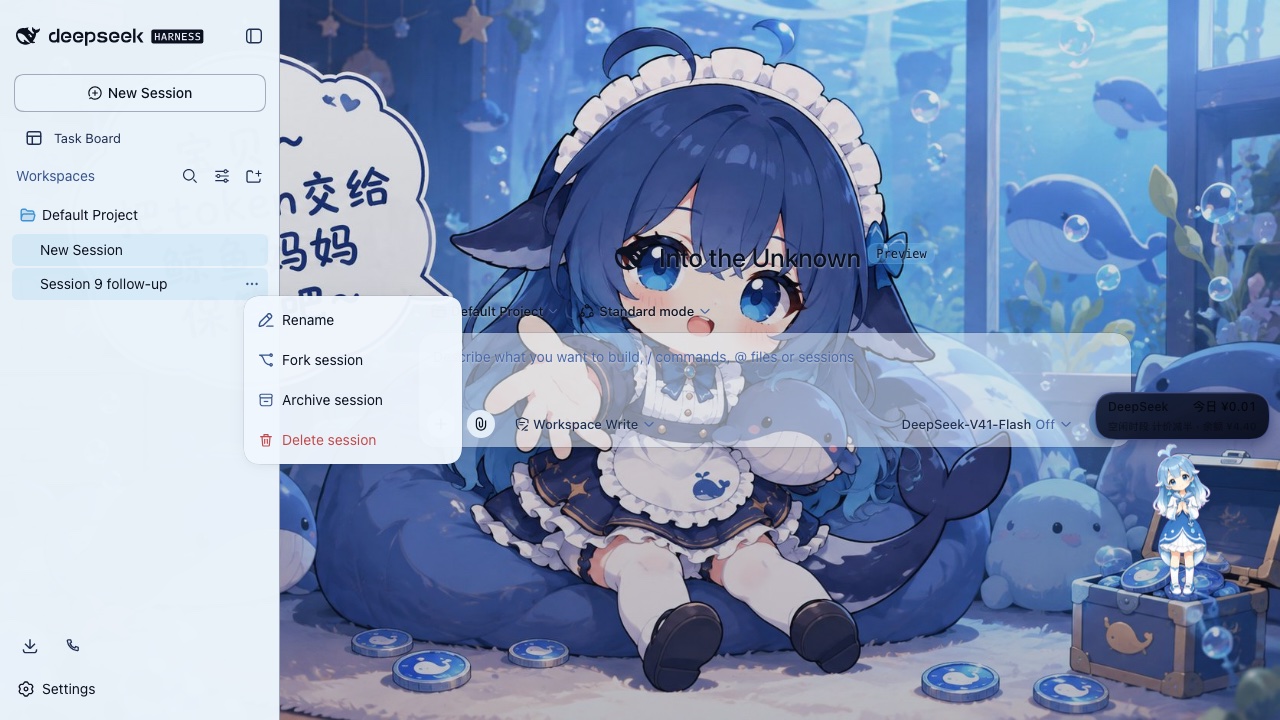
▲ 侧边栏会话菜单里的「删除会话」(红色)
为什么需要它
DSH 侧边栏的会话菜单只有重命名 / 分叉 / 归档——归档只是把会话藏起来,不删数据;而插件dsh-web里的全家桶里的「会话归档管理」在设置深处,删一个会话要跳好几个界面。
这个插件把「删除」放回你最常点的位置:会话行的 ... 菜单。
特性
- 菜单内删除 —— 侧边栏会话
...菜单直接多出「删除会话」;会话 ID 从菜单的 React fiber 读取,永远作用于你点的那一行,不会切换当前会话 - 风险确认 —— 首次删除弹出确认对话框:显示会话标题与 ID,勾选「我已了解,永久删除」后确认按钮才可用
- 确认一次后可跳过 —— 对话框里勾选「不再询问,以后直接删除」,之后点菜单项直接删除(左下角 toast 提示);按住 Shift 点击可临时恢复弹窗;清除
localStorage['dsh-delete-session:skip-confirm']可永久恢复 - 多选批量删除 —— 会话菜单里的「多选」进入选择模式:每行左侧出现勾选圈,点整行即勾选(不会打开会话),底部操作条显示「已选 N 个 / 取消 / 删除」;点删除立即批量执行(无确认弹窗、无全选、所有行都可选),完成后 toast 汇总并刷新列表;Esc 或「取消」退出
- 真正的删除 —— 停止运行中的 agent(cancel + 等待空闲)→ flush / detach 活跃会话 → 删除磁盘会话目录(原始 ID 与
session-前缀两种写法)→ 持久化服务复核 → 清理工作区记账,侧栏不会残留「未分组」孤儿 - 默认安全 —— 宿主路由仅限本机回环(回环 socket + 回环 Host 头 + 同源校验);被 DSH 打开占用的会话会被明确拒绝(409),绝不与活跃写者竞争
- 中英双语 —— 菜单项与对话框跟随 DSH 界面语言(zh / en)
- 零依赖 —— 不引入任何 DSH SDK,所有服务(
sessions/sessionPersistence/agents/workspaceRegistry/webServer)都在调用时通过 cordis 上下文获取
安装
npm(推荐):
dsh plugin --profile web add dsh-delete-session
或从 GitHub 仓库直接安装:
dsh plugin --profile web add github:DDDMUC/dsh-delete-session
重启 dsh web 后生效。
使用
- 把鼠标移到侧边栏的会话行,点
...(会话操作) - 选择底部的「删除会话」
- 首次:勾选「我已了解,永久删除」(想省事可同时勾选「不再询问,以后直接删除」)→ 点「删除」
- 之后:直接删除,左下角出现 toast 提示
- 批量删除:会话菜单 →「多选」→ 勾选多个会话 → 底部「删除」;Esc 或「取消」退出选择模式
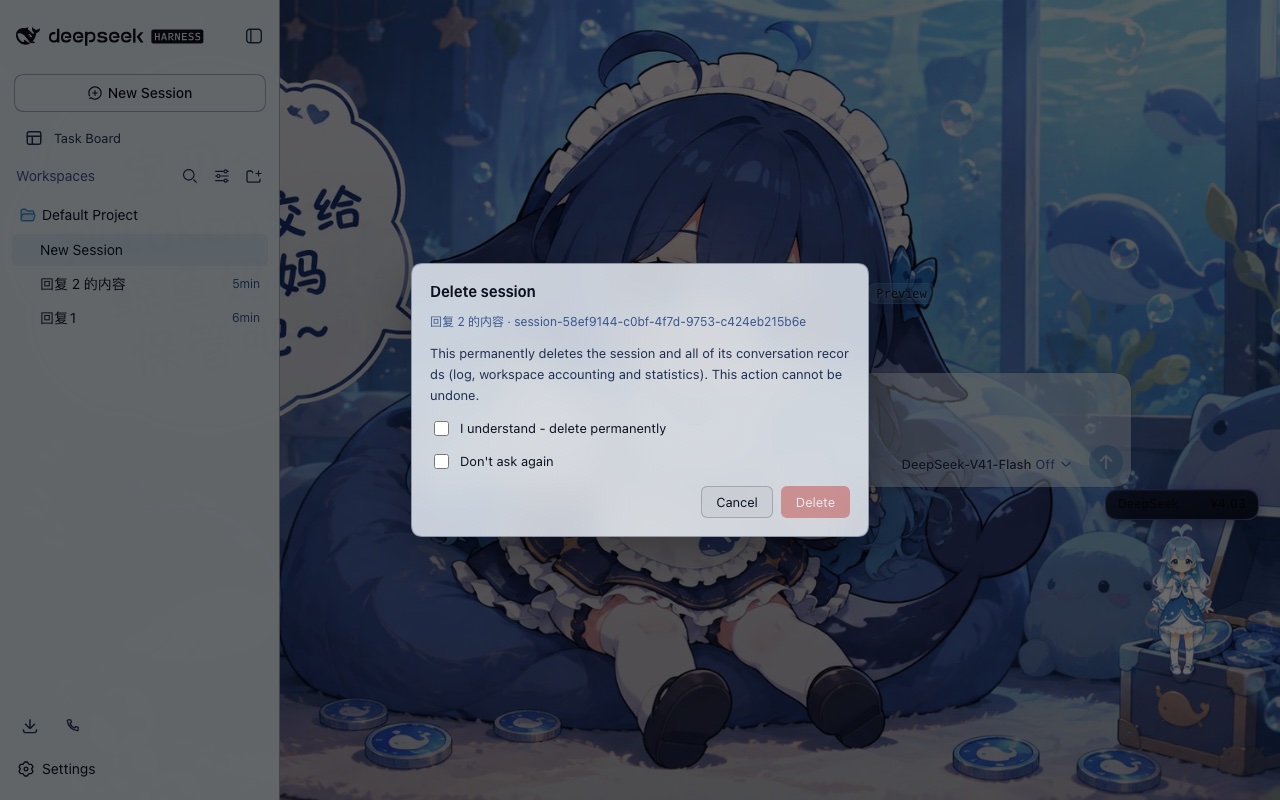
▲ 删除确认对话框(首次删除)
工作原理
src/index.js(宿主):注册一条仅限回环的路由POST /dsh-delete-session/delete{ sessionId },执行删除链路src/client.js(浏览器):经典客户端 bundle——监听 portal 到 body 的会话菜单(body > [role="menu"]),沿 React fiber 链读取会话节点(props.node.id),克隆原生菜单行保持样式,弹出确认对话框- 删除链路:停 agent → flush / detach 活跃会话 → 写所有权探测(被占用 → 409)→ 删除目录(两种 ID 写法 + 复核)→ 清理工作区记账
已知限制
- 被 DSH 当前打开占用的会话:删除会自动等待写所有权释放(通常几秒)后完成;极少数仍被占用的情况会提示稍后重试或重启 DSH
- 菜单注入是 DOM shim:核心 UI 若调整菜单结构或行 fiber 形状,可能不再注入菜单项(不影响其他功能)
- 删除不可恢复:没有回收站,也没有撤销
- 批量删除目前逐条顺序执行:空闲会话很快,被 DSH 打开过的会话每条需要等待写所有权释放(最多数秒),一次选很多时整体耗时会变长(后续版本会并发化)
兼容性
- DSH
0.1.5-rc.1实测通过 - 宿主链路对缺少服务的旧版本会退化为纯文件系统清理
如果这个插件帮到了你,欢迎给仓库点个 ⭐(GitHub)——星标是开发者继续维护的最大动力,感谢支持!
License
MIT
English
▲ "Delete session" (red) in the sidebar session menu
Why you need it
The DSH sidebar session menu only offers Rename / Fork / Archive — archive merely hides a session and keeps every byte on disk, while the session archive manager inside the dsh-web plugin suite lives deep in Settings and takes several screens to reach.
This plugin puts Delete back where you already click: the session row's ... menu.
Features
- Delete from the menu — a "Delete session" row appears in the sidebar session
...menu; the session id is read from the menu's React fiber, so the action always targets the row you clicked and never switches the active conversation - Risk consent — the first delete opens a confirmation dialog with the session title and id; the confirm button unlocks only after ticking "I understand"
- Confirm once, then skip — tick "Don't ask again" and later deletes run directly from the menu (a toast reports the result); hold Shift while clicking to force the dialog back, or clear
localStorage['dsh-delete-session:skip-confirm']to restore it permanently - Multi-select batch delete — "Select multiple" in the session menu enters selection mode: every row gets a round checkbox, clicking a row toggles it (it never opens the conversation), and a bottom bar shows "N selected / Cancel / Delete". Delete runs immediately (no confirm dialog, no select-all, every row selectable) and reports a toast summary; Esc or Cancel exits
- Real deletion — stops a running agent (cancel + quiescence), flushes and detaches the live session, removes the on-disk session directories (both the raw and
session-prefixed id), verifies through the persistence service, then cleans workspace accounting so no orphan shows up under "Ungrouped" - Safe by default — the host route is loopback-only (loopback socket, loopback Host header, same-origin check); a session still held open by DSH is refused with 409 instead of racing the active writer
- Bilingual — the menu item and dialog follow the DSH interface language (zh / en)
- Zero dependencies — no DSH SDK imports; every service (
sessions,sessionPersistence,agents,workspaceRegistry,webServer) is resolved through the cordis context at call time
Install
From npm (recommended):
dsh plugin --profile web add dsh-delete-session
Or straight from the GitHub repository:
dsh plugin --profile web add github:DDDMUC/dsh-delete-session
Restart dsh web to apply.
Usage
- Hover a session row in the sidebar and click
...(session actions) - Pick "Delete session" at the bottom
- First time: tick "I understand - delete permanently" (tick "Don't ask again" too if you like) and confirm
- Afterwards: the session is deleted directly, with a toast
- Batch delete: session menu -> "Select multiple" -> tick rows -> "Delete" in the bottom bar; Esc or Cancel exits
▲ The confirmation dialog (first delete)
How it works
src/index.js(host): one loopback-only routePOST /dsh-delete-session/delete{ sessionId }runs the deletion pipelinesrc/client.js(browser): a classic client bundle — watches for the portalled session menu (body > [role="menu"]), walks the React fiber chain to the session node (props.node.id), clones a native menu row for styling, and opens the confirmation dialog- Pipeline: stop agent → flush / detach live session → write-lease probe (busy → 409) → remove directories (both id spellings + verification) → clean workspace accounting
Known limitations
- A session DSH currently holds open: the delete waits for the write lease to be released (usually a few seconds) and then completes; in the rare case it stays busy, the dialog asks you to retry later or restart DSH
- The menu injection is a DOM shim: core UI changes to the menu markup or row fiber shape may stop the item from being injected (nothing else breaks)
- Deletion is permanent: there is no trash bin and no undo
- Batch delete currently runs sequentially: idle sessions are fast, while a session DSH has opened waits for its write lease (up to a few seconds), so a large selection takes longer (a future version will parallelize it)
Compatibility
- Tested on DSH
0.1.5-rc.1 - On older versions without the services, the host pipeline degrades to filesystem cleanup
If this plugin has been helpful, a ⭐ on GitHub would mean a lot — it is the biggest motivation for the developer to keep maintaining it. Thank you!
License
MIT
Plugins associés
dsh-web-ui (dsh-chat-recovery)
zhu1090093659/dsh-web-ui
billion-context
ranxianglei/billion-context
dsh-synapse
liangmianya/dsh-synapse
dsh-archive-manager
michengai/dsh-archive-manager