dsh-theme-liquid-glass
favktoxic/dsh-theme-liquid-glass
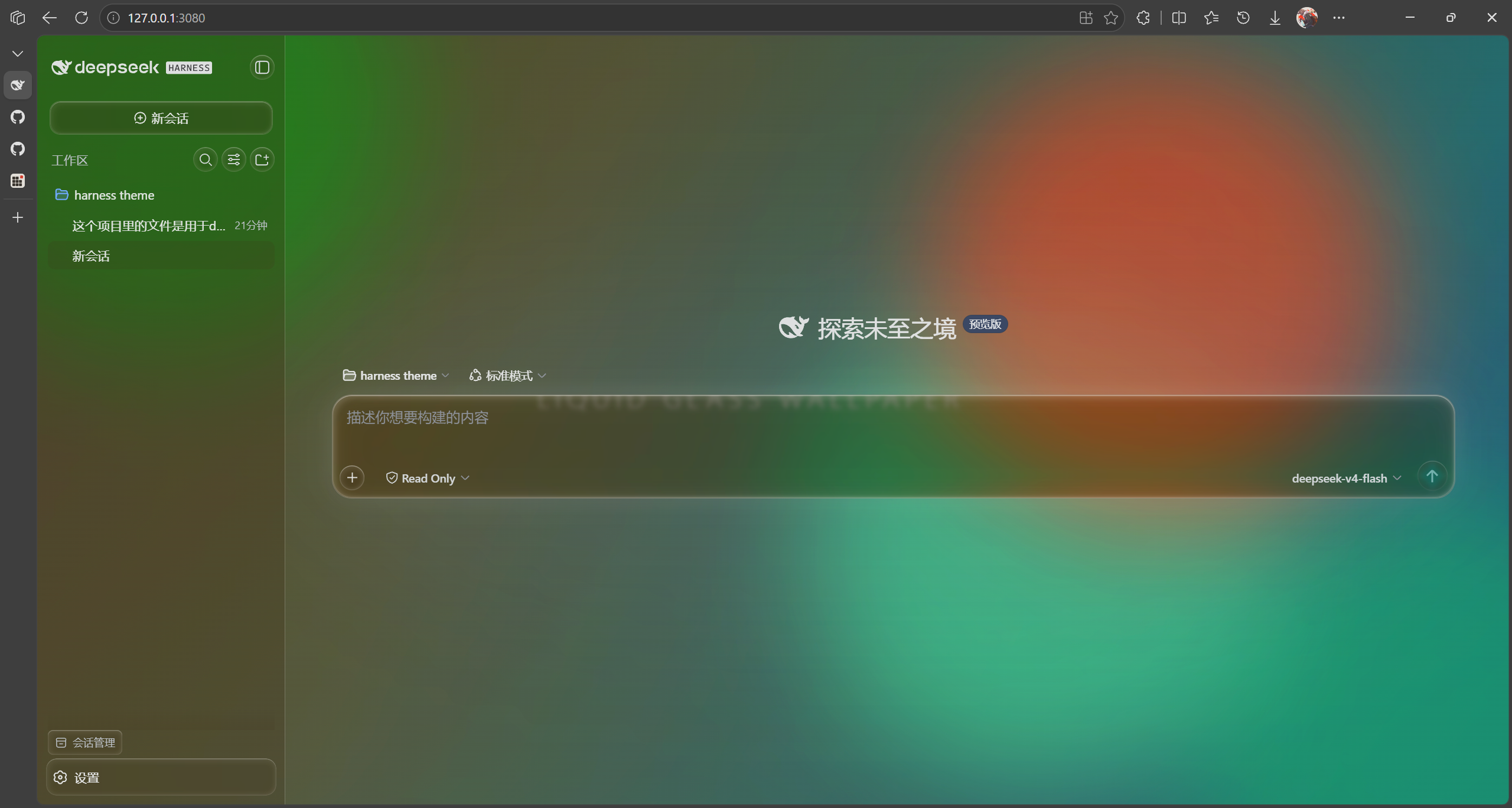
Véritable thème Liquid Glass pour la Web UI de DSH : réfraction des bords via SVG feDisplacementMap sur la carte de saisie, le bouton d'envoi, les bulles, les onglets de vue, le dock de file d'attente et la barre latérale. Fond d'écran de démonstration animé intégré, flou et luminosité de l'arrière-plan personnalisables, popup du sélecteur de modèles repensé, boutons au style verre partout et une icône de réglages unique en forme de goutte d'eau.
Installer
dsh plugin --profile web add github:favktoxic/dsh-theme-liquid-glassREADME
dsh-theme-liquid-glass
Genuine Liquid Glass theme for DeepSeek Harness Web UI.
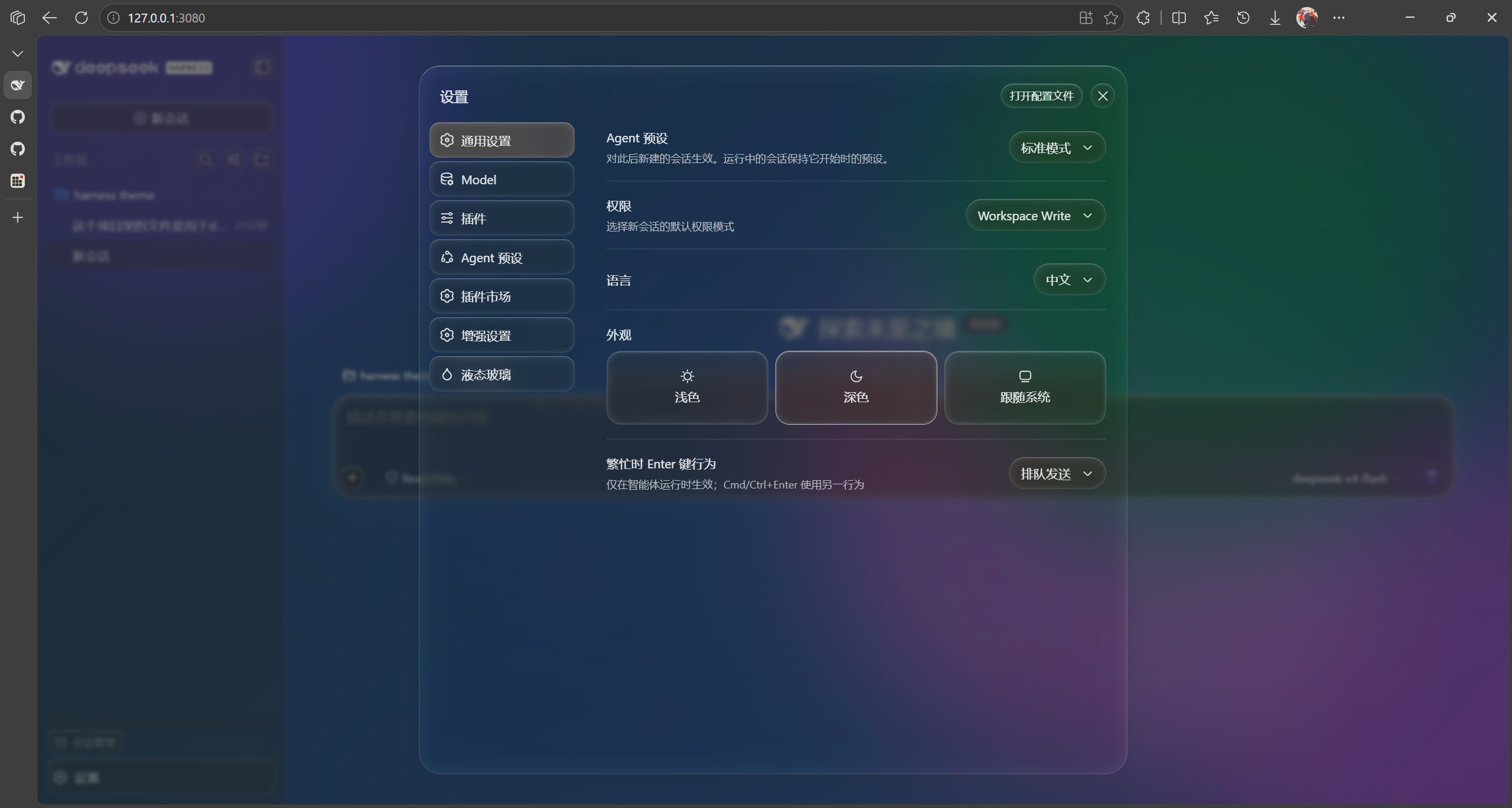
A complete frosted-glass skin: SVG edge refraction, a customizable animated wallpaper, glass-lens buttons, a redesigned full-screen model selector, and a dedicated water-drop settings icon.
v0.4.2 — Requires DeepSeek Harness ≥
0.1.2-rc.1. This release adapts to the harness client-package split: the store part of the removed@deepseek-ai/dsh-client-runtimenow lives in@deepseek-ai/dsh-client-store. See CHANGELOG.md.
Features
Liquid Glass UI
- SVG Edge Refraction ·
feDisplacementMaprefraction on the input card, send button, message bubbles, view tabs, queue dock, and sidebar buttons. Intensity is adjustable from a slider. - Frosted Glass · Token overrides (
ctx.theme.overrideTokens) swap the--dsw-alias-*semantic tokens for translucent glass values. Glass parameters are driven by--dsh-lg-*custom properties onbodyand apply instantly. - Glass-lens Buttons · Send, view tabs, sidebar actions, and the command
(+)button all use a glass material with edge refraction. - Water-drop Settings Icon · A droplet replaces the default gear in the settings nav.
- Hover Highlights · Interactive elements get a subtle glow and lift.
Wallpaper & Background
- Custom Background Blur & Brightness · Control wallpaper blur (
bgBlur) and brightness (brightness) independently so the background sits perfectly under the glass. - Built-in Animated Demo Wallpaper · A color-blob wallpaper that works out of the box, tunable via speed, blob count, color cycle, blur, and opacity.
- Dynamic Wallpaper Sources · Web URLs (iframe, optional host proxy), local HTML, local images, and local videos.
Model Selector
- Redesigned Model Selector · A full-screen frosted picker with provider-group grid layout and hover highlights — skip the intermediate root pane and jump straight to the model list.
Settings Page
- Dedicated top-level "Liquid Glass" page (
settings.section, beside General / Model / Plugins) with two groups: Page Background and Input Card · Frosted Glass. All changes apply in real time; Reset to defaults restores everything. - One-click Disable · The master toggle strips every token override,
removes the wallpaper, and disables all frosted/lens rules at once — every
visual is gated on the
body.dsh-lg-onclass, so disabling leaves zero residue.
Implementation Notes
- Frost is applied as
filter: blur()on a dedicated background layer (inset: -48pxfor bleed room), neverbackdrop-filteron#root— a non-none backdrop-filter makes#rootthe containing block for everyposition: fixeddescendant (menus, popups, toasts), re-anchoring them.
Structure
src/index.ts          Host half: wallpaper file routes, file upload, web proxy
src/client/index.ts   Browser half: token overrides, background layer, glass params, settings panel
src/shared.ts         Shared constants and settings types (zero runtime dependencies)
build.mjs             SWC build pipeline (lib/index.js + lib/client.js in loader format)
Install to a DSH Web Profile
Via npm (recommended)
dsh plugin add --profile web dsh-theme-liquid-glass
Refresh the browser.
Compatibility: requires DeepSeek Harness ≥
0.1.2-rc.1. Earlier harness versions use the removeddsh-client-runtimepackage and are not supported by v0.4.0.
Local Development Link
Link your source directory into the profile's node_modules with a Windows
junction (a plain dsh plugin add "<absolute-path>" can produce a broken
relative symlink and drop the plugin from the profile bundles list):
# 1) remove any stale entry
dsh plugin remove --profile web dsh-theme-liquid-glass

# 2) junction the source dir into the profile
New-Item -ItemType Junction -Path "$env:USERPROFILE\.dsh\profiles\web\node_modules\dsh-theme-liquid-glass" `
  -Target "<absolute-path-to-theme-source>" -Force

# 3) ensure the theme is listed in the profile bundles
dsh plugin add --profile web dsh-theme-liquid-glass
Refresh the browser.
After modifying code: rebuild, then refresh.
cd <theme-source-dir>
node build.mjs
Client changes (settings UI, glass params) take effect after a build + browser refresh. Host changes (routes, upload endpoint) require a
dsh webrestart to reload the host half.
Build
npm install
npm run build        # one-shot build (lib/index.js + lib/client.js)
npm run watch        # watch mode (works with client-hmr hot-reload)
npm run dev          # build + smoke test
npm test             # run the client smoke test
npm run typecheck    # tsc --noEmit
Client Injection
The client bundle exports an inject array of service names:
['slots','locale','theme'] (matching the shipped dsh-ui-appearance /
dsh-dream-skin plugins). The client loader builds the fiber injection table
from this array; missing it causes cannot get property X without inject and a
hard web-boot failure. The apply() function itself is wrapped in try/catch —
runtime errors degrade gracefully without crashing the GUI.
Persistence (Why localStorage)
Settings are stored in localStorage (key dsh-liquid-glass.settings), not
through the settings RPC. The harness settings gateway only exposes hard-coded
product namespaces to browser clients — a third-party namespace stays loading
forever even when the host half registered it. The shipped dsh-ui-appearance
and dsh-dream-skin plugins hit the same wall and both chose localStorage.
Trade-off: settings are per-browser — switching browsers or clearing site data loses them.
Settings Reference
| Field | Description |
|---|---|
enabled | Master switch |
wallpaper.kind | none / url / html / image / video / local |
wallpaper.value | Web URL or relative path under the wallpapers directory |
wallpaper.proxy | Route web URLs through the host proxy (bypasses X-Frame-Options) |
wallpaper.muted | Mute video wallpapers (default true; unmuting may be blocked by autoplay policy) |
demo.speed | Demo wallpaper animation speed multiplier 0.1–4 (step 0.1) |
demo.blobs | Demo wallpaper blob count 1–6 |
demo.colorCycle | Demo wallpaper color cycle 0–10 (0 = static) |
demo.blur | Demo wallpaper blob blur 10–140px |
demo.opacity | Demo wallpaper blob opacity 0.2–1 |
demo.wash | Demo wallpaper background gradient wash toggle |
glass.frosted | Frost toggle (input card / bubbles / dock backdrop blur) |
glass.blur | Input card frost blur radius 0–60px |
glass.bgBlur | Background wallpaper blur 0–60px (independent of card frost) |
glass.refraction | Edge refraction 0–1 |
glass.tint | Glass color |
glass.tintOpacity | Glass color opacity 0–1 |
glass.toolTextColor | Tool call text color (hex, empty = default) |
glass.codeBlockOpacity | Code block background opacity 0.2–1 (independent of tint opacity) |
glass.glassBrightness | Glass material brightness 0.2–1.6 (tint lightness scaling; >1 brighter, <1 darker) |
glass.brightness | Background brightness 0.2–1.6 |
First Launch
On first enable, the plugin checks whether demo.html exists under
<DSH_HOME>/wallpapers. If missing, it writes the built-in demo wallpaper
(existing files are never overwritten). The default path is
$DSH_HOME/wallpapers/demo.html; the directory can be changed via the
wallpaperDir config option.
Screenshots

License
Plugins associés
dsh-deep-whale (maid-atelier)
small-tailqwq/dsh-deep-whale
dsh-wallpaper-engine
elysia395/dsh-wallpaper-engine
dsh-deep-whale
small-tailqwq/dsh-deep-whale
open-sea-skin
d-dev0101/open-sea-skin