dsh-usage-detail
gzq44/dsh-usage-detail
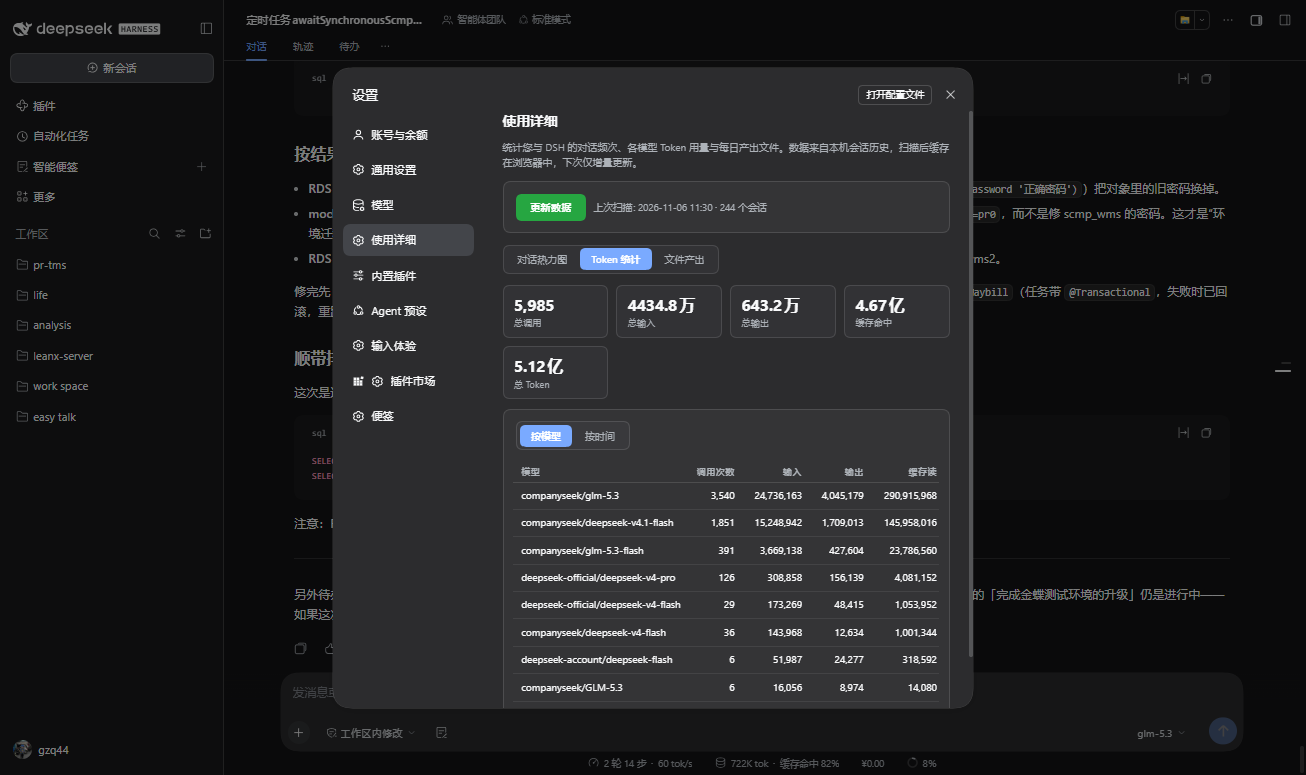
Usage statistics inside Settings: a GitHub-style one-year conversation heatmap of your own daily messages, token usage totals by model and by day/week/month with stat cards, and a per-day list of files written or edited via write/edit tools. All computed locally from session history with incremental rescans; no data leaves the machine.
Installer
dsh plugin --profile web add github:gzq44/dsh-usage-detailREADME
dsh-usage-detail
DSH(DeepSeek Harness)插件:使用详细 —— 设置面板里的使用统计中心。
功能
安装后,Web GUI 的「设置」中会出现「使用详细」导航项(位于「模型」与「内置插件」之间),包含三个标签页:
| 标签页 | 内容 |
|---|---|
| 对话热力图 | GitHub 风格的一年绿色热力图,颜色深浅 = 每天您本人发送的消息数(自动排除子代理会话与系统注入上下文)。打开自动定位到当前月份;顶部统计卡显示累计消息、活跃天数、最长连续、单日峰值 |
| Token 统计 | 全部历史会话的 token 用量。按模型:每个 provider/model 的调用次数、输入/输出/缓存读/缓存写/推理/总量;按时间:天 / 周 / 月粒度的时间段汇总(周一起始)。顶部统计卡用万/亿(或 K/M)紧凑显示总量 |
| 文件产出 | 每天通过 write / edit 工具产出或修改的文件清单,可任选日期查看:日期选择器、前后翻天、最近有产出日期快捷跳转,按路径去重并分别标注新建/修改次数 |
卡片风格 UI,自动适配 DSH 明暗主题;文案中英双语。
安装
已发布到 npm,在任意会话里对 agent 说「安装 dsh-usage-detail」,或直接执行:
dsh plugin --profile web add dsh-usage-detail
也可以从 GitHub 安装:
dsh plugin --profile web add github:gzq44/dsh-usage-detail
实现原理
- 数据源:官方 session Remote API。浏览器端调用
session/list枚举全部会话,再对每个会话用session/events(beforeSeq排他上限)向后翻页读取完整事件流;子代理会话通过专用 subagent 地址读取。宿主半边零代码、零权限,不上传任何数据。 - 聚合:
- 热力图:
user/message且source.kind === "user"→ 按本地日期分桶; - Token:
assistant/message的data.usage(inputTokens / outputTokens / cacheReadTokens / cacheWriteTokens / reasoningTokens)+data.message.source.{provider, model}→ 按模型累计、按天分桶; - 文件:
tool/call中write/edit的arguments.file_path→ 按天分组、按路径去重。
- 热力图:
- 缓存与增量:聚合结果连同每个会话的
maxSeq检查点存入localStorage;再次扫描只读取新增事件。翻页遇到 fork 继承标记(session/end-seed {inherited})即停,父会话已统计的前缀不会重复计数。 - 权限:只读您本机的会话历史,无网络上报、无文件写入。
隐私
所有统计均在浏览器本地完成并存储于 localStorage,不发送任何数据到第三方服务器。
开发
git clone https://github.com/gzq44/dsh-usage-detail.git
cd dsh-usage-detail
npm test          # 冒烟测试:加载 client.js、注册 settings.section、模拟扫描校验聚合
本插件无构建步骤:lib/client.js 是手写的浏览器 bundle(window.__ModuleLoader__.load 格式),修改后通过 link: 安装即可热更新。
License
dsh-usage-detail (Usage Detail)
A DeepSeek Harness plugin that adds a Usage Detail section to Settings with three tabs:
| Tab | What you get |
|---|---|
| Heatmap | GitHub-style one-year green heatmap of your own sent messages per day (subagent sessions and injected context excluded). Auto-scrolls to the current month on open; stat cards show totals, active days, longest streak, and daily peak |
| Tokens | Lifetime token usage across all sessions. By model: calls, input/output/cache-read/cache-write/reasoning/total per provider/model. By time: day / week / month buckets (Monday-start weeks). Stat cards show compact totals (K/M or 万/亿) |
| Files | Files created or edited per day via the write/edit tools — date picker, prev/next day, recent-days chips, per-path new/edited counts |
Card-style UI that follows the DSH light/dark theme; localized in English and Chinese.
Install
Published on npm — tell your agent "install dsh-usage-detail", or run:
dsh plugin --profile web add dsh-usage-detail
Or install straight from GitHub:
dsh plugin --profile web add github:gzq44/dsh-usage-detail
How it works
- Data source: the official session Remote API. The browser half lists every session with
session/list, then pages each durable log backwards throughsession/events; subagent sessions use their typed subagent address. The host half is empty — no host-side code, no extra permissions, nothing leaves your machine. - Aggregation: heatmap counts
user/messageevents withsource.kind === "user"by local day; tokens accumulateassistant/messageusage perprovider/modeland bucket it by day; files groupwrite/edittool calls byarguments.file_pathper day. - Caching: aggregates plus a per-session
maxSeqcheckpoint live inlocalStorage; rescans are incremental. Fork-inherited prefixes (thesession/end-seed {inherited}marker) stop the backward page so a parent's events are never double-counted.
Privacy
All statistics are computed and stored locally in your browser. No data is sent to any third-party server.
Development
git clone https://github.com/gzq44/dsh-usage-detail.git
cd dsh-usage-detail
npm test          # smoke test: loads client.js, registers the settings section, drives a fake scan
No build step: lib/client.js is a hand-written browser bundle (window.__ModuleLoader__.load format). Install via a link: dependency for live reload while developing.
License
Plugins associés
DeepSeek-Balance-Whale-Widget
meteornox/deepseek-balance-whale-widget
dsh-context
bowenliang123/dsh-context
dsh-cost-meter
han-1413141/dsh-cost-meter
dsh-damage-pulse
wssfk12138/dsh-damage-pulse