My-Power-Dsh
haroldz32/my-power-dsh
A DeepSeek Harness plugin bundle: eleven specialist roles usable as one-shot consults or as team members, a team plane with a plan, a shared board and a dependency graph, a durable workmate library, a memory engine, and a verification plane that refuses a PASS unless a different agent records the verdict against gate evidence. Installs as one package with a dsh.bundle patch; also ships a native dshGo panel interface and a conformance gate pinned to a dsh-Go protocol v1 spec commit (d5ad25c).
Installer
dsh plugin --profile web add github:haroldz32/my-power-dshREADME
my-power-dsh
English | 中文








my-power-dsh is a plugin bundle for the DeepSeek Harness (DSH). One install turns a plain DSH setup into a working environment for real coding work: a main agent that reads your project rules, eleven specialists you can consult or delegate to, a library of durable "workmate" agents that remember what they learned, multi-agent teams that run on this bundle's own team record, a served skill corpus, MCP servers for code intelligence, and an extension interface other packages can contribute to.
The bundle runs on two surfaces. Everything below exists in the DSH Web GUI and in the DSH-TUI
terminal edition, with the same install, the same .mpd/ state, the same tools and the same mpd
preset. The terminal surface runs on dsh-TUI, whose site is
dshtui.com. Nothing is forked, and a capability is not absent from the terminal
just because it has no pixels there.
The bundle is the package @mpd-dsh/mpd; this
repository root is that package. One command installs it, and one command removes it without leaving
residue.
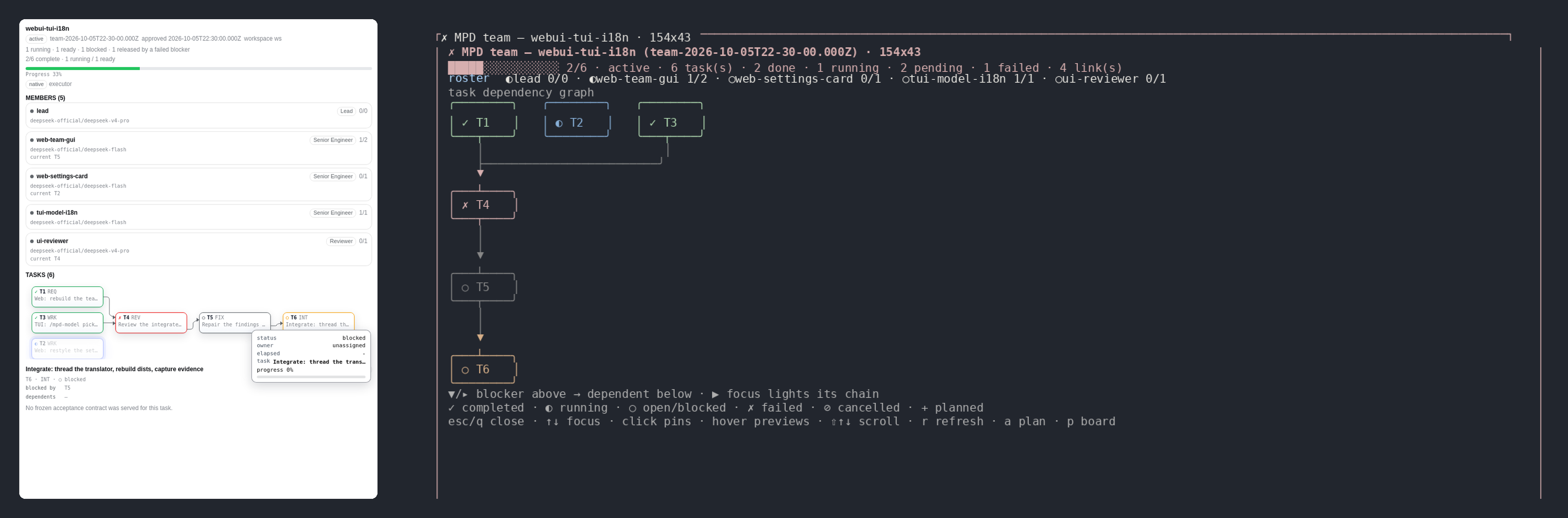
The same bundle, the same run, the same state: the Web GUI on the left, the DSH-TUI
terminal edition on the right. Every screenshot here is a real capture of the shipped bundle, produced
by the Docker lanes under docker/ui/: the Web tiles by headless Chromium driving the
real app, the terminal tiles by rasterizing the bytes the real TUI emitted on a real PTY
(tmux capture-pane -e, carrying the TUI's own colours) at the grid tmux computed.
The TUI localizes its command descriptions and its status line but not its scene bodies, so the
terminal scene tiles read the same in both languages.
One plugin, two surfaces
One install puts the bundle into either profile, or both. The two surfaces share one state root
(<workspace>/.mpd/), one set of tools and one mpd preset. Only the rendering differs.
| What you want to do | DSH Web GUI | DSH-TUI (terminal) | Parity |
|---|---|---|---|
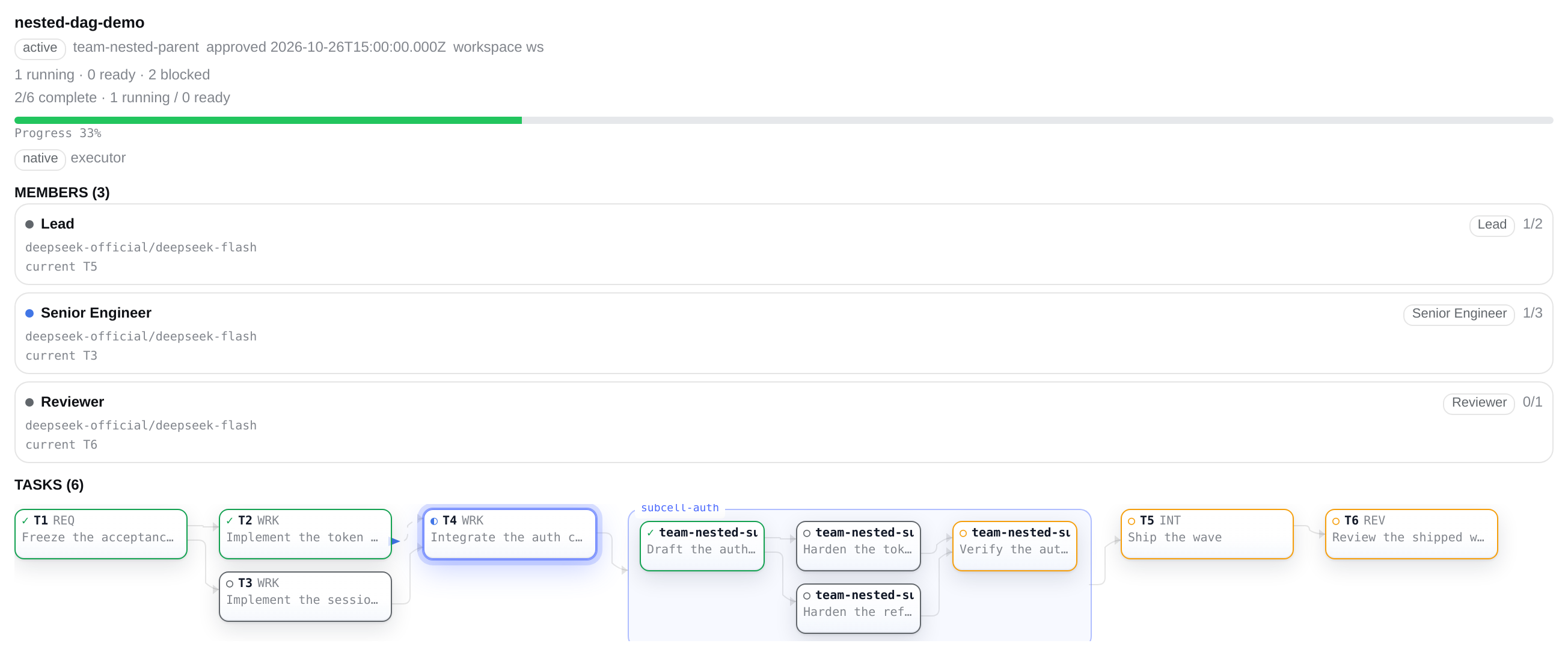
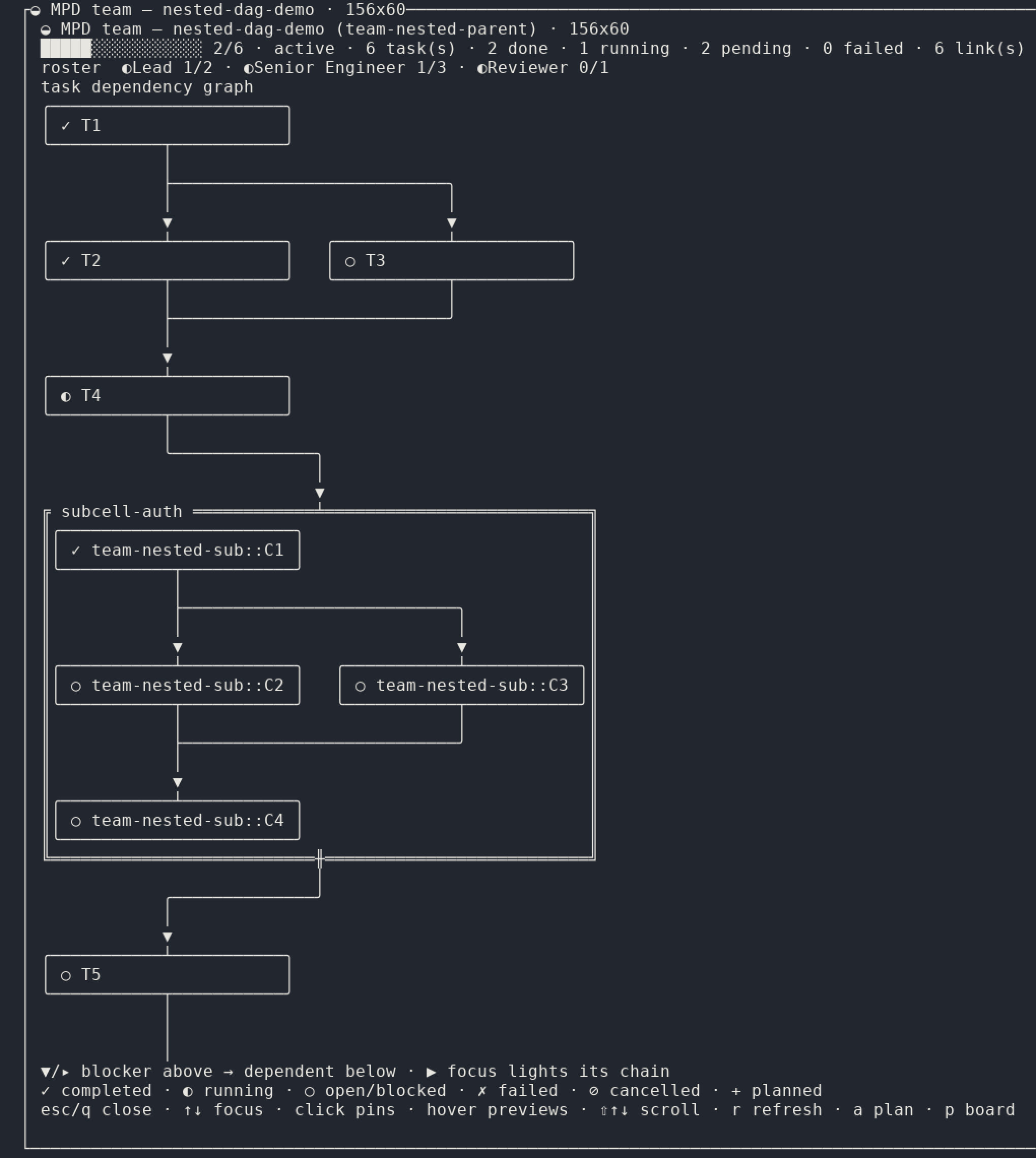
| See the team: id, name, phase, status | the Team view in a sidebar, served by this bundle (/plugins/mpd-team/state) | /mpd team, a full-screen scene | same facts |
| Read the roster: members, model routes, per-member task counts | the Team view's member cards | the same rows inside /mpd team | same facts |
| Read the task graph: id, kind, status, owner, attempt, round, dependencies | the Team view's dependency graph; hover lights a chain, click pins a node | the same rows as boxes and box-drawing edges | same facts |
| Watch a wave that has gone quiet | the Team watchdog sidebar tab: the hold, the escalation banner and the incident replay | the team-hold held (…) row plus the incident replay dialog | same facts |
| Review a staged plan before any work starts | the Team view renders the staged plan and the phrase that approves it | /mpd plan: read it, type approve plan-…, then Ctrl+X | the same plan; approving is an agent_teams_plan tool call on both |
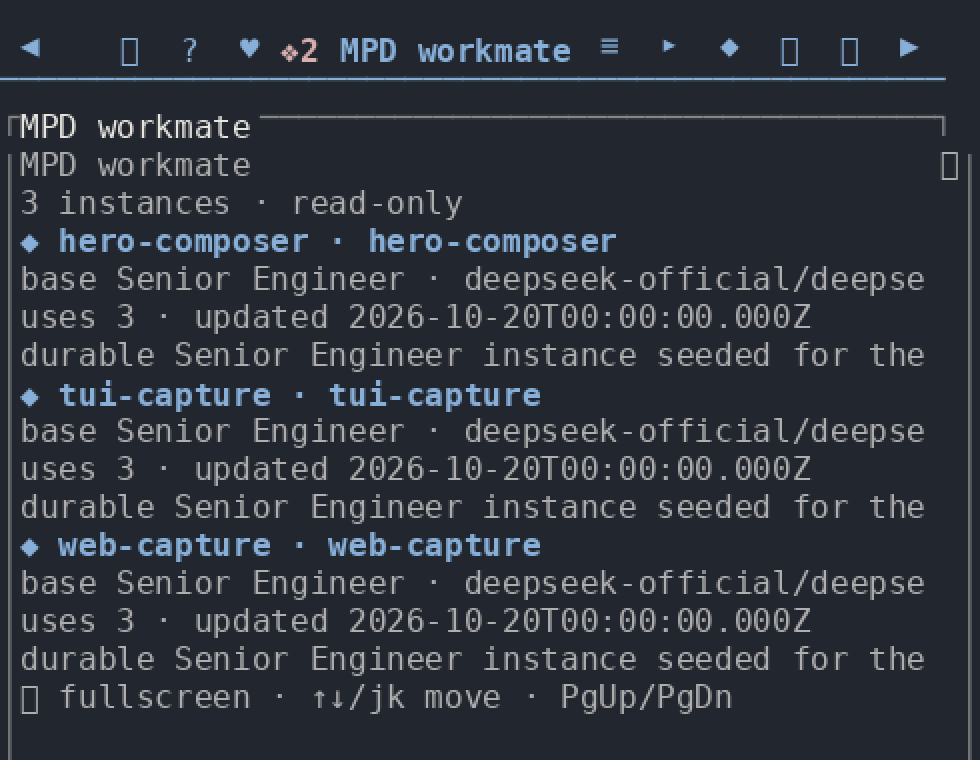
| Browse the workmate library | the Workmates sidebar tab: listing, persona / memory / note | /mpd workmates, the listing only | TUI is listing-only; mutations are Web-only |
| Tune the bundle's knobs | Settings → MPD section | /settings → the MPD section | same knobs, same restart caveat |
| See plan / boulder / workmate progress while you type | the sidebar and the settings card | the keyed status line above the prompt | TUI-native surface |
| Stay on the keyboard | no equivalent (pointer, plus the panel below) | the status line, the /mpd command tree, the alt+a merged panel | TUI-native surface |
| See the roster and board the harness ships | the Agent Teams panel in the conversation header, a different, read-only surface (it spawns, renames and deletes nothing) | none | not this bundle's surface |
| Look at an archived team | ?archived=1 on the Agent Teams panel | not projected; the TUI reads the newest live record | Web-only |
| Drag and resize the panel | the Agent Teams panel is a floating panel | a terminal scene has no geometry | not applicable |
Two Web surfaces are easy to confuse, so the table names them apart: the Agent Teams panel in the conversation header belongs to the harness's own client and is read-only, while the Team and Team watchdog views are this bundle's own pages, served from its routes and rendered in whichever sidebar host the composition provides.
The table is backed by a ledger. docs/tui-parity.md lists every row with its
evidence and records each deviation that is still open. Rows above whose two columns are not the same
sentence are exactly those recorded deviations; read the ledger before you rely on the TUI for a Web
capability.
Features
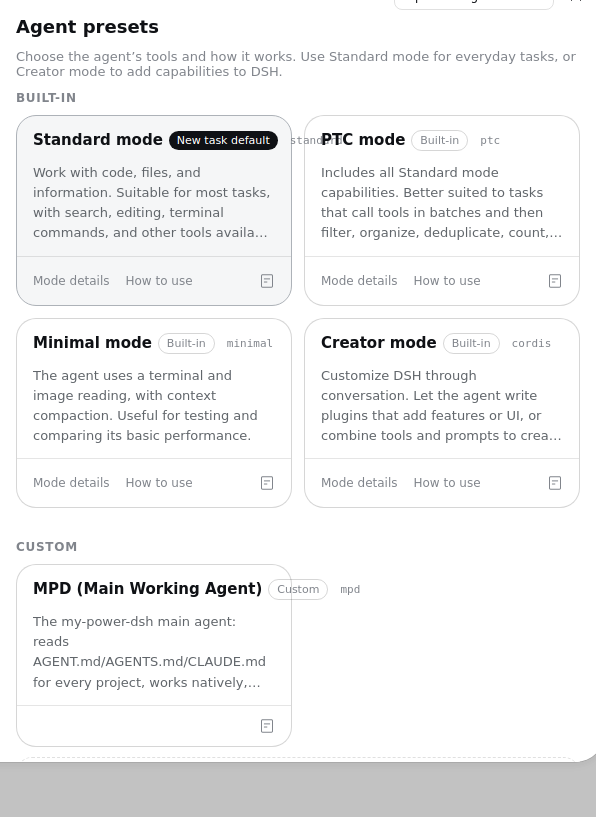
- A main agent that reads your rules. The bundle's one preset,
mpd, carries the project-instruction convention: every session attemptsAGENT.md, thenAGENTS.md, thenCLAUDE.md, from the project root down to the working directory. - Eleven specialists, consulted or delegated. Architect, Researcher, Planner, Deep Worker, Senior Engineer, Lead, Explorer, Reviewer, Plan Reviewer, Vision Analyst, Junior Engineer. Each is a teammate template with its own model route, and the read-only ones are denied write tools mechanically rather than by convention.
- A workmate library that accumulates. Instantiate a specialist as a durable agent under
~/.mpd/workmate/; it self-summarizes after each session, evolving its own persona and memory. - Real multi-agent teams. The team plane is the mpd RECORD (
.mpd/team/teams/<id>.json, served asmpdTeams), executed by the adapter's nativeTeamExecutorbackend by DEFAULT;mpdrows drive it through theagent_teams_plandoor and theagent_teams_task/agent_teams_dispatchboard, and the official authoring verbs (spawn_teammate,team_task_*) are REFUSED at the tool boundary. The officialdsh.team*service is only the contained FALLBACK for a composition that runs the official executor (its rows are disabled in a TUI composition). A durable mailbox, a Web panel and a TUI scene read the same live record. - A durable plan ledger. Autoproject rounds with per-criterion PIN → RED → GREEN → SURFACE → CLEAN, a boulder ledger anchored to a plan file, and a persisted goal that survives across sessions.
- Memory and edits that hold up. A VCS-backed memory store with a reflection state machine, plus hash-anchored editing, a write guard and a declaration-comment gate.
- Verification with teeth. The code one agent writes is verified by a different agent, from a frozen contract, with a recorded verdict and gate evidence.
- Code intelligence and extensibility. MCP servers for AST search (ast-grep), a code knowledge graph, a language server and git-bash; plus an extension interface other packages contribute skills, flows, MCP servers and specialists through.
- A skill corpus that knows the project shape. 19 skills served by reference from
<bundle>/skills, the repository's owndsh-qaamong them.cordis-devloads itself on detection (cordis.patch.ymlorpresets/*.patch.yml, a manifest carryingdsh.bundle/dsh.client,dsh-plugin.json, apackages/*/src/index.tsexportingapply, or anextensions/*manifest), so Cordis / DSH plugin work starts from this repository's own rules. - Bilingual by policy. Every human-facing document ships an English file and a 简体中文 twin; a gate reddens when one falls behind.
Install
Requires Node.js ≥ 22.18 and pnpm on PATH, and a DSH install with a web or headless
profile. The bundle never configures model keys for you.
# Web GUI profile
dsh plugin --profile web add @mpd-dsh/mpd

# DSH-TUI profile: the same bundle, the terminal surface
dsh plugin --profile dsh-tui add @mpd-dsh/mpd
Then restart dsh and start a session on the MPD (Main Working Agent) preset. To uninstall:
dsh plugin --profile web remove @mpd-dsh/mpd
The package declares no cordis dependency and no preinstall/install/postinstall/prepare
script, so installing it runs no code from the package. Its rows reach the harness only through
cordis.patch.yml and the profile mechanism, and it overrides no host row: the mpd preset is
added additively, and it becomes your default through your action, never the bundle's.

To track the repository instead of the npm release, or to pin a revision, install from a checkout:
git clone https://github.com/HaroldZ32/My-Power-Dsh.git && cd My-Power-Dsh
bun install                                       # materialize the declared runtime dependencies
dsh plugin --profile web add .
The user guide covers the packed artifact, the dsh-tui launcher,
the dependency closure and what the install mounts.
Version compatibility
Each row is the host pair a release was built and verified against: the Docker real-machine lanes
run the install and the mount on exactly that pair. The harness pin lives in
package.json (the three @deepseek-ai/dsh-experimental-* dependencies) and the
DSH-TUI pin in dsh-plugin.json compat.hosts plus the host-tui ref in
dsh-distribution.json. A newer host is not claimed until a release row
names it; pin both.
The newest row is the version this package publishes; the rows below it are the pins of earlier releases, kept as history.
@mpd-dsh/mpd | DeepSeek Harness | DSH-TUI | Notes |
|---|---|---|---|
| 0.18.1 | 0.2.2-rc.1 | 0.19.0 | the current release |
| 0.18.0 | 0.2.2-rc.1 | 0.19.0 | previous |
| 0.17.5 | 0.2.1-rc.5 | 0.18.0 | previous |
| 0.17.4 | 0.2.1-rc.5 | 0.18.0 | previous |
| 0.17.3 | 0.2.1-rc.5 | 0.18.0 | previous |
| 0.17.2 | 0.2.1-rc.5 | 0.18.0 | previous |
| 0.17.1 | 0.2.1-rc.5 | 0.18.0 | previous |
| 0.17.0 | 0.2.1-rc.5 | 0.18.0 | previous |
| 0.16.4 | 0.2.1-rc.3 | 0.17.0 | previous |
| 0.16.3 | 0.2.1-rc.3 | 0.17.0 | previous |
| 0.16.2 | 0.2.1-rc.3 | 0.17.0 | previous |
| 0.16.1 | 0.2.1-rc.3 | 0.17.0 | previous |
| 0.15.4 | 0.2.1-rc.2 | 0.16.1 | previous |
| 0.15.2 | 0.2.1-rc.2 | 0.16.1 | previous |
| 0.15.1 | 0.2.1-rc.2 | 0.16.1 | previous |
| 0.15.0 | 0.2.1-rc.2 | 0.16.1 | previous |
| 0.14.0 | 0.2.1-rc.2 | 0.16.1 | previous (the harness-0.2.1 adaptation release) |
The newest row is that pair: 0.18.1 ships against harness 0.2.2-rc.1 and DSH-TUI 0.19.0. The
older hosts stay supported: engines.dsh spans >=0.2.1-rc.2 <0.3.0-0, and 0.18.1 carries 0.18.0's
compatibility rows, which both mount and run on 0.2.1-rc.5. 0.19.0's peer lists add 0.2.2-rc.1 while keeping 0.2.1-rc.4/0.2.1-rc.5, and its
admission chain is byte-identical to 0.18.0's. The pins live in
package.json and dsh-plugin.json compat.hosts (which lists both
TUI hosts); the rows below it record what earlier releases actually pinned. The full matrix is
docs/compatibility.md.
Quick start
- Install, restart
dsh, and start a session on the MPD (Main Working Agent) preset. - Ask for something real. The agent has
bash/read/editplus the MCP code tools. Drop anAGENT.mdin your project to steer it; the file is read automatically at session start. - Consult a specialist.
mpd_roles_listshows the roster, thenmpd_role_spawn { role: "Architect", task: "review the module boundaries in src/" }. - Keep the good one.
mpd_workmate_init { base: "Architect", name: "system-architect" }, then reuse it withmpd_workmate_spawn { name: "system-architect", task: "…" }. - Scale to a team. Ask for one, or describe work that warrants one: the captain stages a plan with
agent_teams_plan(add_member→create_task, each task declaring its dependency answer,blocked_byorindependent: true, →approve), then drives the board withagent_teams_taskandagent_teams_dispatchplussend_message/wait_agent; the officialspawn_teammate/team_task_*verbs are REFUSED at the tool boundary. Watch the roster and the shared board in this bundle's Team sidebar view, or in the TUI's/mpd teamscene. - Teach it a capability. Put an extension directory into
<workspace>/.mpd/extensions/and check it withmpd_ext_list.
Two commands worth knowing from the first minute:
/autoproject  <objective>     drive a long objective to done, in rounds, with gates
/mpd  team            open the team scene (DSH-TUI)
Or just ask. Reach for a specialist when you want a scoped second pair of eyes:
use the Architect to review the retry logic in src/queue.ts

The status line, the /mpd command tree and the /settings section are terminal-native surfaces;
their Web counterparts are the bundle's Team / Team watchdog views, the Workmates tab and
Settings → MPD.
Usage
The bundle's work happens through tools and commands, the same ones on both surfaces. The short version:
| You want to… | Reach for | Detail |
|---|---|---|
| Work with an agent that knows your project rules | the mpd preset | user guide §2 |
| Get a scoped second opinion | the specialist roster, mpd_role_spawn | user guide §4 |
| Keep a specialist that accumulates knowledge | the workmate library, mpd_workmate_* | user guide §5 |
| Run a real multi-agent workflow | team mode, agent_teams_plan → agent_teams_task / agent_teams_dispatch (the official spawn_teammate / team_task_* verbs are REFUSED) | user guide §6 |
| Drive a long objective to done | the autoproject loop, /autoproject | user guide §13.2 |
| Track a multi-step plan durably | the boulder ledger, mpd_boulder_* | user guide §13.6 |
| Remember facts across sessions | the memory engine, mpd_memory_* | user guide §13.7 |
| Edit files without line-drift mistakes | hash-anchored editing, mpd_hashline_* | user guide §13.5 |
| Understand an unfamiliar codebase | the MCP servers: ast-grep, LSP, CodeGraph | user guide §3 |
| Teach the bundle a new trick | the extension interface, mpd_ext_* | user guide §10 |
| Drive it all from a terminal | the DSH-TUI edition | user guide §7 |
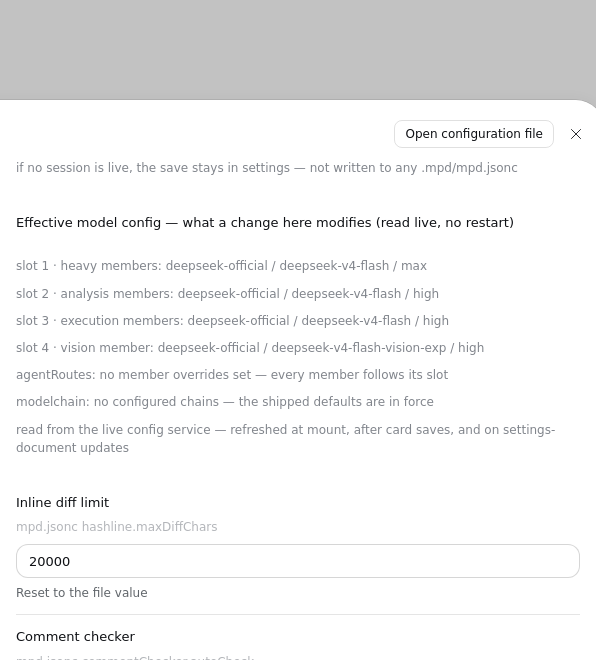
Configuration is JSONC and layered: <workspace>/.mpd/mpd.jsonc over $DSH_HOME/mpd.jsonc, per key,
project wins. Your state lives in <workspace>/.mpd/. The one exception is the workmate library,
which is HOME-scoped at ~/.mpd/workmate/. See
user guide §9 and
§14.
Status and known limitations
- Built and verified against a prerelease harness. The bundle is tested against 0.2.2-rc.1, and the older 0.2.1-rc.5 still mounts and runs. Expect breakage while upstream stabilizes, and pin the harness version you use.
- One capability is missing on the older harness.
list_agentsis not mounted on0.2.1-rc.5: the newer harness removed the subpath export the row needed, and a single preset cannot straddle both. Seedocs/compatibility.md§2. - The TUI surface trails the Web surface in a few named places. The rows of the table above that do
not read "same facts" are open deviations, each recorded with its evidence in
docs/tui-parity.md. - The bundle is a package, not a fork. It ships no harness change and edits no DSH source. If the harness renames a seam, this bundle absorbs it in one adapter file.
- A preset default is yours to choose. The bundle overrides no host row, so
mpdbecomes the default only through your own action: docs/preset-default.md. - A saved setting takes effect after a restart. The plugins capture their configuration when they
mount, so
mpd_config_getproving a new value is not proof that the running plugin acts on it. - The screenshots are headless captures. Web tiles are Chromium at a fixed viewport, driven by Playwright; terminal tiles are the TUI's own ANSI byte stream rasterized at tmux's character grid. A different browser size or terminal will lay out differently: the facts on screen are the claim, not the pixels.
- License: MIT. This repository's own code is MIT (
LICENSE.md, Copyright (c) 2026 HaroldZ32); third-party material keeps its own licence, recorded per component inLICENSE-NOTICES.md.
Documentation
- User guide: install, tools by job, teams, recipes, command reference.
- Documentation hub: every document, with reading paths for users, extension authors, contributors and agents.
- DSH-TUI edition: admission, distribution and per-package compatibility; the terminal host itself is dsh-TUI (dshtui.com).
- Distribution descriptor: this environment's identity, composition and managed data locations in the dsh-distribution meta-protocol format (Draft), readable by tools that support the protocol; detail in docs/tui.md §4.2.
- TUI parity ledger: the Web surface against the TUI surface, row by row.
- Design: how the bundle is assembled inside.
- Extensions and the extension authoring guide.
- Contributing: setup, the gates and the git model.
Contributing
CONTRIBUTING.md carries the setup, the build and gate commands, and the branch
model. This repository is developed against a gate suite rather than a review convention: a change
without evidence on disk is not done. Both the human-facing docs and the pull-request description are
bilingual (English and 简体中文).
Changelog
Release notes live in CHANGELOG.md, newest first, one section per released
version (the current release is v0.18.1). Annotated tags are listed under
Releases.
Acknowledgements
The third-party work this bundle ships, and the licence it travels under, is recorded in
LICENSE-NOTICES.md. In short:
- the served skill corpus (MIT) is re-sourced from
code-yeongyu/lazycodex; - the eleven roster persona texts are re-sourced from permissively licensed public agent prompts;
- the Workmates tab mounts the community sidebar bundle
dsh-better-sidebar; - the optional comment checker is
@code-yeongyu/comment-checker(MIT); - everything else composes over the harness's own official packages.
No entry describes something this repository does not ship.
License
MIT: see LICENSE.md, Copyright (c) 2026 HaroldZ32. Third-party components keep
their own licences; the complete notices are in LICENSE-NOTICES.md.
Plugins associés
webnovel-writer
lingfengqaq/webnovel-writer
loopx (dsh-loopx-plugin)
loopx-project/loopx
ouroboros (dsh-plugin)
q00/ouroboros
loopx (dsh-loopx-plugin)
huangruiteng/loopx