dsh-scheduled-message
intelfabs/dsh-scheduled-message
Schedule a message you are writing in the DSH composer — text, images and files — to be sent later; the Host delivers it after the tab closes, and a message that came due while DSH was closed is sent at the next start and marked late. Tick Repeat to create a DSH Automation task instead. A peak-price hint appears when a DeepSeek model is selected and the chosen time falls in its weekday peak window.
Installer
dsh plugin --profile web add github:intelfabs/dsh-scheduled-messageREADME
dsh-scheduled-message

Schedule the message you are already writing in the DSH composer — text, images and files — to be delivered later by the Host. Because the timer and the store live in the Host, closing the tab or the window does not cancel anything, and a message whose time passed while DSH was closed is sent at the next start and marked sent late.
A Scheduled tab in the left sidebar then lists every scheduled message across all conversations, in time order, and lets you edit the time, the text, the attachments and the destination, move a message to another conversation (or to a new one), send it now, delete it, or retry a failed delivery. Normal sending is untouched: Enter, Shift+Enter, Ctrl/Cmd+Enter and the Send button keep exactly their current meaning.
What you get
| Surface | Behaviour |
|---|---|
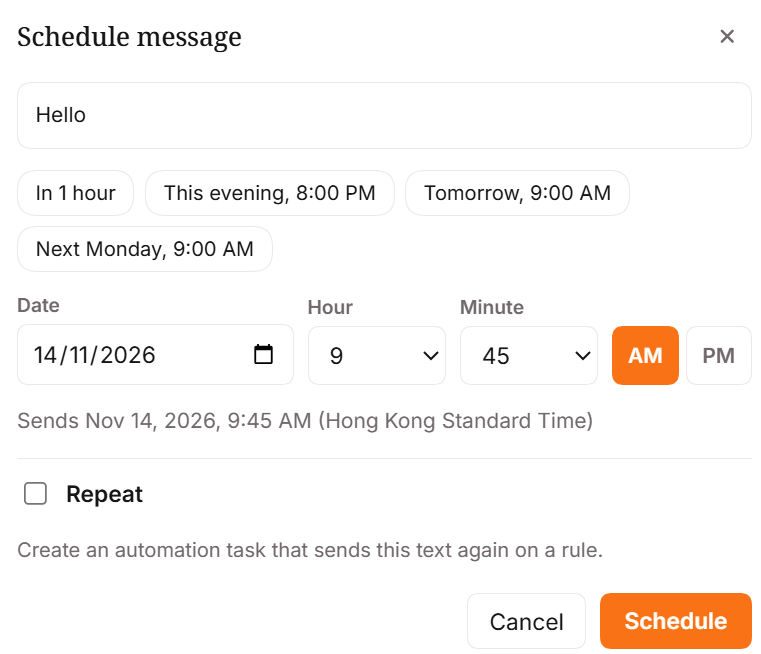
| Schedule button | Orange pill beside Send in the composer tool row. Disabled while the draft is empty or the composer is busy. |
| Alt+Enter (Option+Enter on macOS) | Opens the same dialog. Registered as an editable-region shortcut, editable in Settings › Shortcuts. |
| Dialog | Date, hour 1–12, minute, AM/PM, quick picks, a "Sends …" summary, and an optional Repeat row. Backdrop/Escape close, focus returns to the composer. |
| Scheduled tab | Every scheduled message, across every conversation, grouped by day. Hover actions: Send now, Edit, Delete. Failed rows show the reason plus Retry. |
| Editor | Change the time, the text, images and files, and the destination — an existing conversation or a new one that is created when the message is due. Saves detect concurrent edits instead of overwriting them. |
| Strip | Above the composer: 2 scheduled · next Fri, 14 Nov, 9:00 am, expandable to rows with Send now, Change time, Cancel, Retry, and a View all link to the tab. |
| Repeat | Creates a task in DSH's own Automation service and opens its task page. Blocked when the draft has images or files. |
| Peak-price hint | When the chosen time lands in DeepSeek's peak window and the session runs a DeepSeek model, the dialog adds one orange line naming the window in your own time zone. Weekends and off-peak hours are half price. |
| Phone | Bottom sheet under 640 px, 44 px targets, 16 px inputs (no zoom-on-focus), safe-area padding. |
| Theme | Host tokens for every surface and text colour; the accent orange is the only literal colour. English and Chinese dictionaries ship complete. |
The Scheduled tab
The tab sits directly under Automation tasks in the sidebar and opens as a full page: one centred column, a count under the title, then day groups — Today, Tomorrow, the weekday for the next few days, then a full date. Grouping uses your browser zone, not the Host's.
- Rows show the send time, the message preview, the destination (
workspace › conversation) and attachment chips — image thumbnails and file names with sizes. Hovering (or tapping, on a phone) reveals Send now, Edit and Delete; clicking the row opens the editor. - Failed rows carry a red rule and the delivery reason, with Retry and Edit.
- Sent messages stay for 24 hours in a collapsed, dimmed group; a late one is labelled sent late.
- Repeating messages are listed read-only with a link to Automation tasks — they belong to DSH's Automation service, which delivers text only.
- All / This workspace: when a conversation is open, one small control narrows the list to that workspace. Without that mapping the tab simply shows everything.
Editing one message
The editor opens as a side sheet on wide screens (the list stays visible), a centred dialog in the middle, and a full-height bottom sheet on a phone. Top to bottom: When (the same quick picks, date and 12-hour clock as the dialog, with the "Sends …" summary and the peak-price note), Message (an auto-growing textarea), Attachments (chips with a thumbnail or file glyph, size and ×; add files, drop them on the editor, or paste an image), Send to (a searchable picker of workspaces and their conversations, plus + New conversation per workspace), and the footer: Delete on the left, Cancel and Save on the right.
Save sends only what changed and carries the record's updatedAt. If the message changed in another
tab meanwhile, the save is refused: your text stays, the record is reloaded, and a notice asks you to
review and save again. If the message was sent while you were editing, the editor closes and tells you
so.
A message can be moved to another workspace's conversation — its attachments travel with it, because stored attachments are not tied to a conversation — or to a conversation that does not exist yet, which is created in the chosen workspace when the message is due. That creation is written to the record before the message is sent, so a crash cannot produce two conversations or two copies.
The list refreshes when the panel opens, after every action, on window focus, when the tab becomes visible again, and once shortly after the next due time. There is no interval polling.
Install
Published on npm as dsh-scheduled-message. The package is a normal DSH plugin bundle: a Host half
(index.js), a browser half (client.js), and one patch entry.
dsh plugin --profile <profile> add dsh-scheduled-message
Replace <profile> with the profile your host runs — web for a plain dsh web. DSH Desktop keeps
its own profile, so install there from Settings → Plugins instead of the command line.
The command forwards to pnpm in the profile directory and, because the package declares dsh.bundle,
adds it to dsh.profile.bundles as well. Then restart DSH.
The market card does the same thing in one click: Plugins → Discover, search scheduled message.
Needs DSH 0.2.2-rc.2 or newer (engines.dsh).
Without a package manager
Put the folder where the profile can resolve it, list it in that profile's package.json, and
restart:
cp -r dsh-scheduled-message ~/.dsh/profiles/<profile>/node_modules/dsh-scheduled-message
"dependencies": { "dsh-scheduled-message": "file:./node_modules/dsh-scheduled-message" },
"dsh": { "profile": { "bundles": [ …, "dsh-scheduled-message" ] } }
With the plugin manager available, install_bundle with this directory as the target does the same
thing and reports application: applied.
Registering the row directly, without touching dsh.profile.bundles, also works — the bundle ships
cordis.patch.yml:
- insert:
    - id: dsh-scheduled-message
      name: dsh-scheduled-message
Upgrading from 0.2.x
Nothing to do. The stored records are version 1; the plugin writes version 2 and reads both, so
messages scheduled before the upgrade still deliver. Before the first 0.3.0 run the v1 storage unit
was copied to .backup/ in this repository if you want a copy of the old file.
Using it
- Type the message and attach anything you want.
- Press Alt+Enter, or click Schedule.
- Pick a date and a time on the 12-hour clock, or use a quick pick.
- Press Schedule. The draft and its attachments are cleared and the message appears in the strip.
- Close the tab whenever you like. Delivery is the Host's job.
- Open Scheduled in the sidebar to see everything that is waiting, change it, or move it.
Tick Repeat instead to create an Automation task: daily, weekdays, weekly on the chosen weekday, or monthly on the chosen day. Monthly rules on the 29th–31st skip months that are too short.
What it does not do
- No repeating messages with attachments. The Automation service delivers text only, so the UI and the Host validator both refuse that combination. Repeating tasks are edited in Automation tasks, never in the Scheduled tab.
- No auto-retry. A failed delivery is reported with its reason; Retry is a user action.
- No polling. The strip and the tab refresh on mount, after an action, on window focus, on becoming visible, and once shortly after the next due time.
- No invented conversation names. DSH's session list does not carry a title, so a destination shows the workspace name and a short conversation id unless the build exposes a title.
- No attachment deletion. Removing a chip drops the reference to the stored file; the bytes follow DSH's own attachment retention, because this build has no delete API.
- No cross-zone surprise. The browser's IANA zone is captured at create time and only used for display and for the 12-hour reading; the Host stores one absolute instant.
- Disabling the plugin does not delete anything. Pending records stay in storage and resume when the plugin is enabled again.
Layout
index.js              Host half: durable store, thirteen /api routes, timer, delivery
client.js             browser bundle (generated — see scripts/build-client.mjs)
client.src.js         browser half source: composer button, dialog, strip, Scheduled tab, editor
lib/core.js           dependency-free shared logic: 12-hour clock, zone resolution, validation,
                      record schema v1→v2 migration, day grouping, RRULE text, retention
locale/en.json        English dictionary
locale/zh.json        Chinese dictionary
scripts/build-client.mjs   inlines lib/core.js + locale/*.json into client.js
scripts/check.mjs     static gates (bundle freshness, locale coverage, exports, registrations)
test/support/host-smoke.mjs     end-to-end Host test against in-memory services
test/*.test.mjs       node --test suites
docs/DETAIL.md        design notes, API evidence, and what is still unverified
Development
npm run build     # regenerate client.js after editing client.src.js, lib/core.js or locale/*.json
npm test          # unit + bundle + Host smoke tests
npm run check     # static gates
Status
0.3.1. 60 core tests, 20 client tests, one Host wrapper running 206 assertions, the static gates
and the standalone Host smoke test (206 assertions) all pass.
0.3.0 adds the Scheduled sidebar tab and its editor: every scheduled message in one list, with
the time, the text, the attachments and the destination editable, moves between conversations,
delivery into a newly created conversation, and read-only rows for repeating tasks. With it the
record schema moved to version 2 — the domain declares compatibleVersions: [1], so records written
by 0.2.x still open and still deliver. 0.2.x added the DeepSeek peak-price hint; 0.1.1 fixed the
composer button so it enables as soon as you type.
0.3.1 fixes a blank panel: opening a scheduled message crashed the tab before its record had
loaded, because the editor tried to format a send time it did not have yet. describeDue now
answers an empty string instead of throwing, the editor only writes the summary once it has a real
instant, and test/client.test.mjs renders the editor's first paint so it cannot come back.
Verified: the two project gates, the Host end-to-end smoke test (including a v1 record opening
under the v2 schema and a kind:'new' delivery that creates exactly one conversation), the
bundle-freshness and dictionary-parity gates, the panel's two slot registrations structurally,
and the tab itself rendering in the live desktop GUI. Still a human look away: the editor's
sheet/dialog/bottom-sheet layouts, the destination picker against a real workspace list, and the
phone layout. Details are in docs/DETAIL.md.
Plugins associés
webnovel-writer
lingfengqaq/webnovel-writer
loopx (dsh-loopx-plugin)
loopx-project/loopx
ouroboros (dsh-plugin)
q00/ouroboros
loopx (dsh-loopx-plugin)
huangruiteng/loopx