dsh-search-everything
ivescheung/dsh-search-everything
Ctrl K palette that searches every message of every session, optionally limited to one workspace, then opens the session, scrolls to the matched message and outlines it. Indexes the session logs in the host process, persists the index to disk, and rescans only the changed files when the palette opens. Not on npm yet: install with dsh plugin --profile web add github:IvesCheung/dsh-search-everything. Its HTTP routes have no DSH access check, so a web page open in your browser could call them.
Installer
dsh plugin --profile web add github:ivescheung/dsh-search-everythingREADME
dsh-search-everything
English · 中文
Everything-style global search for DSH: press Ctrl K and search across every session of every workspace — session titles, your own messages, assistant replies — then hit Enter to jump straight to that message inside the conversation and highlight it.
- One search box, four tabs: All / Sessions / My messages / Assistant replies
- Optional scope: limit the search to one workspace from the dropdown on the tab row — 4 ms instead of 32 ms on a 31 MB corpus
- Index lives in the host process and is persisted to disk: a restart restores it in ~0.3 s instead of re-parsing every log, and a query over ~30 MB / 18k messages takes 10–90 ms
- Clicking a result switches workspace, switches session, scrolls to the message and flashes it
- Local only: reads
~/.dsh/sessions, no upload, no network, no telemetry
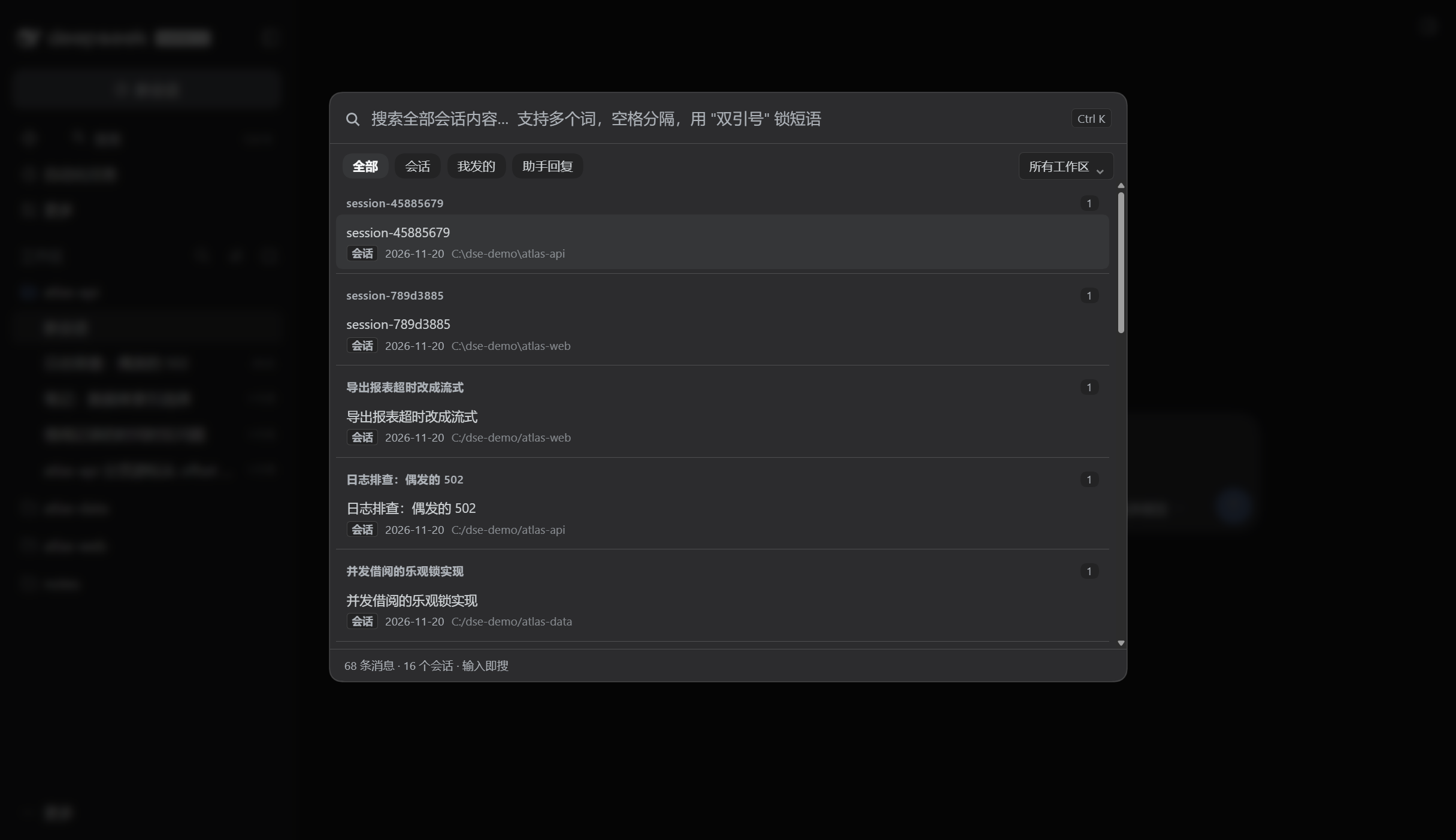
The scope dropdown limits the search to one workspace. It opens on the workspace of the conversation
you are in (atlas-api below, marked 当前), lists every workspace with its message count, and keeps a
single capsule width while it is closed:
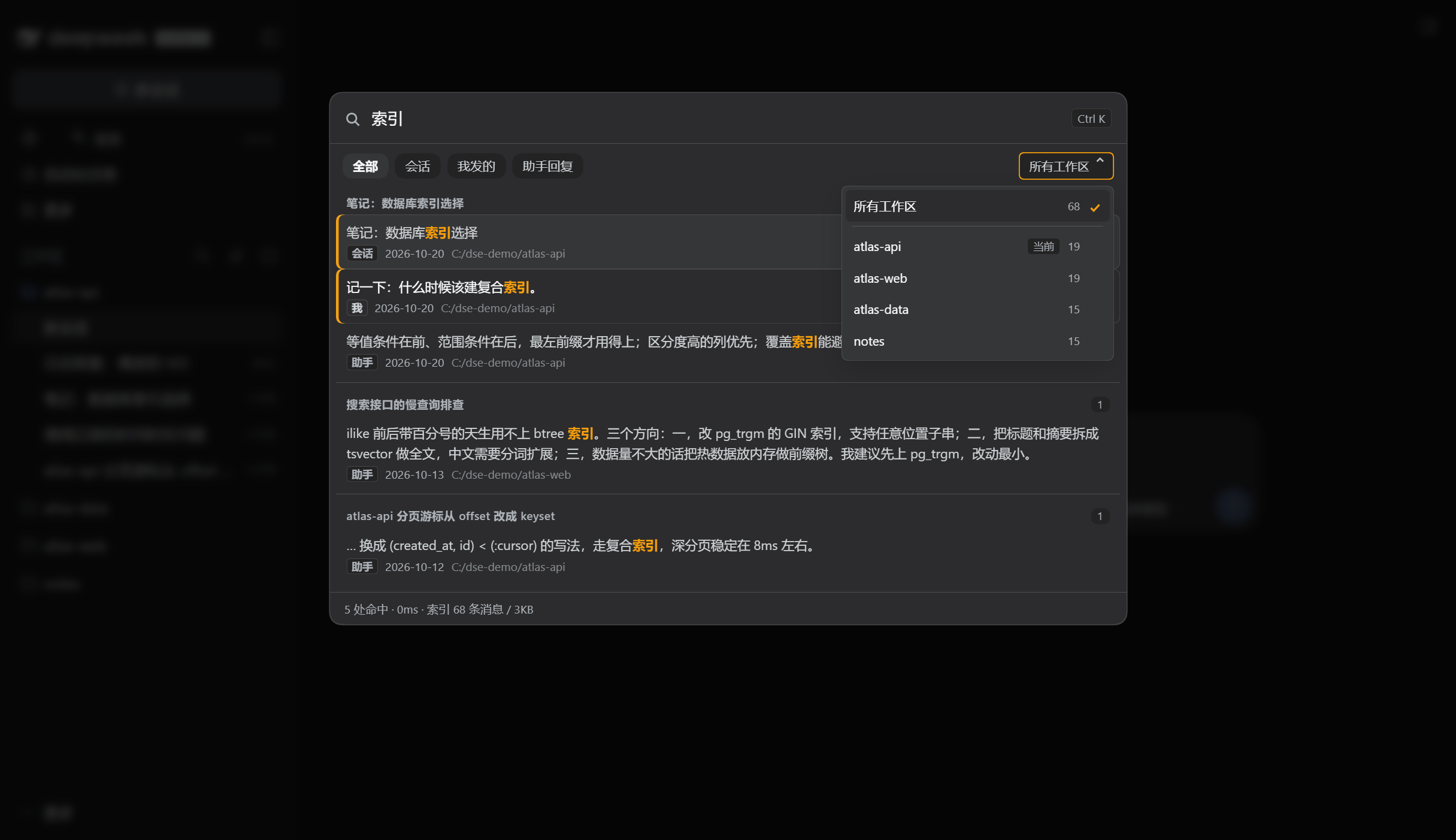
Jumping to a hit — the target message is scrolled into view and outlined:
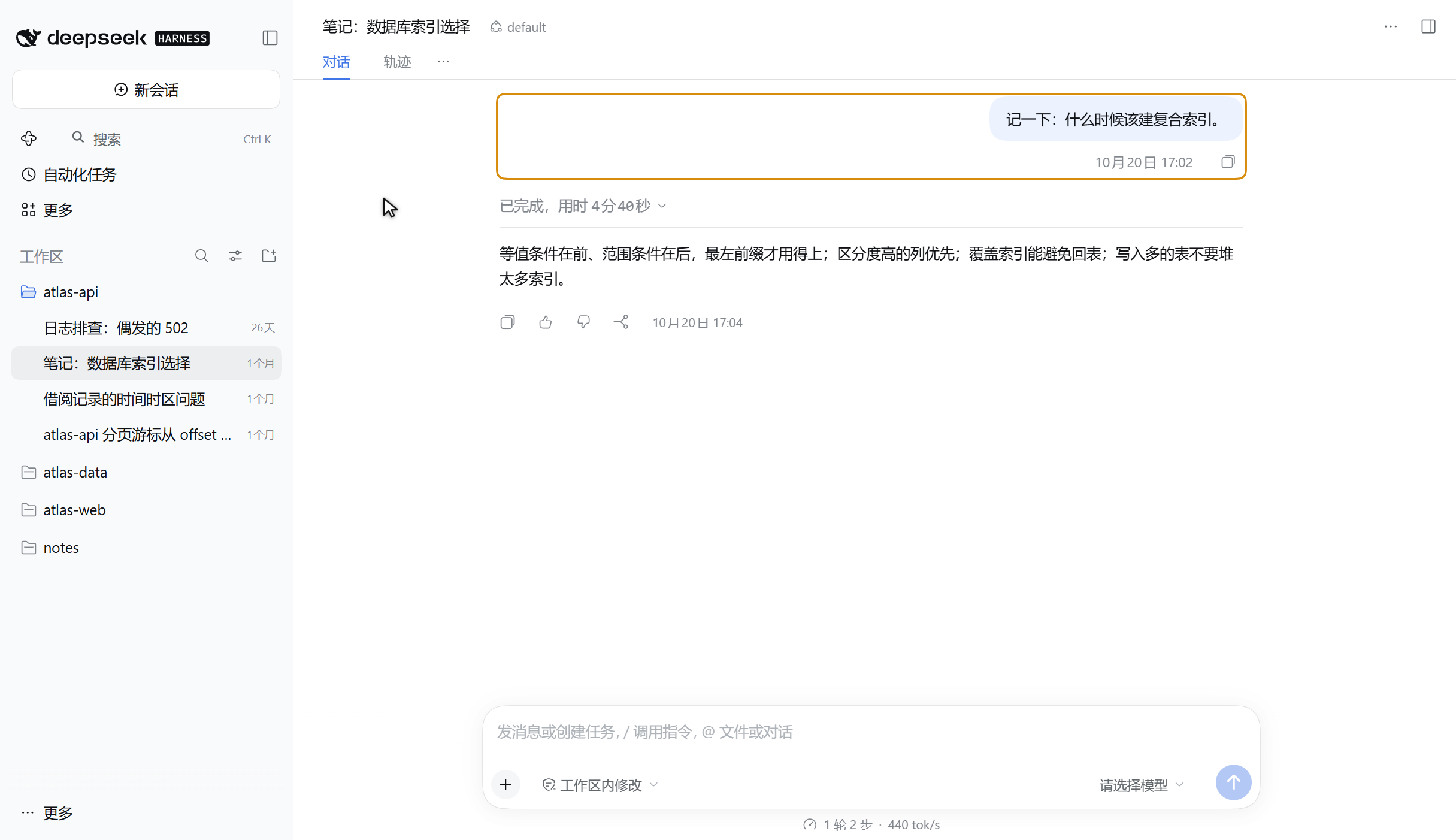
The sidebar entry the plugin adds:
Install
# from a local checkout
dsh plugin --profile web add link:/absolute/path/to/dsh-search-everything

# or from npm (after publishing)
dsh plugin --profile web add dsh-search-everything
Then restart dsh web — the client bundle revision only changes when the host reloads.
After the restart:
- a "Search Ctrl K" entry appears in the sidebar under New session;
- press Ctrl K (⌘ K on macOS) anywhere to open the palette; press it again or Esc to close.
Usage
| Action | Key |
|---|---|
| Open / close palette | Ctrl K / ⌘ K |
| Move selection | ↑ ↓ (or Ctrl P / Ctrl N) |
| Open selected result | Enter |
| Switch tab | Tab / Shift Tab, or → ← when the input is empty |
| Open / close the workspace dropdown | Ctrl W, or click the scope control |
| Pick a workspace while the dropdown is open | ↑ ↓ then Enter, or click |
| Close | Esc |
Query syntax:
- space-separated words are AND (
jellyfin port= one message containing both) - double quotes search a phrase (
"write failed") - case insensitive; CJK is matched as a substring (no word segmentation)
This plugin linearly scans instead of building an inverted index. On real data (30 MB / 18k messages) a multi-word AND scan takes 10–90 ms, while an inverted index costs 20+ seconds of startup time and doubles resident memory. See "Why not an inverted index".
Why not an inverted index
The first version built a 3-gram bitmap inverted index (223 sessions / 16k documents / 713k grams / 30M characters). Measured: index build 23.5 s, per-query 0–7 ms. Conclusions:
- linear scanning is already fast: rare words prune almost everything, and the longest term is compared first, so far fewer characters are touched than the corpus size suggests;
- the inverted index turned "usable 4 s after start" into "usable 23 s after start", at twice the memory;
- it saved ~6 ms per query — invisible to a human, while the startup cost is very real.
So the simplest path stays: an in-memory document array with a pre-lowercased lower field and
indexOf-based multi-word AND.
How it works
~/.dsh/sessions/<encoded cwd>/<sessionId>/session.v4.jsonl.zstd
        │  zstd inflate + per-line JSON (only user/message, assistant/message, session/title, session header)
        ▼
Host half (src/engine.ts)  — in-memory index: { sid, title, cwd, role, seq, time, text, lower }
        │  restored from $DSH_HOME/storages/dsh-search-everything when present, full build otherwise;
        │  afterwards rescanned on demand — no background polling
        ▼
GET /dsh-search-everything-api/{refresh,query,sessions,workspaces,doc,stats,flush}   (loopback only)
        ▼
Browser half (client.js)  — Ctrl K palette, list rendering, keyboard handling, jump & highlight
Only human words are indexed. user/message records carry more than twenty different
source.kind values; only user, user-approval, agent-message, the empty value, and
dsh-ops:* (excluding step-tail) count as human input. System echoes such as
runtime-context, tool-jobs, repeat-tool-reminder and compact-checkpoint are dropped —
otherwise the "My messages" tab would be full of runtime context.
Jumping is not just scrolling to the bottom. The palette asks the host for the hit's original text plus the match offset, cuts several short excerpts around that offset as search needles (long excerpts fail to match because markdown markers, inline code and line breaks do not survive rendering), then:
unarchiveSessionwhen needed — archived sessions fail to open silently in the host;- only when the host has no session attached, locate the owning workspace by
sessionIds/pathandopenWorkspace; uiWorkspace.openSession(sid)to switch the session, waiting for[data-conversation-session]to report the target session;- wait until the message flow has rendered enough
[data-chat-flow-key]nodes, then scroll the virtualized list backwards screen by screen (it anchors to the bottom, so a plainscrollIntoViewgets snapped back), and finallyscrollIntoView({block:'center'})plus a 2.6 s highlight.
Scoping narrows the scan, it does not filter afterwards. Documents are grouped by their session's
working directory once and cached, and a scoped query reads only that group — on the 31 MB corpus
search goes from 32 ms to 4 ms and Everything from 22 ms to 2 ms. The palette opens on the workspace
the current conversation belongs to; the control at the right end of the tab row switches to another one
or back to all.
The index survives restarts. Building it means inflating and parsing every session log — about
4.6 s for 229 sessions / 31 MB, and far worse on a cold page cache. So the documents are written to
$DSH_HOME/storages/dsh-search-everything/ as index.meta.json (one stat entry and the title/cwd
per session file) plus docs.ndjson (one JSON tuple per message), and the next start reads them back
in ~340 ms, then does one incremental pass that re-reads only the files whose mtime or size
changed. Writes are debounced by 1.2 s and atomic (temp file + rename), so a crash leaves the previous
index intact; a version or session-root mismatch discards the cache and rebuilds.
Refreshing is on demand, not on a timer. After that the index is never touched until something
asks for it: the palette calls /refresh the moment it opens, which stats every session file and
re-reads only those whose mtime/size changed — a few hundred milliseconds when nothing changed, and
the usual case (one session being written) is one file. Between openings the plugin does zero disk
I/O, so an idle host stays idle.
Configuration
In the config block of cordis.patch.yml:
- insert:
    - id: dsh-search-everything
      name: dsh-search-everything
      config:
        refreshIntervalMs: 0      # background poll interval; 0 = off (default, on-demand)
        lazyRefreshMs: 0          # if > 0, query/sessions rescan first when the last scan is older than this
        maxResults: 50            # per-query result cap
        sessionsRoot: ''          # session root; defaults to $DSH_HOME/sessions or ~/.dsh/sessions
        cacheDir: ''              # disk index dir; defaults to $DSH_HOME/storages/dsh-search-everything
                                  # (set to a literal "-" to disable persistence and rebuild every start)
Development
npm run build     # src/*.ts -> lib/*.js (Node built-in stripTypeScriptTypes, no third-party deps)
npm test          # node --test test/ (13 cases: indexing/filtering/refresh/cache/scope/corrupt files)
npm run bench     # index build and query timings on the real corpus
node scripts/bench-cache.mjs   # cold build vs warm restore on the real corpus
client.js is hand-written with no build step: it uses DSH's window.__ModuleLoader__.load
form, so a change only needs a host restart (the bundle revision changes). The host half must be
rebuilt with npm run build.
Dependency policy: Node built-ins plus the @deepseek-ai/cordis types only; no third-party runtime
dependencies.
Known limitations
- Web only (
dsh.client.platform = web); the desktop shell is not adapted. - The very first start (no disk index yet) still rescans everything (~4–17 s for 30 MB; during that
window
/queryreturns empty results withindexing: true). Every later start restores from disk. - The index file is roughly 1.2× the indexed text (37 MB for 31 MB of messages), because it stores the original text; the lowercased copy is rebuilt on load rather than stored.
- Only the first 8000 characters of a single message are indexed.
- Jumping matches text excerpts inside the DOM: when the target message is almost entirely markup (pure tables, pure code blocks) the precision degrades, and the plugin falls back to opening the session and scrolling as close as it can.
Contributing
Issues are the front door. Bug reports and feature requests are equally welcome — that is how this plugin gets better, and it is the fastest route to a fix:
A report I can act on has: your DSH version (dsh --version), the OS, the exact query you typed, what you
expected and what happened. For a jump problem, say whether the palette failed to switch session or
switched but did not scroll to the hit — and paste anything red from the browser console. Screenshots of
the palette are welcome, but please crop out anything private from your own sessions.
Feature requests are most useful as what your workflow needs ("I want to find the tool call that wrote this file") rather than how to implement it. Known directions that would need a bigger change: tokenizer or prefix indexing to make sub-word queries cheaper, searching tool output and attachment names, and platforms other than web.
Pull requests are welcome for self-contained changes. Two rules keep this cheap to maintain: Node
built-ins only (no third-party runtime dependencies), and npm test green before you send it.
client.js needs no build step; the host half does (npm run build). If you are unsure whether a change
fits, open an issue first — a short discussion beats a rejected PR.
License
MIT
Plugins associés
billion-context
ranxianglei/billion-context
dsh-web-ui (dsh-chat-recovery)
zhu1090093659/dsh-web-ui
dsh-synapse
liangmianya/dsh-synapse
dsh-archive-manager
michengai/dsh-archive-manager