dsh-zen
john-walks-slow/dsh-zen
Vue Zen Mode et suivi du temps au premier plan pour DeepSeek Harness. Pendant le travail de l’agent, affiche une conversation apaisée avec état, dernier message utilisateur, activité en direct et réponse finale en Markdown avec statistiques brèves du tour. Suit le temps de concentration par observation de l’écran et calcule des scores quotidiens/hebdomadaires ; masque outils et raisonnement, entre/sort automatiquement au début/à la fin des tâches, raccourci Alt+Z et réglages Zen. Côté client uniquement, stockage localStorage, aucun réseau.
Installer
dsh plugin --profile web add github:john-walks-slow/dsh-zenREADME
dsh-zen
A Zen Mode view tab + foreground time tracker for DeepSeek Harness (DSH).
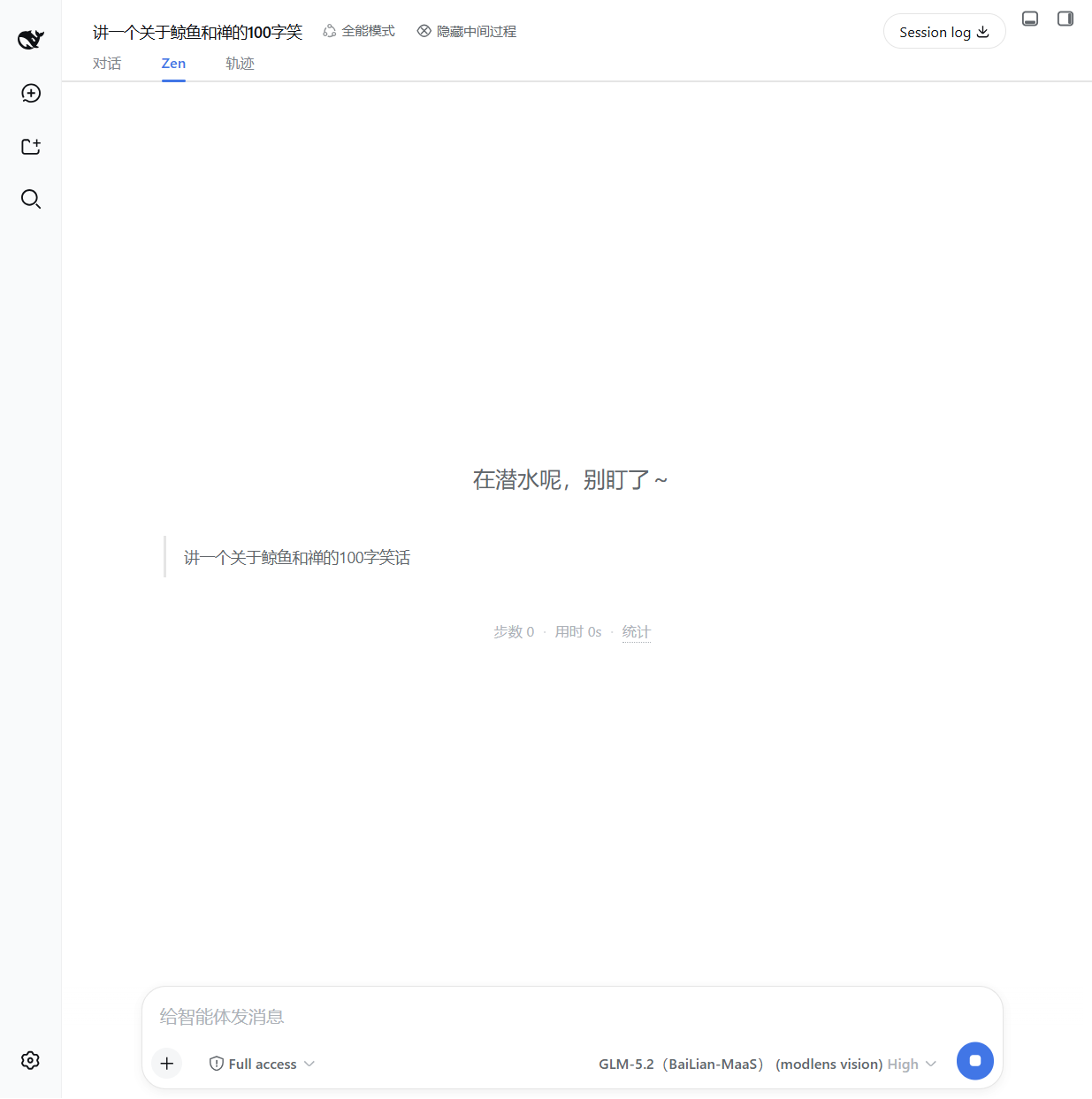
While an agent works in the background, switch to the Zen tab and get a calm, minimal surface: a status message, your latest user message, and one line of statistics — no tool calls, no reasoning rows, no noise. Zen also tracks how much of your "running" time was spent actually watching the screen, and reports a daily / weekly Zen score.
Screenshots
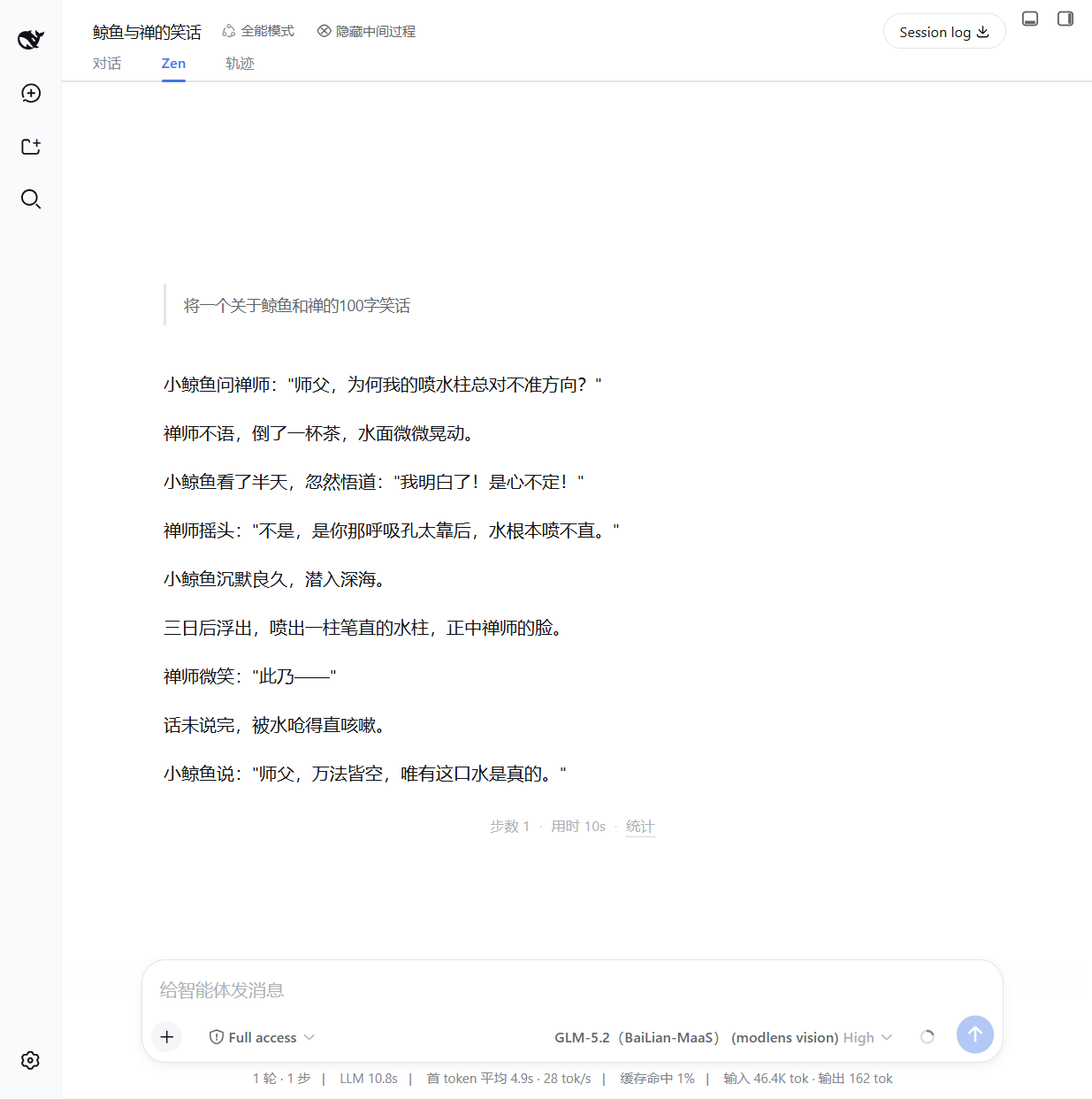
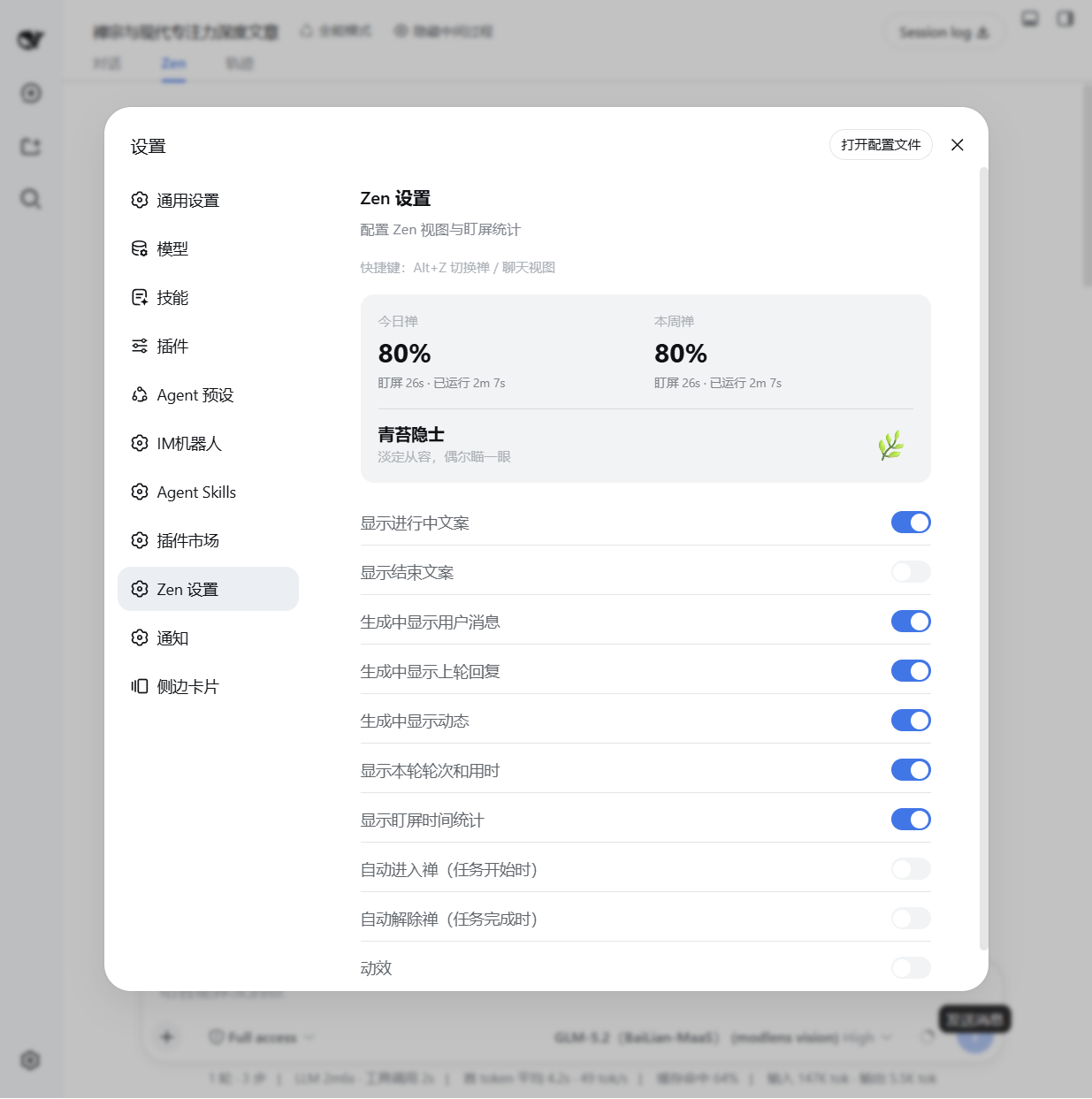
| Zen view (while generating) | Zen view (done) | Zen settings |
|---|---|---|
 |  |  |
Features
- Zen view tab — a dedicated
conversation.viewtab (对话 / Zen / 轨迹), showing:- running / done status message (configurable, with or without the second-line description)
- your user message (while generating), the previous round's reply and live activity hints
- the final AI reply rendered with markdown
- one-line turn stats:
步数 N · 用时 Nm · 统计
- Foreground time tracker — records foreground (visible window) vs. total running time
per session, persisted in
localStorage. Daily / weekly Zen score (100% − 盯屏比例) is shown in the settings panel. - Chat hide toggle — a header button (
隐藏中间过程) that hides tool-call, command, context, compaction, reasoning rows, etc. from the chat view via CSS. - Auto enter / exit Zen — optional: auto-switch to the Zen tab when a task starts, and back to chat when it completes.
- Shortcut — press
Alt+Zto toggle between the Zen and chat views from anywhere. - Animation toggle — disable all entry animations/transitions in Zen view if you prefer instant rendering.
Install
This plugin is distributed as a DSH bundle. It requires a Web-capable profile (the default
web profile).
From a Git repository (recommended)
dsh plugin --profile web add github:john-walks-slow/dsh-zen#<40-character-commit>
Then restart dsh web. The bundle patch (cordis.patch.yml) inserts the zen row
into the profile's composition, and the Web client is served from the committed lib/client.js.
Prefer pinning the exact commit hash; a floating branch can be force-pushed. See docs/PUBLISHING.md for the catalog submission flow.
From npm (once published)
dsh plugin --profile web add @johnnren/dsh-zen
Usage
- Open any conversation in the DSH Web GUI.
- Click the Zen tab (or press
Alt+Z) to switch to the Zen view. - Optionally use the 隐藏中间过程 button in the session header to collapse intermediate process nodes in the chat view.
- Open Settings → Zen 设置 to configure what is shown:
- 显示进行中标题 / 显示进行中副标题 / 显示结束标题 — status message title/subtitle on/off
- 生成中显示用户消息 / 生成中显示上轮回复 / 生成中显示动态 — hints shown while generating
- 显示本轮轮次和用时 — the
步数 N · 用时 Nmline - 显示盯屏时间统计 — the foreground stats tooltip
- 自动进入禅 / 自动解除禅 — auto view switching on task start / complete
- 动效 — entry animations on/off
The settings panel also shows your 今日禅 / 本周禅 scores and the current Zen level.
Development
npm install
npm run build        # bundle src/client.ts + src/index.ts → lib/, deploy into web profile
npm run typecheck    # tsc --noEmit against the local shims in src/dts-shim.d.ts
npm run e2e:zen      # GUI probe against a disposable dsh-e2e instance (see e2e/)
The deploy target is $DSH_HOME/profiles/web/node_modules (default ~/.dsh). Client-only
changes need a page refresh; host-side changes need a DSH restart.
The GUI probe needs a disposable instance started with the provider layer in
e2e/profile/e2e-profile.patch.yml, otherwise agent turns fail with NO_ADAPTER and the
live Chat surfaces cannot be exercised:
export CPA_API_KEY=...   # cpa gateway key (see ~/.config/api-vault)
export DSH_E2E_PLAYWRIGHT_CORE=<path to an installed playwright-core entry>
dsh-e2e start --patch e2e/profile/e2e-profile.patch.yml --wait-ready
npm run e2e:zen
dsh-e2e stop
Repository layout
├── src/
│   ├── client.ts            # Web client: slots, settings section, shortcuts
│   ├── index.ts             # Host face (empty apply; bundle row only)
│   ├── foreground-tracker.ts# Foreground time tracking + persistence
│   ├── zen-settings.ts      # Settings store + migration
│   ├── locales.ts           # zh / en dictionaries
│   └── components/          # ZenView, ChatHideToggle, ZenSettingsSection
├── lib/                     # Committed build artifacts (client factory bundle + host)
├── assets/icon.svg          # Plugin icon
├── cordis.patch.yml         # Bundle patch: inserts the zen row
├── build.mjs                # esbuild bundler + deploy
└── docs/                    # Screenshots and publishing guide
Compatibility
- Requires DeepSeek Harness with the Web client module system (default
webprofile). - Verified against DeepSeek Harness
0.2.0-rc.2(see docs/issues/261011-dsh-02-compat). - Slot contracts used:
conversation.view,conversation.session.header.actions,settings.section. - Client services used:
slots,sessions,locale,uiConversation. - The Zen view reads the Chat target snapshot through
ctx.uiConversation.binding(sessionId).target("chat"); the current Session is derived fromsessions.listmain-view retention. Both are 0.2-era contracts — re-verify them against the target version's source when upgrading. - Zero permissions: no network requests, no file system access, no external
services — the host face is an empty
apply()and all data stays in browserlocalStorage(dsh.zen.*). 无网络请求、无文件写入、无外部服务、无遥测。
Uninstall
dsh plugin --profile web remove @johnnren/dsh-zen
Or remove the row from the profile composition. Stored stats/settings in localStorage
can be cleared by deleting keys prefixed dsh.zen..
License
MIT — see LICENSE.
Community
- Thanks to the LINUX DO community for providing the discussion environment.
Plugins associés
dsh-web (dsh-task-board)
zhu1090093659/dsh-web
dsh-web (dsh-web-all)
zhu1090093659/dsh-web
dsh-TUI
ccch1mneyyy/dsh-tui
dsh-web-ui (dsh-task-board)
zhu1090093659/dsh-web-ui