dsh-web-search-doubao
kenny2077/dsh-web-search-doubao
Fournisseur de recherche web Doubao Search (Volcengine 豆包搜索) pour DeepSeek Harness — remplace le backend web_search actif par l'API autonome Doubao Search avec sa propre clé et sa facturation (500 recherches gratuites par mois) et fournit une carte de réglages dédiée qui stocke la clé via le service d'identifiants.
Installer
dsh plugin --profile web add github:kenny2077/dsh-web-search-doubaoREADME
dsh-web-search-doubao
Web search for the DeepSeek Harness, powered by Doubao Search (Volcengine 豆包搜索).


English | 中文
What is it
dsh-web-search-doubao is a community plugin for the DeepSeek Harness that plugs a Doubao Search-backed search provider into the harness's ctx.web capability seam. One dsh plugin add and your harness searches the web through ByteDance's standalone Doubao Search API — no editing of base bundles, no restart to change settings.
This is not the Ark chat-side 联网内容插件: nothing here routes through a Doubao chat model. It uses the standalone Doubao Search service, so search is decoupled from model inference entirely.
Prefer Zhipu/GLM? This plugin has a sibling: dsh-web-search-zai — the same provider pattern for ZAI's standalone Web Search API, sharing one design language.
Why
- Separate billing from your model spend. Doubao Search is its own service with its own key: 500 free searches per month, then pay-per-use (or a monthly package on the
customedition). No model tokens are consumed by a search — costs never blur into your Ark/LLM invoice. - ByteDance ecosystem sources. The backend draws on the same index that powers Doubao app search, including Toutiao/Douyin-ecosystem public content — strong coverage of the Chinese web, with publish times down to the second when a source provides one.
- Runtime-configurable. Edition, endpoint, snippet length, and authority filter are plain settings — a committed change takes effect on the very next search, no restart.
- Fits the seam, not around it. The provider registers into
ctx.webexactly like the built-in DeepSeek provider, sodsh-tool-weband everything above the seam work unchanged. - No invented fields. Only what the API actually returns gets mapped —
publishedAtappears only when the source provides one.
How it works
The search path — the provider registers into ctx.web exactly like the built-in DeepSeek provider, so dsh-tool-web and everything above the seam work unchanged:
┌────────────────────────────────────────────────┐
│                DeepSeek Harness                │
│                                                │
│  model ──▶ web_search tool ──▶ ctx.web seam    │
└───────────────────────────────────────────┬────┘
                                            │
                                            ▼
                            ┌──────────────────────────────┐
DOUBAO_SEARCH_API_KEY ─────▶│      web-search-doubao       │
 (credentials store —       │        (this plugin)         │
  resolved per search)      └───────────────┬──────────────┘
                                            │  POST {baseURL}/search_api/web_search
                                            ▼        or /search_api/global_search
                            ┌──────────────────────────────┐
                            │  Doubao Search (Volcengine   │
                            │          豆包搜索)            │
                            └───────────────┬──────────────┘
                                            │  Result.WebResults[] / Documents[]
                                            ▼
                              normalized WebSearchResult
                              (sources + truncated, with
                               publishedAt when provided)
                            ──▶ back to your model, unchanged
The settings path — this is what sets the plugin apart: a dedicated card in the harness Settings GUI, storing values in the credentials service so no secret ever reaches a settings file:
┌────────────────────────────────────────────────────┐
│   Settings GUI ─ "Web Search (Doubao)" card        │
│   key (masked, "Get an API key ↗" console link)    │
│   base URL · edition · configured badge            │
└───────────────────────┬────────────────────────────┘
                        │  Save / Reset
                        ▼
        ┌────────────────────────────────────┐
        │  DSH credentials service           │
        │  ~/.dsh/.credentials.yaml          │
        │   DOUBAO_SEARCH_API_KEY            │
        │   DOUBAO_SEARCH_BASE_URL           │
        │   DOUBAO_SEARCH_EDITION            │
        └────────────────────┬───────────────┘
                             │  re-resolved on every search —
                             ▼  next search, no restart
                      the search path above
The service ships two editions with different wire formats; edition picks one:
custom (default — honors the result count server-side)
| Doubao field | Seam field | Notes |
|---|---|---|
Url | url | Entry dropped if missing |
Title | title | Omitted when empty |
Content ‖ Summary ‖ Snippet | snippet | First non-blank wins; entry dropped if all blank |
PublishTime | publishedAt | Omitted when the source provides none |
SiteName, AuthInfoDes | — | Not mapped |
global (longer document bodies, structured Parts[])
| Doubao field | Seam field | Notes |
|---|---|---|
Url | url | Entry dropped if missing |
Title | title | Omitted when empty |
Parts[] (Type: "text") | snippet | Text parts joined; entry dropped if none |
DocumentInfo.PublishTime | publishedAt | Omitted when absent |
HostInfo, ContentTokenCount, image parts | — | Not mapped; images are never requested |
Failures surface as standard WebError codes: WEB_PROVIDER_ERROR (HTTP/network/bad body), WEB_ABORTED (cancellation), and WEB_PROVIDER_CREDENTIAL_MISSING (no key). Through dsh-tool-web, these reach the model under the consumer's usual error wrapper.
Quick start
You'll need the DeepSeek Harness installed (dsh CLI available) and a Doubao Search API key.
-
Get a key at the Doubao Search API-key page: sign in with your Volcengine account, 开通服务 (activate the service), then 创建 API Key. The key is separate from any
ARK_API_KEY— it authorizes only the Doubao Search service. Every account gets 500 free searches per month; beyond that you enable pay-per-use in the same console.This is not the 火山方舟 (Ark) console key. The Ark chat-side web-search plugin is a different product with different billing.
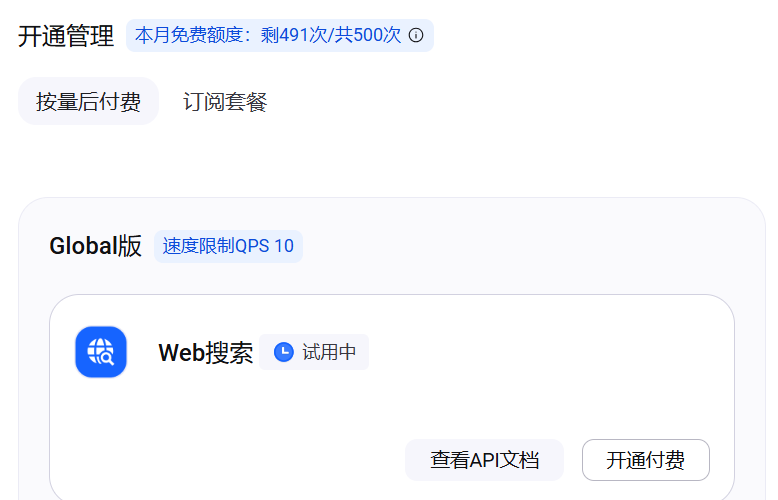
Store the key so it never lands in a config file — paste it into the plugin's Web Search (Doubao) settings card in the harness GUI (see below), add a
DOUBAO_SEARCH_API_KEYentry to$DSH_HOME/.credentials.yaml, or export it in the launching environment. -
Install the plugin:
dsh plugin add dsh-web-search-doubao        # from npm
dsh plugin add github:kenny2077/dsh-web-search-doubao   # from git (prebuilt, no build step)
The
cordis.patch.ymloverlay registers the provider and switches the activesearchProviderfromdeepseek-officialtodoubaoin one step. To go back:dsh plugin remove dsh-web-search-doubao. -
Search. Ask your harness something current and watch the
web_searchtool return Doubao results.
Settings GUI card
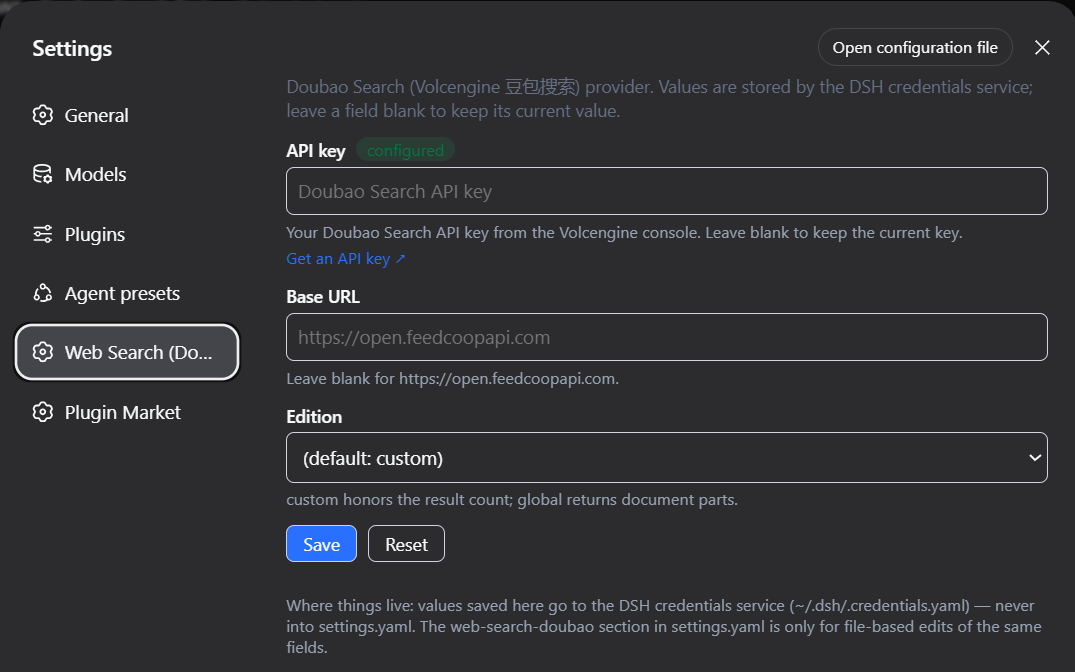
After install, the harness settings sidebar gains a Web Search (Doubao) section with three fields — API key (masked input, with a clickable Get an API key ↗ link to the Doubao Search API-key page), Base URL, and Edition. Save writes them to the DSH credentials service (under the DOUBAO_SEARCH_API_KEY, DOUBAO_SEARCH_BASE_URL, and DOUBAO_SEARCH_EDITION references); Reset clears all three. The badge next to the API key flips to configured once a key is stored and refreshes live when the key changes. Saved values take effect on the next search — no restart.
A footer in the card maps where things live, so you never have to guess: card values → ~/.dsh/.credentials.yaml (the credentials service), never settings.yaml; the web-search-doubao section in settings.yaml exists only for file-based edits of the same fields.
Because the card stores values as credential references, they override the settings-file fields and environment variables:
| Precedence | Source |
|---|---|
| 1 | Credentials service (what the card writes) |
| 2 | web-search-doubao settings (apiKey, baseURL, edition) |
| 3 | Environment (DOUBAO_SEARCH_API_KEY, DOUBAO_SEARCH_BASE_URL) |
| 4 | Built-in defaults |
maxSnippetLength and authLevel remain config-file-only (rarely tuned). The card itself is built from a reusable, config-driven factory (src/client/card.tsx) — future search-key providers (ZAI, Kimi, Qwen, …) can instantiate the same component with their own references and dictionaries.
Configuration
All fields are runtime-configurable via the settings GUI (web-search-doubao namespace); changes apply on the next search. Values stored by the Web Search (Doubao) settings card (credential references) win over every field below — see Settings GUI card.
| Key | Default | Meaning |
|---|---|---|
apiKey | (from credentials store) | Literal Doubao Search API key. Prefer apiKeyEnv so no secret enters config files. |
apiKeyEnv | DOUBAO_SEARCH_API_KEY | Credential reference resolved for each search. |
baseURL | https://open.feedcoopapi.com | Endpoint base; the edition appends /search_api/web_search or /search_api/global_search. |
edition | custom | custom honors the requested result count; global returns longer document bodies. |
maxSnippetLength | (unset) | global edition only: maximum characters per document body snippet (max_snippet_length). |
authLevel | (unset) | custom edition only: source-authority floor 1–4 (Filter.AuthInfoLevel; 1 = government/top institutions). |
Known limitations
- Results without a URL or body text are dropped, so you may get fewer sources than requested.
- The
globaledition may return ~10 documents regardless of the requested count (server-side cap); thecustomedition honorsCount. Either way the seam enforcesmaxResultson return. - No recency filter — the API has no documented server-side recency parameter.
publishedAtappears only when the upstream source provides a publish time.- Images are never requested (
max_image_count_per_docis left unset); the seam has no image field. - Only a
DOMExceptionnamedAbortErrormaps toWEB_ABORTED; aborts carrying custom reasons surface asWEB_PROVIDER_ERROR. - The chat-side 联网内容插件 variant (Ark
web_searchtool / Bot endpoints) is not implemented; this provider uses the standalone search API only.
Repository architecture
One package, two halves: the node half speaks to the ctx.web seam; the client half renders the settings card in the harness GUI. They meet only at the credentials service.
dsh-web-search-doubao/
├── src/                          # ── published source ──
│   ├── index.ts                  #     node entry: Config schema, settings section,
│   │                             #       credential-chain resolution, apply()
│   ├── provider.ts               #     DoubaoSearchProvider: per-search option snapshot
│   │                             #       + credential overrides, both editions'
│   │                             #       request/response mapping, WebError discipline
│   ├── types.ts                  #     wire types for the two Doubao Search editions
│   ├── invariant.ts              #     package-owned invariant companion (no-op)
│   └── client/                   # ── the settings-card half (browser bundle) ──
│       ├── card.tsx              #     createSearchProviderCard(): the reusable,
│       │                         #       provider-agnostic card factory
│       └── index.tsx             #     the Doubao instantiation: credential refs,
│                                 #       console link, en/zh copy
├── tests/
│   ├── doubao.spec.ts            #     node suite: mapping, requests, errors,
│   │                             #       registration, credential precedence
│   ├── doubao.e2e.ts             #     live-API smoke (self-skips without a key)
│   └── client-card.spec.ts       #     card suite: save/reset/badge flows on a fake
│                                 #       context + the built bundle's ModuleLoader handoff
├── lib/                          # ── build output (committed: git installs need no build) ──
│   ├── index.js                  #     node entry (ESM, tsc)
│   ├── client.js                 #     settings card (browser bundle, tsdown) wrapped for
│   │                             #       the shell's window.__ModuleLoader__
│   └── types/                    #     type declarations
├── cordis.patch.yml              # install overlay: registers the provider and selects
│                                 #   searchProvider: doubao in one `dsh plugin add`
├── tsconfig.json                 # strict TS, ES2024 ESM, react-jsx for the client half
├── tsdown.config.ts              # client build recipe (ModuleLoader wrapper, react external)
├── vitest.config.ts
└── .github/workflows/ci.yml      # typecheck + build + test on node 22/24 × Linux/Windows
Development
pnpm install     # all dependencies (including DSH seam packages) come from npm
pnpm typecheck   # tsc --noEmit
pnpm build       # emits lib/*.js + lib/types/*.d.ts + the wrapped lib/client.js settings card
pnpm test        # unit suite
The live-API smoke test self-skips without a key:
DOUBAO_SEARCH_API_KEY=<key> pnpm exec vitest run tests/doubao.e2e.ts
See CONTRIBUTING.md for guidelines.
License
Plugins associés
archify (deepseek-harness)
tt-a1i/archify
next-ai-draw-io (dsh-plugin)
dayuanjiang/next-ai-draw-io
WeKnora (dsh-weknora)
tencent/weknora
weknora
tencent/weknora