dsh-opencode-classic-sidebar
kuznecov-anatoliy/dsh-opencode-classic-sidebar
Classic pre-redesign OpenCode sidebar layout: a project column next to the selected project's session list with pin, rename, fork, copy id and archive, an archive view, Windows caption-strip panel buttons and an account balance chip.
Installer
dsh plugin --profile web add github:kuznecov-anatoliy/dsh-opencode-classic-sidebarREADME
OpenCode classic sidebar for DeepSeek Harness
dsh-opencode-classic-sidebar brings the classic, pre-redesign OpenCode sidebar
layout to the DSH Web UI: a narrow column of project tiles on the left, the
selected project's sessions next to it, the global panel buttons in the Windows
caption strip, and an account balance chip.
"Classic" means the OpenCode sidebar as it looked before its redesign — the layout this bundle reproduces. It is an independent plugin: it copies a layout, not OpenCode's code, and is not affiliated with the OpenCode project.
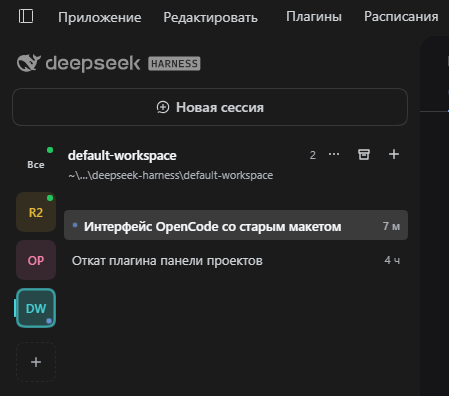
Top to bottom in that screenshot: the Plugins and Schedules buttons in the
window caption strip, the muted brand row, the contour-only New session bar,
the project column with live markers (All, then one tile per project, then the
+ tile), the project header with its ~ path and actions, and the session
list of the selected project with the open session filled in.
Install
dsh plugin add kuznecov-anatoliy/dsh-opencode-classic-sidebar
Restart DSH after installing. Remove it with
dsh plugin remove dsh-opencode-classic-sidebar; the shipped workspace browser
comes back.
What it does
- Project column — one tile per workspace (initials, tooltip), the first tile All lists every non-archived session of every project. Tiles keep a stable hue hashed from the workspace id, and are colour-coded against the theme. The + tile adds a project through the native folder dialog and opens a fresh session in it.
- Session list of the selected project — title and relative time; pinned sessions lead; the session shown in the main view is filled in.
- Markers — a ring on the tile that holds the session open in the main view, a blue pulse while a session of that project runs, a faster red pulse when a session waits for your answer (approval or question), a green dot for a finished session you have not looked at yet.
- Session actions — the … button on a hovered row or a right click opens the row menu: pin/unpin, rename, fork, copy id, archive. Archived sessions are restored from the archive view, not deleted.
- Project actions — right click on a tile or the … in the project header: rename, or delete the workspace from the registry (the folder on disk is kept).
- Archive view — a toggle in the project header lists archived sessions of every project, each with a restore action.
- Panel buttons — on Windows the Plugins and Schedules buttons move from the sidebar navigation list into the caption strip beside the application menu; the navigation list is hidden there. On other platforms the shipped list stays.
- Balance chip — remaining balance, plus spent today and in total, above the
settings row. Click opens the top-up page, Shift+click forces a refresh. The
numbers come from the signed-in DeepSeek account, or from
DEEPSEEK_API_KEYwhen there is no account.
Layout and limits
- The bundle occupies the single
sidebar.workspacesslot withpriority: -1, which shadows the shipped workspace browser at priority 0. The region is therefore owned by this bundle: search, drag ordering and multi-select from the shipped browser are not reimplemented, and the All tile keeps every session reachable without the shipped search. - Sessions are archived, never deleted — the harness API has no session delete.
- Renaming a session goes through a small Host route
(
POST /api/dsh-opencode-classic-sidebar/session-rename) that callssessionController.rename, because the shipped rename dialog belongs to the browser this bundle replaces. If that internal service is unavailable the action reports a failure instead of pretending to succeed. - The brand row and the New-session bar are restyled through the documented
[data-slot="..."]anchors of the sidebar, not through the shipped CSS-module hashes. A future sidebar redesign can drop that cosmetic override; it cannot break the list itself. - Requires DeepSeek Harness
>=0.2.2-rc.1 <0.3.0.
Development
node harness.cjs loads client.js in Node with a fake React renderer and fake
Client services, then exercises the whole flow: creating a project through the
folder dialog, the session and project menus, the archive view, the rename route,
the caption-strip panel buttons and the injected stylesheet.
License
MIT
Plugins associés
dsh-web (dsh-task-board)
zhu1090093659/dsh-web
dsh-web (dsh-web-all)
zhu1090093659/dsh-web
dsh-TUI
ccch1mneyyy/dsh-tui
dsh-web-ui (dsh-task-board)
zhu1090093659/dsh-web-ui