DSH-theme
le-overdue/dsh-theme
Repaints the dsh Web UI with a warm cream-and-charcoal palette in light and dark, applied as a theme token layer.
Installer
dsh plugin --profile web add github:le-overdue/dsh-themeREADME
dsh-overdue-theme
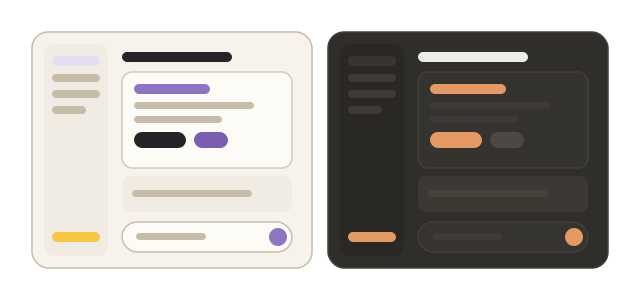
A warm palette for the DeepSeek Harness Web UI: cream surfaces with ink-black primary buttons and a soft purple accent in light mode, warm charcoal surfaces with an amber accent in dark mode.
It is a theme token layer, not a theme entry: Settings → Appearance gains no extra row. Pick Light, Dark, or System there and the palette follows. Text stays on its own tokens, so nothing is drawn on a wash.
Install
From this repository:
dsh plugin --profile <your-profile> add https://github.com/Le-Overdue/DSH-theme
After the package is published to npm, the short form works too:
dsh plugin --profile <your-profile> add dsh-overdue-theme
Installed bundles load after a reload of the Web UI. Turn it off in Settings → Plugins; turning it off removes the token layer.
What it changes
- The
--dsw-*colour tokens for both color schemes: surfaces, borders, brand and buttons, labels, states, charts, Markdown and code blocks, scrollbars, and the illustration family. - One small
<style>rule that scales icon glyphs on hover (transform only, honoursprefers-reduced-motion).
Tokens that later dsh releases add are not overridden and keep the built-in palette.
What it does not do
- No network access, no telemetry.
- No settings surface, no stored data.
- No host-side code:
index.jsis an emptyapply(), the whole feature lives inclient.js.
Compatibility
Built against dsh 0.2.2-rc.5. It only uses the public ctx.theme.overrideTokens Client service, so it should keep working across 0.2.x releases; reinstall or reload after upgrading dsh.
License
MIT
中文说明
用 Overdue 暖色系重绘 DSH 网页界面:浅色是奶油底色、墨黑主按钮配柔和紫强调,深色是暖炭底色配琥珀强调。
它是一个变量图层而不是一个主题条目,所以「设置 → 外观」里不会多出一项:在那里选浅色 / 深色 / 跟随系统,配色自动跟随。要停用在「设置 → 插件」里关掉本项。
不联网、不加设置项、不保存数据;Host 半边是空实现,全部逻辑在 client.js 里。
Plugins associés
dsh-wallpaper-engine
elysia395/dsh-wallpaper-engine
dsh-deep-whale (maid-atelier)
small-tailqwq/dsh-deep-whale
dsh-claude-style
nwflower/dsh-claude-style
dsh-deep-whale
small-tailqwq/dsh-deep-whale