bloomtutor
li-evan/bloomtutor
Bloomtutor est un tuteur IA open source pour l’apprentissage personnalisé, avec des leçons adaptatives de style socratique pour apprendre tout sujet. Comprend une Skill Claude Code et une application Web auto-hébergée.
Installer
dsh plugin --profile web add github:li-evan/bloomtutorREADME

Hire a private AI tutor for anything you want to learn.
Your AI reads how you actually learn — and teaches the next lesson just for you.
Built on Bloom's 2-Sigma research: 1-on-1 tutoring = top 2%.





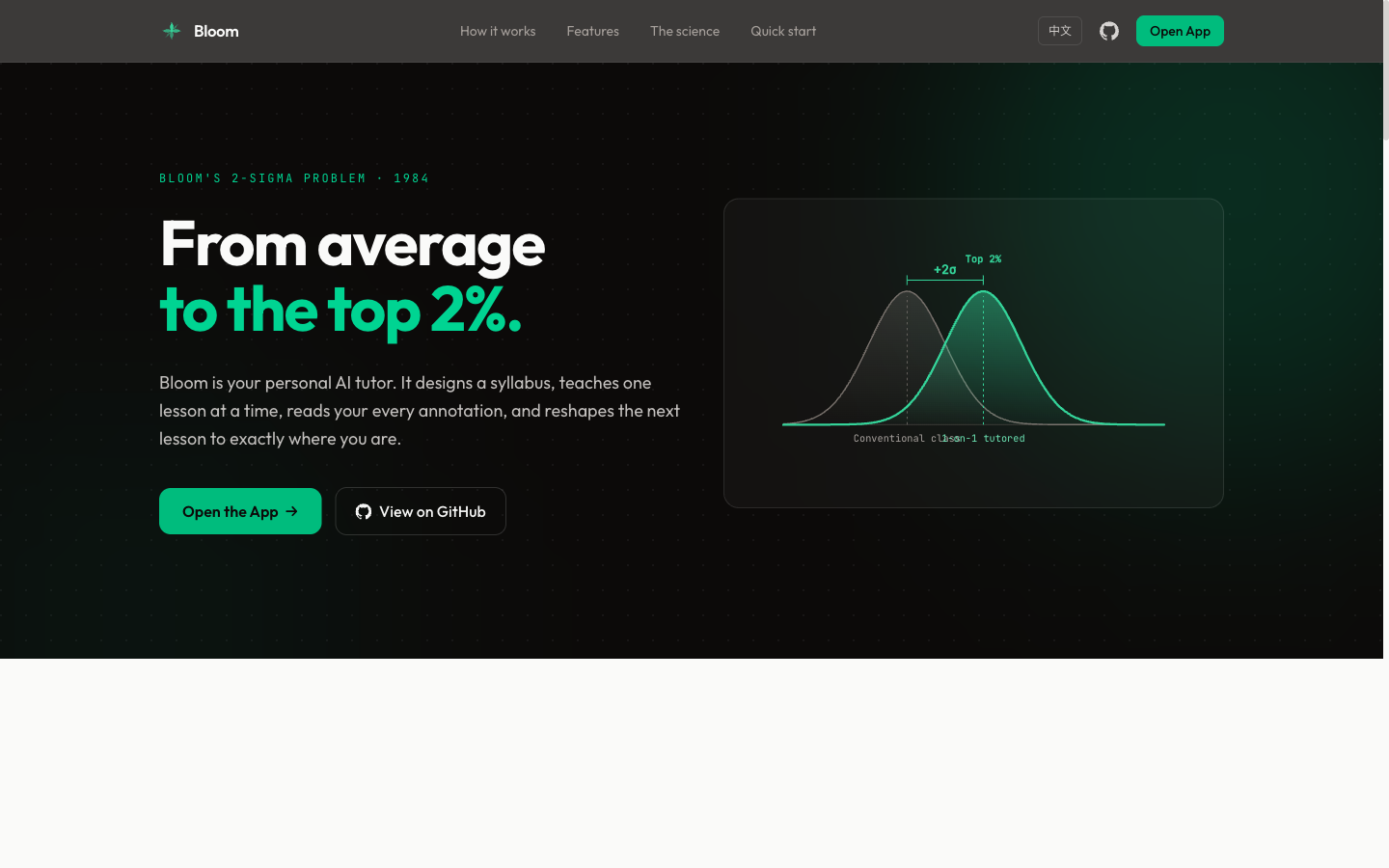
In 1984, educational psychologist Benjamin Bloom discovered that students receiving one-on-one tutoring scored 2 standard deviations (+2σ) above the classroom average — jumping to the top 2%. Bloom called this the "2 Sigma Problem": the effect is proven, but personal tutors don't scale.
Bloom solves this with AI. It generates a structured syllabus, delivers lessons one at a time, reads your annotations and feedback, then tailors the next lesson to your exact understanding level — just like a real tutor would.
Two Ways to Use
| Mode | Setup | Best for |
|---|---|---|
| CLI | Claude Code (or DeepSeek Harness) + terminal | Power users who like Markdown editors |
| Web | Browser (Next.js + FastAPI), self-hosted | Visual learners, your own materials and PDFs |
Both follow the same flow: syllabus → lesson → annotate → feedback → next lesson → evaluation → summary.
Quick Start: CLI Mode
Requires only Claude Code. No backend.
git clone https://github.com/Li-Evan/BloomTutor.git
cd BloomTutor

# Install the tutor skill locally for this clone
mkdir -p .claude/skills
cp -R skills/bloom-tutor .claude/skills/

claude
Then say: Create a new folder and help me learn [any topic]
Or install it as a plugin (bundles bloom-tutor plus the learn-* skills) — in Claude Code:
/plugin marketplace add Li-Evan/BloomTutor
/plugin install bloom@li-evan
Or use it in DeepSeek Harness: this repository is also the bloomtutor-dsh plugin, with the same skills:
dsh plugin --profile web add github:Li-Evan/BloomTutor
Details in integrations/deepseek-harness.
See GUIDE.md for the full walkthrough.
Quick Start: Web Mode
The web app is a self-hosted, single-user tutor: no accounts, no billing. You bring an API key for any OpenAI-compatible model; everything you create stays in your own database.
Prerequisites
- Python 3.11+ with uv
- Node.js 20+ with pnpm
- An API key for any OpenAI-compatible chat model (OpenAI, DeepSeek, Qwen/DashScope, Moonshot, a local Ollama, …)
Setup
git clone https://github.com/Li-Evan/BloomTutor.git
cd BloomTutor

make setup          # creates .env with a random BACKEND_JWT_SECRET, installs backend and frontend deps
# edit .env: fill in LLM_API_KEY, LLM_BASE_URL and LLM_MODEL

make dev-backend    # terminal 1: runs the database migrations, then the API on 127.0.0.1:8000
make dev-frontend   # terminal 2: the web app on http://localhost:3000
Open http://localhost:3000, click New course, and start learning.
Docker
make setup                   # or: cp .env.example .env and fill it in yourself
docker compose up -d --build # then open http://localhost:3000
Data lives in the bloom-storage volume (a SQLite database plus the images inside your materials). To use Postgres instead, set DATABASE_URL in .env.
Configuration
| Variable | What it does |
|---|---|
LLM_API_KEY, LLM_BASE_URL, LLM_MODEL | The model used for syllabi, lessons and answers |
LLM_FAST_MODEL | Optional smaller model for the knowledge map, course placement and selection translation |
PDF_READING_MODEL | Optional vision model for "PDF reading" (page images → Markdown) |
LLM_EXTRA_BODY | JSON passed as extra_body on every call, e.g. {"thinking":{"type":"disabled"}} for DeepSeek |
BACKEND_JWT_SECRET | Shared by the frontend server and the backend; the backend only accepts tokens signed with it |
DATABASE_URL | Defaults to backend/storage/bloom.sqlite3 |
LANGFUSE_* | Optional tracing of every model call to Langfuse |
Security
Bloom has no login: anyone who can open the web app is you. Keep it on localhost, or put it behind something that authenticates (a VPN, Tailscale, or a reverse proxy with basic auth) before exposing it. The backend is never published by docker compose; it only answers requests signed with BACKEND_JWT_SECRET.
Upgrading from the previous (Vite) version
The web app was rebuilt on Next.js with a new database schema. The old bloom.db is not migrated; the new app starts with an empty database in backend/storage/.
How It Works
Topic or your materials
Describe a goal (optionally upload materials) → Bloom asks a few clarifying questions
                        ↓
        Outline: what you will be able to do, in order → review / edit it
                        ↓
        Read lesson 1 → highlight and ask → write feedback → answer thought questions
                        ↓
        Click "Done reading" → the next lesson reviews your answers, answers your highlights,
        follows your feedback and moves on
                        ↓
        Repeat until every mastery item is covered ✅ → evaluation → course summary
Project files, web articles, PDF reading
Upload files / a folder / a link / PDFs → each one becomes a page (no outline)
                        ↓
        Read → highlight and ask, or ask about the whole page → mark as read, archive
                        ↓
        What you read feeds the knowledge map and next-step suggestions
Features
Ways to start a course
- Topic — describe what you want to learn; Bloom asks a few clarifying questions about your goal, then designs an outline at the depth you pick (simple / standard / deep)
- Your materials — upload PDFs, Word, PowerPoint, Excel, EPUB, Markdown or text (or a ZIP); Bloom reads everything into a knowledge pack and grounds the outline and lessons in it, with source citations
- Project files — upload files or a whole folder; each file becomes a page you can read and ask about, no outline needed
- Web articles — paste a link to import the article text and images, or use the browser clipper to save the page you are reading
- PDF reading (experimental) — a vision model turns each PDF page into reflowable Markdown with formulas, tables and figures, next to the original PDF
Learning
- Outline first — review the outline before lesson 1; edit it or tell Bloom how to change it
- Adaptive lessons — each lesson reviews your answers to the last one's questions, answers what you highlighted, and follows your feedback (shorter, more examples, slower…); the last lesson is an evaluation, then a course summary
- Highlight Q&A — select any passage (also inside PDFs) to ask; keep asking follow-ups in the same thread; mark passages without asking
- Ask this lesson — a chat about the whole lesson or file, no selection needed
- Selection translation — translate a passage into the interface language, with what it means in context and the word roots of a term
- Teaching style — presets (concise, analogy, rigorous…) or your own instructions, for every course
- Reading comfort — table of contents, reading time, text size, fonts, light / dark theme, Chinese / English interface
Seeing the whole
- Knowledge map — every course is placed on a shared tree of knowledge (a frozen snapshot of Wikipedia's Vital Articles), with the topics you actually read and neighbouring directions to explore
- Next steps — three course-ready suggestions grown from your history; save them to a wishlist or start one
- User center — activity heatmap and streaks, all your highlight notes in one place, export to Markdown
- Material folders — move, rename, edit, archive or delete files in material courses
Skills
Bloom ships a set of portable Claude Code skills in skills/ — self-contained capability packs you can copy into ~/.claude/skills/ (global) or any project's .claude/skills/ and use anywhere.
| Skill | What it does |
|---|---|
| bloom-tutor | The full interactive tutoring system as one skill — syllabus → adaptive lessons → ??? annotations → evaluation → summary. CLI mode, packaged and portable. |
| learn-deep | Default deep-dive entry — runs all five lenses below in one pass, then helps you pick a direction |
| learn-crossover | Learn a new concept by leveraging what you already know (structural analogies) |
| learn-occam | Decide whether / how deeply something is worth learning (ROI, just-enough) |
| learn-graph | Build a knowledge-graph map of a field plus a learning path |
| learn-prototype | Learn by building the crappiest working prototype, then iterating |
| learn-feynman | Verify true understanding by explaining it back |
Each folder is dependency-free: copy it into a skills directory, then just talk to Claude Code (e.g. "help me learn X", "I'm done reading"). The same folders also run in DeepSeek Harness through the bloomtutor-dsh plugin.
Tech Stack
| Layer | Technology |
|---|---|
| Backend | Python, FastAPI, SQLAlchemy 2, Alembic; SQLite by default, Postgres supported |
| Frontend | Next.js 15 (App Router), React 19, Tailwind CSS 4, Radix UI, next-intl, pdf.js |
| AI | Any OpenAI-compatible chat completions API |
| Container | Docker, docker compose |
| Font | Outfit, Public Sans, JetBrains Mono |
Commands
make setup            # create .env, install dependencies
make dev-backend      # migrations + API with hot reload (127.0.0.1:8000)
make dev-frontend     # web app dev server (localhost:3000)
make test             # backend pytest + frontend tests
make up / make down   # docker compose start / stop
Project Structure
├── GUIDE.md                # CLI usage guide
├── package.json            # makes the repo the bloomtutor-dsh DeepSeek Harness plugin (no app code)
├── .env.example            # configuration template
├── backend/
│   ├── app/                # FastAPI app: courses.py (course engine), knowledge*.py / coordinate.py (knowledge map),
│   │                       # lesson_chat.py, translate.py, recommendations.py, uploads / web_import / document_import ...
│   ├── alembic/            # database migrations (the second one imports the knowledge tree)
│   ├── data/knowledge/     # the knowledge tree release (Wikipedia Vital Articles level 5 snapshot)
│   └── tests/
├── frontend/
│   └── src/
│       ├── app/[locale]/   # pages: /learn (courses, lessons, map, next), /me (user center)
│       ├── components/     # learn/, me/, site/ (header, footer), ui/
│       └── lib/            # API clients, lesson logic
├── extension/              # browser web clipper
├── docs/ARCHITECTURE.md    # how the pieces fit together
├── example/                # pre-built topics for CLI mode
├── integrations/deepseek-harness/  # the bloomtutor-dsh plugin for DeepSeek Harness
├── site/                   # marketing website (standalone Astro static build, decoupled from the app)
└── skills/                 # portable Claude Code skills (bloom-tutor + learn-*)
The Science
| Concept | What it means |
|---|---|
| Bloom's 2 Sigma | 1-on-1 tutoring = +2σ performance over classroom |
| Mastery Learning | Don't move on until the concept is truly understood |
| Socratic Method | Ask questions, don't hand answers |
| Spaced Retrieval | Thought question reviews at lesson start reinforce memory |
| Adaptive Path | Content adjusts to individual feedback in real-time |
Star History
License
MIT. Third-party components, fonts and the knowledge-tree data keep their own licences: see THIRD_PARTY_NOTICES.md.
Plugins associés
Mole (mole)
tw93/mole
nuwa-skill
alchaincyf/nuwa-skill
huashu-design
alchaincyf/huashu-design
auto-claude-code-research-in-sleep
wanshuiyin/auto-claude-code-research-in-sleep