dsh-plus-plus
limlnx523/dsh-plus-plus
La commande slash /dshpp rapporte l’usage de session et de tokens, le taux de succès du cache et le coût estimé à partir des journaux de session du harness. Le dépôt fournit aussi une CLI et une console Web locale pour gérer cycle de vie, fournisseurs, sessions et sécurité des plugins.
Installer
dsh plugin --profile web add github:limlnx523/dsh-plus-plusREADME
dsh-plus-plus

DSH++ — a local-first control plane for DeepSeek Harness (dsh).
It runs on your machine, reads the same $DSH_HOME state the harness does, and gives you the operational layer the harness doesn't ship.
Why you need it
- You can't easily see which plugins are installed, or what each one can reach (filesystem, shell, network, credentials).
- A config change, a new plugin, a prompt tweak, or a harness upgrade can silently break a workflow — and you only find out later.
- Credentials, config, and sessions live in
$DSH_HOMEwith no snapshot/rollback or usage/cost view.
Core capabilities
- Plugin security auditing —
dshpp auditinventories installed plugins, classifies the capabilities (seams) each one touches, grades risk, and flags what to remove. - Workflow regression testing —
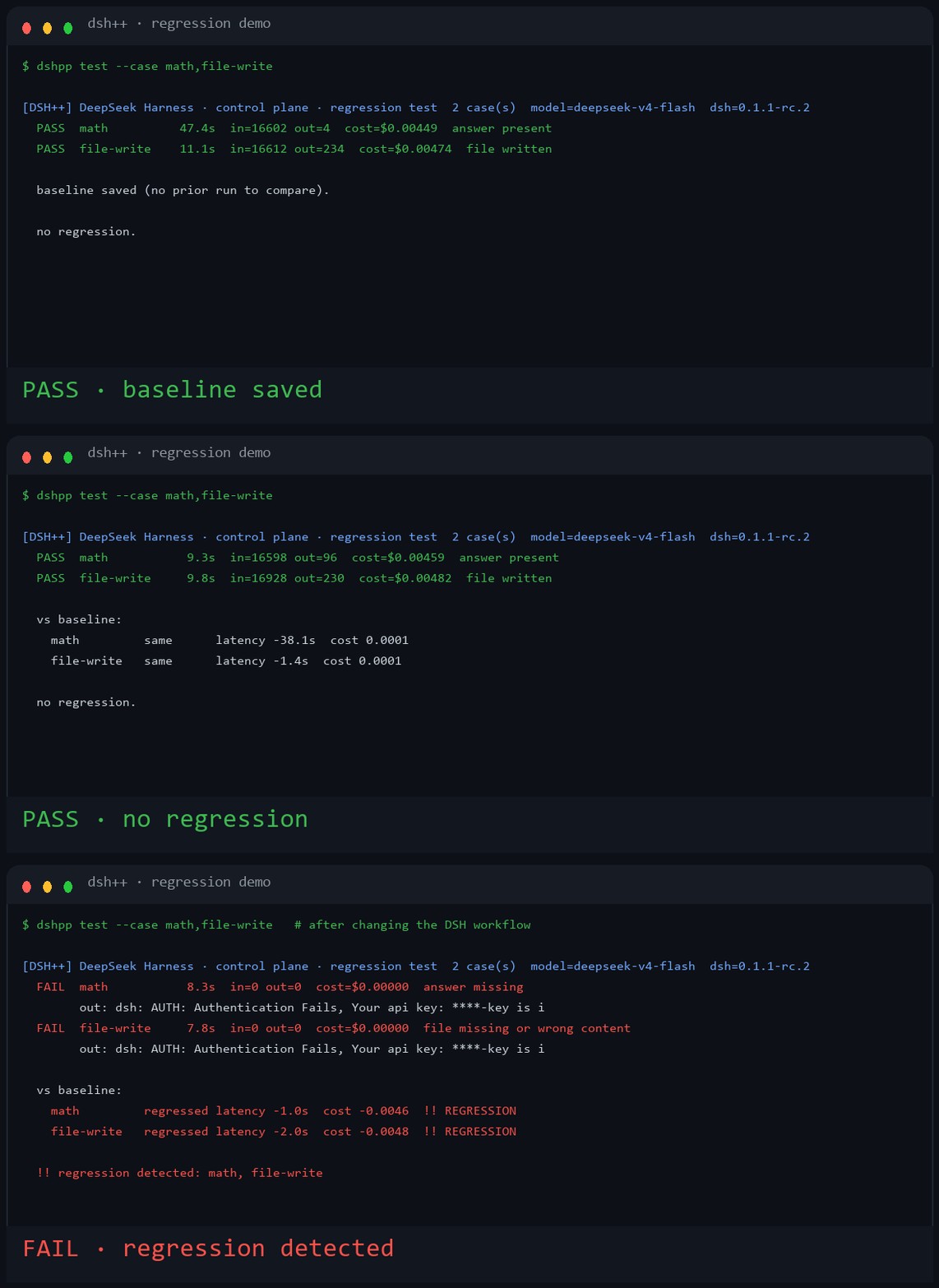
dshpp testruns a fixed set of harness tasks against your current DSH configuration, compares to a stored baseline, and reports regressions. It exits non-zero on a regression, so it can gate CI. - Lifecycle management — detect the install, snapshot and roll back
$DSH_HOMEconfiguration, run diagnostics, and manage providers and credentials.
Install & go
npm i -g .
dshpp status   # overview of the DSH install
dshpp audit    # plugin security risk report
dshpp test     # regression-test the DSH workflow vs baseline


Demo
Change a DSH workflow, run dshpp test, and it finds the regression:
Requirements
- Node.js >= 20.
- No third-party runtime dependencies. Built-in
node:zlibdecodes the concatenated-zstd session logs.
Install
npm i -g .
Or install it as a harness plugin (adds a /dshpp slash command):
dsh plugin --profile web add github:limlnx523/dsh-plus-plus
Example
$ dshpp status

[DSH++] DeepSeek Harness · status
----------------------------------------------------
  DSH home        C:\Users\you\.dsh
  dsh CLI         present (C:\Users\you\AppData\Roaming\npm\dsh)
  .env            found — 1 key(s), 1 secret(s) hidden
  settings.yaml   C:\Users\you\.dsh\settings.yaml
  provider keys   (none detected)
  backups         2 snapshot(s)
  DSH++ home      C:\Users\you\.dsh-plus-plus
----------------------------------------------------
  health: run `dshpp doctor` · console: run `dshpp web`

$ dshpp audit

[DSH++] DeepSeek Harness · control plane · plugin security audit  (197 plugin(s) · dsh 0.1.1-rc.2)
  risk: 高=8  中=69  低=120
  [高] @deepseek-ai/dsh-client-connection@0.1.1-rc.2  官方  seams=network,shell,credentials,goal
  [高] @deepseek-ai/dsh-host-apiproxy@0.1.1-rc.2  官方  seams=network,shell,credentials,llm
  [高] @deepseek-ai/dsh-tool-cordis@0.1.1-rc.2  官方  seams=network,shell,credentials,sandbox,llm,goal

  解读: 高/中风险插件可读取密钥、执行 shell 或访问网络。
  只安装并保留信任的插件;识别为高风险的插件建议停用或移除。

$ dshpp test

[DSH++] DeepSeek Harness · control plane · regression test  6 case(s)  model=deepseek-v4-flash  dsh=0.1.1-rc.2
  PASS  math         4.9s  in=16598 out=108  cost=$0.00460  answer present
  PASS  file-write    6.4s  in=16944 out=256  cost=$0.00470  file written
  PASS  file-read     5.9s  in=16888 out=198  cost=$0.00470  value read
  PASS  edit          7.2s  in=17020 out=406  cost=$0.00474  replaced
  PASS  glob          7.7s  in=16746 out=180  cost=$0.00466  two files counted
  PASS  shell-echo    7.9s  in=16790 out=200  cost=$0.00468  echoed

  vs baseline:
    math         same  latency +0.4s  cost 0.0000
    file-write   same  latency -0.1s  cost 0.0000
    file-read    same  latency +0.2s  cost 0.0000
    edit         same  latency 0.0s   cost 0.0000
    glob         same  latency +0.1s  cost 0.0000
    shell-echo   same  latency -0.2s  cost 0.0000

  no regression.
CLI
dshpp status                      Overview (home, env, settings, backups)
dshpp doctor                      Diagnostics checklist
dshpp env ls [--show]             List credentials (masked unless --show)
dshpp env set KEY=VALUE           Add/update a credential
dshpp env rm KEY                  Remove a credential
dshpp backup                      Create a timestamped snapshot
dshpp backup ls                   List snapshots
dshpp backup restore <id>         Restore a snapshot (auto pre-snapshot)
dshpp backup rm <id>              Delete a snapshot
dshpp providers ls|export|probe   List providers, export config, probe endpoint models
dshpp usage                       Token/cost aggregate from session logs
dshpp budget [set <usd>]          Show or set the monthly budget
dshpp sessions                    List session logs
dshpp sessions export <id>        Export a session as text
dshpp plugins                     Inventory installed plugins + seam audit
dshpp audit                       Security risk report for installed plugins
dshpp test [--case <id>]          Regression-test the DSH workflow vs baseline
dshpp web [--port N] [--no-open]  Start the local web console (loopback only)
Web console
dshpp web serves a local console at http://127.0.0.1:4848/. It binds to loopback only. It surfaces providers, masked credentials, backups, usage and cost, sessions, plugins, and regression results. Secrets are masked unless you opt in with --show, and the console never returns raw key values over the API.
Configuration
- Harness home:
$DSH_HOMEor~/.dsh - Credentials:
$DSH_HOME/.env(never committed; snapshots warn when they include it) - dsh-plus-plus state:
~/.dsh-plus-plus/(backups, provider manifest, regression baseline)
Development
npm link
node bin/dshpp.mjs --help
npm test
License
MIT
Plugins associés
DeepSeek-Balance-Whale-Widget
meteornox/deepseek-balance-whale-widget
dsh-context
bowenliang123/dsh-context
dsh-cost-meter
han-1413141/dsh-cost-meter
dsh-damage-pulse
wssfk12138/dsh-damage-pulse