dsh-neonforge
liyuk/dsh-neonforge
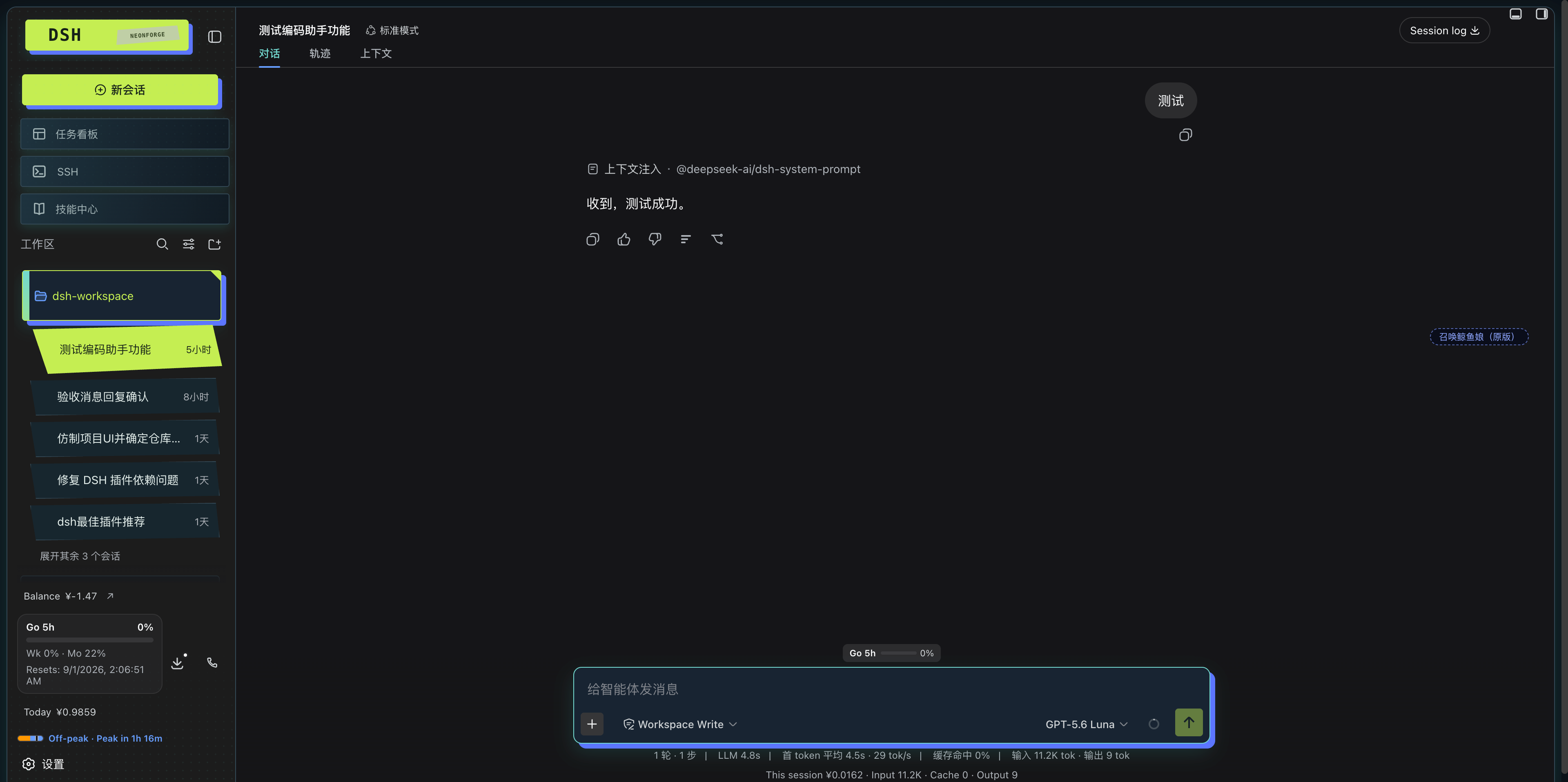
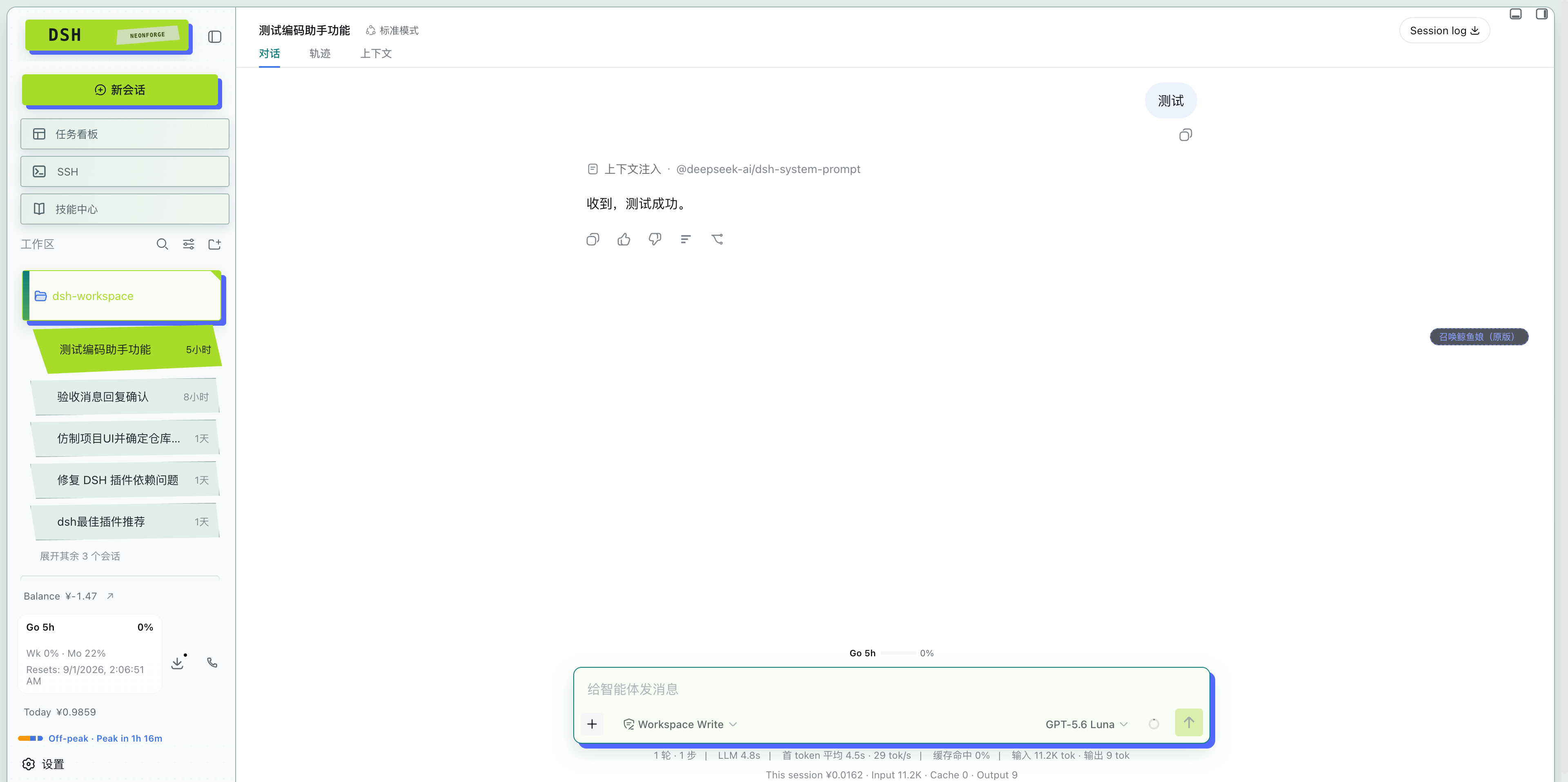
Habillage visuel en collage de fanzine post-punk pour l’atelier DSH Web.
Installer
dsh plugin --profile web add github:liyuk/dsh-neonforgeREADME
DSH Neonforge
DSH Neonforge is a visual-layer fork of the DSH Web workbench. It keeps the existing runtime, plugin composition, and session capabilities while applying a dark industrial console language with restrained cyberpunk accents. It does not copy another project's code, branding, copy, or assets.
See the Neonforge UI design reference.
Project materials and the community announcement draft are indexed in docs/neonforge/README.zh.md.
English | 中文
At a glance
Neonforge is an independent community visual skin for the DeepSeek Harness Web profile. It changes the presentation of the workbench while keeping DSH sessions, tools, permissions, workspaces, Agent runtime, and plugin composition intact.
- Dark and light themes with a shared post-punk industrial-console language.
- Stronger hierarchy for workspace folders, sessions, Composer controls, and runtime states.
- Scoped CSS and DSH extension points so the skin does not replace the host runtime.
- A Settings toggle and
prefers-reduced-motionsupport for long working sessions.
Install
dsh plugin --profile web add npm:@liyuk/dsh-neonforge
dsh web
Open DSH Settings and choose Neonforge 皮肤 to enable the skin and switch between Dark and Light modes.
For the project brief, design notes, repository map, and community announcement, see the Neonforge project documentation. The announcement draft is available in English and 中文.
DeepSeek Harness (dsh) is an open-source agent harness developed by DeepSeek AI.
It uses an architecture where everything is a plugin, and is powered by Cordis, whose design is described in A Programming Paradigm for Spatiotemporal Composability.
Developer preview
DeepSeek Harness is currently in developer preview and is iterating rapidly. THERE WILL BE COMPATIBILITY-BREAKING CHANGES.
Run
Run from npm
Install Node.js, then run:
npx @deepseek-ai/dsh web
The command starts the Web UI at http://127.0.0.1:3080 by default and opens it in the default browser for a local launch. An SSH launch only prints the host URL because the SSH client or editor owns the local forwarded address. Pass --no-open to run the server without opening a browser. See Web UI guide.
Run from source
To run from a repository checkout:
git clone https://github.com/deepseek-ai/deepseek-harness.git
cd deepseek-harness
pnpm install
pnpm run build
pnpm dsh web
pnpm run build prepares the repository artifacts. pnpm dsh web uses those built artifacts without rebuilding.
Community and support
- Feel free to submit feedback or bug reports through GitHub Discussions.
- Add the
dsh-plugintopic to your plugin repository for discoverability. - Join DeepSeek Harness Discord community.
Contributing
See CONTRIBUTING.md.
Development
Start with the development guide and architecture documentation.
For agents, follow AGENTS.md.
License
Third-party dependencies and their licenses are disclosed in THIRD_PARTY_NOTICES.md.
Plugins associés
dsh-wallpaper-engine
elysia395/dsh-wallpaper-engine
dsh-deep-whale (maid-atelier)
small-tailqwq/dsh-deep-whale
dsh-deep-whale
small-tailqwq/dsh-deep-whale
dsh-claude-style
nwflower/dsh-claude-style