dsh-provider-quota
lizhouai/dsh-provider-quota
Plugin DeepSeek Harness : panneau en direct du solde/quota du compte pour chaque fournisseur LLM configuré (widget de barre latérale, intervalle de rafraîchissement configurable).
Installer
dsh plugin --profile web add github:lizhouai/dsh-provider-quotaREADME
English · 简体中文



dsh-provider-quota
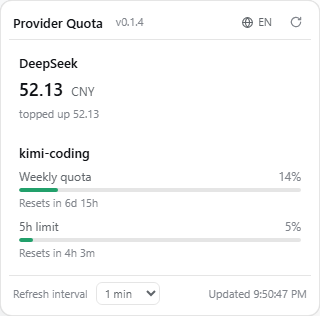
Every provider's balance, one glance away. A DeepSeek Harness plugin that shows the live account balance / quota of every configured LLM provider in the Web GUI sidebar — no more logging into each provider console to check whether you are about to run out of credit mid-session.
Features
- Auto-detection — enumerates the provider routes registered in the current profile (
ctx.llm); zero configuration for well-known routes. - Per-kind wire adapters:
- DeepSeek (
deepseek-official, …) →GET {baseURL}/user/balance(total / granted / topped-up balance) - Kimi Code subscription (
kimi-coding) →GET {baseURL}/v1/usages(weekly quota and rate-limit windows, with reset countdown) - Moonshot open platform (
moonshotai-cn/moonshotai) →GET {baseURL}/users/me/balance
- DeepSeek (
- Credentials stay safe — API keys are resolved per request through the harness credentials service (environment variables /
~/.dsh/.credentials.yaml); never cached, never written to disk. - Sidebar widget — an entry button in the sidebar footer opens the quota panel; the button shows a red dot when any provider errors out.
- Version badge — the panel header shows the running plugin version next to the title, so it is obvious which release is loaded.
- Bilingual panel — built-in Chinese/English UI; follows the harness language by default, with a one-click toggle in the panel header (persisted in localStorage).
- Configurable refresh — adjustable in the panel (15s–30min, persisted in localStorage); the default comes from the plugin config.
- Manual providers — add arbitrary gateways (e.g. a self-hosted DeepSeek-compatible endpoint) via config.
Screenshots
Install
[!NOTE] Requires an existing DeepSeek Harness installation.
npm
dsh plugin --profile web add dsh-provider-quota@latest
Build from source
git clone https://github.com/lizhouai/dsh-provider-quota.git
cd dsh-provider-quota
pnpm install
pnpm build
pnpm pack   # produces dsh-provider-quota-<version>.tgz
dsh plugin --profile web add ./dsh-provider-quota-<version>.tgz
Install the tarball, not the repo directory: dsh plugin add . links the repo, whose own node_modules then shadows the harness's shared @deepseek-ai/cordis instance and the host half never registers (RPC 404). The link form is still handy for client-only UI iteration — the browser bundle is self-contained, so a rebuild + page refresh picks it up — but switch to the tarball (or the npm release) whenever you need the host half. If pnpm fails with EPERM ... symlink while replacing a linked install, delete the stale node_modules/dsh-provider-quota junction in the profile directory and retry.
Restart dsh web after changing the plugin set (a plugin add/remove requires a restart; afterwards, code changes only need a rebuild + re-add + page refresh).
Upgrade
dsh plugin --profile web add dsh-provider-quota@latest
Then restart dsh web and refresh the page. If the release you want was published very recently, your profile's supply-chain cooldown (minimumReleaseAge) may silently keep the older version — pin the exact version instead (dsh plugin --profile web add dsh-provider-quota@0.1.5) and dsh will exempt it automatically. The version badge in the panel header confirms which release is actually loaded.
Configuration
Defaults work out of the box: the plugin auto-detects every provider route of the active profile. A trusted profile can tune behavior in ~/.dsh/profiles/web/cordis.patch.yml:
- insert:
    - id: provider-quota
      name: dsh-provider-quota
      config:
        refreshSeconds: 60   # suggested panel refresh interval (5–86400)
        autoDetect: true     # enumerate provider routes from the llm registry
        providers: []        # manual specs; an id matching a detected route overrides it
| Field | Type | Default | Description |
|---|---|---|---|
refreshSeconds | number | 60 | Suggested widget refresh interval in seconds (5–86400) |
autoDetect | boolean | true | Enumerate live provider routes from the llm registry |
providers | array | [] | Manual provider specs: {id, kind, baseURL, apiKeyEnv, displayName?, enabled?}, kind ∈ deepseek / kimi-coding / moonshot |
The same fields can be hot-updated under the provider-quota: namespace in ~/.dsh/settings.yaml.
Adding a manual provider
config:
  providers:
    - id: my-deepseek-gateway
      kind: deepseek
      baseURL: https://my-gateway.example.com
      apiKeyEnv: MY_GATEWAY_KEY
      displayName: My Gateway
How it works
- Host half (
src/index.ts):QuotaService extends TypertRemoteServiceexposesquota/listvia@Remote('list')(SRC mode, no codegen). Config is declared with schemastery, andinstallSettingsSectionenables hot updates from settings. - Client half (
src/client/): awindow.__ModuleLoader__.load({id, factory})bundle (built by tsdown) registers into thesidebar.footer.actionslot and pollsquota/listthroughctx.connection.rpc.call('/api', 'quota/list', {args:{}})on its own interval. The service stays stateless — every poll fetches live values.
License
Plugins associés
DeepSeek-Balance-Whale-Widget
meteornox/deepseek-balance-whale-widget
dsh-context
bowenliang123/dsh-context
dsh-cost-meter
han-1413141/dsh-cost-meter
dsh-damage-pulse
wssfk12138/dsh-damage-pulse