dsh-todo-float-ball
loyalchiiina/dsh-todo-float-ball
Bulle flottante avec todo de session DSH : done/total, titre de tâche active en capsule et anneau de progression. Clic ouvre/replie, clic droit change de mode. États : en cours (pulse)/done/pending/vide. Plans remplacés archivés hors progression, masquables/effaçables/restaurables; autres sessions épinglables côte à côte. Source prioritaire runtime sessions projection, panneau todo officiel en secours (liste complète même barre repliée). Texte auto/noir/blanc, snap en bas à droite sur demande, déplacement jusqu’en haut. 130 skins partagés; 2 officiels dark/light suivent le thème client. Sync par bulle : skin partagé ou propre. Isolation Shadow DOM, position par profil; même sur desktop/web.
Installer
dsh plugin --profile web add github:loyalchiiina/dsh-todo-float-ballREADME
dsh-todo-float-ball
AI 在跑长任务,计划清单却总在眼前消失?把它变成一颗常驻桌面的进度球。
把 DeepSeek Harness(DSH)的任务清单搬到桌面右下角的一颗悬浮球上:已完成/总数 常驻可见、当前进行中的任务名直接写在球面上,还能拖、能缩成胶囊、能换 130 款皮肤。



English | 简体中文
效果图
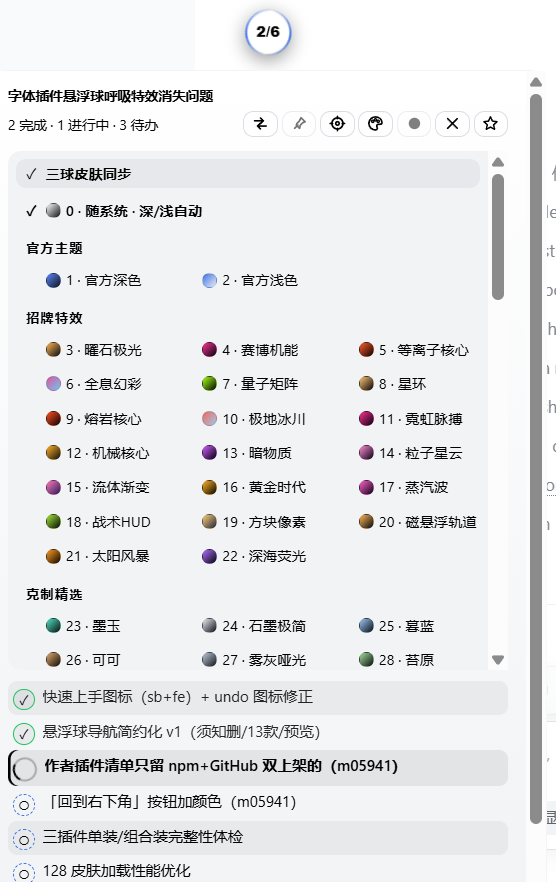
皮肤菜单 + 悬浮球
130 款皮肤分 8 组,菜单首行是「三球皮肤同步」开关,第二行是「0 · 随系统 · 深/浅自动」。
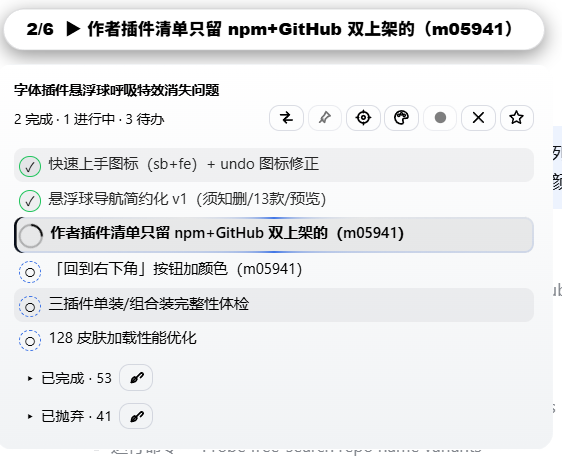
胶囊态 + 面板展开
右键球体收起为横向胶囊(进度条 + 当前任务名);单击展开完整任务面板,进行中的那一项带旋转描边环。
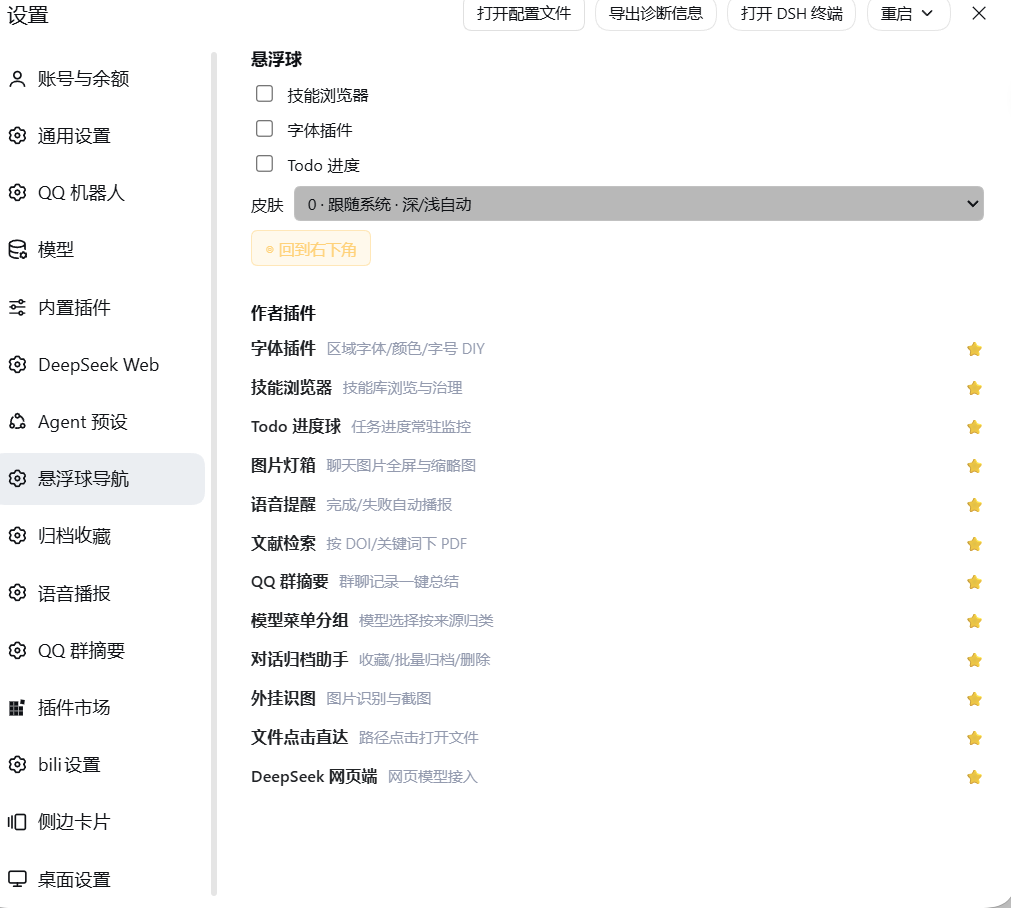
设置页「悬浮球导航」
设置页里的共用分区:三球显隐、皮肤下拉、◎ 回到右下角、作者插件清单。
一句话说明
DSH 里让 AI 干活时,它会用内置的 todo_write 记一份任务清单。官方界面把这份清单渲染成输入框上方的一小条——但那一小条很容易被忽略、会随对话滚走、助手还在干活时它就已经折叠了。你被迫反复翻对话找"现在到底做到哪一步了"。
dsh-todo-float-ball 把这份清单搬到一颗常驻悬浮球上:
| 你遇到的 | 这个插件怎么解决 |
|---|---|
| 计划条随对话滚走,找不到进度 | 球常驻桌面右下角(可拖拽,位置跨重启记忆,拖出屏幕自动拉回) |
| 想知道"几项做完了",得展开细看 | 球面直接显示 已完成/总数,外圈进度环同步可视化 |
| 不知道助手当前在忙哪一项 | 球面显示当前进行中任务的名称;胶囊态只显示这一行 |
| 屏幕空间紧张,球占地方 | 右键切成横向胶囊:一条进度条 + 任务名 |
| 同时跑多个会话,来回切换看进度 | 固定多个会话,面板并排显示多栏进度,一屏看住所有并行任务 |
| 任务做完没做完,颜色分不清 | 状态色一眼可读:橙脉动=进行中 / 绿=全部完成 / 蓝=只有待办 / 灰=暂无清单 |
| 想回看之前排过的任务 | 历史归档:新计划覆盖旧计划时,旧任务自动折叠进"已完成历史 / 被抛弃历史",不会凭空消失 |
| 皮肤看腻了 / 和别的插件风格不搭 | 130 款皮肤(官方主题 / 招牌特效 / 克制精选 + 5 组配色),三球可同步可独立 |
| 浅色皮肤上白字看不清 | 强制字色:自动 / 黑 / 白一键切,官方皮肤下自动锁定 |
它只是一个只读的观察者:插件从不修改官方面板、不改对话内容、不干扰其他插件。
为什么值得装
- 专治"长任务失联" —— DSH 的 AI 会自动续跑很多轮,你可能十几分钟不看屏幕。球上的橙灯和
3/8让你一眼就知道还在跑、跑到哪了。 - 多会话并行不再瞎猜 —— 固定标签把两栏进度并排摆在同一个面板里,不用左点右点来回切。
- 三球视觉统一 —— 与姊妹插件
dsh-skill-browser、dsh-font-enhancer共用同一套 130 款皮肤目录,三个球可以一起换肤、风格一致,也可以让某个球独立。 - 双端同一份代码 —— 桌面端(Electron)和网页端行为一致。
- 零侵入零配置 —— 装上即用,不写配置文件也不改官方 UI;
Shadow DOM + all:initial做样式隔离,与你其他主题/皮肤插件互不干扰。 - 数据来源可靠 —— 三路同步:主 = 运行时
sessions服务的权威投影帧;兜底 1 = 官方 todo 面板的 DOM 观察;兜底 2 = 传输帧被动拦截。兜底只在权威通道对该会话尚无数据时才发言。官方那一条折叠了、甚至没渲染,球上依然是完整清单。
功能详解
悬浮球与胶囊态
- 圆形悬浮球常驻窗口右下角(默认
right:18px; bottom:18px),随时可见。 - 球面实时显示
已完成/总数,下方一行是当前进行中任务的名称(超长自动截断)。 - 外圈进度环用同一比例可视化进度(
conic-gradient+ 百分比遮罩),与球面数字同源。 - 状态色:橙色脉动 = 正在干活 / 绿色 = 全部完成 / 蓝色 = 只有待办 / 灰色 = 暂无清单。
- 可拖动:按住拖到任意位置,坐标按 profile 存
localStorage,重启后恢复;保存的坐标跑到屏幕外时会自动拉回视口内(防"球丢了")。 - 胶囊态:右键球体在【圆形球】与【横向胶囊】之间切换。胶囊是一条横向进度条 + 任务名 +
已完成/总数,屏幕空间紧张时用。 - 点击展开完整任务面板;再点一下(或按
Esc)收起。
任务面板
- 任务清单:每项带状态图标与配色——✓ 已完成(绿色 + 删除线)、▶ 进行中(橙色)、○ 待办(灰色虚线圈)。
- 进行中旋转描边环:正在执行的那一项外圈有一道绕行描边(
@property --tfb-spin+tfbBorderSpin),一眼看出"就是这条在跑"。 - 已完成历史折叠:
▾ 已完成 · N,默认收起,点标题展开。 - 被抛弃历史折叠:
▸ 已抛弃 · N,被新计划替换掉的未完成任务收在这里。 - 分界线:历史区与当前轮清单之间有一道
── 当前进度 · 5/10 完成 ──分界线(两侧渐隐细线 + 圆角胶囊标签,两套皮肤各自配色,pointer-events:none不挡点击),把"历史贡献"和"官方最新清单"在视觉上一刀切开。 - 行级 ✕ 隐藏、🧹 一键隐藏本区、↩︎ 恢复已隐藏的 N 条、📋 整行复制(复制完整文本,非显示截断)。
- 📌 固定会话:把别的会话也钉到面板里,与当前对话走同一个渲染器,折叠开合与隐藏记录按会话隔离。
- ⇄ 布局切换:上下堆叠 ⇄ 左右并排,偏好写
localStorage,下次打开自动恢复;左右并排时带列标题。
皮肤:130 款,8 组
皮肤菜单(标题栏 🎨 按钮)分组与数量(实测目录,显示序号 1..130 连续):
| 分组 | 数量 | 说明 |
|---|---|---|
| 官方主题 | 2 | 1 · 官方深色 / 2 · 官方浅色,与 DSH 界面同色系 |
| 招牌特效 | 20 | 曜石极光、赛博机能、全息幻彩……自带外圈光带与旋转描边、呼吸动画 |
| 克制精选 | 8 | 墨玉、石墨极简、暮蓝……静态、安静、不抢眼 |
| 浓郁深底 | 38 | 高饱和深色底 |
| 尘埃灰调 | 20 | 低饱和灰调 |
| 柔光深底 | 15 | 柔和暗色 |
| 中性点缀 | 10 | 中性色 + 一点强调色 |
| 浅色纸面 | 17 | 浅色底,适合白天 |
- 0 · 随系统 · 深/浅自动:菜单第二行。跟随
prefers-color-scheme,系统切深浅色时球和面板实时跟着切(解析到「官方深色」或「官方浅色」)。 - 三球皮肤同步:菜单第一行的勾选行。勾选 = 跟随全局皮肤(三球同款,改一个三个一起变);不勾 = 本球独立皮肤,只影响 Todo 球,全局换肤不动它。
- 招牌特效类皮肤自带外圈光带(底部
radial-gradient光带 + 旋转描边),随皮肤自动出现或消失,没有单独的开关——换皮肤就是开关。
强制字色
标题栏的 ◐ 按钮循环切换 自动 → 黑 → 白,作用于面板内外所有文字(球面标签、任务行、折叠行、提示语),解决浅色皮肤白字看不清 / 深色皮肤黑字看不清。
- 自动:跟随皮肤自带的文字色。
- 官方皮肤下自动锁定:选到 1 · 官方深色、2 · 官方浅色,或选「0 · 随系统」解析到官方皮肤时,字色由皮肤强制决定(深色皮肤 → 白字、浅色皮肤 → 黑字),按钮呈锁定态、点击不再切换——官方皮肤本身就带正确的对比度,不需要也不允许手动覆盖。
拖到屏幕顶部也不丢
DSH 桌面端窗口顶部约 40px 是窗口拖拽带(Electron 的 app-region: drag)。球和面板都写了:
.tfb-ball, .tfb-panel, .tfb-theme-menu {
  -webkit-app-region: no-drag;
  app-region: no-drag;
}
所以把球拖到屏幕最顶端也不会点不动、拖不动——否则落在拖拽带上的球会被窗口拖拽逻辑吃掉所有鼠标事件,看着在、实际已经"死"了。
设置页「悬浮球导航」
DSH 设置页里有一个 「悬浮球导航」 分区(settings.section,order: 22)。这个分区由姊妹插件 dsh-skill-browser 注册,本插件只读它写入的共享键,属于三球共用的一块面板:
- 三球显隐:技能浏览器 / 字体插件 / Todo 进度 三个勾选框(没装的插件显示「(未安装)」且置灰)。
- 皮肤下拉:
0 · 跟随系统 · 深/浅自动+ 8 个分组的全部皮肤,等价于三球同步时的全局皮肤。 - ◎ 回到右下角:一键把球归位。
- 作者插件:12 个插件清单(名字 + 一句话描述 + ⭐ 链接)。
装了这一组插件里任意一个,这个分区就会出现;只装 Todo 球而没有
dsh-skill-browser时,用球自己的标题栏按钮(◎ 归位、🎨 皮肤)做同样的事。
标题栏按钮(全部黑白线性图标)
面板标题栏那排按钮都是 stroke: currentColor 的线性 SVG,跟着字色走,不用 emoji:
| 图标 | 动作 |
|---|---|
| ⇄ | 切换面板布局:上下堆叠 / 左右并排 |
| 📌(线性) | 固定 / 取消固定当前会话 |
| ◎ | 归位到右下角 |
| 🎨(线性调色板) | 打开皮肤菜单 |
| ◐ / ● / ○ | 强制字色:自动 / 黑 / 白(官方皮肤下锁定) |
| ✕ | 折叠面板 |
| ☆ | 去 GitHub 点 Star |
快速上手
- 装上就有效果:装好后右下角出现一颗球。没有任务时它是灰色的,显示
✓。 - 让 AI 干活:随便让它做个多步骤任务,它会调用
todo_write,球面立刻变成0/3、1/3……并显示当前那一项的名字。 - 点球看全清单:单击球体展开面板,进行中的那项带旋转描边环;再点收起。
- 右键变胶囊:觉得球挡视线就右键切成横向胶囊,只留一条进度条 + 任务名。
- 换个皮肤:点 🎨 打开皮肤菜单。想跟另外两个球一致就勾上「三球皮肤同步」;想单独一个球漂亮就取消勾选再选。懒得选就点
0 · 随系统 · 深/浅自动。 - 字看不清就调:点 ◐ 在 自动 → 黑 → 白 之间切。(官方皮肤下这个按钮会锁定,是正常行为。)
- 拖到哪都行:按住球拖到顺手的位置,位置会记住;拖到屏幕顶端也不会失效。想归位就点 ◎。
基本用法
- 悬浮球始终固定在窗口角落(默认右下角)。
- 球面实时显示
已完成/总数,下方显示当前进行中的任务名;外圈进度环同步可视化同一比例。 - 单击展开完整任务面板;再点一下(或按
Esc)收起。 - 右键切换到胶囊模式。
- 拖拽到任意位置,按 profile 记忆坐标;拖出屏幕会自动拉回。
- 颜色一眼看状态:橙色脉动 = 正在干活,绿色 = 全部完成,蓝色 = 只有待办,灰色 = 暂无清单。
安装
从 DSH 插件市场安装(推荐)
在 DSH 的插件市场里搜索 dsh-todo-float-ball 或 Todo 进度球,点安装后重启 DSH。
从 npm 安装
npm install dsh-todo-float-ball
然后在你所用 profile 的 package.json(如 %USERPROFILE%\.dsh\profiles\desktop\package.json)里,把 "dsh-todo-float-ball" 同时加进 dependencies 和 dsh.profile.bundles,重启 DSH 生效。
手动安装
把本包目录整体复制进 profile 的 node_modules(必须是真实目录复制——不要用 link: / file: 依赖,会触发 DSH 安装恢复死循环),按上面同样方式注册后重启。
重启后右下角应出现悬浮球。可用下面的地址验证宿主端已挂载:
http://127.0.0.1:<你当前的 DSH 端口>/dsh-todo-float-ball/health
→ {"ok":true,"plugin":"dsh-todo-float-ball","version":"<已安装 package.json 里的版本号>"}
端口要填你自己的。 DSH 桌面端默认 port: 0(每次重启换一个随机端口),没有固定值可抄。可从 DSH 窗口地址栏读取,或在 %USERPROFILE%\.dsh\desktop-preferences.json 里把 port 固定下来。该路由还只接受本机渲染进程的请求,其他请求一律回 403 Browser access is disabled,所以除非你打开 browserAccess,curl 是拿不到的。
适配版本
- DSH 内核(
@deepseek-ai/dsh):0.2.1-rc.3(package.json的engines.dsh已声明>=0.1.7-rc.1) - DSH 桌面端:2.0.20-next(DSH NEXT)
- Node.js:
^22.19.0 || >=24.0.0 - 已在上述版本实测通过;低版本
0.1.7-rc.1及以上兼容。
实现原理
官方的 todo 数据是一条会话投影(session projection):
@deepseek-ai/dsh-tool-todo注册todo_write工具,并在sessionProjections上登记todos投影单元;每次调用向会话日志追加一条todo/write快照;@deepseek-ai/dsh-client-connection把当前值以控制帧广播:{type:"projection", sessionId, key:"todos", value:[{content,status}...]};@deepseek-ai/dsh-client-ui-conversation把它渲染成输入框上方的任务条([data-testid="todo-panel"])。
本插件在两端各挂一个只读探针,不碰任何一端:
- 主路:订阅运行时
sessions服务的权威投影帧(另有 2 秒轮询兜底,防 shell 重建后回调失联)。 - 兜底一(DOM):一个带 200ms 防抖的
MutationObserver盯着[data-testid="todo-panel"]——面板展开时读li[data-status]全量清单;折叠时解析本地化的计数文案(如"1 完成 · 2 进行中",含中文数字解析)。 - 兜底二(传输层):一次性、防御式的
window.fetch包装(clone 响应、只处理文本/JSON)与WebSocket.prototype.onmessage包装(文本帧),把每个载荷送进严格的提取器——只对形如投影帧、todo/write事件、{todos:[...]}快照的对象起反应,其余一律忽略,绝不回写。
所有通道汇入同一个归一化器:过滤出三种合法状态、丢弃空内容、列表无变化时零开销跳过(签名比对)。兜底由 hasPrimaryData() 把关,权威通道有数据即静默。
历史归档的口径:权威通道的一帧就是当前计划的全部(todo_write 是整表替换),所以 snapLen = norm.length,其后的合并项即历史。球面计数、进度环、头部汇总只统计最新快照,历史是纯档案、不进任何计数。
常见问题
悬浮球不出现?
先开上面的 health 地址:能返回说明宿主端正常,是客户端 bundle 没加载(查 DSH 日志有无 loaded without registering,bundle id 必须与包名一致);不能返回说明插件没进 profile 的 bundles 列表。
球拖到屏幕顶端就点不动了?
不会。球和面板都写了 app-region: no-drag,落在窗口拖拽带上依然可点可拖。若真遇到,请报 issue 并附 DSH 版本。
选了官方皮肤,字色按钮点不动? 正常。官方皮肤(官方深色 / 官方浅色 / 随系统解析到官方皮肤)下字色由皮肤强制决定并锁定按钮,保证对比度。
「三球皮肤同步」勾和不勾有什么区别? 勾选 = 跟随全局皮肤(改一个三个球一起变);不勾 = 这个球用自己的皮肤,全局换肤不影响它。
官方面板折叠时也能同步吗? 能。这正是兜底存在的意义:官方面板折叠时只渲染计数文案,而投影帧始终携带完整清单。
会拖慢界面吗?
不会。观察器 200ms 防抖;传输层窃听先做 "todos" 字符串预筛再解析;兜底看门狗跑约 10 分钟后自动停止。
兼容性
- DSH 桌面端 2.x(desktop profile)与 DSH web(web profile)
- Node.js
^22.19.0 || >=24.0.0 - 插件自包含,只通过公开 DOM/HTTP 面与 DSH 交互;皮肤目录与
dsh-skill-browser、dsh-font-enhancer共用(可选,不装也能单独用)
隐私
零遥测、零数据上传。宿主端只注册一个仅限本机回环访问的健康检查路由(/dsh-todo-float-ball/health)。
License
MIT
Plugins associés
dsh-web (dsh-task-board)
zhu1090093659/dsh-web
dsh-web (dsh-web-all)
zhu1090093659/dsh-web
dsh-TUI
ccch1mneyyy/dsh-tui
dsh-web-ui (dsh-task-board)
zhu1090093659/dsh-web-ui