dsh-session-inherit
macilydots/dsh-session-inherit
Ajoute une entrée « Inherit » au menu de session : extrait mécaniquement d’une longue session des repères concrets (tâche, instructions récentes, fichiers modifiés, échecs récents, commandes, todos), crée une passation puis continue dans une nouvelle session propre avec le même preset, sans copier l’historique ni appeler de modèle.
Installer
dsh plugin --profile web add github:macilydots/dsh-session-inheritREADME
dsh-session-inherit

Hand a long-running session off to a clean new session.
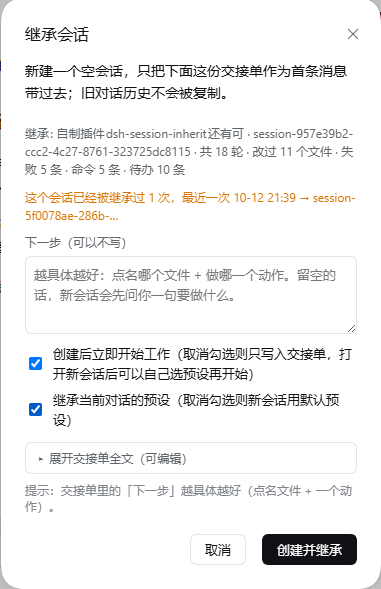
The session row's "…" menu gains an Inherit entry. Click it → preview a handoff document mechanically extracted from the source session → confirm → a new session is created without the old history, and that handoff is sent as its first message. Work continues there. The source session is left untouched.
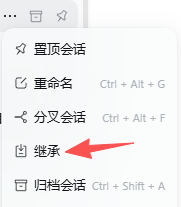
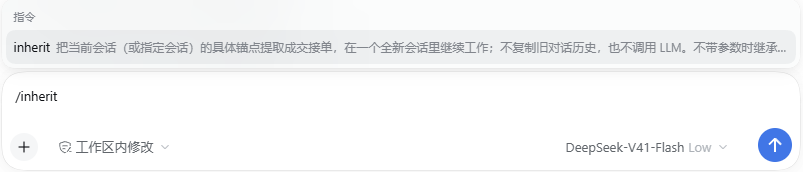
The /inherit command is the same entry point (it shows up in the prompt's hints):
Pin           ← stock DSH
Rename        ← stock DSH
Fork          ← stock DSH
Inherit       ← this plugin (order 350)
Archive       ← stock DSH
All four rows other than "Inherit" ship with DSH itself — they are the official entries
of the sidebar.workspaces.session.menu.item slot. If you have other session-menu plugins
installed, their entries appear here too; this plugin owns only the "Inherit" row.
Why not /compact, and not "Fork"
DSH already has two ways to keep going. This is the third:
| Approach | What it carries over | Why it does not fit |
|---|---|---|
/compact | Replaces history with a summary; same session | Measured: after compressing 541,227 tokens down to 25,602, degeneration recurred within 4 steps — and the repeated token changed from "做。" to "好。". Length is not the cause, and neither is the content of the context |
| Official Fork | Copies the source session's whole history prefix | Carries the trigger along with it; the new session opens on hundreds of thousands of tokens of history |
| Inherit (this plugin) | Only verifiable concrete anchors; no history at all | The new session's context starts at a few thousand characters |
Why no LLM summary
The /compact evidence was direct: the summary kept abstract intentions such as
"needs acceptance testing, needs a report written", and dropped exactly the concrete
anchors — file paths, next-step parameters. Holding a vague intention, the model kept
telling itself what to do at the abstract level, using almost the same sentence every
time — which is itself fuel for repetitive degeneration.
So this plugin's handoff document makes zero model calls. It only performs mechanical extraction: the original task statement, recent user instructions (verbatim, not rewritten), files touched, commands run, the last todo state, and the source session's final reply. Every line can be traced back to the source session for verification.
The handoff also hard-codes three rules at the top:
Do not restate this document. Do not summarize it. Do not reply "got it / understood". Read it and go straight to the "next step". Take exactly one concrete action first, then stop and report; do not branch out in several directions at once.
What the handoff looks like
The handoff language follows the interface language (the client sends lang with the
preview/commit request): an English UI gets an English handoff, a Chinese UI gets Chinese.
Below is the English output — the real sections, with the ← annotations added here for
readability (they are not part of the output).
📋 Session handoff

> Source: `session-xxx` (title) · 15 turns · last activity 2026-10-08 19:37
> **Rules**: do not restate this document…
> Last state: turn 12 still running (the source session has not stopped…)

## Task                          ← the first message that looks like a request, not a greeting
## Files edited (written/modified by the source session, most recent first)   ← edit/write `file_path`
## Attachments (present in the source session, not copied)   ← names and sizes only, never contents
## Recent failures (last tool errors in the source session — check whether they are already resolved)   ← turn + error code
## Run this first (the source session's most recent verification command)   ← single-line commands only
## Recent user instructions (oldest first)   ← verbatim `source.kind === 'user'` messages
## Files read (read-only, never modified)
## Paths mentioned in text (scraped from tool-argument bodies; may be noise)
## In-project relative references (base directory undetermined; confirm with a file search)
## Recent commands
## Todos (last todo state in the source session)
## Source session's last reply
## Next step                     ← written by you in the preview box
A few sections exist so the new session does not waste its first steps:
- Last state appears only when the last turn did not end normally (
aborted,error,max-tokens,blocked, or still running). A source session that is still live reads as "still running" — its log genuinely ends mid-turn. - Task skips pure greetings ("hi", "你好") in the first five user messages and takes the first one that looks like a request. If every message is a short opener it falls back to the first one and says so in the handoff.
- Run this first picks the most recent single-line verification-ish command
(
npm test,cargo test,tsc, …) and removes it from "Recent commands" so it is not listed twice. Multi-line scripts are skipped — they cannot be re-run as one command. - Attachments lists image/file names with media type and size. Contents are never copied.
- On chained inheritance (A→B→C) the task statement is taken from the previous handoff, so the original task survives instead of being replaced by "the first instruction after inheriting".
Section headings carry no numbers. Numbering used to be hard-coded per section and
drifted whenever a section happened to be empty: the client hint said ## 7. 下一步 while
the generated document actually contained ## 8., so anyone following the hint never found
the section.
"Recent user instructions" accepts only source.kind === 'user'. In one real session, 27 of
its 42 user/message events were runtime injections — agent-instructions /
runtime-context / skill-catalog / time-context / memory notices / model selection /
compaction checkpoints — all noise. They are now kept out.
Two high-value anchors
Files edited come only from the structured file_path of writing tools (edit /
write). In one real session: 85 write calls against 58 read calls, touching 17 files
(writes) versus 43 (reads). Mixed together, read-only files push the actually-edited ones
past the cap. Paths that merely appear inside a write body or an edit new_string count
as "mentioned in text" instead.
Recent failures come from tool/result events with isError. In one real session, 11
of 374 tool/result events were failures, e.g.:
- (t5) `edit` FS_STALE_VERSION:cannot write "…\inject-codex.ps1": file changed since it was read — re-read the file, then retry
Each entry carries its turn number — failures in that section can span several turns,
and without the marker the new session cannot tell which of them are stale news. That is
the most direct clue for "what to do next", and it is extracted mechanically. The 363
successful ones are dropped, as are user-initiated aborts (AbortError) and interrupted
auto-reviews; identical messages repeated across several tools are merged into one.
Absolute-path anchors also get an existence check: anything already deleted or renamed is marked (已不存在) (no longer exists), so the new session does not waste its first steps looking for it.
Usage
Entry point 1: the session row menu
- Hover any session in the sidebar and click the "…" at the end of the row.
Any session works, including cold ones — reading goes through
sessionQuery.readSessionand does not activate an agent. - Click Inherit.
- A preview opens, top to bottom: source session info (title / turns / files edited / failures / commands / todos) → a "Next step" input box (optional) → the "start working immediately" checkbox → the "inherit the current session's preset" checkbox → the handoff, collapsed into a single row.
- Write what you want done next in that box — the more specific the better (name the file, name the single action) — then click "Create and inherit". To edit the handoff itself, click "▸ Show the full handoff (editable)". It starts collapsed because most of the time you only want to write one sentence, not read several thousand characters.
The new session opens automatically, titled 继承: <source title>, with the same working
directory and model route as the source session; its agent preset is inherited from the
source by default (uncheck that box and the new session uses the DSH default preset).
The "start working immediately" checkbox is on by default: the handoff is sent through
sessionController.prompt as a normal user message and work begins right away. Unchecked,
it is written straight into the session log instead (session:append) — recorded but not
triggered, so you can say what to do once you open it.
Degradations are stated, not swallowed. If the host could not start the session
automatically (prompt failed or is unavailable), the dialog does not silently close — it
stays open showing the reason and the new session id, plus an "Open new session" button.
Previously this path only did console.warn, so the dialog vanished and you would assume
the new session was already running.
The "Next step" box and the handoff are two independent sources. If commit receives both, the host writes the box's text into the "## 下一步" section of that handoff — so even when you expand and edit the handoff, neither side gets silently dropped.
Repeat inheritance is flagged. The source session (often cold) cannot be renamed:
sessionTitle.rename(session, title) requires a live session object (it asserts
ctx.sessions.get(id) === session), and sessions.get documents that it returns
undefined for a cold session. So "where did this session get inherited to" is recorded in
%DSH_HOME%\session-inherit\history.json and surfaced the moment you open the preview
again: "This session has been inherited N time(s); most recently … → …". The record stores
only session ids and timestamps, capped at 200 source sessions with 10 entries each.
Entry point 2: the /inherit command
/inherit                                  inherit the current session
/inherit <sessionId>                      inherit a specific session
/inherit --next run npm test once          inherit the current session with a first step
/inherit <sessionId> --next switch files   both together
Bare text without --next can only be a session id; if it is not valid you get an honest
error instead of a guess at what you meant by "next step".
Entry point 3: the session_inherit tool
The same operation exposed to the agent, with parameters sessionId (required),
nextStep, and start. This lets an agent propose a session switch on its own when its
context grows long, or lets you express the intent through the agent.
All three entry points funnel into one path: read the source session → mechanical extraction → create the session → attach the workspace → inject the handoff.
Looking back at the source: the session_read tool
The handoff's first line carries the source session id, but the new session cannot read it
directly: the log lives at
%DSH_HOME%\sessions\<escaped workspace>\session-<id>\session.vN.jsonl.zstd and is a
concatenation of zstd frames (a real 2.7 MB file was split into 1067 frames, and Node's
zstdDecompressSync stops after the first one). So the plugin also registers a read-only
tool to close that gap:
session_read { sessionId, mode: 'search' | 'summary' | 'tail' | 'timeline' | 'branches',
               query?, limit?, offset?, allowCrossWorkspace?, lang? }
search(default): keyword search over the source session, returning surrounding contextsummary: structured digest (task / files edited / recent failures / todos / last reply)tail: the last N events that carry content — "where exactly did it stop?"timeline: readable events in order, paged withoffsetbranches: sessions that share the leading events with this one (see below)
It reads only; it never creates or modifies anything.
branches and the workspace boundary. DSH has no parent-session chain, so "where did this
session fork from" is answered by comparing event prefixes: two sessions that share the first
N events verbatim (time | type | data, 40 by default) came from the same line. Only the
same workspace is scanned by default — sessions in other workspaces usually belong to other
projects, so widening it is an explicit allowCrossWorkspace: true. The scan reads at most the
first 64 KB of each candidate and caps the candidate list, which keeps it around 50 ms in a
workspace holding 600+ sessions.
Entry point 4 (for plugins): the sessionInherit in-process service
The first three entry points are for people; this one is for other plugins (e.g.
dsh-degen-guard calling it optionally on a degeneration trip). It is published with
ctx.provide('sessionInherit', api). Consumers declare export const inject = ['sessionInherit'],
or read it with ctx.get('sessionInherit').
await api.handoff({
  sourceId,                        // required: the tripped/inherited source session
  mode: 'hint'|'draft'|'auto',     // default 'draft'
  parentSessionId, depth,          // forwarded to the callback; depth is the PARENT's depth (root = 0)
  nextStep, title, lang,
  inheritPreset,                   // default true
  onChildCreated,                  // ★ awaited after the child exists, before any inject/prompt
})
Mode semantics:
| mode | creates child | starts | state |
|---|---|---|---|
hint | no | no | hinted (read-only suggestion) |
draft | yes | no (start:false, append only) | draft |
auto | yes | prompt only after cwd/preset checks and depth registration | started / draft-fallback |
The result is {ok, mode, state, childId, doc, cwd, preset, workspace, preflight, warnings, note}.
state values: hinted / draft / started / draft-fallback (check or registration failed —
the same child gets a draft append, never recreated) / pending-injection (child created but
injection failed, childId retained) / create-timeout (may have been created, id unknown — never
retried) / failed.
Why onChildCreated runs before start: a circuit-breaker guard must register
childId → depth before the child begins working. If notification came after prompt, a fast
second degeneration would not recognize the child as the next generation and would create
another one — the fast-trip race. The service therefore awaits the callback right after
creating the child and before any prompt; a thrown callback means "depth not registered", so
auto degrades to a draft on that same child. The companion depth API is idempotent per child
(first write wins):
api.registerChildDepth(parentSessionId, childSessionId, depth)
// → {registered:true, parentSessionId, childSessionId, depth, at}
//   registering the same childId again → {registered:false, ...existing record}
api.depthOf(childSessionId)  // → record or null
api.probe()                  // read-only health check
The three manual entry points are unaffected; if service registration fails it only logs and degrades.
Installation
From npm (recommended, one command):
dsh plugin --profile <profile> add dsh-session-inherit
Or straight from the repository, without npm. Edit the profile's package.json — both
places:
{
  "dependencies": {
    "dsh-session-inherit": "link:/path/to/dsh-session-inherit"
  },
  "dsh": {
    "profile": {
      "bundles": [
        "dsh-session-inherit"
      ]
    }
  }
}
bundles is what actually loads the plugin — listing it only under dependencies will
not mount it. Restart DSH afterwards.
The desktop app manages its own profile exclusively through Electron and the global CLI refuses to operate on it; in that case edit that profile's
package.jsondirectly and restart.
Version compatibility
Verified on DSH 0.2.0-rc.2 (Windows). The plugin depends on a number of DSH internal
services and menu slot names, so a DSH upgrade can break the match. If the menu entry does
not appear, or the plugins page shows an error, check the profile's compatibility.json
first: on startup a profile validates each plugin's peerDependencies against
@deepseek-ai/dsh and dsh-* and skips any bundle that does not satisfy them (it logs
skipping profile bundle). Add the current DSH version to the allowed list in
compatibility.json.
Components
- Host half
index.mjs: registersPOST /__session-inherit/preview,POST /__session-inherit/commit,POST /__session-inherit/retry,GET /__session-inherit/healthandGET /__session-inherit/status(same-origin check + loopback/token boundary) - Client half
client.js: registerssidebar.workspaces.session.menu.item(idsession-inherit, order 350) and the preview dialog onshell.overlay
It consumes only public services: agents (hard dependency), sessionQuery,
sessionController, workspaceRegistry, sessionTitle, agentPresets,
agentDefaultModel, webServer. Everything except agents is looked up on demand — a
missing service degrades one feature instead of taking the whole plugin down.
Configuration
Override in the profile's cordis.patch.yml (all optional):
- id: session-inherit
  config:
    enabled: true        # false = register nothing at all
    recentUsers: 6       # how many recent user instructions to include (1–50)
    startByDefault: true # default value of the preview checkbox
    cacheTtlMs: 120000   # reuse one log read between preview and commit; 0 = no cache
    previewTimeoutMs: 30000  # upper bound for reading the source session in the preview
    lang: auto           # auto | zh | en — language of the handoff and tool output;
                         # auto means "the UI request decides, command/tool entries fall back to zh"
    inheritReasoningEffort: warn   # warn = disclose in the footer only; inherit = also apply it
    presetAdapter: auto  # auto | none | tavern — whether to record the binding in a
                         # third-party preset ledger; see "Preset ledger" below
    sections:            # turn low-value sections off to shorten the handoff
      readFiles: true
      mentioned: true
      relativeRefs: true
      commands: true
    allowRemote: false   # loopback-only by default; see "Access boundary" below
    token: ''            # required when allowRemote is on (>= 16 chars)
    timeoutMs:               # commit step budget; a step is capped by min(its own, remaining total)
      total: 60000
      build: 20000
      create: 10000
      binding: 2000        # third-party preset ledger call; never blocks the handoff
      workspace: 5000
      inject: 15000
Preset ledger
What makes the new session actually use a persona is the DSH-side path: the plugin passes
presetId as agentPreset at creation time and mounts it. Recording the binding in a
third-party plugin's ledger (session-bindings.json) is a separate, optional step whose only
purpose is to keep that plugin's panel in sync.
That is why it can be turned off entirely:
auto(default) — record only when awebServerport is available; otherwise skip silently;none— never touch another plugin's ledger (no HTTP call at all);tavern— explicitly require it; if the port cannot be resolved, the commit still succeeds but carries apreset-adapter-unavailablewarning.
Access boundary
All endpoints are loopback-only by default. DSH's web server binds 127.0.0.1, but if you
change that binding (LAN or phone access) these endpoints become reachable too — and they
can write text into any session. So the plugin checks socket.remoteAddress itself:
- loopback (
127.0.0.0/8,::1,::ffff:127.0.0.1) → allowed; - anything else →
403, unlessallowRemote: trueand atokenis configured and sent as thex-session-inherit-tokenheader; - unknown source address → rejected (fail closed).
This is separate from the same-origin check: same-origin blocks browser cross-site calls, the address check blocks non-local callers.
Preview quality and consistency
Two things can make a handoff useless without producing any error:
- The source session moved on.
commitalways re-reads the source session and compares it with the fingerprint the preview returned. If the event count changed, the commit still succeeds but carries asource-changedwarning — the handoff may miss the last few turns. - There is nothing to hand off. For a role-play session the mechanical extraction finds a
character name, zero files and zero commands. The preview reports
quality: {score: 'thin', reasons: [...]}and the dialog says so, instead of letting you inherit an empty shell.
The dialog also lists the sessions this one has already been inherited into, not just a count — a source can be inherited repeatedly, and seeing the children is what prevents another one.
Health check
GET /__session-inherit/health is read-only and answers "what does this plugin
see right now":
services.available/services.missing— which DSH services resolved;bindings— the shape ofsession-bindings.json(object/legacy/mixed/invalid/absent) and how many entries actually parse;events.seenvsevents.expected— which event types were consumed, against the ones the extraction depends on;cache— how many derived results are held.
It exists because of a silent failure: dsh-tavern 2.7 changed the bindings file from strings to objects, this plugin kept reading strings, and inheriting a session quietly lost its persona — no error anywhere. If something looks wrong after a DSH update, look here first.
What happens when something fails
A session is created before the handoff is injected, so the plugin treats "session exists" as the point of no return and never hides it behind an error:
- Failure after the session was created returns
200withstate: "pending-injection"and awarnings[]list. The dialog stays open, shows the new session id, and the session stays in your sidebar — it is never orphaned. - Creating the session itself timing out returns an error (
code: "create-timeout") and deliberately does not retry:agents.createcannot be cancelled, so a retry would produce a second session while the first one leaks. The error text tells you to refresh the sidebar before clicking again. - Two concurrent inherits of the same session with the same parameters return the
same session (marked
deduplicated); with different parameters the second one is rejected with409 conflicting-commitinstead of silently reusing the first one's settings. - Degraded steps (workspace attach, preset ledger, rename) never fail the handoff; they
are reported in
warnings[]and shown in the dialog.
Known limitations
- It does not fix decoding degeneration. Degeneration happens while generating the
current step — a decoding-layer problem. What this plugin does is continue in a clean
session without the old context, removing the two triggers "long history" and "abstract
intention". The new session's first step can still degenerate; that belongs to the
decoding layer and is handled by a separate plugin that detects repetition during
generation and aborts (e.g.
dsh-degen-guard). This plugin does not touch it. - The handoff is mechanically extracted; it will not think up your "next step" for you. Leave it blank and the model will ask first — deliberately.
- If the source session's first user message is a short greeting or preamble, it appears verbatim as the "task statement".
- Paths whose last segment contains spaces depend on boundary detection. Path parsing
has three routes, ordered by reliability: (1) a tool's structured parameter (
read/greppath) is a whole path on its own — most reliable; (2) anything wrapped in quotes or backticks has an explicit boundary; (3) the rest is scraped by regex, whose final segment may not contain whitespace (otherwise it would swallow the following sentence). So a path embedded directly in prose and followed by more words (X:\work\My Project Name 这个项目) gets truncated toX:\work\My Project. In one real session about 4 such fragments survived, all inside the "paths mentioned in text" section, which is labelled as possibly noise. - Two paths joined by a space on one line used to merge into one. That is now blocked by
forbidding a drive-letter colon inside a path segment (
copy X:\p\a.cs X:\p\b.cs); CJK punctuation (,。;:、!?()【】《》) is also treated as a separator. - The handoff is capped at 14,000 characters. Beyond that, whole sections are dropped in priority order ("paths mentioned in text" → "files read" → "in-project relative references" → "commands run" → "last reply" → "todos" → "recent user instructions" → "files edited"); "next step / task statement / files edited / recent failures" are never dropped. A real session with 1976 events produced 4,425 characters — 32% of the cap, so the drop path rarely triggers.
- Per-section caps come from measured information density, not taste. On that same real session the handoff was 6,235 characters, and "recent commands" alone took 23.9% — while its content was PowerShell scripts hard-cut at 180 characters (unreadable and not re-runnable). "Files read" plus "paths mentioned in text" took another 26.8%. The caps are now 16 edited / 8 read / 6 mentioned / 6 relative / 5 commands × 120 chars / 12 todos / 5 failures × 200 chars — the four core sections keep their counts and only got shorter limits. Same session: 6,235 → 4,425 characters (−29%). The handoff is the new session's first message and is re-sent every turn, so every saved paragraph is recurring.
- If the source session was compacted (
compaction/*events), the handoff says so — after a compaction the earlier original text is no longer in the log, so mechanical extraction cannot reach it either. - The custom preset a session actually uses is carried over by default. Some presets (third
party roleplay ones, for instance) do not touch the session header's
agentPreset(it may staystandard); the preset that actually applies is recorded in the host's%DSH_HOME%\.agent-presets\session-bindings.json, shaped like{"session-xxx": "preset-xxxxxxxx"}. The dialog has an "Inherit the current session's preset" checkbox, checked by default: with it on, the plugin passes that preset id as the new session'sagentPresetat creation time, so the new session really starts with that preset. Uncheck it and the new session uses the default preset instead. The handoff footer records the actual outcome —Preset: preset-… → inherited by the new session, ornot inherited this time/mount failed. - An HTTP endpoint of some preset plugin is not what performs the inheritance. For example
dsh-tavern'sPOST /api/tavern/bind-presetonly writes that plugin's own bindings ledger; its source comment says switching the agent preset is the chat preset picker's job. The plugin still calls it so the ledger stays consistent, but the real inheritance goes through the host'sagentPresetsservice while the session is being created. Getting this backwards was the bug that made an earlier version print a preset in the footer while the new session had no persona at all.
Tests
node test/extract.test.mjs   # extractor pure functions (44)
node test/branches.test.mjs  # fork detection: prefix fingerprints, workspace boundary, zstd + plain jsonl (5)
node test/contract.test.mjs  # real-shape event fixture: anchors, sections, no reasoning/injected noise (4)
node test/host.test.mjs      # host half: endpoint registration, the full preview/commit path, /inherit argument parsing, preset inheritance, the inherit ledger, health/retry/status, preset-adapters, fingerprint and quality against a fake ctx (42)
node test/client.test.mjs         # client half: module protocol, slot registration, fallback menu row, and menu → preview → collapse/expand → confirm → commit (7)
node test/inherit-service.test.mjs # in-process service: hint/draft/auto, onChildCreated timing, check-failure fallback, depth idempotency, concurrent dedup (12)
Releasing
Every release must carry two assets:
dsh-session-inherit-<version>.tgz— the archived builddsh-session-inherit.tgz— the fixed-name one
The fixed name is what releases/latest/download/dsh-session-inherit.tgz resolves to.
latest points at the most recent Release, so keeping the asset name version-free is
what stops the install command printed in plugin marketplaces from breaking on every bump —
forget it and that URL 404s on the next release.
npm test                  # 1) run the tests
# 2) bump the version → commit & push → push the tag (the script checks it matches package.json)
node scripts/release.mjs  # 3) pack, create the Release, upload both assets
--dry-run lists the package contents without packing or uploading; --tag v1.2.3 picks
the tag explicitly. The script never touches git — committing and tagging stay manual, it
only packs and uploads.
Relation to existing plugins
Existing options were surveyed before writing this; none overlaps completely:
- WeiYe6/dsh-session-handoff (
dsh-session-handoff) — closest match: a/handoffcommand that creates a session in the same workspace, injects a handoff document, and opens it. Differences: it summarizes the last N turns with an LLM, and it only works from a command typed in the current session. This plugin's entry point is the session row menu, it works on any session (including cold ones), it makes no model calls, and it moves only concrete anchors. - ZhijiangTang/dsh-handoff —
deterministically exports a
HANDOFF.md, but does not create a session. - liangmianya/dsh-synapse — a visual session map wired by DSH's native fork relationships; the "carry all history" route.
@michengai/dsh-archive-manager— also registers adelete-sessionentry in the same menu (order 500). This plugin uses order 350, so they do not conflict.
License
MIT
Plugins associés
billion-context
ranxianglei/billion-context
dsh-web-ui (dsh-chat-recovery)
zhu1090093659/dsh-web-ui
dsh-synapse
liangmianya/dsh-synapse
EduWork (dsh-side-chat)
ecnu/eduwork