dsh-slddrw-review
magician330/dsh-slddrw-review
用 SolidWorks API 静默读取 .SLDDRW 的结构化数据,先计算确定性预标记,再交给 DSH 当前选择的模型逐项判定 GB/T 制图规范与车间可读性。
Installer
dsh plugin --profile web add github:magician330/dsh-slddrw-reviewREADME
SolidWorks Drawing Review for DeepSeek Harness
A DSH plugin that reviews SOLIDWORKS drawings against drafting standards — from exact API data, not screenshots.
dsh-slddrw-review adds the slddrw_standard_check tool to DeepSeek Harness. Open a .SLDDRW, and the tool:
- opens it silently in SOLIDWORKS (no save, no modification),
- pulls sheets, views, dimensions, tolerances, notes, GD&T, datum tags, tables, layers, custom properties and the referenced part's bounding box,
- computes deterministic pre-flags (overridden dimensions, dangling annotations, undefined datums, missing overall sizes, holes without diameter callouts…),
- asks the LLM you already selected in DSH (DeepSeek, OpenAI-compatible, LM Studio, Ollama-style local models — whatever provider is configured) to judge a checklist,
- writes a Markdown report plus JSON artifacts next to the drawing.
No PDF rendering, no image export, no OCR. Every number in the review comes from the model data, so a dimension whose printed value was typed over is caught as a fact, not guessed from a picture.
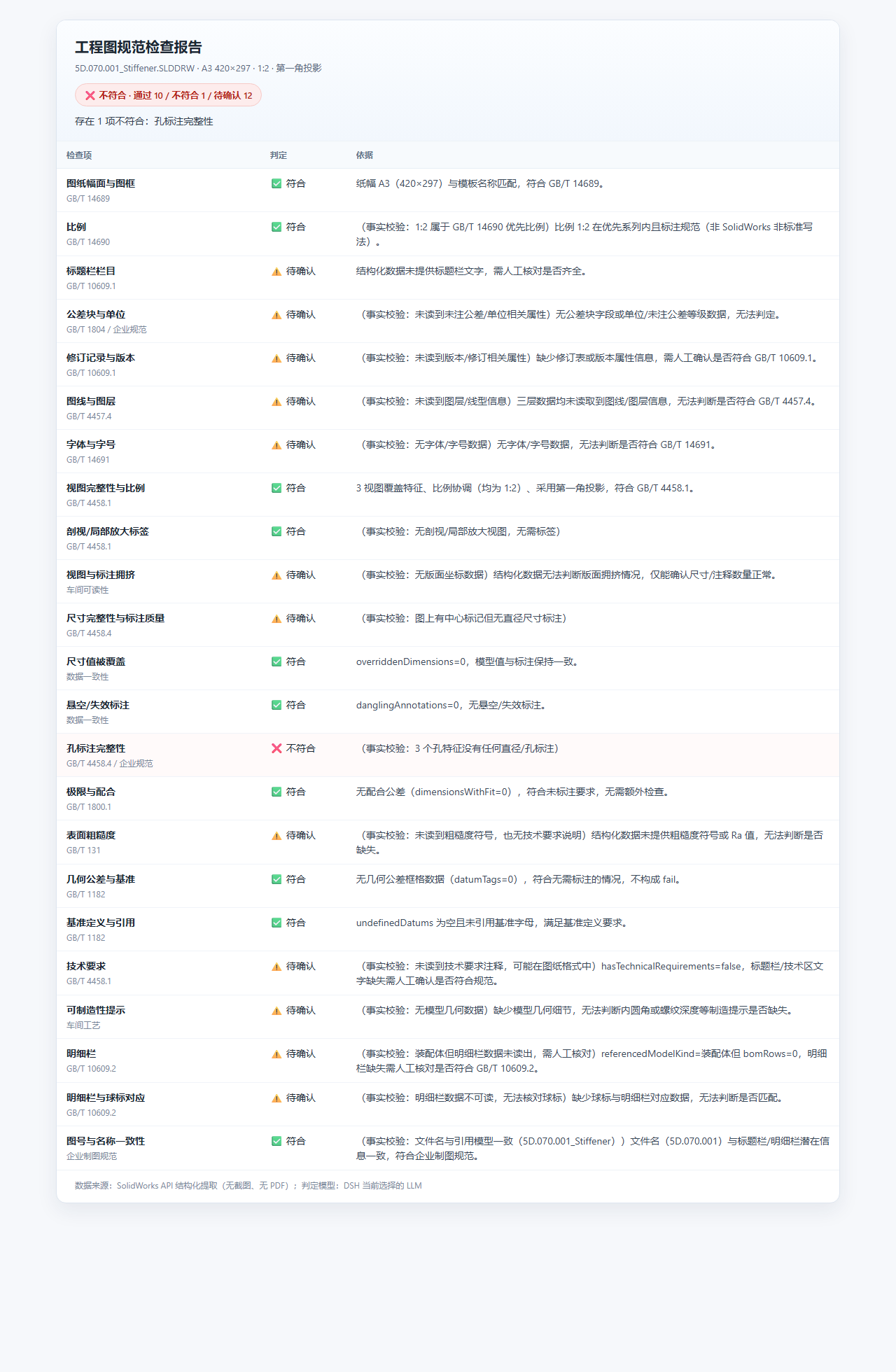
A real run on 5D.070.001_Stiffener.SLDDRW: 10 pass, 1 fail (three holes with no diameter callout), 12 uncertain. Rendered from the run's result.json by tools/make-demo.mjs.
What it checks
The checklist lives in standards/gbt-drawing.json and can be replaced with your own file. Out of the box it covers:
| Area | Checks |
|---|---|
| Title block & sheet | Part number, name, material, finish, revision, dates, scale, sheet count, units; tolerance block; revision table consistency; standard paper size (A0–A4) and template |
| Dimensions | Missing overall size (compared against the model bounding box), duplicates and over-dimensioning, uniform precision, arrow consistency, complete hole callouts, overridden values (critical), dangling dimensions |
| Views | Coverage, per-view scale, first/third angle, section and detail labels, crowding (limited), center marks |
| Notes, GD&T | Technical requirements, surface finish, datums referenced in a frame but never defined, feature control frames |
| Assemblies | BOM against balloons (best effort) |
| Consistency | Drawing number in the file name vs. title block / referenced model |
Pre-flags are confirmed facts from SOLIDWORKS API, so a small local model cannot talk itself out of them: overriddenDimensions > 0 is always a failure, and a missing overall size is reported as one.
How it works
SOLIDWORKS drawing (.SLDDRW)
   │  C# extractor over the SOLIDWORKS COM API (scripts/SldExtract.cs)
   ├─► digest.json   sheets, views, dimensions, tolerances, notes, GD&T,
   │                 datum tags, tables, layers, custom properties,
   │                 part bounding box, per-view outline
   │  JavaScript: summarize + deterministic pre-flags
   ├─► prompts (checklist + facts + digest)
   │  DSH LLM service: the model selected in the app, or provider/model from config
   └─► report.md + result.json  in <drawing folder>\.slddrw-check\<name>-<timestamp>\
The extractor runs through powershell.exe and the SOLIDWORKS interop assemblies; it never writes to the drawing. The tool itself is plain Node ESM and imports nothing outside Node — it reaches the model only through ctx.llm.
Requirements
- Windows with SOLIDWORKS installed (tested on SOLIDWORKS 2025; any version that ships
api\redist\SolidWorks.Interop.sldworks.dll). - DeepSeek Harness with at least one usable model (DeepSeek API, an OpenAI-compatible endpoint, or a local LM Studio/Ollama model).
- PowerShell 5.1 and .NET Framework 4.x (both ship with Windows).
- The remote desktop caution: SOLIDWORKS automation needs an interactive desktop. Do not disconnect an RDP session while a review is running.
Install
As a local plugin (recommended while iterating)
- Clone this repository somewhere stable, e.g.
C:\path\to\dsh-slddrw-review. - In DeepSeek Harness open Plugins → Add plugin, choose install a local directory, and select the repository folder.
- Enable the plugin row if it is not enabled yet.
- Ask the agent to check a drawing.
From the command line (DSH tool)
plugin_manager install_bundle target=C:\path\to\dsh-slddrw-review
Manual profile entry
Add the package to your DSH profile package.json and reference it from cordis.patch.yml. The package name and the plugin row id are both dsh-slddrw-review:
// profile package.json
"dependencies": { "dsh-slddrw-review": "link:C:/path/to/dsh-slddrw-review" }
# cordis.patch.yml
- insert:
    - id: dsh-slddrw-review
      name: dsh-slddrw-review
      config:
        provider: ''
        model: ''
        temperature: 0.1
        maxTokens: 2500
        reasoningEffort: low
        timeoutMs: 900000
        solidWorksDir: 'D:\ProgramFiles\SOLIDWORKS Corp\SOLIDWORKS'
        reportDir: ''
The repository root is the plugin package: package.json, cordis.patch.yml, index.js and the extractor all live at the top level, so installing the cloned folder is enough.
Usage
Once installed, the tool is available to the agent as slddrw_standard_check:
检查 D:\work\5D.070.001_Stiffener.SLDDRW 是否符合制图规范
The agent calls:
{
  "drawing": "D:\\work\\5D.070.001_Stiffener.SLDDRW",
  "provider": "lmstudio",
  "model": "your-model-id",
  "openArtifacts": true
}
| Parameter | Required | Meaning |
|---|---|---|
drawing | yes | .SLDDRW path, absolute or relative to the working directory |
checklist | no | Path to a custom checklist JSON; defaults to the bundled GB/T set |
provider / model | no | Override the model for this call; otherwise the model selected in DSH is used |
openArtifacts | no | Keep digest.json / result.json in the report folder (default true) |
Output is a compact per-item verdict in the chat plus a Markdown report on disk:
工程图规范性检查:...(lmstudio/your-model-id)
通过 8 / 不符合 1 / 待确认 14
❌ 孔标注完整性:3 个孔特征没有任何直径/孔标注
...
报告:...\.slddrw-check\5D.070.001_Stiffener-20260901-101500\report.md
Each report also carries the pre-flag summary and the raw data digest.
Configuration
Plugin config (all optional):
| Key | Default | Meaning |
|---|---|---|
provider | '' | LLM provider route, e.g. deepseek, lmstudio. Empty = use the model selected in DSH |
model | '' | Model id for that provider. Empty = use the model selected in DSH |
temperature | 0.1 | Sampling temperature |
maxTokens | 2500 | Completion budget; raise it for more checklist items |
reasoningEffort | low | Passed to reasoning models; retried without it when the model cannot disable thinking |
timeoutMs | 900000 | Timeout for extraction + model call |
solidWorksDir | D:\ProgramFiles\SOLIDWORKS Corp\SOLIDWORKS | SOLIDWORKS installation containing api\redist |
reportDir | '' | Report root; empty = <drawing folder>\.slddrw-check |
Custom checklists
Any JSON with this shape works; pass its path as checklist:
{
  "id": "my-checklist",
  "title": "My shop rules",
  "items": [
    {
      "id": "dimensions",
      "title": "Dimensions",
      "standard": "ISO 129",
      "severity": "high",
      "question": "Every feature is located and sized; overall sizes match the model bounding box…"
    }
  ]
}
severity is one of critical, high, medium, low. Keep the ids of the built-in items if you want the deterministic guards (overridden-dims, dangling-annotations, datums, hole-callouts, dimensions, bom…) to keep overriding the model.
Known limitations
- Sheet-format text is not reachable. Title-block labels and technical requirements usually live in the drawing's sheet format; the SOLIDWORKS automation API does not expose them. Those items are reported as uncertain and flagged for manual confirmation — never as a guessed pass.
- BOM rows are not reachable. The BOM table object can be found, but its rows are not readable through automation. Part drawings legitimately have no BOM; assembly drawings with an unread BOM are reported as uncertain.
- Crowding and manufacturability need geometry or visuals. They stay uncertain instead of pretending.
- Missing dimensions are proven for overall sizes (model bounding box vs. dimensions) and for holes without any diameter callout. Feature-level "should have been dimensioned here" cases that need geometric reasoning are only hints, not verdicts.
- SOLIDWORKS must run on an interactive desktop. A disconnected RDP session can stall COM calls; the tool reports a timeout instead of hanging forever.
- One drawing per call; extraction takes tens of seconds, model time depends on the provider.
Troubleshooting
| Symptom | Fix |
|---|---|
SolidWorks interop assembly not found | Point solidWorksDir at the folder that contains api\redist\SolidWorks.Interop.sldworks.dll |
没有可用的 LLM | Select a model in DSH, or set provider + model in the plugin config or the tool call |
该模型始终思考,不支持关闭思考 | Set reasoningEffort to low/high/max; the tool retries without the field otherwise |
| Review hangs during extraction | Keep the desktop session active; check for a modal dialog in SOLIDWORKS |
| Model returns invalid JSON | Raise maxTokens, or use a stronger model; the tool retries once with a repair prompt |
Development
index.js                     tool registration, prompts, guards, report writer
scripts/SldExtract.cs        C# extractor (SOLIDWORKS COM API)
scripts/extract-drawing.ps1  compiles the extractor and writes digest.json
standards/gbt-drawing.json   default checklist
tools/make-demo.mjs          renders a result.json into the README screenshot
docs/DETAIL.md               plugin page shown in DSH
locale/                      display metadata
Compile check without SOLIDWORKS running:
powershell.exe -NoProfile -ExecutionPolicy Bypass -File scripts\extract-drawing.ps1 `
  -Drawing "C:\path\drawing.SLDDRW" -Out ".\digest.json"
Regenerate the README screenshot from any run:
node tools/make-demo.mjs .slddrw-check\<run>\result.json docs\review-demo.html
msedge --headless=new --disable-gpu --hide-scrollbars --window-size=1280,1960 `
  --screenshot=docs\review-demo.png "file:///<repo>/docs/review-demo.html"
Acknowledgements
- Checklist structure and the "pre-flags before the LLM" idea are inspired by kilwizac/claude-solidworks-review (MIT), adapted to data-only review inside DeepSeek Harness.
- Standards referenced: GB/T 14689, 14690, 14691, 4457.4, 4458.1, 4458.4, 10609.1/2, 1182, 1800.1, 131.
License
MIT — see LICENSE.
Plugins associés
archify (deepseek-harness)
tt-a1i/archify
WeKnora (dsh-weknora)
tencent/weknora
next-ai-draw-io (dsh-plugin)
dayuanjiang/next-ai-draw-io
AiToEarn (dsh-plugin-aitoearn)
yikart/aitoearn