dsh-aardio
mfn233/dsh-aardio
Aardio development tools and skills — keyword search over the local installation, a configurable aardio folder, open-in-IDE, and compile/run inside the IDE through an optional bridge.
Installer
dsh plugin --profile web add github:mfn233/dsh-aardioREADME
dsh-aardio

The aardio toolchain for DeepSeek Harness: three bundled authoring skills, a keyword search engine over your own aardio installation, always-on project rules, open-in-IDE, and a settings page that points the plugin at the aardio folder on your machine.
What it looks like
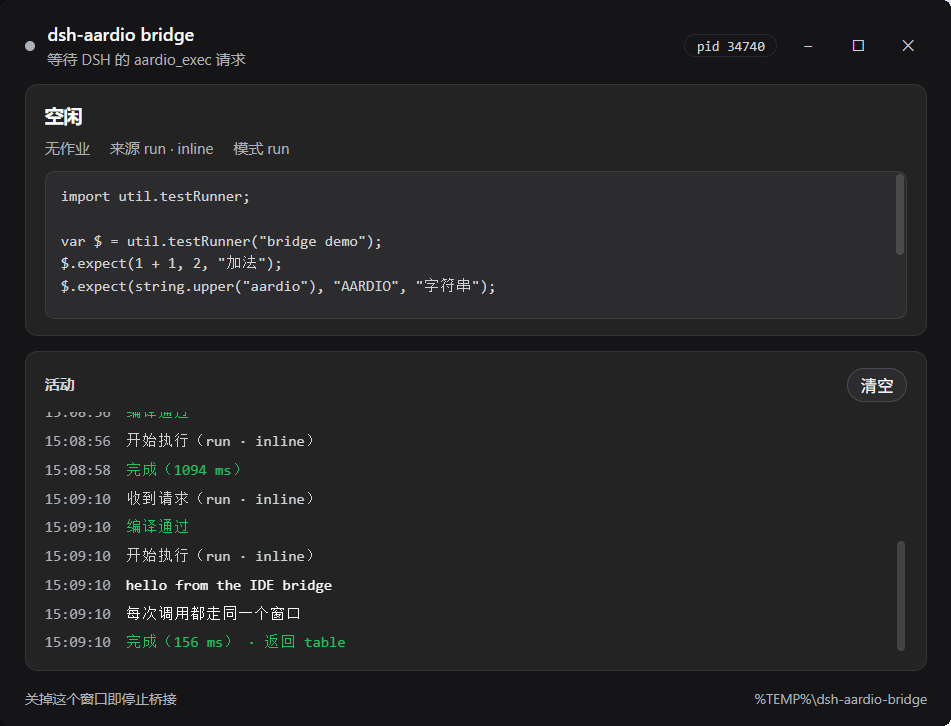
The bridge window reports what it is doing while aardio_exec runs: request source and mode, the code, live print lines, compile failures, and each result with its duration.
What you get
| Kind | Name | What it does |
|---|---|---|
| Skill | aardio | Language rules, the local documentation map, and the working procedure for writing aardio code |
| Skill | aardio-project | *.aproj project structure, version attributes, publish settings, and the traps around them |
| Skill | aardio-library | User and extension libraries: intellisense/details blocks and the documentation layout |
| Tool | aardio_docs | Search engine over docs/, examples/, and lib/: multi-term queries, phrases, exclusions, ranked hits with context, and a bounded read of any file inside the installation |
| Tool | aardio_exec | Compile or run aardio code inside your running IDE through the optional bridge, returning print output, the return value, and errors |
| Tool | aardio_open | Hand an .aardio file, an .aproj, or a project folder to the aardio IDE |
| Tool | aardio_env | Report the resolved installation, where the value came from, and what was probed |
| Setting | Config page | Choose the folder that contains aardio.exe, with a folder picker and an auto-detect reset |
| Prompt rules | dsh-aardio:project-rules | Tells the model that projects belong to the user and that dlg//lib/ edits need an IDE-side refresh |
Install
From the Plugins page (recommended): open Plugins → Add plugin, choose the local directory that holds this package, and install it. DSH restarts the plugin when it activates; reload the page if the Plugins page was already open.
From the CLI:
dsh plugin --profile desktop add dsh-aardio
# or a checkout on disk:
dsh plugin --profile desktop add link:D:\path\to\dsh-aardio
Remove it with dsh plugin --profile desktop remove dsh-aardio.
After installation, a new session lists the three skills, and the three tools appear in the tool list.
Point the plugin at your aardio folder
You do not need to edit YAML. The plugin resolves the installation in this order:
- the
aardioRootsetting (see below), - the
AARDIO_ROOTorAARDIO_HOMEenvironment variable, - automatic detection:
%ProgramFiles%\aardio,%LOCALAPPDATA%\aardio,%APPDATA%\aardio, and the usualaardio,Develop\aardio,Program Files\aardio,Applications\aardio,software\aardio, andtools\aardiofolders on every fixed drive.
A folder counts as an installation when it contains aardio.exe. If nothing matches, the tools say so and list every folder they probed; aardio_env shows the same information on demand.
The settings page
The form sits on the bundle's own page: Plugins → Aardio toolchain. It renders between the description and the component list, so opening the plugin is enough — the row's own page (opened by the chevron beside the row title) shows the same form.
- aardio folder — typed, or chosen with Choose folder…, which opens the native folder picker. Pasted shapes are normalised first: surrounding quotes,
file:///URLs, forward slashes, a trailing separator, or theaardio.exefile itself. - Save stores it in the profile's configuration layer and applies immediately: the field is declared volatile, so the plugin is not restarted and the tools read the new folder on their next call.
- Find automatically clears the stored value (it appears only when a value is actually stored), so detection takes over again.
An empty field means "auto-detect", and it is stored as an empty value rather than an empty string, so it never shadows a value set in a patch layer.
The same value can be pinned in cordis.patch.yml when you manage profiles by hand:
- id: dsh-aardio
  name: dsh-aardio
  config:
    aardioRoot: D:/path/to/aardio
A value set in the patch is a composition-layer value: the settings page shows it as inherited and can override or clear it.
Tools
aardio_docs — search and read
The search engine is built for an agent, not for a person reading a results page:
| Input | Meaning |
|---|---|
query | listview checked requires both terms in a file; use "quoted phrase" for adjacency and -term to exclude |
scope | docs, examples, lib, or all (default) |
mode | all (default) or any; a multi-term search with no hits retries any and says so in relaxed |
context | Lines around each hit, 0–4, default 1 |
limit / perFile | Total matches (default 12, max 40) and matches kept per file (default 2) |
path | Read a file instead of searching: absolute, or relative to the installation |
Ranking rewards the evidence that actually answers an API question: a term that is the file's name, a term at the start of a line (a definition), a documentation page, and an index.md. Standalone uses of string.save outrank prefixes like string.saveFiles, a multi-term query only matches a file where the terms appear within 20 lines of each other, binary-looking files are skipped, and overlapping snippets are collapsed.
path reads any text file inside the installation (400 lines per call, offset/lines) even when another tool's sandbox cannot reach that folder; paths outside the installation are refused.
Searches stop at 12000 files, 256 MB, or a 2 MB file, reporting truncated when a budget is hit. The file list is cached for 30 seconds, so repeated queries in one turn are cheap.
aardio_open and aardio_env
aardio_open takes path; a folder opens its default.aproj so the IDE restores the project instead of a bare file. It launches the IDE detached and returns immediately.
aardio_env takes no arguments and is the first thing to call when a search finds nothing: it reports the resolved folder, whether it came from the setting, the environment, or detection, and which folders were probed.
Project rules in the system prompt
Beyond the skills, the plugin adds one short system-prompt section (dsh-aardio:project-rules, order 10500, literal text):
- Projects belong to the user. The agent must not create or hand-write
default.aproj; the user creates the project in the aardio IDE, and the agent only editsmain.aardio, resources, and code. dlg/andlib/changes need an IDE refresh. After editing either, the agent must ask the user to reopen the project or restart the IDE, or the IDE keeps serving cached forms and libraries.- Verify headlessly. The agent should write a
*.test.aardiousing aardio's ownutil.testRunnerand ask the user to press F5, instead of reaching for screenshots or simulated input; GUI smoke tests must not enterwin.loopMessage().
These rules are stated once, in one place, so they can be replaced or removed without touching the tools. The section is registered only when the deployment provides ctx.systemPrompt; a composition without it keeps working.
Headless verification
aardio ships util.testRunner — a Jest/PyTest-style structured assertion engine built for agents — and its own agent (AA / autos) verifies with it rather than with screenshots. This plugin adopts the same workflow:
- skills/aardio/references/headless-tests.md holds the template, the full API (
test,expect,expectNear,contains,match,throws,notThrows,assert,fail,log,report), and the patterns for pure logic, file I/O, offscreengdippixels, and GUI smoke tests. - The model writes
xxx.test.aardiointo your workspace; you press F5 in the IDE and paste back the JSON thatprint(JSON.stringify($.report()))produces. - Failures carry
fileandline, so the next attempt is a fix rather than a guess.
The plugin still cannot run that test by itself unless the bridge below is running. aardio has no headless command-line entry, and loadcode/loadcodex exist only inside an aardio process.
The IDE bridge (aardio_exec)
Starting the bridge once turns verification into a tool call instead of a request for the user to press F5.
- Open
bridge/aardioBridge.aardioin the aardio IDE (aardio_opencan do it) and press F5. - Leave the window open. It shows what the bridge is doing in real time — status, the current job and its code,
printlines as they arrive, compile failures, and the result — and stays idle until a request arrives. Closing it stops the bridge. - The agent can now call:
aardio_exec({ code, mode: "check" })— compile only, with line numbers;aardio_exec({ code })oraardio_exec({ path })— run and return everythingprint(...)received, thereturnvalue (as JSON),compileError, anderror;aardio_exec({ path, replace: { oldCode, newCode } })— replace one unique snippet in memory before compiling. This is the GUI smoke-test pattern: swapwin.loopMessage();for bounded test code without touching the source file;aardio_exec({ jobId })— keep waiting for a run that outlived its timeout.
How it works: one request/response file pair per DSH process under %TEMP%\dsh-aardio-bridge\, a one-time token in bridge.json, and a nonce per request — no port, no firewall rule, no third-party library, and two DSH instances can share one bridge without reading or deleting each other's files. The window is a WebView2 page styled with the host's own dark palette (rgb(21,21,23) base, rgb(35,35,36) cards, rgba(255,255,255,.08) borders), falling back to a plain text window when WebView2 is missing. The script mirrors the execution recipe aardio's own agent (AA / autos) uses in lib\autos\tools\handlers.aardio: loadcode to compile, a worker thread to run, and print overridden to collect output.
Boundaries worth knowing:
- The IDE runs the code, not DSH. Trust and risk are the same as pressing F5 in the IDE; the bridge only serves requests written by this plugin's tool (token + nonce), but any code you ask the agent to run does execute there.
- One job at a time. Requests are serialized by the plugin; default timeout 15 s, maximum 120 s.
win.loopMessage()is not bounded. Overriding it inside the worker does not reach code that importswinitself (measured), so a bare call keeps running until its window closes. The result then carries awarning, and GUI smoke tests should passreplaceto swap that line for bounded steps.- A timeout does not kill the code. aardio has no safe thread termination, so the bridge keeps running and answers
pendingwith a job id: the plugin re-polls until its own deadline, then names the job so{ jobId }can resume. If the code loops forever, stop it in the IDE. - The bridge is optional. Without it,
aardio_execexplains how to start it, and everything else keeps working.
Bundled skills
The three skills are registered by the plugin itself, with rank 600. A skill of the same name in your own skills directory ranks 400 and therefore wins, so you can keep experimenting locally without editing the package. Delete ~/.dsh/skills/aardio* if you want the bundled copies to be the only source.
The skills deliberately contain no absolute installation path: they tell the model to call aardio_env, and to prefer aardio_docs over guessing an API.
Limits
- aardio has no headless command line.
aardio.exe <script>only opens the IDE;/run,/build, and friends do nothing.loadcode/loadcodexexist only inside an aardio process. With the bridge running, the plugin compiles and runs code through your IDE; without it, the user presses F5. - The IDE is Windows-only, so
aardio_openrefuses to run elsewhere. Search and skills still work against any copy of an installation. - The documentation is read, never shipped.
docs/index.mdforbids redistributing the official documentation; this package contains only original indexes and summaries, and reads your installation in place.
Development
npm test          # node --test: installation resolution, search, skills, tools, packaging
npm run check     # syntax check of the Host and browser entry points
npm run pack:check
Tests are offline and create their fixtures in the OS temp directory.
Config needs @deepseek-ai/schemastery, a peer provided by the profile that installs the plugin. A linked checkout has no node_modules, so lib/config.js also resolves the peer through DSH_INSTALL_DIR/DSH_PROFILE_DIR/DSH_HOME; without any copy the plugin still loads and falls back to the environment variable and detection, just without a settings page.
Layout
| Path | Role |
|---|---|
index.js | Cordis entry: Config, inject, registration, disposal |
client.js | Browser half: the plugins.row.config page for dsh-aardio#dsh-aardio |
lib/config.js | Config schema and its peer resolution |
lib/installation.js | Path normalisation, probing, precedence, diagnostics |
lib/search.js | Query parsing, ranking, and the bounded read |
lib/bridge.js | Node side of the IDE bridge protocol |
bridge/aardioBridge.aardio | The IDE-side script the user starts with F5 |
lib/prompt.js | The always-on project rules |
lib/skills.js | Skill frontmatter and the provider |
lib/tools.js | The three tool definitions |
skills/ | The bundled skills |
docs/ | The Plugins-page detail image |
License
MIT. The aardio documentation, examples, and library sources are not part of this package.
Plugins associés
deepseek-harness
deepseek-ai/deepseek-harness
dsh-market
dsh-market/dsh-market
dsh-web (dsh-plugin-manager)
zhu1090093659/dsh-web
dsh-web
zhu1090093659/dsh-web