dsh-desktop-pet-codex (plugin)
mng12345/dsh-desktop-pet-codex/plugin
A desktop pet for DeepSeek Harness: an always-on-top character and a roster panel that show what the watched conversations are doing, with seven animations, Workspace grouping, subagents drawn under their parent, and one click to open a session. Ships Windows, macOS (Intel and Apple silicon) and Linux window binaries in the package, so installing runs no install scripts and needs no build step.
Installer
dsh plugin --profile web add github:mng12345/dsh-desktop-pet-codexCe plugin se trouve dans le sous-répertoire plugin du dépôt.
README
dsh-desktop-pet-codex
A desktop pet for DeepSeek Harness: a small always-on-top character plus a roster panel that shows what the conversations you care about are doing. It is two halves under one contract — a DSH Host plugin that reads the Harness, and a Tauri window that draws it.
 |
 |
 |
 |
 |
 |
 |
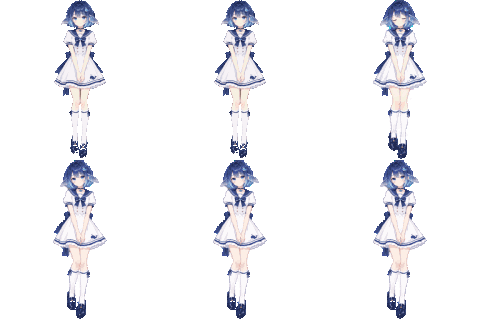
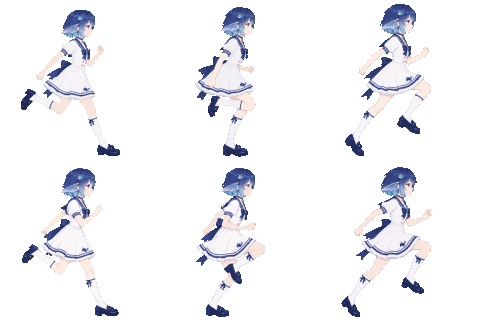
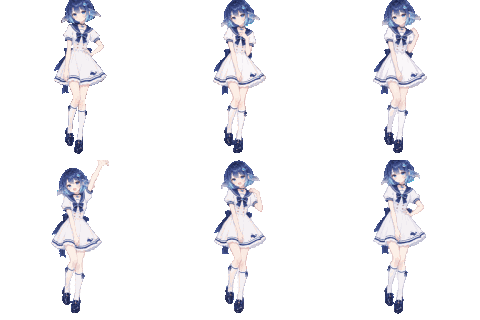
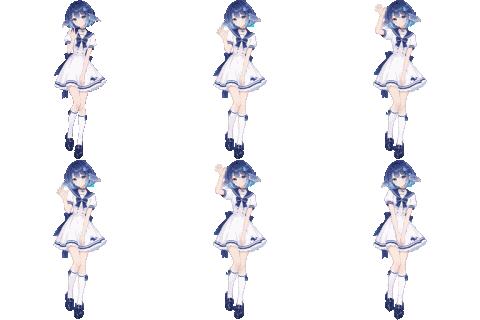
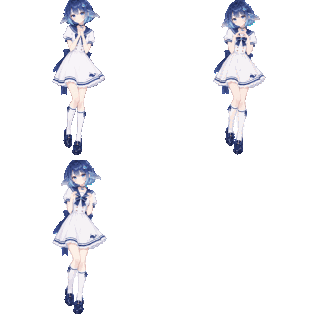
| Idle | Working | Waiting | Finished | Wave | Heart | Nap |
Seven animations: four looping states the pet switches between, and three short reactions it plays once. They are described below, together with the roster panel.
Character states
A pet has one face, so the roster collapses to one mood. Attention beats activity beats aftermath: a
waiting conversation outranks a working one, a working one outranks a finished one, and stopped has
no face of its own — it borrows the quiet pose. While nobody waits, the pet wears the outcome of the
most urgent conversation, so a finished turn stays on screen until something else happens.
| State | Animation | Shows when |
|---|---|---|
| Idle | stands with her hands clasped; breathes, blinks on an uneven beat, shifts her weight | nothing to report — the roster is empty, or its most urgent conversation has stopped |
| Working | runs in profile, arms and legs cycling | a watched conversation is working; a subagent working arrives as its parent working |
| Waiting | lifts a hand as if flagging someone down, holds it, then lowers it | a watched conversation is blocked on the reader — an approval, a question, a blocking tool call |
| Finished | hops with both arms up, lands and settles | a watched conversation finished its turn |
| Wave | raises one hand and waves it twice | the character is clicked |
| Heart | presses her hands together at her chest and closes her eyes | the pointer lands on the character, at most once every 6 seconds |
| Nap | drifts off standing up — eyes close, head drops — then catches herself | the roster has been empty for five minutes; once per quiet spell |
The last three are one-shot segments: they play over whichever scene is showing, hand the sprite back
when they end, and only a real scene change cuts one short. The scene tables live in
pet-app/src/pet-frames.ts; the seven files shown above are named for their code names — idle,
run, wait, happy, wave, heart, doze.
The GIFs under docs/states/ are rendered from the same frame tables the window plays, by
node tools/gen-readme-gifs.mjs — no artwork is committed twice.
Session list
The roster window is where the pet lists what it watches: the conversations the reader tracks, not every session DSH knows, grouped by Workspace and anchored above the character.
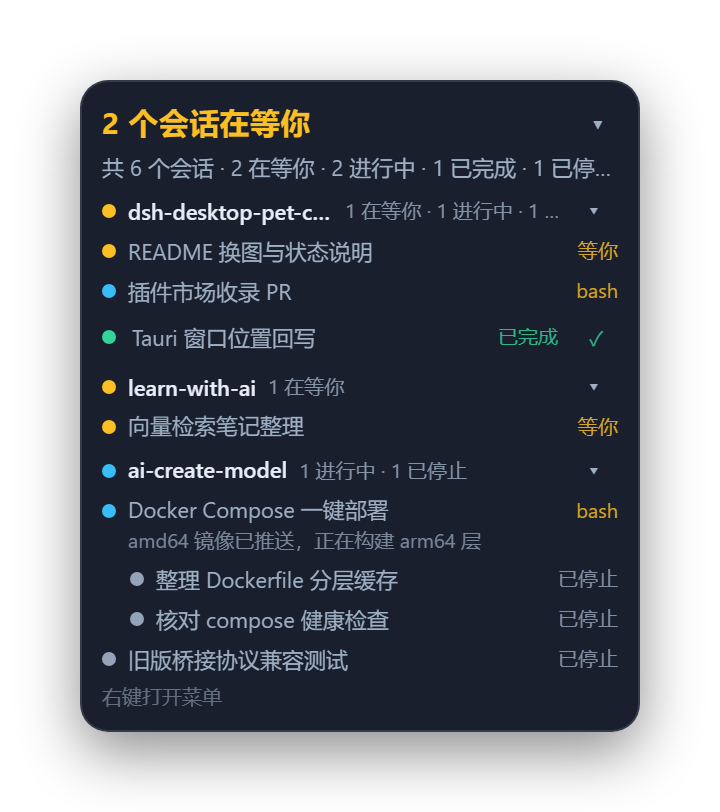
Sample data: three Workspaces, two conversations waiting on the reader, and two indented subagent rows.
The header line counts what needs the reader. While at least one watched conversation waits, it
reads 2 个会话在等你 in the waiting colour. Otherwise it splits into the outcomes, one coloured
segment per phase that has any — 1 完成 · 2 进行 · 1 停止 — and an empty roster reads 全部空闲. The
line under it is the total: 共 6 个会话 · 2 在等你 · 2 进行中 · 1 已完成 · 1 已停止 · 2 个子代理, with the
subagent count only when there are subagents.
Groups are Workspaces, each with the Workspace name, its own counts, and a dot coloured by the most urgent live phase inside it (grey when nothing is live). Clicking a group head folds it, and the fold is remembered by this window rather than by the settings.
A row is a conversation. The name is the conversation's title, falling back to its directory and
then a short id. Beside it sits the last tool while it runs (bash), 等你 while it waits — a row
that needs the reader says what it needs, not what it called — and 已完成 or 已停止 once it
settles. A running row can carry its last thought on a second line, and a retained result carries a ✓
that removes that conversation from the pet.
Subagents are never rows of their own. They hang indented under the parent that dispatched them, and they are not counted: a child working is its parent working.
A click opens that conversation. Only the window process can raise DSH and only the plugin's
browser half can switch sessions, so the two actions do not wait for each other: the window parks the
request (PUT /focus, answered 202) and the page switches when the request is pushed over SSE. On
Windows the DSH window also comes to the front; elsewhere DSH is opened instead.
The list folds; the character stays. The ▾ in the header collapses the panel to its header line
and remembers that in the window, and turning showSessionList off removes the window altogether,
leaving the character alone on the desktop. Right-clicking the character or the panel offers
设置… and 隐藏桌宠.
When the bridge is down the last roster stays on screen and the subtitle says 未连接 DSH
(正在连接 DSH… while retrying) instead of showing an empty list; the character greys out rather than
disappearing.
Architecture
DSH Host process                              your desktop
┌──────────────────────────────┐              ┌──────────────────────────────┐
│ plugin/  (TypeScript bundle) │  127.0.0.1   │ pet-app/  (Tauri process)    │
│  Harness events → roster fold│ ───────────▶ │  pet window      character   │
│  bridge + per-run token      │  HTTP + SSE  │  roster window   the list    │
│  DSH-page routes             │ ◀─────────── │  settings        appearance  │
└──────────────────────────────┘    :47600    └──────────────────────────────┘
Everything the window can draw comes out of a pure roster fold; the effectful edge publishes it on a loopback bridge, and the window is an ordinary process that reads it. Either half restarts alone.
The four routes the DSH page uses — /desktop-pet/focus, /desktop-pet/focus/events,
/desktop-pet/client-state, /desktop-pet/pet — are on the DSH web server, not the bridge: the
page is served from that origin, so there is no CORS and no second token.
Install
Requires DSH >= 0.2.0-rc.2. The published package and the release archive both carry a window binary for Windows (x64), macOS (Apple silicon and Intel) and Linux (x64), so one install works on any of them and nothing is built locally.
Install from npm
Ask for the package by name — in the Web sidebar open Plugins → Add plugin and enter it, or pass it to the plugin manager:
plugin_manager action: install_bundle target: dsh-desktop-pet-codex
A version pins with dsh-desktop-pet-codex@0.1.1. The package carries the compiled plugin and all four
window binaries, so installing it runs no install scripts, needs no build step, and downloads nothing at
start-up.
Once the plugin is listed in the community catalog, searching the plugin market for the pet installs it in one click as well.
Install the release archive
Point the plugin manager at this asset URL — use this to pin a version, or when npm is unreachable:
plugin_manager  action: install_bundle
                target: https://github.com/Mng12345/dsh-desktop-pet-codex/releases/latest/download/dsh-desktop-pet-codex.tgz
That URL always resolves to the newest release; the asset named after a tag beside it is the same
archive, for pinning one. The archive holds the compiled plugin (package/lib/), the browser half, the
locale files, cordis.patch.yml, and one window binary per platform under
package/bin/<platform>-<arch>/ — the plugin starts the one that matches the machine it runs on.
Platform notes:
- Windows needs nothing extra.
- Linux needs WebKitGTK 4.1 at runtime, which is what a Tauri window draws with: Debian 12+, Ubuntu 24.04+ and Fedora 39+ ship it, older releases need it installed separately. Without it the plugin still loads and the window simply never starts.
- macOS ships an unsigned binary. If Gatekeeper refuses it, clear the quarantine flag with
xattr -dr com.apple.quarantine <path to dsh-desktop-pet>. - Clicking a roster row raises the DSH window only on Windows; elsewhere it opens DSH instead.
From source — for working on the plugin
git clone https://github.com/Mng12345/dsh-desktop-pet-codex
plugin/lib/ ships compiled in the repository, so a clone is installable with no npm install and no
build. Use the plugin manager; hand-editing the profile's package.json or cordis.patch.yml is not
supported:
plugin_manager action: install_bundle target: <abs path>/dsh-desktop-pet-codex/plugin
A source checkout has no pet window. The executable is a per-platform build product and is not in git (
plugin/bin/), so a clone has the plugin but nothing to launch: the Host half collects state and serves the bridge, and no window appears. Build one locally (see Build) or install the release archive instead.
Build
Building needs Node.js >= 22 (plugin/package.json engines) and, for the window, Rust.
# plugin: TypeScript -> plugin/lib
cd plugin && npm ci && npm run build
node scripts/smoke.mjs                  # pure core + bridge, no Harness, no window

# window: frontend -> pet-app/dist, then the executable
cd pet-app && npm ci && npm run build   # build:icon, build:ui, cargo build --release
The executable lands in pet-app/src-tauri/target/release/ (dsh-desktop-pet.exe on Windows,
dsh-desktop-pet elsewhere); copy it into plugin/bin/<platform>-<arch>/ — plugin/bin/win32-x64/ on a
Windows x64 machine — so the plugin starts it, or point petExecutable at it.
The window build needs Rust: rust-toolchain.toml pins the channel and target at the repository root,
and rustup finds it by walking up from the working directory, so the build must run inside the repo.
npm run typecheck exists in both halves; npm run verify:frames in pet-app checks that every frame
the tables name is present in dist/.
node tools/pack-release.mjs builds both halves, copies this platform's executable into
plugin/bin/<platform>-<arch>/, runs npm pack in plugin/, and refuses to emit an archive lacking
package/lib/index.js, package/client.js, package/cordis.patch.yml, the locale files or the binaries
staged for each platform. --skip-build packs plugin/bin/ exactly as staged, --require-all refuses
unless all four targets are present (this is what CI uses), and --out <dir> moves the .tgz (default
.ref/release). It also refuses to pack a window binary that names a home directory other than the CI
runner's: Rust records the source path of every panic site, so a binary built on a laptop carries that
laptop's path, and publishing it would publish the path too. Build with
RUSTFLAGS=--remap-path-prefix=<home>=~ to remove it; the release workflow sets the same flag.
Configuration
Plumbing — ports, tokens, whether the window is launched — is the plugin row desktop-pet-codex in
plugin/cordis.patch.yml, editable from Settings → Plugins → this bundle → the row:
| Field | Default | Meaning |
|---|---|---|
enabled | true | Run the Host half at all. |
port / portAttempts | 47600 / 20 | Loopback port, and how many consecutive ports to try when it is taken. |
requireToken | true | Require the per-run token on bridge routes. |
autoLaunch | true | Start the window with the Host; restart it if it dies. |
petExecutable | "" | Explicit binary; empty resolves bin/<platform>-<arch>/ inside the bundle. |
petArgs | [] | Extra arguments for the window. |
sleepAfterMs | 300000 | Reserved for the sleeping pose; the window holds the same value as a constant. |
resyncMs | 60000 | Roster re-baseline interval; 0 disables healing. |
Appearance has one owner, the settings window — right-click the pet → 设置 (the UI is Chinese):
| Field | Default | Range | Meaning |
|---|---|---|---|
scale | 1 | 0.6–2 | Size of the character. |
fontScale | 1 | 0.8–1.6 | Text size relative to the roster — grow the text, not the pet. |
opacity | 0.94 | 0.3–1 | Panel translucency; the text stays opaque. |
visible | true | — | Show the pet. Not persisted: every start shows the pair again. |
showSessionList | true | — | Whether the roster window exists at all. |
alwaysOnTop | true | — | Whether the pair floats above other windows. |
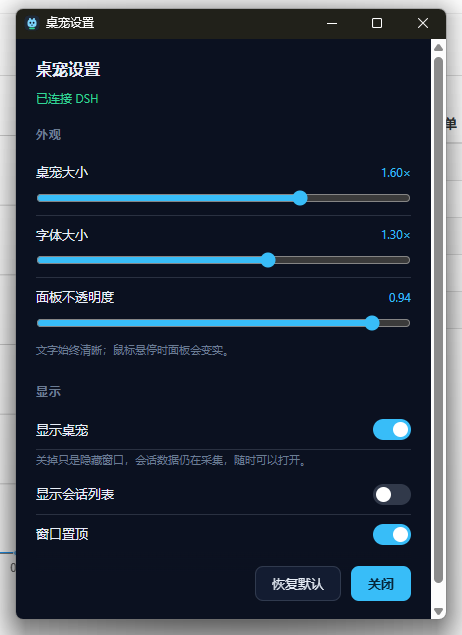
Appearance writes are live and answer with the clamped value, not an acknowledgement, so the panel always shows what took effect; a plumbing change re-applies the row and briefly restarts the bridge.
State lives in ~/.dsh/desktop-pet-codex/ (or $DSH_HOME/desktop-pet-codex/): endpoint.json,
watch.json, settings.json, pending.json. The bridge binds 127.0.0.1 only, and everything but
GET /health needs the per-run token (x-pet-token, or ?token= on the stream).
Design notes
The roster is a set you curate, not every session DSH knows. An empty set is seeded from
whatever is running at that moment; a conversation enters when it starts a turn (turn/start),
a resumed one included; it leaves only after a confirmed visit once it has a result, a ✓ dismissal,
or archiving. No expiry: running and waiting conversations stay tracked.
A subagent never joins. Nobody chooses a subagent, it is dispatched, and treating one as watched
would also bury the tree in child rows. Subagents are drawn as children of a watched parent, keyed on
origin === 'subagent' — not lineage alone, since DSH also parents side threads and placeholders.
Groups are Workspaces, matched by path, exactly as DSH does it: session.cwd === workspace.path.
A Workspace's sessionIds is an ordering account that does not list every session in the directory,
so matching on it splits one project into identically-named groups; a session no Workspace claims
groups by its whole directory path.
The bridge is loopback with a token, not origin-locked. The payload names your working
directories, so the bind and the token are the boundary; Access-Control-Allow-Origin: * answers
because the window is served from http://tauri.localhost and the origin protects nothing.
A click on a row is two unsequenced halves. Only the window process can raise DSH, and only the
plugin's browser half can switch sessions, so PUT /focus parks the request and answers 202 —
accepted, not done. That mailbox is pushed over SSE, not polled, because a hidden Chromium renderer
throttles timers hard and a click on the pet happens when DSH is hidden.
Phases have no catch-all. waiting (approval, question, blocking tool call), running (a working
child included), completed (turn/end with reason completed), stopped for the rest. No idle:
a session with a result is not resting, so idleness belongs to the group.
Layout
plugin/
  package.json          the dsh bundle, exports, and the schemastery peer
  cordis.patch.yml      the row, with every plumbing tunable
  src/core/             pure: types, decoders, the roster fold, settings, wire encoding
  src/host/             effectful: config, event adapters, bridge, focus routes, persistence
  client.js             the browser half
  scripts/smoke.mjs     exercises the pure core and the bridge with no Harness present
pet-app/
  src/                  the windows' wiring, snapshot model, SSE client, animation tables
  public/               pet.html, roster.html, settings.html, style.css, frames/
  src-tauri/src/lib.rs  window mechanics: transparent, always-on-top, click-through, geometry
tools/                  pack-release.mjs builds and packs; gen-pet-frames.mjs draws the frames;
                        gen-readme-gifs.mjs replays them into docs/states/ for this README
docs/                   the state GIFs, the roster sample, and the settings screenshot
License
MIT — see LICENSE. Copyright (c) 2026 ming.
The pose frames under pet-app/public/frames/ and pet-app/public/pet.png are original artwork by
the copyright holder, under the same licence.
Plugins associés
dsh-web-ui (dsh-pet)
zhu1090093659/dsh-web-ui
dsh-pet (dsh-pet)
pc2005-cloud/dsh-pet
dsh-tavern (dsh-tavern)
flizzywine/dsh-tavern
dsh-tavern (dsh-profile-bridge)
flizzywine/dsh-tavern