dsh-plugin-star-radar
moon-cold-sir/dsh-plugin-star-radar
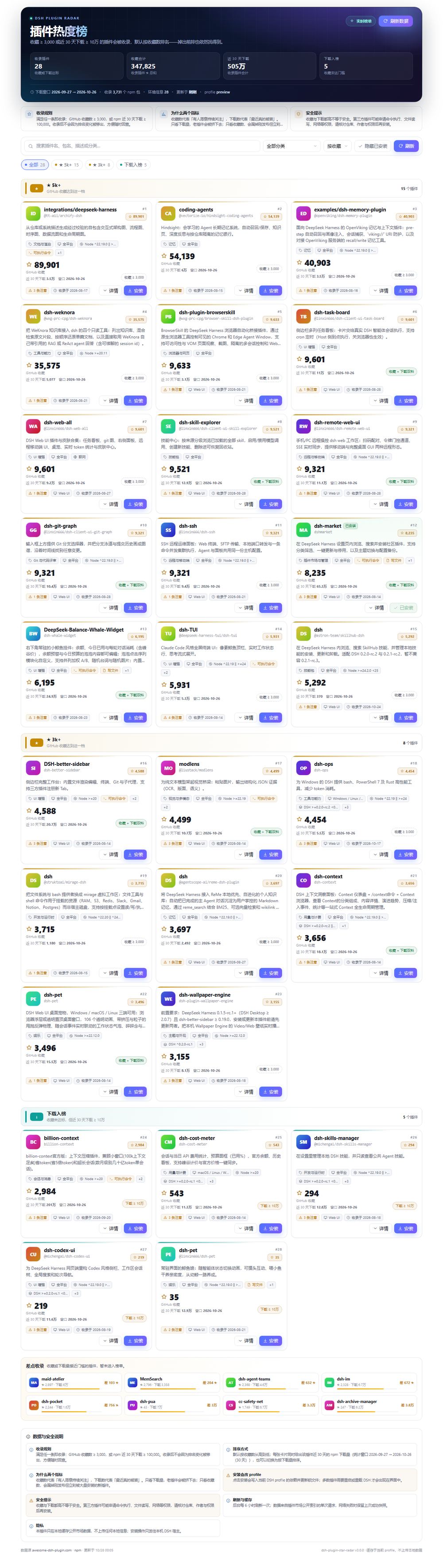
Star-ranked radar for DSH plugins. A plugin is listed once it has 3,000+ GitHub stars or 100k+ npm downloads in 30 days; after its rank drops it stays listed for 180 days by default, so a plugin is still findable for months after a hot streak.
Installer
dsh plugin --profile web add github:moon-cold-sir/dsh-plugin-star-radarREADME
Plugin Star Radar · dsh-plugin-star-radar
A "what should I install?" reference for people new to DeepSeek Harness (DSH).
It answers one question: which DSH plugins are people actually paying attention to and installing?
- Ranked by GitHub stars;
- Every card also shows npm downloads over the last 30 days, and you can re-sort by that;
- 3000+ stars OR 100k+ downloads in 30 days gets a plugin listed;
- Once listed, a plugin stays listed even after it falls below both thresholds: it moves to a labelled
已跌出 · 保留group forretainDays(180 by default) with its last measured numbers, so it is still findable months later.
Why two metrics
| Downloads only | Stars only | Both |
|---|---|---|
| Older plugins get pushed out by newer download spikes and become hard to find | A brand-new plugin that is installed in bulk but not starred yet is missed | What people keep watching and what gets installed right now |
Inclusion is the union; ranking is stars-first. A plugin that cools down stays on the page, which is exactly what a reference list needs.
Install
Desktop (recommended)
Settings → Plugins → Install, then paste:
dsh-plugin-star-radar
Or press the 安装 / Install button on any card in this plugin.
CLI
dsh plugin --profile web add dsh-plugin-star-radar
Local checkout
pnpm add "file:D:/path/to/dsh-plugin-star-radar"
Add "dsh-plugin-star-radar" to dsh.profile.bundles in the profile's package.json, then restart DSH.
Migrating from the older
dsh-plugin-radar/dsh-plugin-download-radar? Disable and remove the old one first — all three register the same section id (plugin-radar), so only one may be enabled.
What the page does
- Groups by star band (★ 5k+ / ★ 3k+ / download-only) so the tiers are obvious at a glance;
- Search across name, package, description and category;
- Category filter from the market index;
- Sort by stars / 30-day downloads / name;
- Details per card: stars, downloads, why it is listed, listing date, Node/DSH ranges, OS/CPU, package size, permission notes, manual install command, repo links;
- One-click install through the official
pluginManager.installBundle, falling back to the profile's pnpm with a copyable manual command.
Configuration
In the profile's cordis.patch.yml:
- id: plugin-radar
  config:
    minStars: 3000
    minDownloads: 100000
    intervalHours: 6
| Key | Default | Meaning |
|---|---|---|
minStars | 3000 | star count that gets a plugin listed |
minDownloads | 100000 | 30-day download count that gets a plugin listed |
retainDays | 180 | days a plugin stays visible after falling below both thresholds |
intervalHours | 6 | background refresh interval (1–168) |
catalogTtlHours | 12 | market index cache |
metaTtlHours | 24 | npm manifest cache |
maxManifest | 80 | how many manifests feed the environment notes |
manifestBudgetMs | 90000 | manifest phase budget; overruns are skipped, never block the board |
catalogUrl / npmRegistry | official | point them at a mirror if needed |
dataDir | <profile>/.dsh-plugin-radar | cache directory |
Where the data comes from
| Data | Source |
|---|---|
| plugin list, GitHub stars, 30-day downloads, category, description, icon | https://awesome-dsh-plugin.com/plugins.json — one request for everything |
Node/DSH ranges, os/cpu, install scripts, package size | https://registry.npmjs.org/<pkg>/latest, only for listed plugins |
Two deliberate choices:
- No per-package npm downloads history calls.
api.npmjs.org/downloads/rangeanswers HTTP 429 under bursts, which is what made an earlier version of this plugin stall mid-refresh. One catalog request cannot rate-limit itself. - Manifest reads are optional and budgeted. Missing notes never block the board.
Development
node scripts/build-client.mjs      # client.css + client.src.js -> client.js
node --test "test/*.test.mjs"      # offline unit tests
node scripts/live-check.mjs        # real market index, prints the board

cd preview && npm install && npm run build && npm run serve
npm run shot                       # screenshots into preview/screenshots/
Publishing
There is no official DSH marketplace; community indexes fill the gap. See docs/publishing.md.
License
MIT
Plugins associés
deepseek-harness
deepseek-ai/deepseek-harness
dsh-web (dsh-plugin-manager)
zhu1090093659/dsh-web
dsh-market
dsh-market/dsh-market
dsh-web
zhu1090093659/dsh-web