dsh-code-nav (file-tree-actions)
nancy0-0/dsh-code-nav/packages/file-tree-actions
Right-click menu and drag support for the Files sidebar on Windows - copy absolute or workspace-relative paths, create files and folders, rename, move entries to the Recycle Bin, and drop a row into the composer to insert an @ reference.
Installer
dsh plugin --profile web add github:nancy0-0/dsh-code-navCe plugin se trouve dans le sous-répertoire packages/file-tree-actions du dépôt.
README
dsh-code-nav

DeepSeek Harness(DSH)的插件 monorepo,包含两个互相独立的小插件,用来减少「聊天 → 文件树 → 编辑器」之间的来回:
- symbol-links(npm 包名
dsh-symbol-links)——聊天消息里行内代码中的函数名、类型名可以直接点开,在右侧预览中定位到源码行。 - file-tree-actions(npm 包名
dsh-file-tree-actions)——给 Files 侧栏补上右键新建文件夹/文件、改名、移到回收站、复制路径,以及把文件拖进对话栏生成@引用。
两个包各自带 host 半和浏览器半,不共享运行时,也没有构建步骤;可以单独安装、单独卸载。
仓库:https://github.com/Nancy0-0/dsh-code-nav(MIT)
包一览
| 目录 | npm 包名 | 注册的宿主路由 | 状态 |
|---|---|---|---|
packages/symbol-links | dsh-symbol-links | POST /api/symbol-links/resolve | 定义跳转已实现;引用/实现候选为开发中(文本匹配) |
packages/file-tree-actions | dsh-file-tree-actions | POST /api/file-tree-actions | 新建/改名/回收站/复制/拖拽可用 |
symbol-links:聊天内符号导航
- 作用范围是会话正文(
[data-conversation-scroll])里的行内<code>;链接、代码块、按钮内的代码不动。 - 点击后按确定性阶梯解析:定义(definition)→ 包装函数(wrapper)→ 顺序出现(occurrence),命中后在右侧预览打开文件并滚动到对应行。
- 解析由 host 的只读索引完成,浏览器端只负责装饰、发同源
POST、调用官方的openFile(path, { line })。 - 解析不到时保持原样,只给一个轻提示,不改变文本、不影响复制。
右键菜单(2026-11-02 接入):打开定义、引用候选(文本匹配)、同名定义(候选)、复制名字。引用候选与同名定义都是正则/同名匹配,不声称语义调用关系或接口实现,仍按「开发中」对待;结果上限 50/20 条,超出或索引未完成会在面板里提示。
file-tree-actions:Files 侧栏文件操作
- 文件/文件夹行右键:复制绝对路径、相对路径、名称、
@引用。 - 目录行右键:新建文件、新建文件夹(菜单内联输入名字)。
- 任意行右键:重命名(预填原名)、移到回收站(二次确认)。
- 按住行拖进对话输入框:插入
@相对路径;含空格的路径自动加引号。 - 写操作走 host 路由,路径必须收敛在会话工作区(或 sandbox 工作区根)内;删除只进回收站,不会静默变成永久删除。
安装
从 npm / 插件市场安装(发布后):
dsh plugin --profile <name> add dsh-symbol-links
dsh plugin --profile <name> add dsh-file-tree-actions
开发期从本地源码安装:
dsh plugin --profile desktop add C:\path\to\dsh-code-nav\packages\symbol-links
dsh plugin --profile desktop add C:\path\to\dsh-code-nav\packages\file-tree-actions
两个包都通过 cordis.patch.yml 向 profile 的 dsh.profile.bundles 插入一行;浏览器半由各自 package.json 的 dsh.client 段声明。
生效方式:首次安装或改动 host 半(index.js / lib/*)后需要重启 DSH;只改浏览器半(client.js)时刷新页面即可。安装后第一次也要刷新页面。
截图
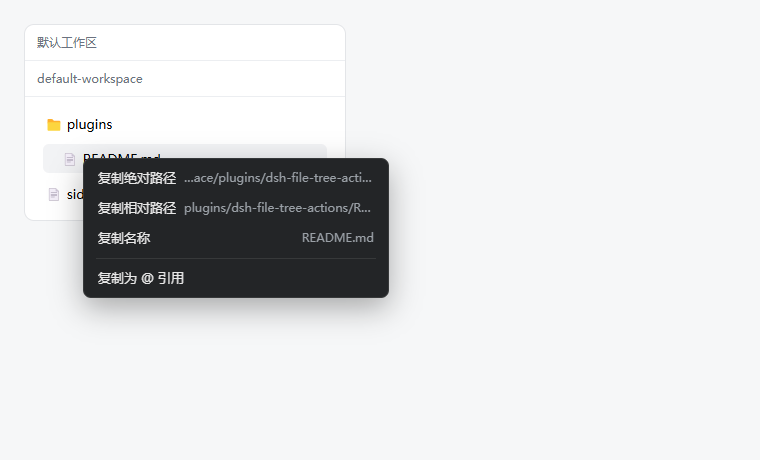
发布与收录
- npm 包名分别为
dsh-symbol-links/dsh-file-tree-actions,发布前检查项见 docs/RFC.md §8; - awesome-dsh-plugin 的收录材料(两份
data/plugins/*.yml+ 提交步骤)在 docs/awesome-submission; - CI 在 Windows 与 Ubuntu 上跑两个包的语法检查与单元测试。
兼容性
| 项 | 说明 |
|---|---|
| DSH | 0.2.1-rc.3(Desktop 内置 Web 前端),其他 0.2.x 未逐一验证;0.3 未验证 |
| 平台 | web(DSH Desktop 与 dsh web 共用前端);symbol-links 跨平台 |
| Node.js | 仓库脚本要求 `^22.19.0 |
| 回收站 | 仅 Windows;其他平台 file-tree-actions 的删除返回 501,不降级为永久删除 |
| LSP | 不依赖,也不调用语言服务器;解析是正则级的 |
目录结构
dsh-code-nav/
├─ .github/workflows/ci.yml   # Windows + Ubuntu,node --check / node --test
├─ .gitignore
├─ LICENSE                    # MIT
├─ README.md
├─ DESIGN.md                  # 架构、安全边界、索引预算
├─ package.json               # private,workspaces: packages/*
└─ packages/                  # symbol-links / file-tree-actions
   ├─ symbol-links/           # dsh-symbol-links
   └─ file-tree-actions/      # dsh-file-tree-actions
每个包的典型布局(与现有插件一致):
symbol-links/
├─ lib/index.js        # host:只读索引 + POST 路由
├─ lib/resolver.js     # 纯解析逻辑(可单测,无 I/O)
├─ lib/client.js       # 浏览器:DOM 装饰 + 点击 + 打开预览
├─ test/               # node --test
├─ cordis.patch.yml
└─ package.json

file-tree-actions/
├─ index.js            # host:文件写路由
├─ client.js           # 浏览器:右键菜单 + 拖拽
├─ lib/paths.js        # 路径/名字校验
├─ lib/ops.js          # 文件系统动作
├─ test/               # node --test(含真实 Chromium harness)
├─ cordis.patch.yml
└─ package.json
开发
在仓库根目录:
npm test        # node --test + file-tree-actions 的 host 测试
npm run check   # 对两个包的 JS 逐个 node --check
根
package.json的check脚本按packages/symbol-links与packages/file-tree-actions这两个目录名写死了文件路径;若目录改名,请同步修改脚本。
已知限制
- 精度是正则级,不是编译器级:宏、模板元编程、同名重载、生成代码可能判错;解析阶梯会回退到包装函数或首次出现,返回结果带
via标注来源。 - 引用/同名定义是文本级候选:右键可查,但只是文本匹配/同名定义,不是语义引用或接口实现;定义跳转是稳定闭环,另外两项按候选标注。
- 索引范围:默认只索引会话工作区;其他仓库需要在插件配置里显式声明
extraRoots(最多 4 个,只读)。超过 5 万个文件、单文件超过 2 MB 的内容会被跳过。 - 冷启动:大仓库首次索引有 3.5 秒等待上限,超时返回
incomplete并在后台继续建;期间点击会提示「正在建立索引」。 - 升级宿主可能失效:两个客户端半都依赖官方 DOM 约定(会话滚动容器、文件树行属性),宿主升级改选择器时需要跟着改。
- 需要重启:host 半改动、首次安装都要重启 DSH;仅刷新页面只覆盖
client.js的改动。 - 回收站平台限制:非 Windows 不支持删除(501)。
English
dsh-code-nav is a small monorepo of two independent DeepSeek Harness (DSH) web plugins:
- dsh-symbol-links turns inline code in chat messages into clickable symbol references. Clicking resolves the name through a deterministic ladder (definition → enclosing wrapper → first occurrence) and opens the file in the right-hand preview at the target line. Right-click adds definition / reference candidates (text match) / same-name definitions / copy name; the last two are text-level candidates, not semantic results.
- dsh-file-tree-actions adds a context menu to the Files sidebar — new file/folder, rename, move to the Windows Recycle Bin, copy absolute/relative path or
@mention — and lets you drag a row into the composer to insert an@pathreference.
dsh plugin --profile <name> add dsh-symbol-links
dsh plugin --profile <name> add dsh-file-tree-actions
Compatibility: DSH 0.2.1-rc.3 / Web; Node.js ^22.19.0 || >=24.0.0 for the repo scripts. Symbol resolution is regex-based (no LSP) and intentionally heuristic. Host-side changes require a DSH restart; client-only changes need a page refresh. See DESIGN.md for architecture, trust boundaries, and cold/hot index budgets.
License
MIT,见 LICENSE。
Plugins associés
dsh-web (dsh-task-board)
zhu1090093659/dsh-web
dsh-web (dsh-web-all)
zhu1090093659/dsh-web
dsh-TUI
ccch1mneyyy/dsh-tui
dsh-web-ui (dsh-task-board)
zhu1090093659/dsh-web-ui