dsh-workaround-git
roshenn/dsh-workaround-git
Batch git across every repository in a workspace: eight tools that each return one table — status with branch, working-tree dirt, ahead/behind and last commit; fast-forward-only sync that skips dirty trees; per-repo change digests for writing commit messages; one commit per repo with its own message; push; stage/unstage; discard or stash; and merge/rebase/cherry-pick conflicts (list, resolve ours or theirs, continue, abort) — plus a sidebar panel with a per-repo commit box, and dryRun on sync, commit and push. Its HTTP routes have no DSH access check, so a web page open in your browser could call them.
Installer
dsh plugin --profile web add github:roshenn/dsh-workaround-gitREADME
dsh-workaround-git
DeepSeek Harness (dsh) plugin: batch git operations across every repo in a workspace — one status table, one sync, one commit per repo's own diff, one push.




Why
Parallel development across a workspace with several projects means the same five git commands, N times, in N terminals. The model can run them one at a time — slowly, with no idea what the other repos are doing, and no single place where the batch result lands.
This plugin gives the model eight verbs that operate on the whole workspace at once, and returns one table per verb: what changed, what moved, what failed and why.
Screenshots
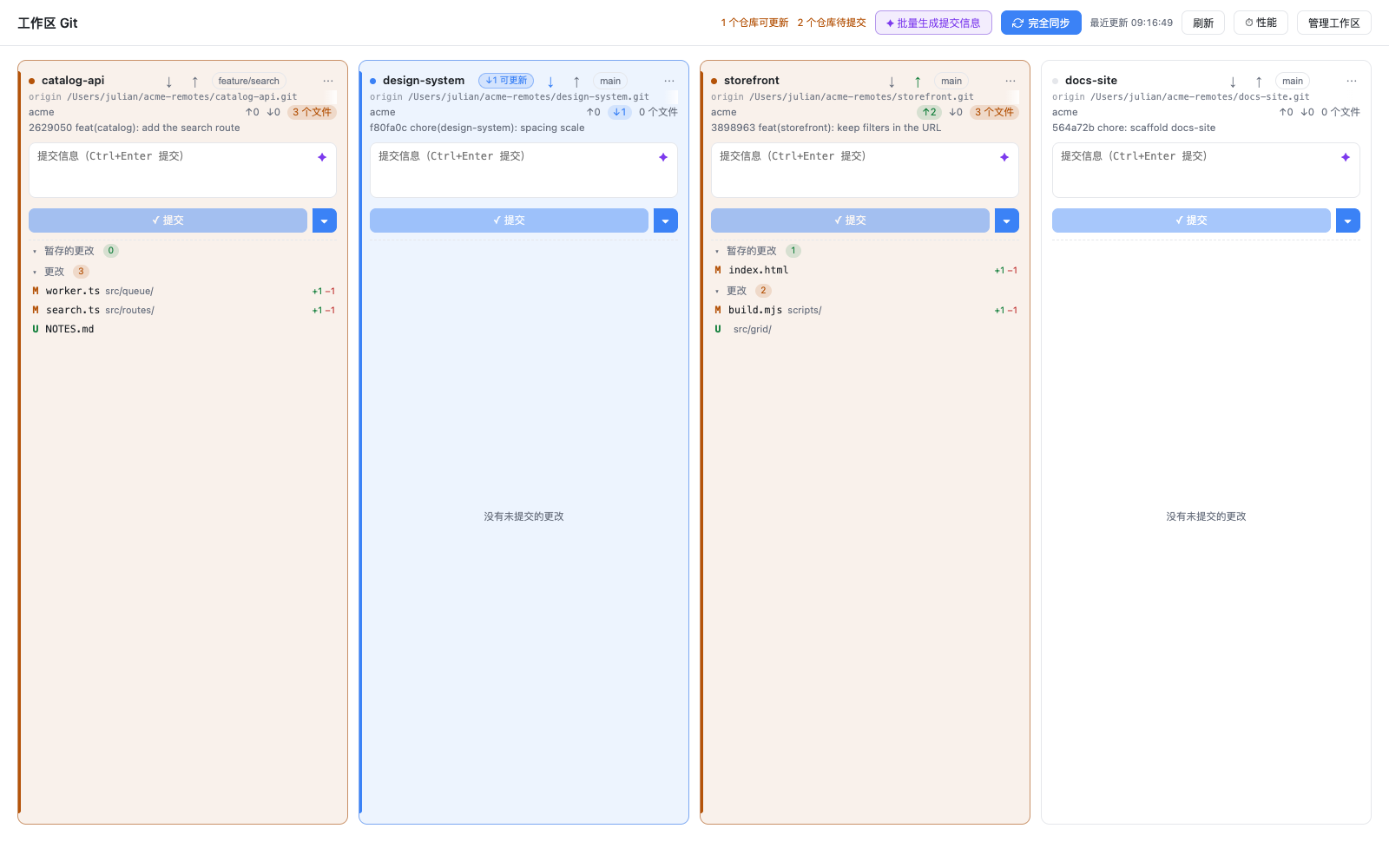
The panel: one card per repository, with a per-repo commit box, the staged / changes lists, and the batch drafts, one-click sync and workspace management on the toolbar.
Features
- Discovery, not configuration. Every
.gitunder the workspace root is a project, and a workspace that points at a subdirectory of a repository is a project scoped to that directory. No repo list to maintain, no config file to drift. - One view of everything. Branch, working-tree dirt, ahead/behind vs upstream, and last commit in a single table.
- A conflict is a step, not a dead end. A merge, rebase, cherry-pick or revert in progress is reported with its unmerged files named. Resolve a file in one call (
ours/theirs/ mark a hand-edited file resolved), thencontinueorabortthe operation — a plain commit never concludes a merge behind your back. - Only the files you chose.
git_workspace_commitcan commit exactly what is staged (stagedOnly) or an explicit path list per repo, so selective staging actually scopes the commit instead of being cosmetic. - Live panel. The source-control page re-reads
/stateevery 10 seconds while visible, refreshes on window focus, and shows最近更新 HH:MM:SS, so work done from chat or a terminal shows up without pressing 刷新. - Sync that refuses to guess. Fetches, then fast-forwards; a repo with a dirty working tree is skipped and reported instead of half-resolving a conflict.
- One commit message per repo.
git_workspace_changeshands the model each repo's own diff;git_workspace_committakes a map of repo → message, so a workspace-wide commit never reuses one message. - Partial success is normal. A failed repo is a row in the table, not an aborted batch.
- Dry run before write.
sync,commit, andpushall acceptdryRun. - Zero dependencies, zero build. Plain ESM, no
npm installneeded to load it.
Tools
| Tool | What it does | Key arguments |
|---|---|---|
git_workspace_status | Table of every repo: branch, dirt (conflict files named), ahead/behind, last commit, in-progress operation | root?, maxDepth? |
git_workspace_sync | fetch + fast-forward each repo; dirty trees are skipped | root?, maxDepth?, mode?, dryRun? |
git_workspace_changes | Per-repo change digest for writing commit messages | root?, maxDepth? |
git_workspace_commit | Commit repos in one call, each with its own message | messages (required), paths?, stagedOnly?, root?, maxDepth?, dryRun? |
git_workspace_push | Push each repo's branch; sets upstream on first push | root?, maxDepth?, dryRun? |
git_workspace_stage | Stage / unstage named files per repo (git add, git restore --staged) | files (required), action?, root?, maxDepth?, dryRun? |
git_workspace_restore | Discard or stash named files per repo; discard needs confirm: true | files (required), action, confirm?, root?, maxDepth?, dryRun? |
git_workspace_conflicts | List an in-progress merge/rebase/cherry-pick/revert and its unmerged files; resolve, continue, or abort | action?, repo?, paths?, confirm?, root?, maxDepth?, dryRun? |
root defaults to the calling session's workspace, then to the process working directory.
Install
Requires Node ^22.19.0 || >=24.0.0, dsh >= 0.2.1-rc.3, and git on PATH.
# from a local checkout (works today)
dsh plugin --profile web add /path/to/dsh-workaround-git

# from GitHub, after the repo is pushed
dsh plugin --profile web add github:Roshenn/dsh-workaround-git#v0.1.0

# from npm, once published
npx -y @deepseek-ai/dsh plugin --profile web add dsh-workaround-git@0.1.0
Then restart dsh web. dsh plugin forwards to pnpm against the profile's package.json; the package's dsh.bundle.patch mounts cordis.patch.yml, which inserts the plugin row.
Verify the row landed:
dsh --profile web --dump-config | grep workaround-git
Desktop app: the desktop profile is managed by the Electron shell and the CLI refuses it. Open Plugins → Add plugin in the app instead.
Develop against the running desktop app
The desktop app has no working dsh CLI shim, so the dev link is the same one
dsh-looptree-dashboard uses: a link: dependency in the live profile plus a
bundle entry. From the profile directory:
cd ~/.dsh/profiles/desktop
# package.json:
#   dependencies: "dsh-workaround-git": "link:../../dsh-workaround-git"
#   dsh.profile.bundles: append "dsh-workaround-git"
pnpm install --prefer-offline
Then fully quit the app (tray → Quit) and relaunch. The junction
node_modules/dsh-workaround-git points at this checkout, so every later edit
is picked up by the next restart — no rebuild step, the client half is plain JS.
Sanity checks before restarting:
node --test                     # host half
node scripts/smoke-panel.mjs    # panel API end to end against a temp repo
node scripts/bench-panel.mjs    # entry-path timings on the managed workspaces here
node scripts/bench-panel.mjs --breakdown   # same, split per workspace / repo / git command
docs/perf-baseline.md records what the entry path costs on this machine,
where its git spawns go, and the thresholds that decide the next round of
panel-performance work.
Panel (browser half)
The client half registers a left-sidebar entry (sidebar.panellist, order 45)
and a main-area page (main). First open lists every workspace dsh knows with
its git state — git (the path is inside a work tree: a repo root or a module
directory of one), contains (repos live below it), or none — and asks which
ones to manage. The choice is stored in
$DSH_HOME/workaround-git/managed.json; nothing else is persisted.
A managed workspace is the unit of management; the cards are the
repositories under it. A workspace classified contains expands into one
card per repository, so a card has no workspace row of its own. Use the ⋯
button in the card header (or right-click the header) and choose 「从面板移除」
to hide a single card: only hiddenRepos in managed.json changes, never a
repository. Hidden cards stay listed under 「已隐藏的仓库」 in 管理工作区, where
恢复 brings them back.
A managed entry that dsh no longer lists — the workspace was removed from dsh,
or its folder was deleted — stays in the picker with a 「不在 dsh 工作区中」
badge instead of disappearing. Saving the picker merges the selection (existing
entries keep their addedAt), accepts an empty list, and reports any entry it
could not add.
A workspace that is a subdirectory of a repository is a scoped workspace: its card shows only that module's branch state, changes and line counts, and commits from it refuse to run when something outside the module is already staged (the index is shared with the whole repository). Managing both the repository root and a module inside it is allowed and yields two cards, one per scope; the same repository reached twice by different workspaces still renders once.
The workbench is one horizontal strip of vertical cards — one card per repository, never wrapping to a second row. Four cards are visible on a wide pane (three, two or one as it narrows); when more repositories are managed the strip scrolls sideways with the wheel, a trackpad, or the ‹ › buttons that appear at the edges. Cards fill the pane when fewer than four exist, and the card body stretches to the pane height. Every card keeps the same block order — repository header (name, branch, origin URL), commit box, a flexible change area (min 140px) that fills the leftover height, status line — so the commit box, the staged section, the changes section and the buttons of a row share one horizontal line. The strip is the only view — there is no list mode to switch to, so the cards never reflow into a second layout.
Each card follows VS Code's source-control layout:
- Remote line under the repository name: the
originURL (falling back to the first remote) in small monospace, aligned across cards; a URL that does not fit scrolls horizontally on hover and takes no extra height. - Commit box with a model button (✦) that drafts a Conventional Commits message from the staged diff; the draft lands in the input and is never committed automatically. The split button commits, or commits and pushes.
- Staged / changes sections with the per-file status letter, name,
directory and
+added −removed; headers collapse and carry stage-all / unstage-all. - Hover actions per row:
+stages,−unstages,↩discards after a confirmation dialog. - Context menu per file: open file, reveal in the file manager, copy path,
copy relative path, stage/unstage, add to
.gitignore(file / extension / directory, untracked files only), discard changes…, view diff, file history, stash. - Card menu (right-click the header, or the
⋯button): stage all, unstage all, stash all, refresh, copy repo path, reveal repo, remove from panel…. - Branch menu in the card header lists local branches and switches with
git switch. - Per-repo pull / push: the
↓and↑buttons left of the branch chip run fetch + fast-forward and push respectively; a repo behind its upstream shows a blue↓N 可更新badge. - State colours: every card carries a state dot and a tinted border /
background — amber for uncommitted changes, blue for commits to pull, green
for commits to push, red for conflicts. Count chips (
↑ahead,↓behind, files), section count badges and file status letters (M amber, A/U green, D red, R violet) reuse the same palette so actionable spots stand out. - Batch bar: 批量生成提交信息 drafts a message for every repository with
pending changes; the result line reports the drafts and any failures, and each
draft lands in its card's commit box. Pull and push stay per card (the
↓/↑buttons) or across the whole workspace via 完全同步. The buttons render enabled in the panel's first frame — the entry path reads the managed store first and neither card loading nor the remote check holds them disabled. - Full sync: 完全同步 (a two-arrow cycle icon) chains the whole batch flow behind one click for
every managed repository —
git fetch, a model-drafted message plus a commit for the pending changes,git pull --rebaseto integrate the remote, thengit push. It is the bar's only primary (filled) button, because it is the only action that pushes without a second click. A repo is skipped — never force-handled — when it has no remote, no upstream, an unfinished merge/rebase/cherry-pick, or no generated commit message; a conflicting rebase stops that repo and leaves it in the conflict lane instead of pushing. - Full sync runs in parallel waves: all repositories
fetchat once and, because the network round trip and the model call are independent, every dirty repo drafts and commits while its fetch is still in flight. Rebasing and pushing then run as one wave each. A twelve-repo workspace costs roughly the slowest repo rather than the sum of twelve, and a remote check that finished in the last 15 seconds is reused instead of fetching every repo a second time. - Full sync progress: the header shows a progress bar with
已完成/总数 · 当前阶段 · 已用秒数(the stage names every concurrent stage, e.g.抓取/生成中), and every card carries a five-dot strip — 抓取 / 生成 / 提交 / 合并 / 推送 — that marks each stage pending, running, done, skipped or failed, plus the per-repo elapsed time once it settles. Card actions are dimmed while its repo is in flight, and the hover title names the stage timings in milliseconds. The result line reports synced / skipped / failed counts and total seconds. - Cards per screen: 管理工作区 starts with a 显示设置 row whose
默认每屏显示项目数selector picks 1–8 cards (default 4); the choice is remembered inlocalStorage(wg-columns) and applied immediately, while a narrow pane still shows fewer cards rather than shrinking below 260 px. - Open terminal: the
>_button right of the branch chip launches an interactive shell in the repository directory —wt.exe -d <repo>when Windows Terminal is available, otherwise a hidden PowerShell launcher thatStart-Processespowershell -NoExitin that directory (open -a Terminalon macOS,x-terminal-emulatoron Linux). The path is passed as the working directory or a single argv element, never interpolated into a shell string. - Remote update check: opening the panel runs
git fetchon every managed repository in the background, after the cards render. The header shows a spinning 检查远端更新… chip (role="status", no motion underprefers-reduced-motion) while it runs, and the batch buttons stay clickable the whole time; repos behind their upstream then show an amber↓N 可更新badge plus a header count, and a failed fetch only surfaces a small warning. Pressing 刷新 runs the check again. - Conflict lane: a card with an operation in progress shows a badge (合并中 /
变基中 / 拣选中 / 回滚中) plus 中止… (confirmed, destructive) and 继续 (rebase /
cherry-pick / revert only, disabled while conflicts remain). A conflict row's
context menu leads with 用 Ours 解决 / 用 Theirs 解决 — the tooltip notes that
git inverts them during a rebase — and 标记为已解决; once a merge is fully
resolved the commit button becomes
✓ 完成合并并提交and concludes it explicitly. - 性能 measurement: the header's 性能 button starts a recording run and
shows a four-step script in a banner (刷新 → stage a file → type in a commit box →
open a diff); 结束测量 posts p50/p95 per span — entry path, first card, every
card action, the poll and the diff drawer — plus long tasks to
/api/perf, which savesperf-report.jsonnext tomanaged.jsonand shows the table in a dialog. Nothing is recorded while the button is idle except four entry timestamps per mount;docs/perf-baseline.mdexplains what the numbers mean. - Live refresh: the panel re-reads
/stateevery 10 seconds while it is visible and the batch bar is idle, and immediately (throttled to once per 2 s) when the window regains focus or the tab becomes visible. A failed background poll stays quiet, a successful one clears a stale error banner, and the header shows最近更新 HH:MM:SS. A card action cannot start twice, and a poll never touches text being typed into a commit box. A card action refreshes only that card (POST /api/repo-state) instead of re-reading every workspace;open,terminal,copyand the card's own 刷新 cannot change git state and skip the re-read entirely, falling back to a full/stateonly if the single read fails. - Opening and clicking never wait for a full read: the panel paints the cards
it painted last (a module-scope snapshot) and the first-ever open shows four
skeleton cards instead of a blank body, then replaces them when
/statelands. Stage / unstage / stage-all / unstage-all move the file row on the click frame and reconcile withPOST /api/repo-statea moment later; a refused request restores the previous row and reads the truth before reporting the error. - Diff drawer (unified patch with line numbers) and file history open from a row click or the context menu.
Discard is the only destructive action: it asks for confirmation, restores
tracked files with git restore --worktree, and deletes untracked files — the
untracked deletion cannot be undone. The model route comes from the session
default (agentDefaultModel) or the first advertised provider; no API key ever
reaches the plugin. Drafts run at the cheapest reasoning effort the model
advertises (low) rather than the session's effort (typically max): a commit
subject is short and format-constrained, so thinking tokens only add latency. A
model that does not advertise low keeps the inherited effort — dsh rejects an
explicit unsupported effort instead of clamping it — and an effort the provider
rejects at its endpoint is retried once at the inherited effort, so the draft
never fails on the effort choice alone.
The browser half talks to one prefix route, /workaround-git/api:
| Method | Path | Purpose |
|---|---|---|
| GET | /api/workspaces | every workspace with its git state (?refresh=1 bypasses the 60s cache) |
| GET/POST | /api/managed | read / merge the managed list (returns hiddenRepos) |
| POST | /api/hidden-repos | hide or restore one card: {workspaceId, repo, hidden: true} / {path, hidden: false} |
| GET | /api/state | per-repo status with grouped staged / changes / conflicts |
| POST | /api/repo-state | one card's state (same row shape as /api/state), used to refresh a single card after an action |
| POST | /api/stage | stage everything, or the listed paths |
| POST | /api/unstage | unstage everything, or the listed paths |
| POST | /api/discard | restore tracked files / delete untracked ones |
| POST | /api/ignore | append a rule to the repo's .gitignore |
| POST | /api/fetch | fetch every managed repo (or one) and report per-repo failures |
| POST | /api/batch | pull / push / suggest / stage-and-commit across every managed repo |
| POST | /api/perf | save one panel measurement as $DSH_HOME/workaround-git/perf-report.json (diagnostics; never touches a repository) |
| POST | /api/autosync | start a full sync; returns { jobId, total, reusedFetch } immediately |
| GET | /api/autosync/<id> | per-repo, per-stage progress for that job (poll it) |
| POST | /api/open | open a file, or reveal it in the file manager |
| POST | /api/terminal | open an interactive terminal at the repository directory |
| POST | /api/diff | unified diff for one file |
| POST | /api/history | commits that touched a file |
| POST | /api/stash | stash the listed paths |
| POST | /api/branches, /api/branch-switch | list / switch local branches |
| POST | /api/suggest | model-drafted commit message (no commit) |
| POST | /api/commit | commit the message in the box (allowSequencer: true concludes a resolved merge) |
| POST | /api/resolve | resolve one conflicted file: strategy: ours | theirs | stage |
| POST | /api/sequencer | action: continue | abort for the in-progress merge/rebase/cherry-pick/revert |
| POST | /api/sync, /api/push | per-repo sync / push |
Mutations take {workspaceId, repo}; every path must resolve inside that
repository, so the browser cannot turn the panel into "run git anywhere". A
scoped workspace additionally pins every command to its module directory, and a
commit is refused (scope-conflict) when the shared index holds changes staged
outside that module.
Configure
Defaults live in cordis.patch.yml and can be edited there:
| Field | Default | Meaning |
|---|---|---|
maxDepth | 3 | How deep to descend under the root looking for .git |
concurrency | 4 | Repos processed in parallel |
pullMode | ff-only | Default integration for git_workspace_sync: ff-only, rebase, or merge |
allowOutsideRoot | false | Allow a root outside the session workspace (see Safety boundaries) |
The patch loader replaces config wholesale, never deep-merges — restate every field you need.
Usage
You do not call the tools yourself; you ask in chat and the model picks them.
Where am I?
What do the repos in this workspace look like right now?
Catch up before starting work:
Sync everything that is safe to sync, then tell me which repos were skipped and why.
The two-step commit:
Look at what changed in each repo, write a commit message per repo from its own diff, then commit.
The model calls git_workspace_changes, reads each repo's files and line counts, writes one message per repo, and passes them back as a map:
{
  "messages": {
    "api-server": "fix(auth): refresh token before expiry instead of after",
    "web-client": "feat(settings): move account section above billing"
  }
}
A repo with no entry in messages is skipped — never committed with someone else's message. Keys must be the exact label shown by git_workspace_changes (or an absolute path); a bare directory name is not enough once labels nest (apps/api-server and libs/api-server both end in api-server), and an unmatched key fails the call instead of being dropped.
Push the batch:
Push every repo you just committed.
Get out of a conflicted update:
Three repos stopped on a merge conflict. List the unmerged files, take the incoming side in each, then finish the merges.
git_workspace_conflicts reports the operation and its files, action: "theirs" resolves and stages them, and action: "continue" concludes the merge. action: "abort" throws the operation away and needs confirm: true.
Commit only part of a repo:
Stage just the README and src/auth.js in api-server, then commit those and leave my other changes alone.
git_workspace_stage puts those paths in the index, and git_workspace_commit with stagedOnly: true (or a paths map) commits exactly them.
Example output
git_workspace_sync on a five-repo workspace, dry run — it fetches so the preview is accurate, then stops before integrating:
**sync** · 5 repos · up-to-date: 3, would-sync: 1, skipped: 1

| repo | action | status | after | detail |
| --- | --- | --- | --- | --- |
| app | up-to-date | ok | ↑0 ↓0 | already up to date |
| app-ahead | up-to-date | ok | ↑1 ↓0 | already up to date |
| app-behind | would-sync | ok | ↑0 ↓1 | — |
| app-dirty | skipped | skipped | ↑0 ↓0 | working tree is dirty (0 staged, 1 modified, 1 untracked) |
| app-nested/deep | up-to-date | ok | ↑0 ↓0 | already up to date |
What it will not do
- No force push, no
reset --hard, no history rewrite on its own. Sync fetches, then integrates with--ff-onlyunless you ask formode: 'rebase'or'merge';pushis a plaingit push. - No commit without a message.
messagesis required, every value must be a non-empty string, and a key that matches no repo label is reported as an error rather than silently ignored. - No syncing a dirty repo. A repo with staged, modified, untracked, or conflicted files is skipped with the reason, because a conflict resolved wrongly in ten repos at once is worse than one repo left for you. A skip is reported, not counted as a failure.
- No bare repos. Discovery looks for a
.gitdirectory or worktree file; bare remotes on disk are ignored, andnode_modules,dist,build,target,.venv, and dot-directories are skipped. Submodules do carry a.gitfile, so they show up as their own repos. - No silent partial staging.
git_workspace_commitstages everything (git add --all) by default;stagedOnly: truecommits exactly the index, and a per-repopathsmap stages and commits only those files (git commit --only), leaving other staged work in place. - No silent merge conclusion. A repo with an operation in progress is refused by
git_workspace_commit; the merge/rebase is finished throughgit_workspace_conflicts(continue) or the panel's explicit完成合并并提交. - No credentials handling. Authentication is whatever your
gitalready has configured;GIT_TERMINAL_PROMPTis disabled so a missing credential fails fast instead of hanging.
Safety boundaries
root is model-generated, and every operation runs git in that directory. It is therefore confined to the calling session's workspace: a root outside it is refused before any git process starts. A deliberate wider scan requires allowOutsideRoot: true in the plugin config.
Reads (status, changes) never write. sync, commit, and push accept dryRun; the sync preview still fetches, because a preview that cannot see upstream commits would report the wrong thing — it never integrates, resets, or writes to a working tree.
How it works
lib/index.js    cordis plugin: exports name / inject / apply, registers eight tools
lib/git.mjs     git primitives: discovery, status, sync, changes, commit, push
lib/format.mjs  markdown rendering of each batch result
Discovery walks the root depth-first to maxDepth, treating every directory with a .git entry as a project, and keeps walking inside it (worktrees, nested projects); a hard cap of 200 repos stops a wrong root from turning into an unbounded scan. Status is parsed from git status --porcelain=v2 --branch, so ahead/behind come from the repo's own view of its upstream.
Every per-repo operation resolves with a result object and never rejects: the plugin reports partial failure instead of throwing away the whole batch.
Development
node --test                                # 79 tests against real git repos in a temp workspace
node scripts/smoke.mjs                     # print the status table, a sync dry run, and the change digest

# optional: prove the schemas compile under the real tool registry, not the test stub
npm i --no-save @deepseek-ai/dsh-tools && node scripts/validate-schema.mjs
No install step: there are no runtime dependencies. @deepseek-ai/dsh-tools and @deepseek-ai/cordis are peer dependencies supplied by the harness; the plugin test stubs the former through a loader hook.
Compatibility
| dsh | >= 0.2.1-rc.3 |
| Node.js | ^22.19.0 || >=24.0.0 |
| Platforms | Windows, macOS, Linux (anywhere git runs) |
| Host kind | host tools + browser panel (dsh.client entry, plain JS, no build) |
License
Plugins associés
dsh-web (dsh-git-graph)
zhu1090093659/dsh-web
plannotator
backnotprop/plannotator
dsh-web-ui (dsh-git-graph)
zhu1090093659/dsh-web-ui
codex-guard (dsh)
akimiya-z/codex-guard