obsidian-dsh-acp
silenzerorz/obsidian-dsh-acp
Adaptateur ACP qui pilote DeepSeek Harness depuis Obsidian Agent Client (et d'autres clients ACP) : lister, reprendre, dériver et supprimer des sessions, changer de modèle par session, prévisualiser un résumé en une ligne, importer des sessions ACP externes et importer les conversations d'Obsidian Agent Client dans le stockage natif des sessions dsh. Nécessite DSH >= 0.1.5-rc.3.
Installer
dsh plugin --profile web add github:silenzerorz/obsidian-dsh-acpREADME
obsidian-dsh-acp
See CHANGELOG.md for version history.




Run DeepSeek Harness (DSH) inside Obsidian — an ACP adapter that turns Obsidian into a full DSH client.
What is this?
obsidian-dsh-acp is an ACP (Agent Client Protocol)
server that bridges DSH into Obsidian. Add it as a Custom Agent in Obsidian's
Agent Client community plugin (or install it as a cordis plugin in a DSH
profile) and you can drive DeepSeek Harness — chat, tools, session history —
without leaving Obsidian.
Obsidian (Agent Client plugin)
      │  ① launches it as a Custom Agent over ACP
      ▼
obsidian-dsh-acp (ACP server, v1 over stdin/stdout)
      │  ② one prompt per turn
      ▼
dsh  (headless one-shot task, or the long-running dsh web gateway)
It works like claude-agent-acp does for Claude Code: each turn streams DSH
output back to the client as agent_message_chunk updates and finishes with an
end_turn result.
Features
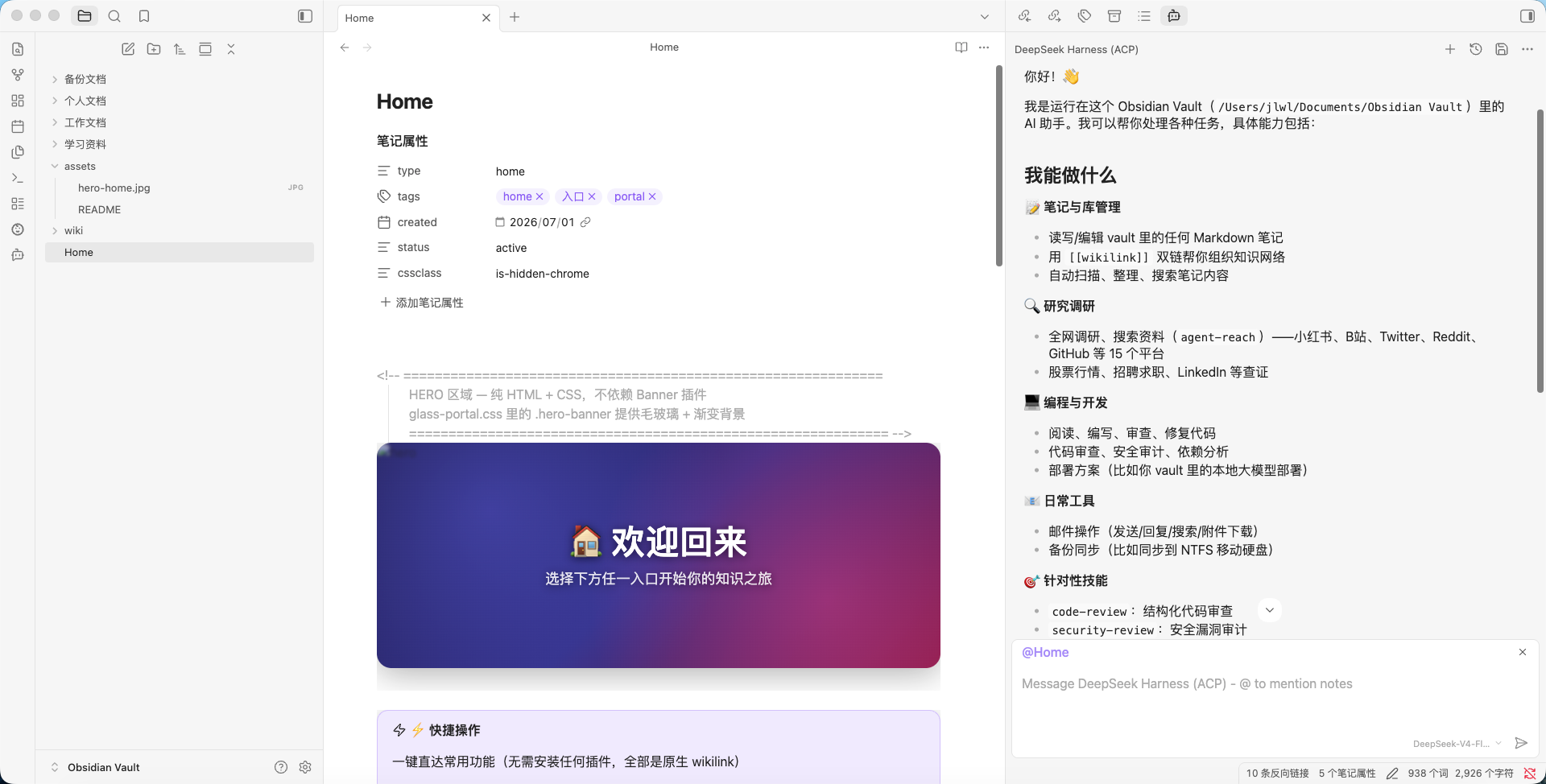
- 💬 Chat inside Obsidian — prompt DSH from the Agent Client side panel.
- 🧰 Tool-call frames — tool cards render in the client (
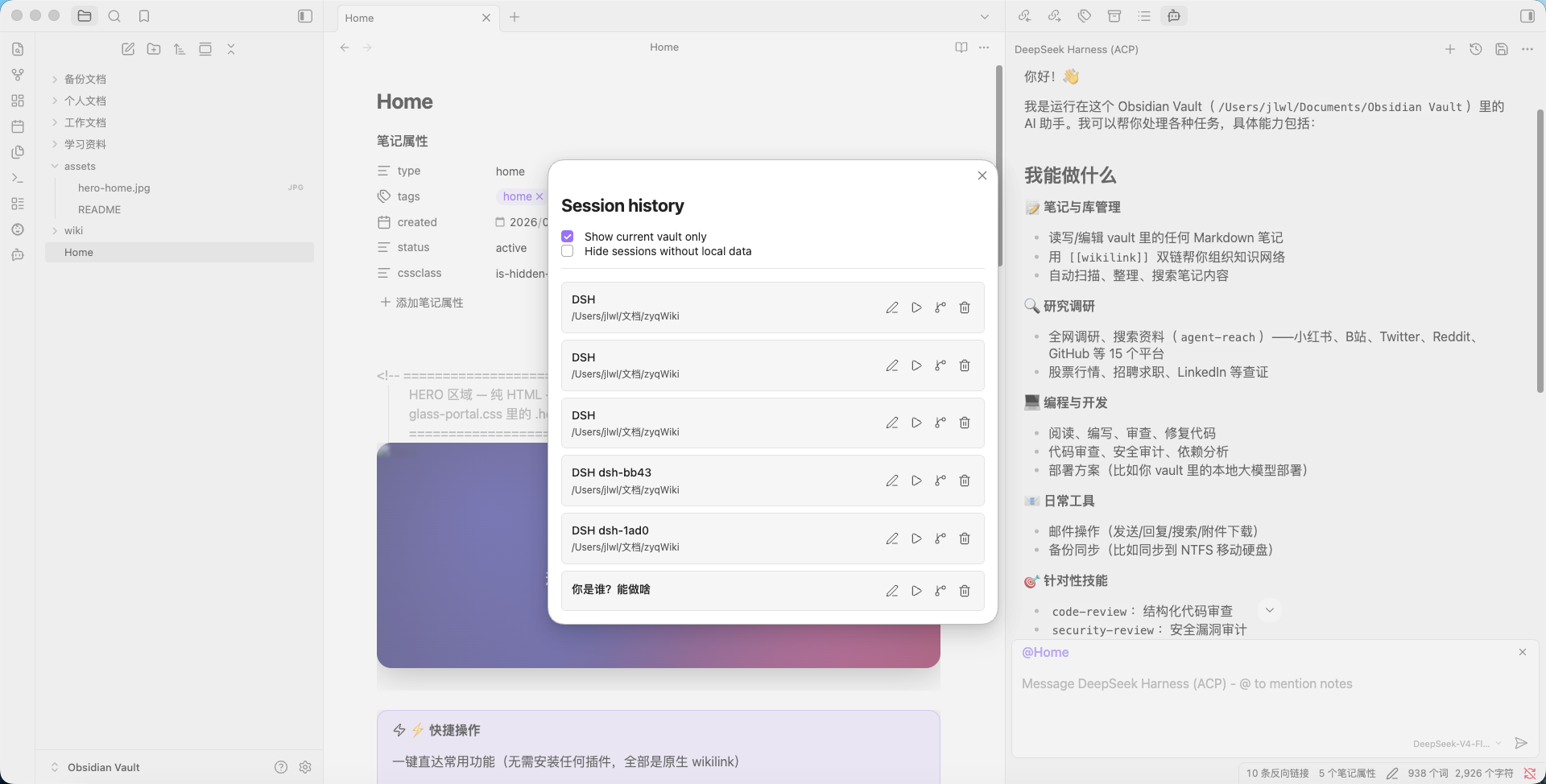
in_progress→completed), with token usage per step. (needs a tool-capable model) - 🗂️ Session management — durable session list, fork, resume, and permanent delete; survives adapter restarts.
- 🔀 Per-session model switching — a model dropdown in the client; the chosen model applies to that session only (shared profile config is never mutated).
- 🧠 Reasoning & live streaming — live reasoning / execution display in long mode (inside a dsh web profile).
- 📥 Import external sessions — import a session exported by another ACP agent (e.g. Claude / Agent Client) into the local DSH session store.
- 🩺 Self-check & one-click repair —
dsh-acp doctordiagnoses environment drift and can repair most issues automatically. - 🧹 Automatic cleanup — orphaned sessions are reconciled against Obsidian's own session list (conservatively; live sessions are never removed).
Screenshots
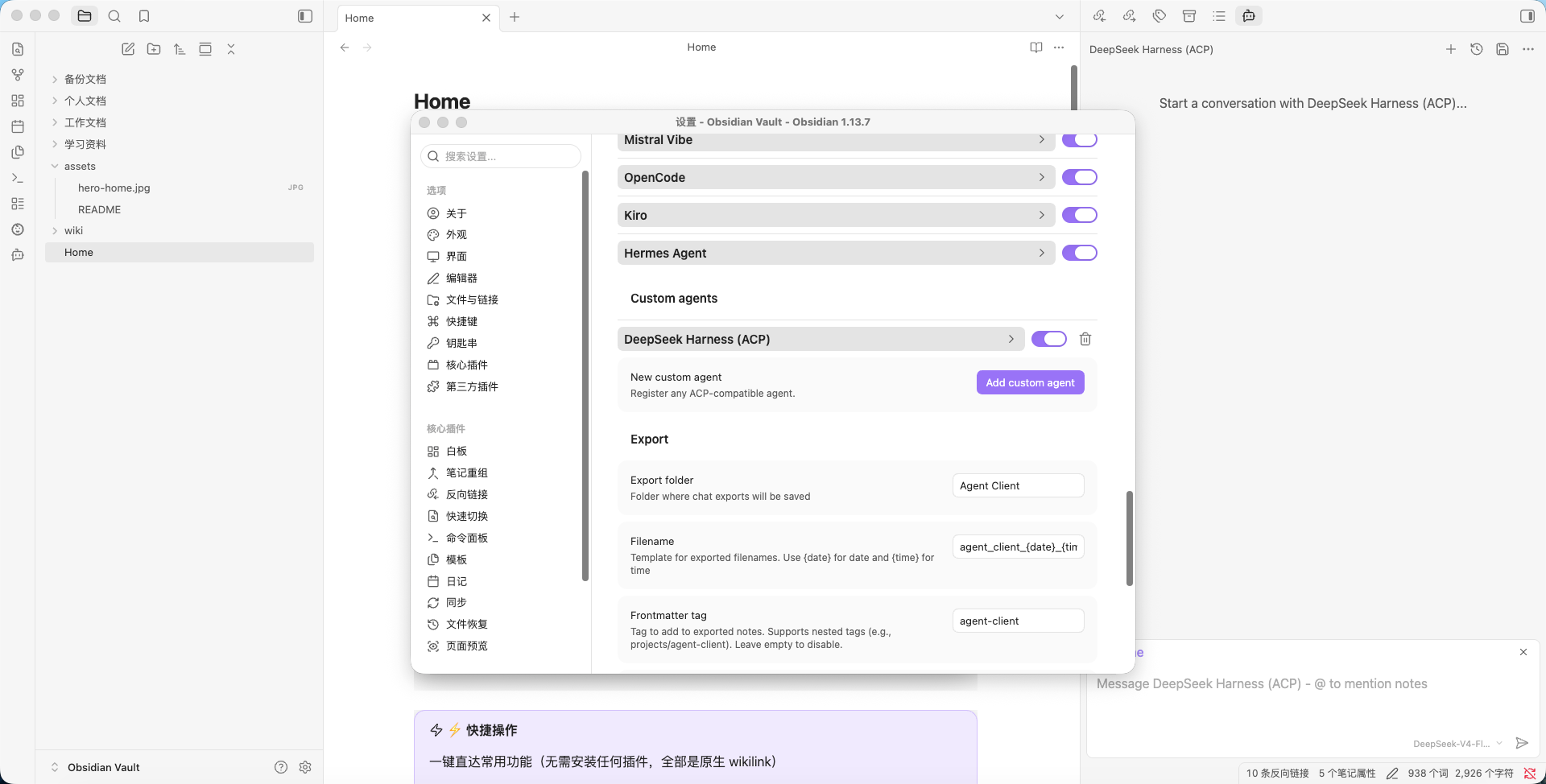
Registered as a custom agent, running a conversation, and browsing session history — all inside Obsidian Agent Client:
Requirements
- Node.js >= 22.13
- A bootable
dshbackend (see Headless profile bootstrap) - Obsidian with the Agent Client community plugin (for the Obsidian path)
Install
One-click (recommended)
The package ships a parameterized installer that (a) installs the plugin into a
DSH profile via the official dsh plugin add path and (b) wires an Obsidian
Agent Client custom agent to the ACP server. It is idempotent, backs
up every file before touching it, supports any Obsidian vault, and can be
previewed with --dry-run.
# preview first (changes nothing)
./install.sh --obsidian-vault /path/to/any/vault --dry-run

# install into the "web" profile + wire Obsidian
./install.sh --obsidian-vault /path/to/any/vault

# install into another DSH profile / skip Obsidian
./install.sh --profile headless --obsidian-vault /path/to/any/vault
./install.sh --no-obsidian
Run ./install.sh --help for every option (--profile, --dsh-home,
--package, --node-bin, --dry-run, --uninstall, …).
Windows: use the PowerShell edition instead — .\install.ps1 -ObsidianVault 'D:\path\to\vault'
(add -DryRun to preview, -Uninstall to restore). It writes DSH_BIN pointing
at the dsh.cmd shim and separates the plugin-target profile from the adapter
runtime profile.
Manual (Obsidian Agent Client)
- Install and enable the Agent Client community plugin (Settings → Community plugins → Browse → "Agent Client").
- Settings → Custom Agents → Add, and fill in:
- ID:
dsh-acp - Display name:
DeepSeek Harness (ACP) - Command: absolute path to this package's
dsh-acp.mjs - Args: (empty)
- ID:
- Set the plugin's
nodePathto a realnodebinary (>= 22.13). - Reload Obsidian (
Cmd/Ctrl-R) and pick DeepSeek Harness (ACP) in the agent picker.
customAgent.envis an array of{ key, value }objects — not"KEY=VALUE"strings. Agent Client builds the child env from that array; a plain string entry is silently ignored.
Quick start
- Pick a tool-capable model in the session panel before your first prompt
(e.g.
gemini-2.5-pro), and make sure it has a valid API key configured. Tool-call frames only appear when the model supports tool/function calling. - Send a prompt. DSH runs the turn and streams the answer back into Obsidian.
If the first prompt fails with AUTH: Authentication Fails or returns nothing,
your default model either isn't tool-capable or has no credentials — choose a
configured model in the picker and retry.
Usage
dsh-acp                       # start the ACP server (default)
dsh-acp doctor                # health check + one-click repair guidance
dsh-acp import <file>         # import an external ACP session JSON
dsh-acp manage <verb> ...     # list / export / archive / move / import sessions
dsh-acp --help                # full help
Health check & repair (doctor)
When DSH or Obsidian reports a connection problem ("ACP connection closed",
"dsh exited 1", MISSING_CREDENTIAL, …), run:
dsh-acp doctor                 # diagnose, print copy-pasteable fix commands
dsh-acp doctor --repair        # self-check full repair — PREVIEW (writes nothing)
dsh-acp doctor --repair --apply# apply the fixes (each file is backed up first)
doctor is version-agnostic: it only does generic checks (dsh binary, dsh
version, credentials, headless profile health) and never depends on a
dsh-version-specific internal API.
Tool-only turn fallback
Reasoning models sometimes call a tool but emit no user-facing text (the
whole answer stayed in the reasoning stream). Without help the client shows only
a tool card and a blank reply. To avoid that, dsh-acp synthesizes a truthful
notice so the turn always shows something:
[模型请求调用工具:<tool names>;当前运行模式不执行工具,本轮无结果与文字]
This is display-only — it does not change the protocol or the archived
history. It can be disabled with DSH_ACP_TOOL_ONLY_FALLBACK=off.
Proxy/long tool gate (default OFF). The proxy/long runtime path makes a
single ctx.llm.stream() call and has no tool executor. Exposing tool
schemas there let the model request tools that never ran, ending the turn with
no text. So tool schemas are not exposed on that path by default:
DSH_ACP_LONG_TOOLS=1 dsh-acp ... # opt in (set in the dsh web process env)
Needs to run tools? Use the spawn path (unset DSH_ACP_HTTP_GATEWAY_URL,
set DSH_ACP_PROXY_MODE=false) — the real dsh backend has its own agent loop.
Optional closing-reply nudge (default OFF). Enable it to steer the model to always append a closing sentence after tool use:
DSH_ACP_CLOSING_REPLY_NUDGE=1 dsh-acp ...
When enabled, the prompt sent to the model is prefixed with a short instruction ("after calling any tool, tell the user what you did"). The nudge is model-visible only — never shown as user text.
⚠️ Enabling this changes the prompt prefix on tool turns → prompt-cache miss → higher cost. Keep it OFF unless you understand the trade-off. Override the wording with
DSH_ACP_CLOSING_REPLY_NUDGE_TEXT.
Memory tools on the proxy path are not executed (no executor), and the headless profile does not load
ui-obsidian-memory. Same-session recall works (session history); cross-session memory does not. Seedocs/known-gaps.md.
Session cleanup (gc, automatic)
Obsidian's delete button only removes its own local session file and never sends
the ACP session/delete — so this adapter's durable index can go stale and a
deleted session can "come back". The adapter reconciles automatically on every
session/list (conservatively — sessions still present in Obsidian are never
removed).
dsh-acp doctor         # shows detected Obsidian session dirs + orphan count
dsh-acp doctor --gc    # run garbage collection now
| Env var | Default | Meaning |
|---|---|---|
DSH_ACP_GC | on | off disables auto GC |
DSH_ACP_GC_REPORT_ONLY | 0 | 1 = dry-run, report only, never delete |
Configuration
Obsidian ↔ adapter transport (proxy vs spawn)
The adapter picks its transport per prompt:
- proxy (recommended when a dsh web gateway runs) — forwards the turn to the already-running gateway over HTTP/SSE, one long-lived model process.
- spawn (fallback) — starts its own
dsh --profile headless "<prompt>"subprocess.
Recommended custom-agent env entries:
| key | value | effect |
|---|---|---|
DSH_ACP_HTTP_GATEWAY_URL | http://127.0.0.1:3080 | point the adapter at the dsh web gateway |
DSH_ACP_PROXY_MODE | true | request the proxy transport |
If you set neither, the adapter uses spawn (headless) — this needs the dsh
CLI on your system (DSH_ACP_SPAWN_PROFILE overrides the profile; it defaults to
headless, which is the prompt-capable one).
Common environment variables
| Variable | Meaning | Default |
|---|---|---|
DSH_BIN | dsh executable | dsh on PATH |
DSH_ACP_SPAWN_PROFILE | profile for the spawn transport | headless |
DSH_ACP_DEFAULT_MODEL | default provider/model for new sessions | (profile) |
DSH_ACP_MODELS | override the model dropdown (comma-separated id(display)) | (catalog) |
DSH_ACP_PERMISSION_MODE | default / acceptEdits / dontAsk / bypassPermissions | default |
DSH_ACP_LOG_DIR | directory for a runtime log | (disabled) |
DSH_ACP_STORE_DIR | durable session JSON index directory | ~/.dsh-acp |
Advanced → full adapter environment table
| Variable | Meaning | Default |
|---|---|---|
DSH_PROFILE | profile to boot (other components) | — |
DSH_ARGS | extra args before the prompt (space-separated) | (none) |
DSH_ACP_LOG_MAX_BYTES | log size cap (bytes) before rotation | 5242880 (5 MB) |
DSH_ACP_LOG_KEEP | rotated log files to keep | 2 |
DSH_ACP_PERSIST_DEBOUNCE_MS | debounce window for index writes | 100 |
DSH_ACP_PERMISSION_TIMEOUT_MS | approval auto-reject timeout | 300000 |
DSH_ACP_PERMISSION_EDIT_TOOLS | tools treated as edit-style | Edit,Write,MultiEdit,NotebookEdit |
DSH_ACP_RUNTIME_MODE | long / spawn explicit override | (auto) |
DSH_ACP_SPAWN_FALLBACK | fall back to spawn if long init fails | true |
DSH_ACP_USE_OFFICIAL_BRIDGE | try the official dsh bridge | 0 |
DSH_ACP_ARCHIVE_IN_MAIN | put turn archives under sessions/ | 0 |
Headless profile bootstrap
dsh --profile headless needs a default model provider it can resolve. Give the
headless profile its own settings via a direct llm-pi-ai patch entry:
~/.dsh/profiles/headless/cordis.patch.yml— anllm-pi-aiprovider block +agent-default-modelset to your chosenprovider/model.~/.dsh/profiles/headless/package.json—dsh-llm,dsh-agent-loop,dsh-acp,dsh-base,dsh-headlesspinned to your globaldshversion.~/.dsh/profiles/headless/pnpm-workspace.yaml—overrides:pinning the@deepseek-ai/dsh-*core packages +allowBuilds:for native modules.
Verify with dsh-acp doctor — it reports headless-profile misconfigurations with
copy-pasteable fix commands.
Known limitations
- No permission prompts on the spawn path — bash / file-write tools run
without confirmation dialogs there. Use
DSH_ACP_PERMISSION_MODE(effective on the long-runtime path) if you need approvals. - Official dsh bridge is experimental (0.3.8) — the default path is legacy.
Enabling the official bridge requires all three env vars set together (see
"Enabling the official bridge" below); when launched via launchd, they must go
into the plist
EnvironmentVariablesorlaunchctl setenv, otherwise a restart reverts to legacy. - Permission path hangs (still open in 0.3.8) — under the official bridge +
internal router, a tool that triggers approval (
session/request_permission) hangs. The 0.3.8 default web profile does not expose bash/write tools, so users do not hit it in practice.
Headless credential setup
Since @deepseek-ai/dsh 0.2.1-rc.2, the headless profile disables the managed
credential store (~/.dsh/.credentials.yaml is not read). API-key routes
fall back to: process.env → <invocation cwd>/.env → $DSH_HOME/.env.
If you see MISSING_CREDENTIAL: llm-pi-ai: no credential for provider route "<name>":
- Find the env name from
~/.dsh/profiles/<profile>/cordis.patch.yml— the provider'sapiKeyEnvfield (e.g.JLTOKEN_API_KEY, note: this may differ from the ref name in.credentials.yaml). - Write it into
~/.dsh/.env:JLTOKEN_API_KEY=<your-key> - On Windows, restrict permissions:
icacls "$env:USERPROFILE\.dsh\.env" /inheritance:r /grant:r "${env:USERNAME}:R" - Restart DSH Desktop / Obsidian.
Verify: dsh --profile headless echo hi should succeed without errors.
Context window (usage percentage)
usage_update frames include a size field (the model's context window). When
the upstream model does not report one, dsh-acp defaults size: 0, which makes
clients show used/0 tokens + Infinity%.
To provide a real context window, set the env var:
DSH_ACP_CONTEXT_WINDOW=200000 # or your model's actual limit
Add it to ~/.dsh/.env (alongside your API key) or the dsh web process
environment. It is used as a fallback when the upstream model reports none.
Enabling the official bridge (experimental)
0.3.8 defaults to legacy. To enable the official bridge:
# Option 1: temporary env (this dsh web process only)
DSH_ACP_USE_OFFICIAL_BRIDGE=1 \
DSH_ACP_OFFICIAL_PROVIDER=<provider> \
DSH_ACP_OFFICIAL_MODEL=<model> \
dsh --profile web --port 3080 --no-open

# Option 2: launchd (persistent, recommended)
launchctl setenv DSH_ACP_USE_OFFICIAL_BRIDGE 1
launchctl setenv DSH_ACP_OFFICIAL_PROVIDER <provider>
launchctl setenv DSH_ACP_OFFICIAL_MODEL <model>
launchctl kickstart -k gui/$(id -u)/com.deepseek.harness.web
# rollback: launchctl unsetenv ... + kickstart
Verify: curl -s http://127.0.0.1:3080/acp/proxy/probe should return
official.envSwitchOn:true + servicesReady:true.
Development
npm run test:unit       # unit tests (node --test)
npm run test:protocol   # ACP protocol test (spawn)
npm run test:long       # long-runtime test
npm run test:all        # unit + protocol + long
License
Plugins associés
dsh-web-ui (dsh-chat-recovery)
zhu1090093659/dsh-web-ui
billion-context
ranxianglei/billion-context
dsh-synapse
liangmianya/dsh-synapse
dsh-archive-manager
michengai/dsh-archive-manager