dsh-sideask
sleeping112/dsh-sideask
Adds a floating side-chat window that reads the current conversation read-only, answers with citations in its own thread, and writes back to the main composer only when the user clicks a write-back action.
Installer
dsh plugin --profile web add github:sleeping112/dsh-sideaskREADME
Side Ask · 旁问
A floating light conversation beside your current DeepSeek Harness chat: ask with read-only context, get cited answers in its own thread, and write back only when you click — never polluting the main conversation.



English | 中文 · Design · Changelog
Why
You are deep in a long conversation and want to ask a side question — "why is this written that way?", "explain that error again", "what else can this API do?". Asking inline derails the thread and pollutes the context; opening another window means pasting the background again.
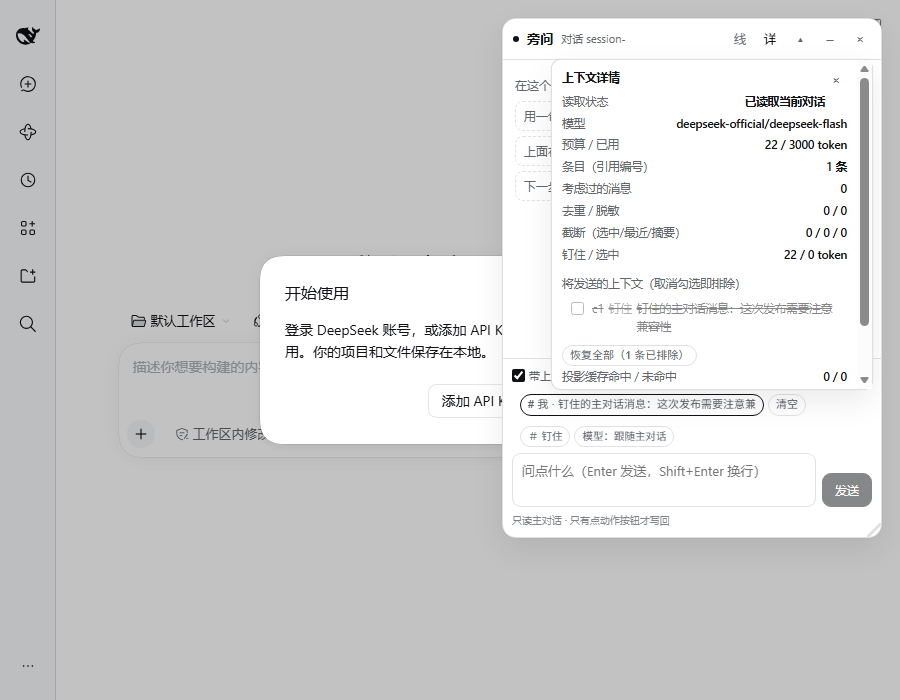
Side Ask docks a small window next to the chat. It reads only what you can already see, answers in its own thread, and touches the main conversation only through the write-back buttons you press.
Features
- Floating window — drag, snap to four corners, resize, minimize/collapse, remembers position and size. The closed-state bubble is draggable too (right-click re-docks it). Hotkey
Alt+Shift+A(plugin-ownedkeydown, no host shortcut registration). - Own thread, own history — new / switch / delete threads, per-thread drafts, fork a thread from an answer, regenerate the last answer. History is stored by the plugin and can be cleared at any time.
- Read-only context — the visible messages of the current conversation (recent N plus user selection), a background summary of older messages, token budget with a visible used/budget counter, de-duplication, two-layer secret redaction, incremental projection cache. The details panel lists every item that will be sent and lets you exclude individual items before sending.
- Selection entry — select text anywhere in the main chat and click the floating 「旁问」 button next to it.
- Cited answers — responses cite
c1..cN; clicking a citation scrolls to and highlights the source message in the main conversation (falls back to showing the excerpt when the message cannot be located). - Model picker — follow the main conversation's model, or choose an explicit provider/model from the host's catalog for side questions only.
- Templates — quick prompts (explain / risks / tests / clearer / summary / next steps / contradiction check) that are inserted into the draft, never sent automatically.
- Explicit write-back — copy, quote block, quote with note, insert as draft, or hand the conclusion to the main conversation as a task. Nothing is sent automatically; “insert as draft” asks before replacing an existing draft.
- Privacy switches — turn context reading off, disable history persistence, clear all history.
Install
Requires DeepSeek Harness 0.2.0-rc.1 … 0.3.0-0 (verified on 0.2.2-rc.1).
From GitHub (recommended)
dsh plugin --profile web add github:sleeping112/dsh-sideask
Replace web with the profile you actually use, restart dsh, and the 「旁问」 bubble appears in the top-right corner. The repository ships a dsh.bundle manifest with a cordis.patch.yml, which is what makes it installable this way; the prepare script builds the host and browser halves during install.
Prebuilt tarballs are attached to Releases (asset name dsh-sideask.tgz) for storefronts and for profiles that prefer not to build from source. The stable URL is https://github.com/sleeping112/dsh-sideask/releases/latest/download/dsh-sideask.tgz.
From source (development)
git clone https://github.com/sleeping112/dsh-sideask.git
cd dsh-sideask
pnpm install            # `prepare` builds automatically
pnpm run build          # explicit build: host (tsc) + browser bundle (esbuild)
dsh plugin --profile web add link:$PWD
On Windows use link:E:/path/to/dsh-sideask for the last command, and see docs/quickstart.md for the isolated test recipe. After changing the host half, restart dsh; after changing the browser half, rebuild and refresh the page (or use pnpm run dev to rebuild on change).
Usage
| Action | How |
|---|---|
| Open / close | Alt+Shift+A, the floating bubble, or the header buttons |
| Ask a side question | Type, Enter sends, Shift+Enter inserts a newline |
| Ask about a selection | Select text in the main chat → click 「旁问」 next to it |
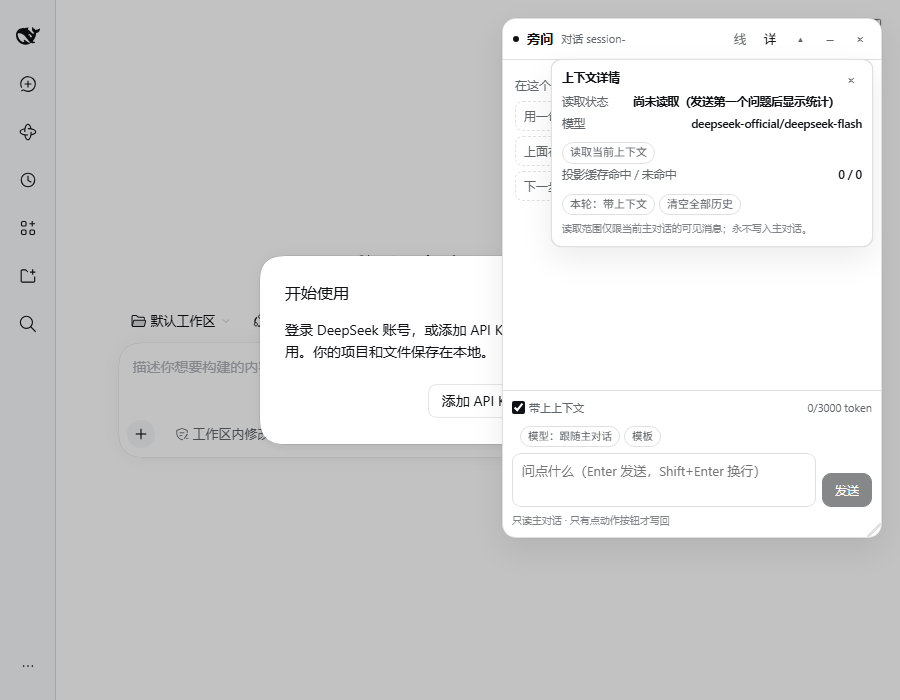
| Carry main-chat context | The “带上上下文” toggle (default on); the counter shows used/budget token |
| Inspect or edit context | 「详」 → see the item list, uncheck items to exclude them |
| See what was cited | Click a cN chip (jumps to the source) or a citation chip under the answer |
| Pick a model | 「模型」 → follow the main conversation, or choose a provider/model for side questions |
| Use a template | 「模板」, or type / in an empty draft |
| Stop / retry / regenerate | Stop while streaming; retry the last failed turn; regenerate the last answer |
| Fork a thread | 「分叉」 under an answer |
| Write back | Copy / quote block / quote with note / insert as draft / hand off to the main conversation |
| Manage threads | 「线」 → new, switch, delete |
| Clear | Header menu clears the current thread; details panel clear all history |
What it can read, and what it can write
| Layer | Behaviour |
|---|---|
| Host half | Imports no session/agent write API. One ctx.llm.stream(...) per question; no dsh session is created and no session log is written. |
| Access control | Every HTTP route applies DSH's connection.requestRejection fence (Host/Origin + browser authentication) before dispatch; unauthenticated or cross-origin requests get 401/403 without touching the runtime. |
| Model input | Request-only user input; no durable message is produced. |
| Storage | Side threads live in $DSH_HOME/storages/sideask/threads.json; UI state in browser localStorage. |
| Browser half | Reads eventSource.getSnapshot() snapshots; never mutates conversation state. |
| Write-back | Only the explicit buttons above, through the public composer API (insertQuote / setDraft / clipboard), with fallbacks. |
| Network | The plugin has no network access of its own. The only outbound traffic is the host model service, using your existing dsh account/model configuration. |
| Tools / files | None. The plugin does not run tools, does not read files, and does not access other sessions. |
Secret redaction (emails, phone numbers, IPs, API keys, JWTs, bearer tokens, PEM blocks, home paths, etc.) runs in the browser and is re-validated by the host before a request leaves; it is best-effort, not a guarantee.
Configuration
The plugin exposes a schemastery Config; all fields are volatile (changes apply without a restart). The same values can be set in a profile cordis.patch.yml (see examples/profile-patch.yml).
| Key | Default | Meaning |
|---|---|---|
enabled | true | Enable the host half |
readContext | true | Privacy master switch: off ⇒ never reads the main conversation |
redactSensitive | true | Secret redaction (browser + host, two layers) |
persistHistory | true | Persist side-thread history |
recentMessageLimit | 12 | Messages in the recent window |
contextBudgetTokens | 3000 | Hard context token budget |
autoSummary | true | Background summary of messages outside the window |
requireCitations | true | Ask the model to cite context items |
answerMaxTokens | 1200 | Answer length cap |
temperature | 0.4 | Sampling temperature |
historyTurns | 8 | Side-thread turns embedded in the prompt |
defaultCorner | top-right | Default dock corner for the bubble and window |
pillOffset | 40 | Vertical offset of the bubble from the top edge (px) |
hotkey | Alt+Shift+A | Toggle hotkey |
provider / model | '' | Empty ⇒ host default model |
customRedactionPatterns | [] | Extra redaction regexes |
maxThreads | 30 | Stored threads (oldest dropped) |
maxMessagesPerThread | 200 | Messages per thread (oldest dropped) |
requestTimeoutMs | 120000 | Per-question timeout |
Limits and resources
| Structure | Bound |
|---|---|
| Context token budget | 3000 default, hard cap 64000 (clamped in config) |
| Single context item | 35% of the budget |
| Threads / messages per thread | 30 / 200 (configurable), oldest dropped |
| Projection cache | 512 entries |
| Summary cache | 3 sessions × 8 entries × 4000 chars, persisted in localStorage |
| Drafts | 40 drafts × 8000 chars |
| SSE buffer | only the unfinished frame |
Measured: 200 simulated ask turns leave the V8 heap flat (no growth after warm-up); a real dsh instance with the plugin loaded sits at the Electron baseline. Details and evidence are in docs/verification.md.
Development
pnpm install                # installs dependencies and runs `prepare` (build)
pnpm run typecheck          # tsc for host and browser halves
node scripts/build.mjs      # host (tsc) + browser bundle (esbuild) + bundle-shape checks
node scripts/check.mjs      # manifest / export / no-dangerous-HTML self checks
node scripts/preflight.mjs  # delivery gate: manifest, built artifacts, package contents, screenshots, metadata
node --test                 # 244 unit and integration tests
node scripts/memory-check.mjs  # 200-turn heap-growth and thread-trim bounds
Layout: src/shared (pure, cross-platform logic) · src/host (Node ESM plugin) · src/client (browser bundle, Shadow DOM). The browser bundle is built as a single window.__ModuleLoader__.load({ id: 'dsh-sideask', factory }) registration; the build enforces that contract, and tests execute the real bundle under a fake Module Loader.
Documentation
- Design document — alternatives, architecture, state machines, context budget, contracts, risks
- UI wireframes · Verification evidence
- Quickstart / troubleshooting
- Research notes: host API · client API · plugin loading patterns
- Publishing / listing checklist · Contributing · Security
Compatibility
- DeepSeek Harness
0.2.0-rc.1 … 0.3.0-0(manifestdsh.compatibility), verified on0.2.2-rc.1. - Host dependency
@deepseek-ai/schemastery~3.19.0is a peer dependency provided by the harness. - Node ≥ 20 is required to build from source; installing a prebuilt release does not need Node.
License
MIT — see LICENSE. Not affiliated with DeepSeek.
Plugins associés
dsh-web (dsh-task-board)
zhu1090093659/dsh-web
dsh-web (dsh-web-all)
zhu1090093659/dsh-web
dsh-TUI
ccch1mneyyy/dsh-tui
dsh-web-ui (dsh-task-board)
zhu1090093659/dsh-web-ui