dsh-video-skin
something11235/dsh-video-skin
Utilise un clip silencieux en boucle comme fond du chat avec opacité réglable et joue une animation de démarrage avec son. Au premier lancement sous un thème clair, bascule une fois vers le sombre et propose d’annuler.
Installer
dsh plugin --profile web add github:something11235/dsh-video-skinREADME
dsh-video-skin
DSH 视频皮肤:一段短片循环铺成整个界面的聊天背景(无声、透明度界面里就能调), 另一段做有声的开机动画(片尾交叉溶解进界面、点击画面随时跳过)。零依赖。
安装(Install)
设置 → 插件 → 添加插件,把下面这一行贴进输入框,点「安装」,然后完全退出并重新打开 DSH:
github:Something11235/dsh-video-skin#main
桌面版(Electron)的索引注入表是宿主启动时收集一次的快照,所以装完必须完全重启 DSH 才会生效(刷新页面不够)。卸载:
dsh plugin --profile <你的 profile> remove dsh-video-skin, 或者用仓库里的scripts/uninstall.ps1。
装好之后:右下角会出现一个半透明小圆钮,点开就是透明度滑块(调完刷新还在,不用重启); 启动时会先播放开机动画,点一下画面就跳过。
English: install github:Something11235/dsh-video-skin#main from Settings → Plugins → Add plugin,
then fully quit and relaunch DSH. A small pill appears in the bottom-right corner for the
transparency sliders; click anywhere during the boot animation to skip it.
A video skin for DSH: one clip becomes a looping, silent video backdrop behind the whole Web UI, and a second clip becomes a boot animation — played with sound, played through to its end, then fading into the app, and skippable with a click.
- Boot animation: full-window clip with audio, a progress bar driven by the kernel's real activation
progress, and a permanent “click to skip” pill. The clip finishes first (
ended), then the overlay fades out over a fixedfadeMs; the volume fades with it instead of being cut off.Earlier builds cross-dissolved over the clip's tail and used the actual remaining time as the fade duration — when the app became ready late that left only 100–200 ms, which read as a hard cut. Default is now
exitMode: 'end';exitMode: 'tail'restores the crossfade (still with a fixed fade). - Backdrop: silent, looping,
object-fit: cover, with the canvas and sidebar surface tokens made translucent — the picture is clearly visible and the text stays readable. Raised surfaces stay opaque: the kernel paints dialogs, popovers, menus, cards and the settings view with--dsw-alias-bg-layer-1/2/3(_dialog_* { background: var(--dsw-alias-bg-layer-2) }), so those tokens are deliberately left untouched — otherwise the scrolling text behind a dialog shows through it and neither layer is readable. - Light-theme users get switched to dark once. The asset is dark (
YAVG ≈ 0.25), so a readable light theme needs a 0.6 white surface and the video washes out — most people never find the theme toggle. On first launch the plugin moves a light preference todarkonce, through the kernel's own settings service (ctx.settings.update('ui-theme', …), never by editing the profile YAML), shows a one-time notice with 恢复浅色 / keep dark, and never touches it again once you undo or change it yourself. Disable withtheme.autoDark: false. Seescripts/verify-theme.mjs(12 assertions). - A transparency panel in the UI (bottom-right pill): three sliders — canvas, video scrim, and raised surfaces (dialogs/settings) — plus three presets and a live body-text contrast readout. The surface slider defaults to 100% (kernel-native opaque); dial it down for a frosted look. Changes persist and apply on refresh with no DSH restart.
- Zero dependencies. The host half imports only
node:builtins; the browser half is one inline script. Nothing in the built artifact has animport— which is also why a plaingithub:install works with no build step and nopreparescript.
中文完整说明(安装、调参、控件用法、机制约束、排错、自检)见 README.zh.md。
Screenshots (captured on this machine by scripts/verify-browser.mjs)
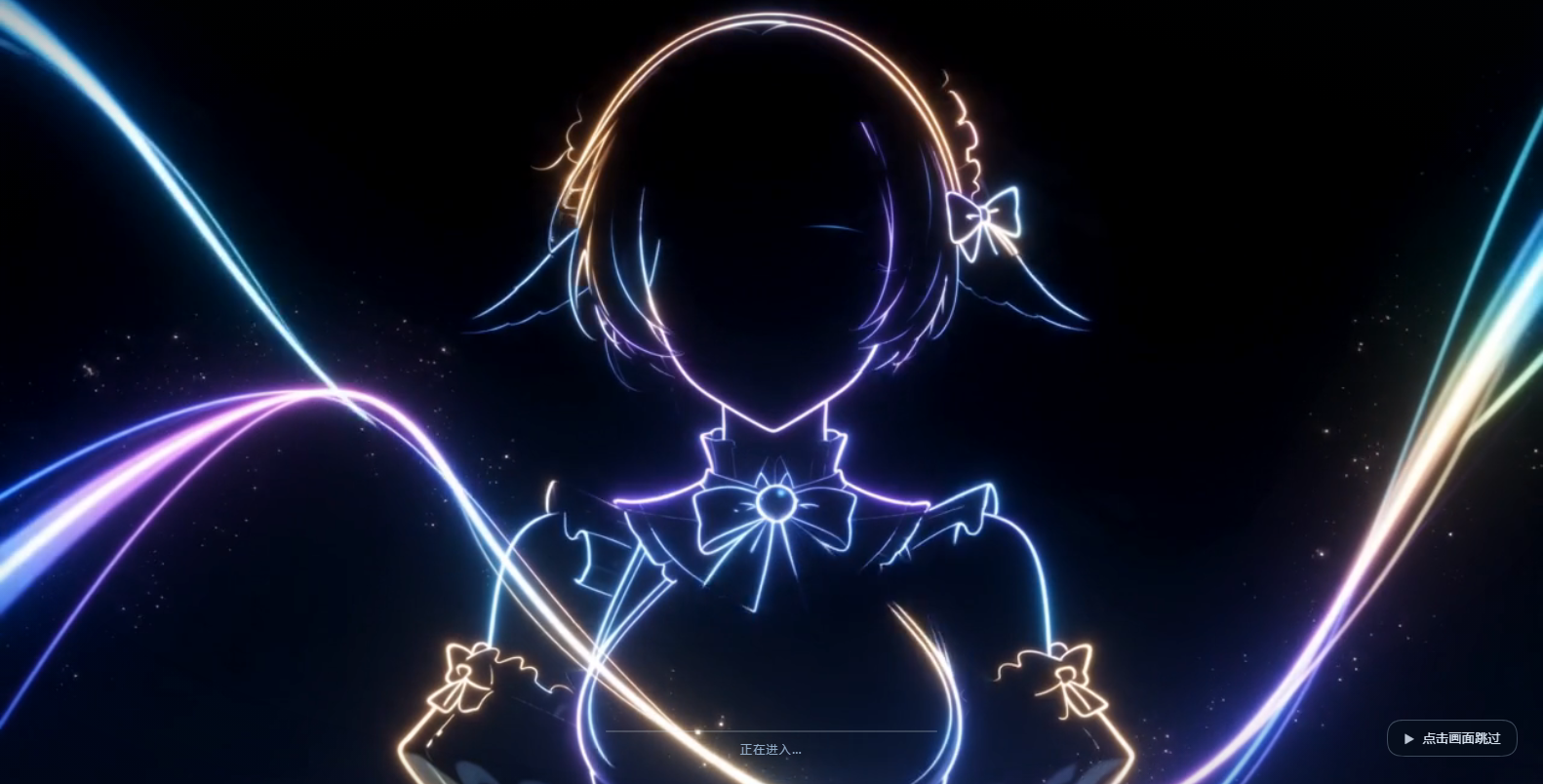 | 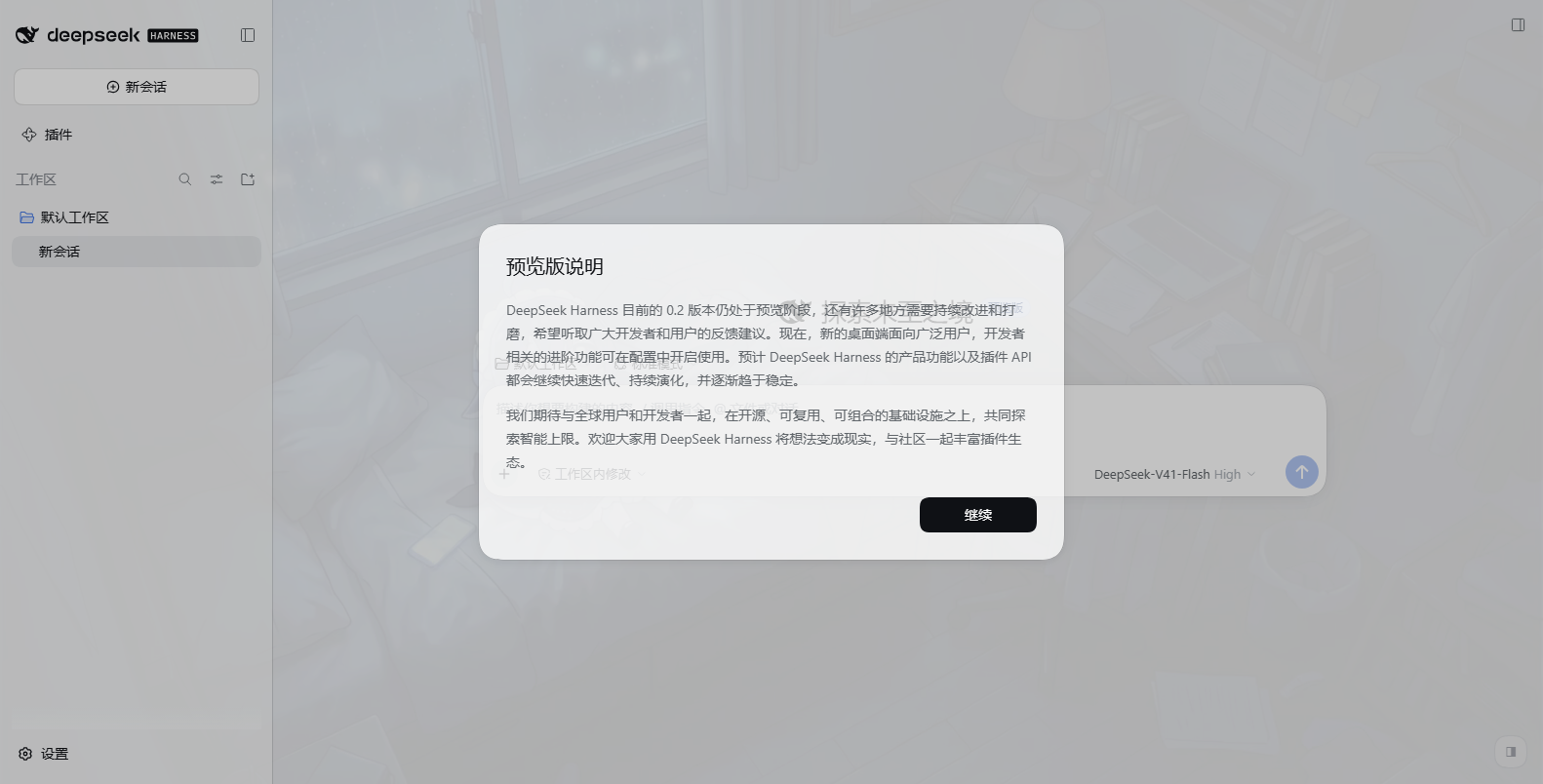 |
| Boot animation: clip fills the window (with sound), real boot progress bar, permanent "click to skip" pill | Light theme: backdrop fills the window, body-text contrast p5 = 7.90 |
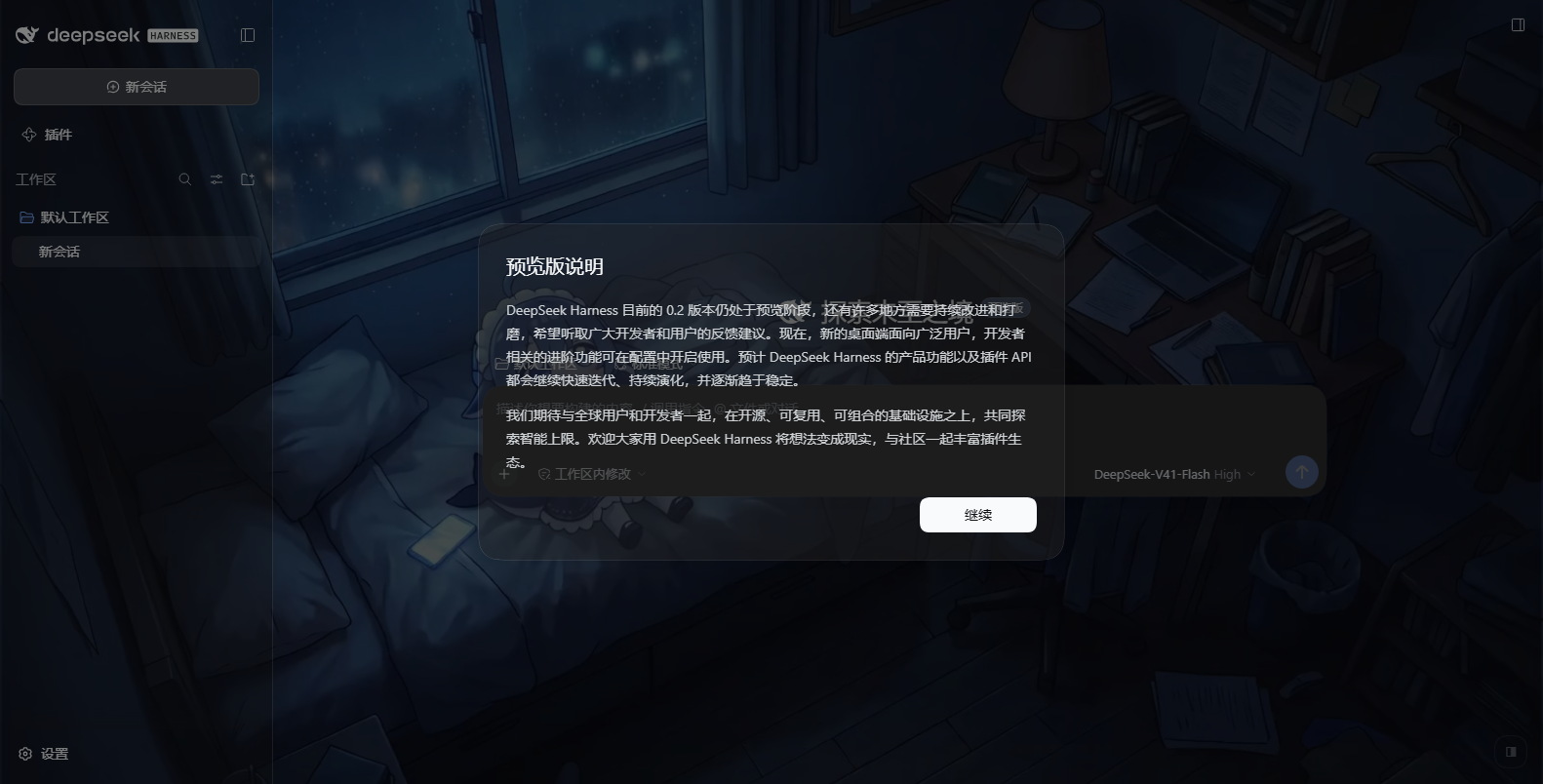 | 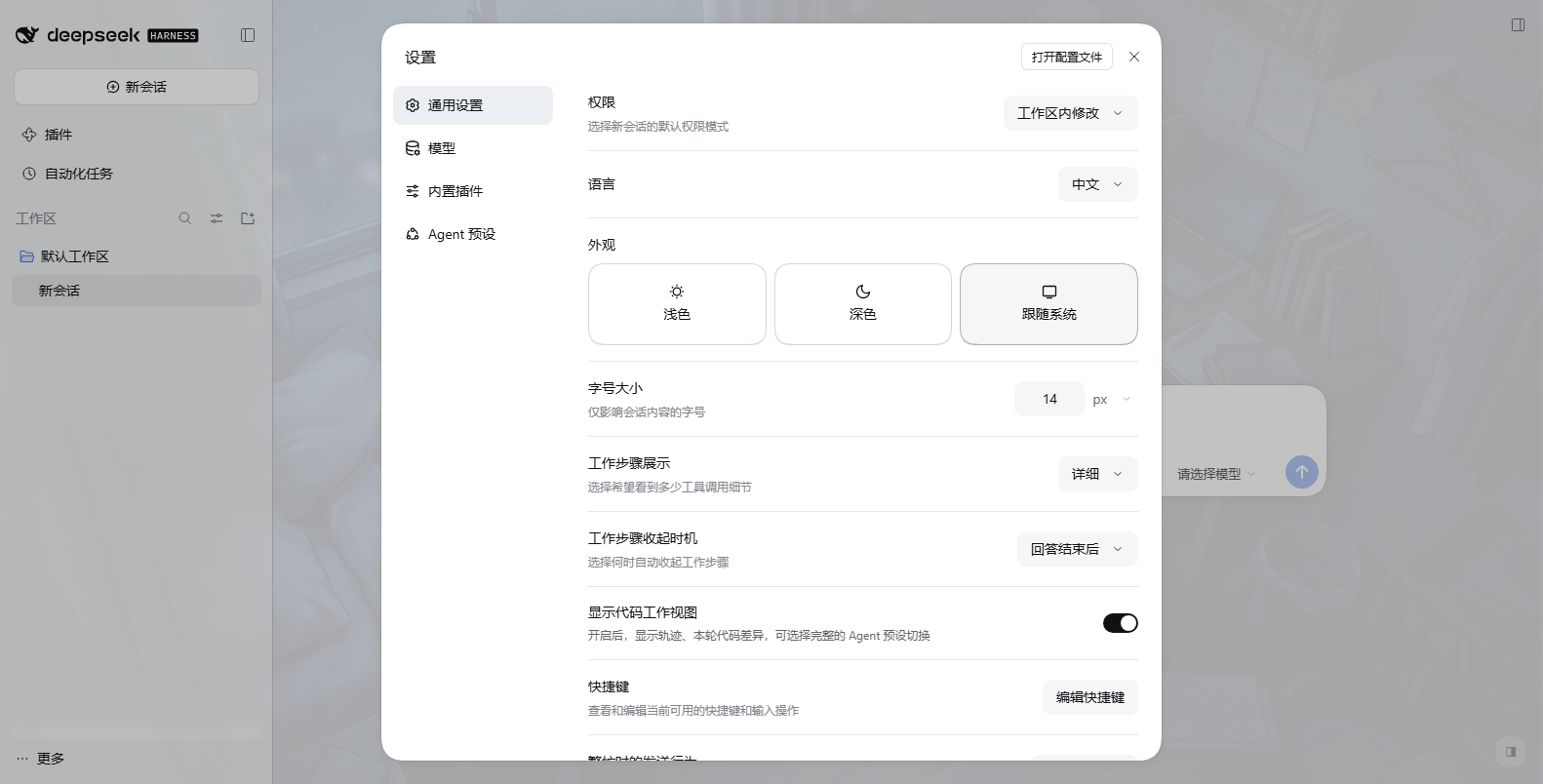 |
| Dark theme: video clearly visible, body-text contrast p5 = 6.86, median 16.06 (AA needs 4.5) | Settings view (light): opaque panel — the chat behind does not bleed in |
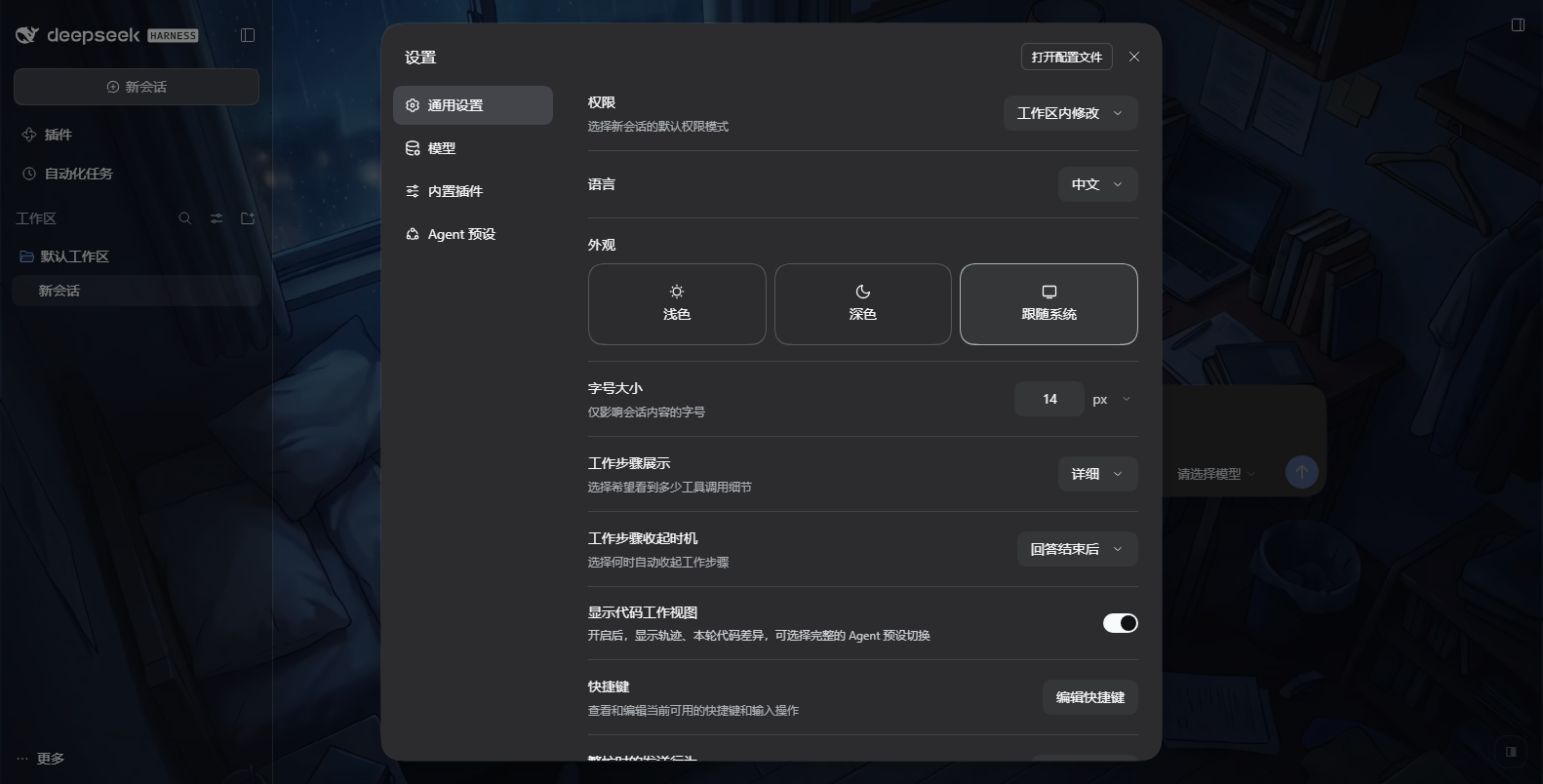
Settings view in dark theme. That layer used to be layer-2 at alpha 0.36 (the worst case) and let the
chat text show straight through the dialog; it now keeps the kernel's native opaque colour.
Sound
The desktop shell sets no webPreferences.autoplayPolicy, so Electron's default
(no-user-gesture-required) applies: an unmuted play() succeeds and the boot animation starts with
sound. A plain browser (dsh web in Chrome) blocks unmuted autoplay by default; the runtime then
falls back to muted playback (never trapping you on a dead screen) and shows a separate sound
button in the bottom-left — clicking it turns sound on without skipping, so the two intents never
collide. Set boot.sound: false for a silent boot.
Transparency
surface (dark theme) and surfaceLight (light theme) are the two knobs that trade picture strength
against readability; veil / veilLight are the scrims over the video. They are deliberately different
per theme: text is light in dark mode and dark in light mode, and this asset is dark (YAVG ≈ 0.25), so
an equally thin white surface drops dark text below 3:1. Measured in a real browser:
surface | surfaceLight | dark min / p5 / median | light min / p5 / median |
|---|---|---|---|
| 0.2 | 0.6 | 2.49 / 6.81 / 16.05 | 7.74 / 7.91 / 8.72 |
| 0.2 | 0.4 | 2.52 / 6.85 / 16.06 | 4.34 / 4.52 / 5.37 |
| 0.05 | 0.6 | 1.53 / 4.89 / 15.24 | 7.38 / 7.56 / 8.37 |
| 0 | 0.55 | 1.22 / 4.14 / 14.71 | 5.87 / 6.06 / 6.90 |
p5 (the 95% of frame area) is the meaningful readability number; --sweep prints this table live.
Tuning it in the UI
A small half-transparent pill sits in the bottom-right corner. Clicking it opens a panel with two sliders (panel opacity / video scrim), three presets, a live body-text contrast readout measured from the current video frame, and a reset button.
- Dragging applies immediately; releasing writes to
$DSH_HOME/dsh-video-skin.jsonthrough aPOST/DELETE /dsh-video-skin/overrideroute. Only those four knobs are written; everything else in the file is preserved. A refresh picks the values up (no DSH restart), and the file stays hand-editable. - A file rather than
localStorage: the desktop page is served from thedsh-app://scheme, where Web Storage availability is not guaranteed. - If the write fails (read-only home), the panel says so — it does not pretend to have saved.
Escor a click outside closes the panel;Alt+Btoggles it;background.controls: falseremoves it.- The pill sits at
z-index: 900, below the kernel'sModaloverlay (1000) on purpose: a modal should cover everything, and a wallpaper control must not steal its clicks.
Install
powershell -ExecutionPolicy Bypass -File scripts\install.ps1     # writes profile package.json + bundles
powershell -ExecutionPolicy Bypass -File scripts\uninstall.ps1   # removes both again
A full restart of DSH is required. The desktop (Electron) shell serves a static index.html and
collects the index-injection table once at host startup, with no refresh path; tapIndex never
applies there. So a newly installed plugin's injection rows only reach the page on the next launch.
Configure
Defaults work as shipped. To tune, write either file (the second wins):
<plugin>/video-skin.config.json%USERPROFILE%\.dsh\dsh-video-skin.json
Changes apply on page refresh. On the desktop shell the boot-animation fields are baked into the startup snapshot, so those need a restart.
{
  "boot":       { "enabled": true, "fadeMs": 1000, "exitMode": "end", "skipFadeMs": 320, "holdMs": 18000, "hint": "点击画面跳过" },
  "background": { "enabled": true, "veil": 0.32, "surface": 0.5, "delayMs": 1200, "playbackRate": 1 }
}
veil (scrim over the video) and surface (opacity of the app's --dsw-alias-* surfaces) are the two
knobs that trade picture strength against text readability.
How it is wired
Host half
  ├─ ctx.on('webserver/index-inject', table => table.push(styleRow, scriptRow))  ← first thing in apply()
  └─ ctx.inject(['webServer'], …) → /dsh-video-skin/{boot.mp4,background.mp4,config.json}
                                    with Range / ETag / 206 / 416 / HEAD
Three constraints that must not be broken (each one was paid for):
- Never
kind:'script-src'. The desktop interpreterawaits external script rows and a rejection kills__DSH_BOOT_READY__, i.e. the whole app fails to start. An inlinekind:'script'row cannot fail. - Register the injection listener synchronously in
apply(). An object-levelinjectdelaysapplypast the host's one-shot collection, and the row then never lands. - Keep the overlay on
document.body, never inside#root. The kernel hydrates#root's existing boot DOM (:scope > [data-dsh-boot]); inserting a node there breaks hydration.
The backdrop is a position: fixed; z-index: -1 first child of body, so nothing in the app needs a
z-index and no pointer interaction is blocked.
Verify
node scripts/check-syntax.mjs
node --test "tests/**/*.test.mjs"
node scripts/verify-all.mjs
tests/runtime.test.mjs runs the injected script inside a stub DOM with a virtual clock and asserts the
real timing properties (the clip plays to ended before the fade; the fade span is always the configured
fadeMs, never the remaining time; a click uses
skipFadeMs; unmuted is tried first and muted is the fallback; the sound button toggles sound
without skipping; the volume fades to 0 with the picture; unknown duration / no first frame / media
error (retried once) / a never-ready kernel each have an upper bound that never truncates the clip).
tests/host.test.mjs drives the real apply()
against a real HTTP server for the Range, ETag, 304, 416 and cache-header contracts.
Two more suites need a live target:
# 81 assertions (Electron-equivalent autoplay) / 66 (plain browser) in a real headless Chromium over CDP:
#   --autoplay allow (Electron-equivalent): unmuted playback, no sound button,
#                                          webkitAudioDecodedByteCount > 0 (the audio track really decodes)
#   --autoplay block (plain browser)      : muted fallback, sound button visible, a real mouse click on it
#                                          does NOT skip and does unmute
# Plus: overlay covers the viewport, a click at the viewport centre really skips, the fade removes the
# node, the backdrop layer is body's first child at z-index:-1, the --dsw-alias-* tokens really
# *resolve* to translucent colours, the backdrop video really decodes, and the app really mounted.
# It also samples the video frame into a canvas and reports measured WCAG contrast for body text
# (this machine: dark p5 6.86 / median 16.06, light p5 7.90 / median 8.70). --sweep prints the full table.
node scripts/make-verify-profile.mjs
node scripts/verify-browser.mjs --url "http://127.0.0.1:19388/?token=..." --shot-dir docs
node scripts/verify-browser.mjs --url "http://127.0.0.1:19388/?token=..." --autoplay block --port 9445

# Composition rehearsal with the kernel's own loadProfileDirectory, which is the first thing that
# can throw on the boot path. Needed because `dsh --profile desktop --dump-config` is refused.
$env:ELECTRON_RUN_AS_NODE='1'
& 'D:\AI\Agent\DSH官方\DeepSeek Harness.exe' scripts\rehearse-profile.mjs desktop
License
MIT — see LICENSE.
Plugins associés
dsh-deep-whale (maid-atelier)
small-tailqwq/dsh-deep-whale
dsh-wallpaper-engine
elysia395/dsh-wallpaper-engine
dsh-deep-whale
small-tailqwq/dsh-deep-whale
open-sea-skin
d-dev0101/open-sea-skin