dsh-otaku-study-board
sorenlorn/dsh-otaku-study-board
Sorchron Study Board, a study workspace plugin with pomodoro timer, task management and activity heatmap for DSH harness. Records stay in the browser's localStorage (JSON export for backup) and the plugin makes no network requests.
Installer
dsh plugin --profile web add github:sorenlorn/dsh-otaku-study-boardREADME
Sorchron Study Board



English · 中文
A DSH (DeepSeek Harness) plugin that adds a single left-nav panel for solo study and coding:
dashboard, tasks, a pomodoro focus timer with crash-safe settlement, session capture, a 365-day
activity heatmap and JSON backup. All records stay in the browser's localStorage; the plugin makes
no network requests.
Contents
Features · Installation · Quick start · Configuration · Screenshots · Development · Uninstall · Contributing · License
✨ Features
Four pages — Dashboard, Tasks, History, and Settings (opened from the top bar as “Data” / 数据). Every entry below is implemented and reachable from the UI; there are no placeholder buttons.
| Area | Capability |
|---|---|
| Dashboard | Four summary metrics (tasks, completed, focus time, streak), today's tasks with inline check-off, focus card, per-project progress, 365-day activity heatmap, 7-day trend, recent activity, read-only knowledge and memory overview |
| Tasks | Create, edit, complete, reopen, two-step delete, search, sort, status filter, inline expand, detail drawer |
| Focus timer | Timestamp-based countdown, pause and resume, short and long breaks, task binding, explicit settlement on finish, retry after a failed write, idempotent accounting across refreshes and multiple tabs |
| Session capture | Mounted once at the workspace root; consumes DSH session events and counts sessions only — it never adds to focus minutes |
| History | 30 / 90 / 365-day heatmap with five intensity levels, active days, per-day timeline, streak |
| Backup / restore | Export full, last 7 days or current month; import with preview; merge or overwrite; transactional rollback; storage probe; two-step clear |
| Settings | Data overview, session-capture toggle, storage status, export, import, danger zone, capability boundaries |
How settlement works
Finishing a focus round writes four entities — the log, the daily aggregate, the task totals and the timeline event — inside a single transaction. If that transaction fails, the round stays pending with a persisted baseline; the plugin verifies all four entities before deciding whether to repair, retry, or leave everything untouched.
The UI reports exactly one of three states:
| State | Meaning |
|---|---|
| Saved | All four entities verified |
| Not saved (red) | The write failed; the round is kept and can be retried |
| Discarded (neutral) | Shown only after a discard was proven safe to perform |
A discard is refused when the daily aggregate or the task totals have already been counted for the
round: those structures carry no round id, so the amount to subtract cannot be derived. See
KNOWN-LIMITATIONS.md.
📦 Installation
From GitHub (recommended)
dsh plugin --profile desktop add github:SorenLorn/dsh-otaku-study-board
lib/index.js and lib/client.js are committed, so nothing is built locally. Reload the DSH window
afterwards; the panel appears in the left navigation as 溯时学习工作台 (clock icon, order 20).
The short form
dsh plugin add dsh-otaku-study-boardrequires the package to be published on npm. It is not published yet — use thegithub:form above.
From a local clone
npm install
npm run build

dsh plugin --profile desktop add "file:/absolute/path/to/dsh-otaku-study-board"
dsh plugin --profile desktop list      # confirm the entry
Requirements
| Requirement | Value |
|---|---|
| Node.js | >= 20 |
| DSH | 0.1.1-rc.1 – 0.2.x (declared in engines.dsh and peerDependencies) |
| Browser | Any current Chromium or Firefox; storage must be enabled |
A symlink works as well: if node_modules/dsh-otaku-study-board inside the profile points at your
clone, re-running npm run build is enough — no reinstall needed.
🚀 Quick start
- Run a focus round — Dashboard → focus card → “开始专注”. Default 25 minutes; 10–90 minutes in the expanded settings. Pause at any time, then press “结束并记录”.
- Record a task — Tasks → “新建” → type a title → tick it in the list.
- Check the feedback — today's cell in the heatmap changes colour; hover for the day's numbers, click to open that day.
- Back up once — top bar → “数据” → Export JSON. Data lives only in this browser profile.
What one session produces:
09:30  start a 25-minute focus round bound to "Chapter 3 exercises"
09:55  finish → 1 focus log (25 min) + daily aggregate +25
                + task +25 min / +1 pomodoro
09:56  tick the task → status completed, completedAt recorded
       dashboard: focus 25m · tasks 1 · heatmap score 25 + 25×1 = 50 → level 2
Every button is documented in USER-GUIDE.md.
⚙️ Configuration
There is no configuration file — the host half is intentionally a no-op and the plugin registers
itself from the client bundle. Runtime options live in Settings (数据) and are persisted in
localStorage:
| Option | Default | Range / notes |
|---|---|---|
| Focus duration | 25 min | 10–90 min, per round |
| Short break | 5 min | 1–30 min |
| Long break | 15 min | 1–30 min |
| Rounds before long break | 4 | Drives the cycle indicator |
| Session capture | on | Off stops new captures |
| Active project scope | all projects | Archived projects are excluded either way |
Data is stored under 14 keys prefixed dsh-otaku-study-board:, each wrapped in
{ schemaVersion: 4, data }. The timer key is transient and aiRuns is an audit key; neither is
included in backups. V1 / V2 / V3 data is read in place and upgraded on read without writing back.
🖼️ Screenshots
| Dashboard (light) | Focus timer |
|---|---|
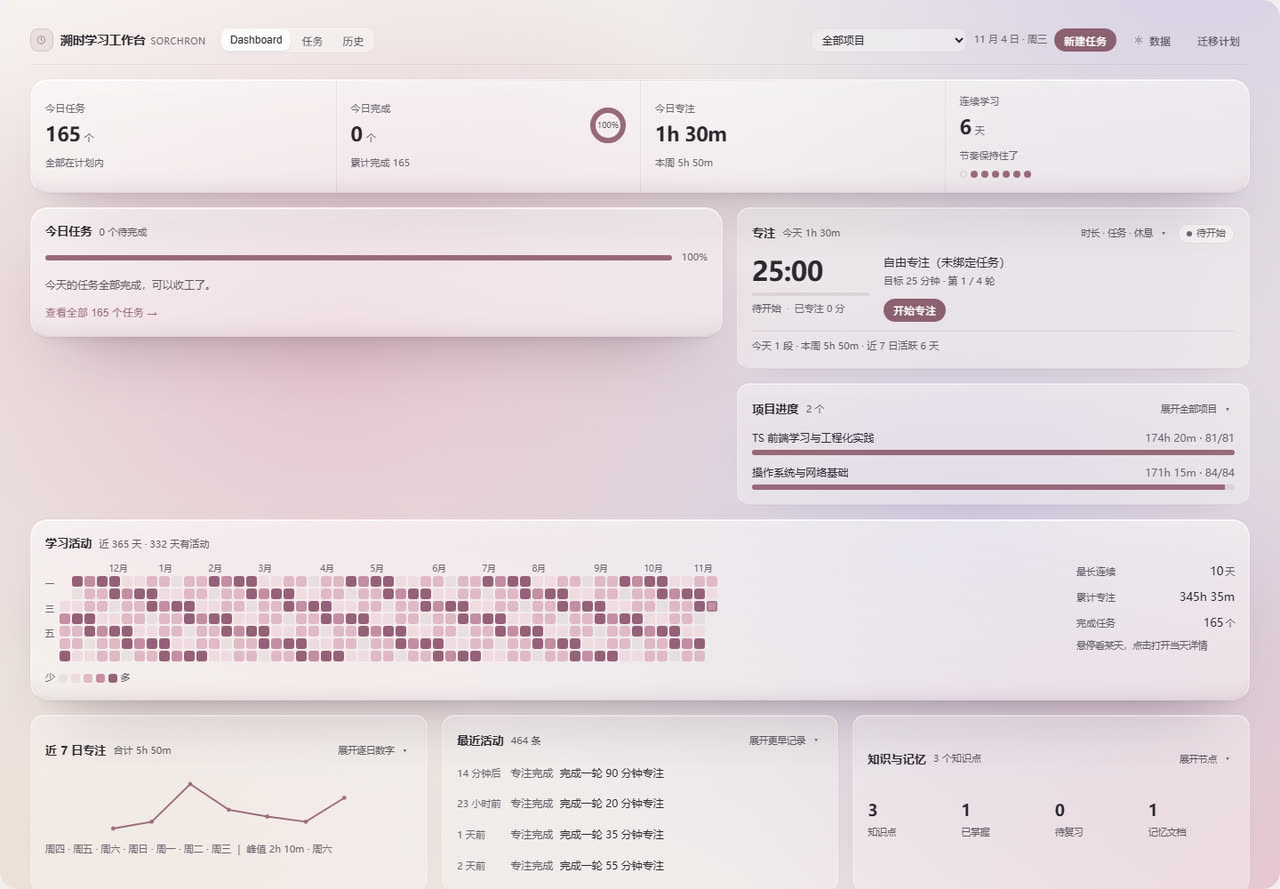 | 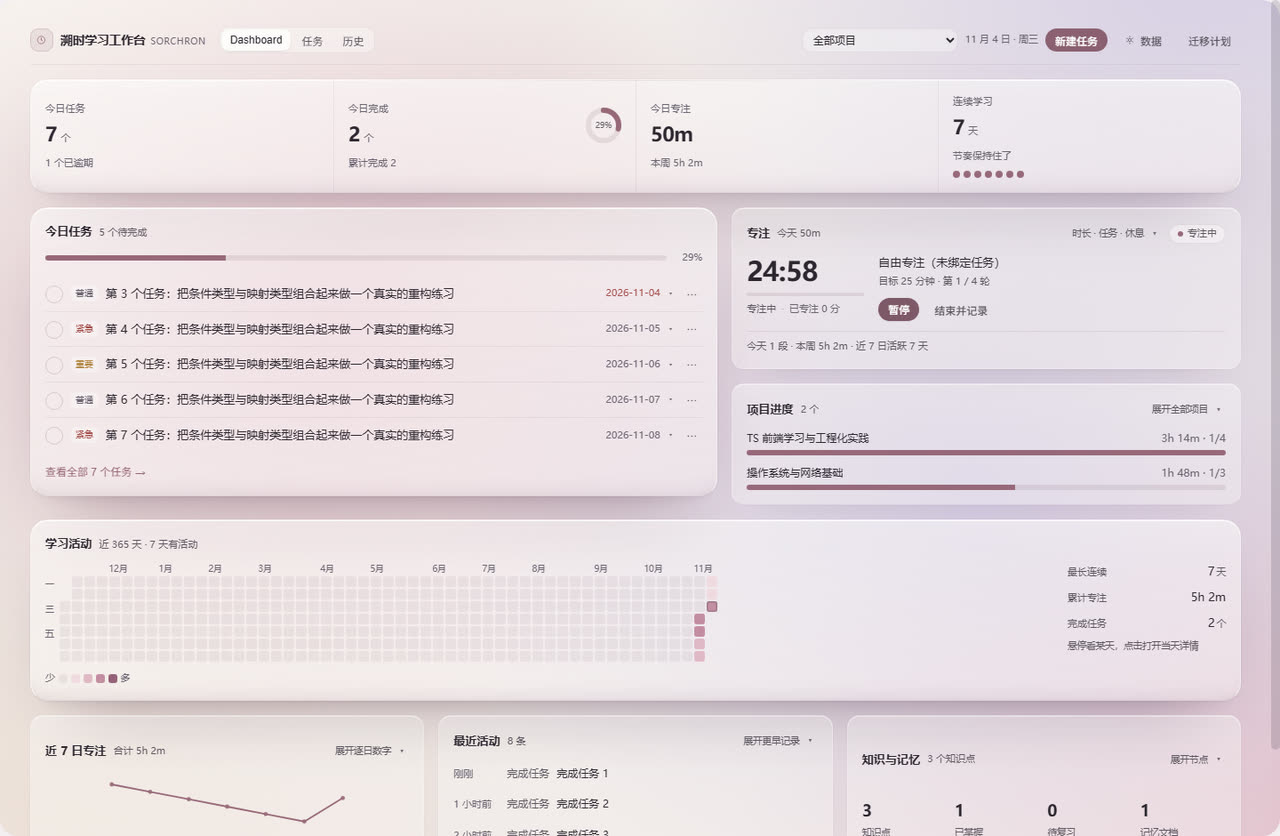 |
| Dashboard (dark) | Tasks |
|---|---|
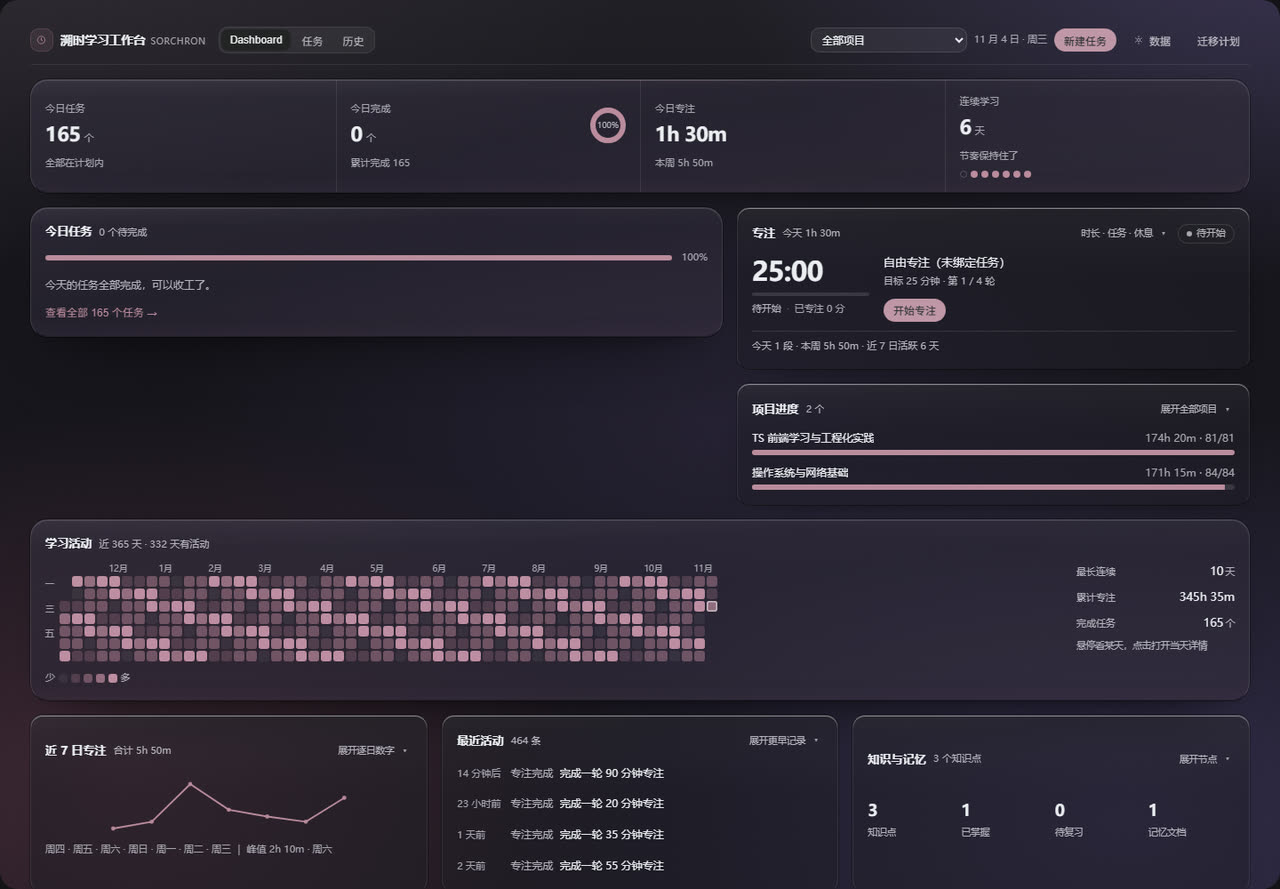 | 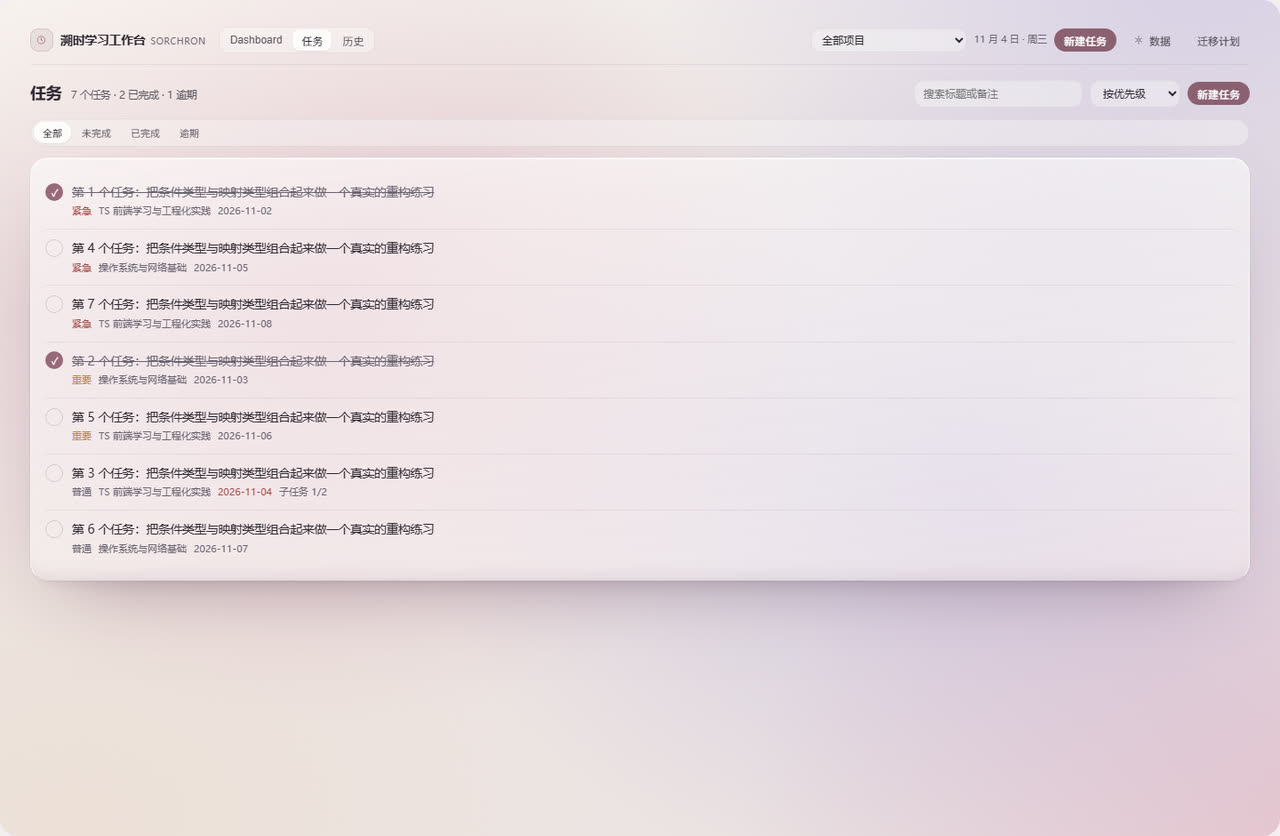 |
Captured from a standalone Chromium at 1440 px using real components and the real stylesheet; the
numbers are demo data. The plugin market reads the same files through
screenshots.json — see assets/README.md for adding or
replacing images.
🛠️ Development
npm run typecheck     # tsc --noEmit — must report 0 errors
npm run build         # writes lib/index.js + lib/client.js
npm run clean         # removes lib/
Stack: React 18 function components and hooks, TypeScript 5.6 (strict), esbuild 0.25 producing two
artifacts with no bundler config file, cordis as the DSH plugin runtime, and a hand-written .v4-*
CSS namespace. Tests are plain scripts — jsdom for component tests, a standalone Chromium over CDP
for browser tests; there is no jest or vitest. The most-used command:
npx esbuild scripts/smoke.ts --bundle --platform=node --format=cjs --outfile=smoke.cjs && node smoke.cjs
Project layout
src/
  index.ts                 host half (Node ESM, intentionally a no-op)
  client/
    index.tsx              registers the nav entry and the panel
    v4/                    workspace: Shell, Dashboard, Tasks, History, Settings,
                           FocusPanel, Heatmap, CaptureBridge, overlays
    hooks/                 storage, board data, timer, backup
    lib/                   focus state machine, settlement, transactions,
                           daily aggregation, activity scoring, schema
    style/board.css        all styles, inlined into the bundle at build time
scripts/                   build, register check, smoke tests, UI test suites
lib/                       build output (committed)
assets/                    market icon and screenshots
docs/                      listing entry for awesome-dsh-plugin
Commands, suites and uncovered areas are listed in TESTING.md. Design constraints —
host API behaviour, transaction semantics, storage rules — are in ARCHITECTURE.md.
🗑️ Uninstall
dsh plugin --profile desktop remove dsh-otaku-study-board
If the profile's package.json still lists dsh-otaku-study-board under dsh.profile.bundles,
delete that line too, otherwise the loader keeps looking for a package that is gone. Reload the
window afterwards.
Uninstalling does not delete your data. To remove it as well, run this in the DevTools console of the DSH window:
Object.keys(localStorage)
  .filter(k => k.startsWith('dsh-otaku-study-board:'))
  .forEach(k => localStorage.removeItem(k))
🤝 Contributing
Issues and pull requests are welcome. Before opening a PR:
npm run typecheckand the smoke command above must pass.- A failed write is reported as failed, an undecided state is reported as undecided, and no button may exist that does nothing.
- Changes to business logic should come with a test; documentation-only changes do not need one.
📄 License
MIT — see LICENSE.
Further reading
| Document | Contents |
|---|---|
USER-GUIDE.md | Every button, step by step, plus FAQ |
ARCHITECTURE.md | Modules, data flow, consistency constraints |
KNOWN-LIMITATIONS.md | Real limits and what is not implemented yet |
TESTING.md | How to run the tests and what they cover |
Plugins associés
dsh-web (dsh-task-board)
zhu1090093659/dsh-web
dsh-web (dsh-web-all)
zhu1090093659/dsh-web
dsh-TUI
ccch1mneyyy/dsh-tui
dsh-web-ui (dsh-task-board)
zhu1090093659/dsh-web-ui