dsh-workspace-browser
tm5452/dsh-workspace-browser
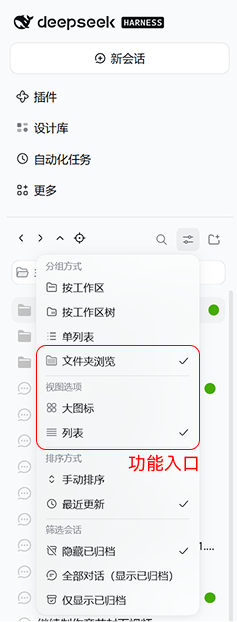
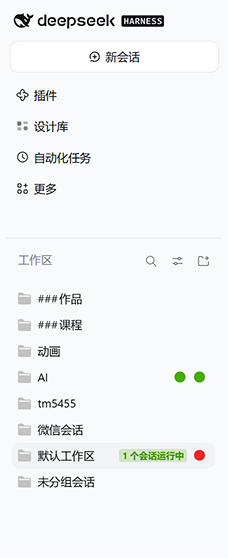
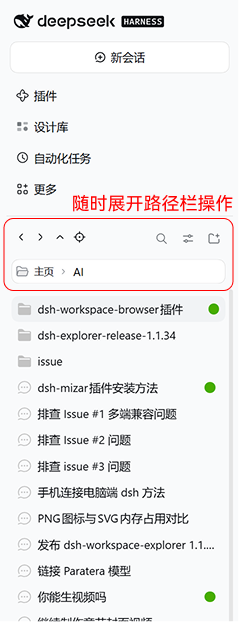
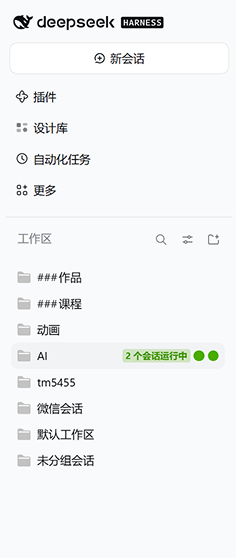
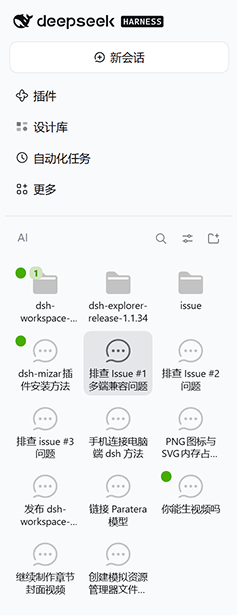
Folder browsing for the workspace sidebar, offered next to the group-by modes in the view-options menu: workspaces become folders and sessions become files, with a path bar over the title, large-icon and list layouts, session status aggregated per folder, and right-drag gestures that go back, forward or one level up. Layout and current directory persist across session switches, and sorting, archive filters and search keep using the native settings.
Installer
dsh plugin --profile web add github:tm5452/dsh-workspace-browserREADME
工作区浏览器 · Workspace Browser
dsh-workspace-browser 为 DeepSeek Harness 的工作区与会话提供文件资源管理器式的浏览页面。
安装试用
在 DSH 的「插件 → 添加插件」中粘贴安装包的本地完整路径。启用后,打开左侧「工作区」标题旁的「视图选项」,在「分组方式」下选择「文件夹浏览」。
浏览工作区
- 「主页」是工作区树的根,列出顶层工作区。有未归属会话时,主页也会显示「未分组会话」。
- 工作区层级沿用 DSH「按工作区树」的规则。双击文件夹进入,单击会话打开原对话。也可以用 Tab 聚焦,按 Enter 打开。
- 标题显示当前文件夹名,根目录显示「工作区」。将鼠标移到标题区即可展开路径栏,点击路径或使用旁边的按钮返回其他层级。
- 下方网格和列表可独立滚动。
- 会话右侧显示状态点,文件夹汇总下属会话的状态。在子目录里,标题左侧提示当前目录之外最高优先级的状态。
- 文件夹浏览及当前目录会保存在 DSH 客户端。切换会话时侧栏保持文件夹视图。
- 可拖动路径栏上方的横线调整分区比例。双击横线恢复默认。
- 「文件夹浏览」启用时,可在同一菜单切换「大图标」和「列表」。
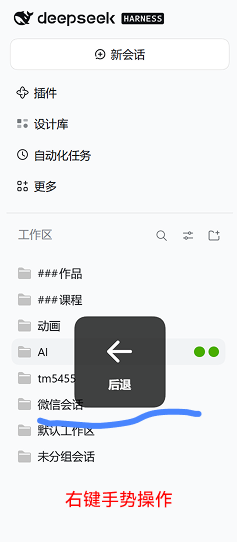
- 文件夹浏览支持从左侧栏任意位置开始的右键手势。按住右键向左后退、向右前进、向上返回上一级,松手时执行。单击右键保留原来的菜单行为。
- 排序和归档筛选沿用「视图选项」中的设置。搜索时显示 DSH 原生搜索结果,清空后回到当前目录。
- 「手动」下可拖动会话和文件夹排序,顺序与 DSH 原生侧栏共用一份数据;「最近更新」下不可拖动,按更新时间排。
截图
 |
 |
 |
 |
 |
 |
 |
本地构建
在源码目录运行 npm pack,即可生成 .tgz。插件使用 DSH 提供的界面组件和主题,构建无需安装依赖。
Plugins associés
dsh-web (dsh-task-board)
zhu1090093659/dsh-web
dsh-web (dsh-web-all)
zhu1090093659/dsh-web
dsh-TUI
ccch1mneyyy/dsh-tui
dsh-web-ui (dsh-task-board)
zhu1090093659/dsh-web-ui