dsh-translate-card
waldemarpng/dsh-translate-card
🌍 Select text, translate in place. A card under your selection in DeepSeek Harness — your own model first, configurable fallbacks behind it.
Installer
dsh plugin --profile web add github:waldemarpng/dsh-translate-cardREADME
dsh-translate-card
Select text. Read the translation in place.
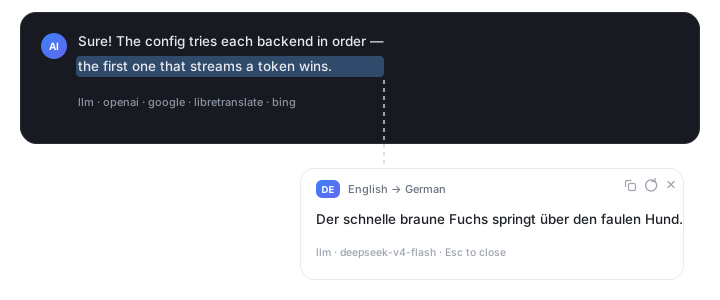
A translation card that appears right under any selection in the DeepSeek Harness chat — your own model first, a configurable fallback chain behind it.



Quick start · Backends · Configuration · How it works · Privacy · Development
Highlights
- 🔒 Private by default — the first backend is your own DSH model. Text leaves your machine only if you explicitly add a public backend to the chain.
- ⚡ Streaming — model translations render token by token; long sentences never feel frozen.
- 🔁 Fallback chain — a backend that dies before the first token is replaced silently by the next one. A backend that dies mid-stream shows an error, because you already see a partial translation.
- 🎯 Any target language — one line in the config:
"to": "ru","en","de","zh-Hans", … - 🧩 Zero dependencies — no install scripts, no native modules, no
npm install. - 🎛 Fully configurable — backend order, model route, timeouts, API keys via environment variables.
- ⌨️ Explicit trigger — selecting text shows a small
Translatepill; nothing is translated (or sent anywhere) until you click it or press the hotkeyAlt+Shift+T(Option+Shift+Ton macOS). Copying withCmd/Ctrl+Cis never intercepted. - 🧹 Respects the composer — selections inside input fields and whole-page
Ctrl+Anever trigger a card.
Quick start
dsh plugin --profile desktop add "link:/abs/path/to/dsh-translate-card"
Restart DeepSeek Harness once (the injection table is built at host startup), then select any text in an answer: a small pill appears under the selection. Click it or press Alt+Shift+T (Option+Shift+T on macOS) to translate. Esc closes the card, ⟳ retries with a cache bypass, the copy button copies the translation.
Out of the box: the private ["llm"] chain only — nothing leaves your machine unless you add a public backend yourself. Target language ru, host-side cache 24 hours.
Install straight from GitHub:
dsh plugin --profile desktop add "github:waldemarpng/dsh-translate-card"
Pin an exact revision by appending a git ref, for example #v0.1.0. For local development, clone the repository and use the link: form above.
Backends
Each id can appear anywhere in the backends chain, any number of times.
| id | Speaks | Streaming | Timeout | Where the text goes |
|---|---|---|---|---|
llm | DSH model service (ctx.llm), the model picked in the GUI, or a route fixed in the config | ✅ | timeoutMs | Your model provider only |
openai | Any OpenAI-compatible /v1/chat/completions: Ollama, llama.cpp, vLLM, OpenRouter, … | ✅ | timeoutMs | Wherever baseUrl points |
google | Public translate.googleapis.com endpoint, no key | — | ≤ 15 s | |
libretranslate | Self-hosted or public LibreTranslate | — | ≤ 15 s | Wherever baseUrl points |
bing | Public cn.bing.com, MyMemory as an in-backend fallback | — | ≤ 15 s | Microsoft, then MyMemory |
Configuration
Config lives in ~/.dsh/.dsh-translate-card.json (or $DSH_HOME/.dsh-translate-card.json). It is re-read on every request — no restart. A broken config is reported inside the card and never crashes the host.
| Field | Meaning |
|---|---|
to | Target language, ru by default. |
enabled | false disables translation without unloading the plugin. |
trigger | button (default) — translate only after clicking the pill or pressing the hotkey; auto — translate as soon as text is selected (the previous behaviour). |
hotkey | Hotkey that translates the current selection: alt+shift+t by default. mod maps to Cmd on macOS and Ctrl on Windows/Linux; alt is Option on macOS. Accepts ctrl, alt, shift, meta, one key (a-z, 0-9, f1-f12), or off to disable. |
skipTargetLanguage | true (default) — do not show the card when the selection is already in the target language. Set false to translate everything. |
backends | Array of backend ids in attempt order. Defaults to ["llm"], the private chain. |
backend | Deprecated alias: auto now means the private default chain, llm / bing select a single backend. Mutually exclusive with backends. |
timeoutMs | Timeout for llm and openai, 1000–300000, default 45000. The other backends are capped at 15000. |
llm | { "provider", "model" } — a fixed route instead of the GUI selection. Both fields together. |
openai | { "baseUrl", "model", "apiKeyEnv" }. model is required; apiKeyEnv names an environment variable holding the key and must end in _API_KEY, _KEY or _TOKEN. A remote baseUrl must be https:// — plain http:// is accepted for loopback hosts only, so an API key is never sent in clear text. |
libretranslate | { "baseUrl", "apiKeyEnv" }; a local instance needs no key. |
Recipe 1 — your own model, public fallback
{
  "to": "ru",
  "backends": ["openai", "llm", "bing"],
  "openai": { "baseUrl": "http://127.0.0.1:11434/v1", "model": "qwen3:1.7b" }
}
Recipe 2 — a paid model route with a key
{
  "to": "ru",
  "backends": ["openai", "bing"],
  "timeoutMs": 60000,
  "openai": {
    "baseUrl": "https://openrouter.ai/api/v1",
    "model": "deepseek/deepseek-chat",
    "apiKeyEnv": "OPENROUTER_API_KEY"
  }
}
Recipe 3 — fully local translation
{
  "to": "en",
  "backends": ["libretranslate"],
  "libretranslate": { "baseUrl": "http://127.0.0.1:5000" }
}
How it works
flowchart LR
    A[Selection in the chat] --> B[Card under the selection]
    B --> C{Backend chain, in order}
    C -->|first token| D[Stream into the card]
    C -->|error before token| E[Silent fallback to the next backend]
    E --> C
    C -->|error after token| F[Terminal error in the card]
    D --> G[Cache the result for 24h]
The host plugin injects a small page script, exposes three local routes (client.js, config, translate), and streams results as newline-delimited JSON events — meta, delta, translation, done, error. Routing keeps the protocol tiny, so the card never waits for a complete response.
Privacy
Nothing leaves the machine when you merely select text: the request is issued only when you click the pill or press the hotkey.
llm— only your model provider sees the text.openai— a local server keeps text on the machine, a cloud endpoint sends it out.google/bing— public services, text leaves the machine.libretranslate— depends onbaseUrl; a self-hosted instance is private.
Local routes are fenced: cross-site requests and opaque null origins are rejected, Origin is checked against Host, and the decision is delegated to the host connection.requestRejection. Without that host fence, only loopback requests that carry browser fetch metadata are allowed. No CORS headers are emitted, so a foreign page can neither drive translations through your localhost routes nor read the results.
The config file is trusted input, like any file in your home directory: whoever can write it decides where your selections are sent. baseUrl may point anywhere you choose, including your LAN; redirects are refused, so a server cannot bounce the request elsewhere. apiKeyEnv only accepts upper-case names ending in _API_KEY, so a config cannot ship unrelated environment variables such as HOME, GITHUB_TOKEN or AWS_SECRET_ACCESS_KEY to a remote server. baseUrl with embedded credentials (user:pass@) is rejected.
Every backend response is size-capped (1 MiB per HTTP body, 200 000 characters per translation), so a broken or hostile endpoint cannot exhaust memory.
Optional environment variables: DSH_TRANSLATE_CONTACT — contact email for a higher fallback-service quota in bing; DSH_TRANSLATE_TRUSTED_HOSTS — comma-separated trusted hosts for proxies.
Troubleshooting
“No model route” / “llm service unavailable”
Pick a model in the GUI model selector, or pin a route in the config — llm.provider + llm.model, or use the openai backend with an explicit baseUrl and model.
Google returns 429
The public endpoint is rate-limited. Add bing after google in backends, or lower the recursion by using a model backend first.
The card never appears
Restart DeepSeek Harness after installing (the injection row is collected at host startup). After editing only the card script, a hard page reload is enough. Check the browser console for /dsh-translate-card/client.js errors.
Ollama is not translating
Use the OpenAI-compatible endpoint: http://127.0.0.1:11434/v1. Make sure the model is pulled (ollama pull qwen3:1.7b) and that no key is required — omit apiKeyEnv for a local server.
Development
Node.js ≥ 20, zero dependencies, no npm install.
| Command | What it does |
|---|---|
npm run check | Syntax-check every host and card module. |
npm test | Offline tests: stubbed fetch and ctx, no network. |
npm run guard | Fails on comments or any non-ASCII character in code and docs assets. |
SMOKE=1 npm run smoke | Live check against a local OpenAI-compatible server and Bing. |
SMOKE=1 SMOKE_GOOGLE=1 npm run smoke | Adds the Google endpoint (429 is reported as skipped). |
License
MIT — see LICENSE.
Plugins associés
dsh-web (dsh-task-board)
zhu1090093659/dsh-web
dsh-web (dsh-web-all)
zhu1090093659/dsh-web
dsh-TUI
ccch1mneyyy/dsh-tui
dsh-web-ui (dsh-task-board)
zhu1090093659/dsh-web-ui