dsh-file-link-menu
xcodefish/dsh-file-link-menu
Ajoute un menu contextuel aux références de fichiers dans les sorties du chat : ouvrir avec les applications enregistrées et leurs icônes, afficher dans le gestionnaire de fichiers, copier les chemins absolus ou relatifs au workspace de session. Les blocs de code, textes bruts et liens externes gardent le menu natif.
Installer
dsh plugin --profile web add github:xcodefish/dsh-file-link-menuREADME
dsh-file-link-menu
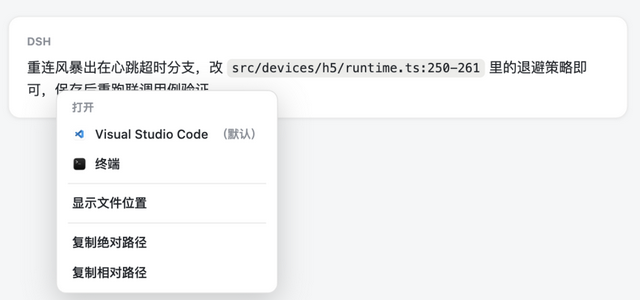
DSH 文件引用右键菜单插件 —— 在 DSH 聊天输出里的文件路径上右键,直接用本机应用打开、在文件管理器中定位,或复制绝对/相对路径。




DSH 助手经常在回复里引用项目文件(行内代码路径、文件 chip、dsh-resource:// 链接),但原生右键菜单对它们无能为力。本插件接管这些文件引用的右键事件,弹出一个原生风格的浮层菜单;代码块、普通文本、外部链接不受影响。
功能
| 菜单项 | 行为 |
|---|---|
| 用 <应用> 打开(标注「默认」) | 用系统默认关联应用打开文件(带应用图标) |
| 用 <应用> 打开 | 本机所有注册了该文件类型关联的应用(带图标,逐项列出) |
| 显示文件位置 | 在系统文件管理器(Finder / 资源管理器)中定位该文件 |
| 复制绝对路径 | 复制 <当前会话工作区>/<相对路径> |
| 复制相对路径 | 复制相对于当前会话工作区的路径 |
识别范围(四层判据,按顺序)
<a href="dsh-resource://file/session/<id>/<path>">资源地址链接[data-file-path]显式标记- Markdown 文件链接按钮
<button title="<path>">(含带图标的行内引用 chip) - 非代码块内的行内代码
<code>:全文恰为文件路径(容忍:行号/-行号后缀)
代码块(<pre><code>)、普通文本、外链一律保持原生右键菜单,不会被劫持。
安装
方式一:DSH Desktop CLI(推荐)
DSH Desktop 的插件即 profile 的 pnpm 依赖,直接用桌面内置 CLI 从 GitHub 安装:
DSH_HOME="$HOME/Library/Application Support/dsh-desktop/harness"

"$DSH_HOME/.desktop-bin/node" \
  "/Applications/DSH Desktop.app/Contents/Resources/app.asar.unpacked/node_modules/@deepseek-ai/dsh/lib/bin.js" \
  plugin --profile web add --save-exact github:XcodeFish/dsh-file-link-menu
- 也可写完整 URL:
https://github.com/XcodeFish/dsh-file-link-menu(或git+https://…),效果相同 - 用
github:XcodeFish/dsh-file-link-menu#v1.0.0(tag)或#<commit>可锁版本 - 已发布到 npm(
@codefisher798/dsh-file-link-menu),可省事为:plugin --profile web add @codefisher798/dsh-file-link-menu
安装完成后重启 DSH Desktop 生效(client bundle 按文件 mtime 生成 rev 并版本化缓存,不重启不会重载)。
本插件纯 ESM、零依赖、无
prepare构建脚本,不会触发 pnpm 的allowBuilds审批,装完即用。
方式二:DSH NEXT plugin_manager
plugin_manager install_bundle(target="github:XcodeFish/dsh-file-link-menu")
或在 DSH NEXT 里「设置 → 插件 → 添加插件」填入 github:XcodeFish/dsh-file-link-menu。
同样接受 https://github.com/<用户名>/dsh-file-link-menu、release 资产的 .tgz 地址、npm 包名或本地绝对路径;#v1.0.0(tag)或 #<commit> 可锁版本。
方式三:本地路径安装(开发调试)
plugin_manager install_bundle(target="<本仓库绝对路径>")
或 DSH Desktop CLI:
"$DSH_HOME/.desktop-bin/node" \
  "/Applications/DSH Desktop.app/Contents/Resources/app.asar.unpacked/node_modules/@deepseek-ai/dsh/lib/bin.js" \
  plugin --profile web add /path/to/dsh-file-link-menu
本地路径安装会以 file: 依赖形式写入 profile(与 DSH 内置插件的源码调试方式一致),改完代码重启即可看到效果。
卸载
"$DSH_HOME/.desktop-bin/node" \
  "/Applications/DSH Desktop.app/Contents/Resources/app.asar.unpacked/node_modules/@deepseek-ai/dsh/lib/bin.js" \
  plugin --profile web remove dsh-file-link-menu
卸载后重启 DSH Desktop。
使用
装好并重启后,在聊天输出里对文件路径右键:
- 出现「打开」分组:默认应用(标注「默认」)+ 本机文件关联应用(带图标)
- 「显示文件位置」(在系统文件管理器中定位)
- 「复制绝对路径」「复制相对路径」
打开与定位均通过 Session Remote 由 Host 执行,Host 端会对路径做二次校验(仅限当前会话工作区内的文件)。
工作原理与实现要点(踩过的坑)
- client 插件必须注册 slot 才会被物化执行。DSH 的 client 模块是惰性的——「插件首次被使用之前什么都不会运行」,
immediately: true只让脚本被加载并注册 factory,不等于执行apply()。本插件注册空 slot(conversation.session.header.utilities/conversation.composer.dock)作为消费者。 - 文件打开走 Session Remote:
session.workspacePathApplications({path})查关联应用,session.openWorkspacePath({path, application})打开、{path, action: 'reveal'}定位。 - 不要依赖 CSS Modules 生成的类名(
fileMention/fileLink可能被构建 hash 化),判据以title与文本为准。 - 缩放/定位:菜单挂
document.body,position: fixed+ 高z-index,并按视口边界收敛坐标。
开发与自测
node --check client.js
node self-test.mjs
预期输出:
button[title] right-click -> intercepted | menu: built (7 blocks)
inline code (no path) -> left to native menu (ok)

ROUND TRIP OK — menu build path no longer throws
self-test.mjs 是一个最小 DOM-stub 测试床:加载 client.js、执行 factory + apply()、合成一次右键事件,覆盖「菜单构建」与「判据放行」两条主路径,无需浏览器。
项目结构
| 文件 | 作用 |
|---|---|
package.json | bundle 清单:dsh.bundle.patch + dsh.client(platform: web, immediately: true) |
cordis.patch.yml | 组合行:insert: id: file-link-menu, name: dsh-file-link-menu |
index.js | host 半边(空 apply;渲染与交互全在 client 半边) |
client.js | 浏览器半边:右键监听 + 自绘浮层菜单 + Session Remote 调用 |
self-test.mjs | 本地 DOM stub 自测(node self-test.mjs) |
兼容性
- DSH Desktop(
webprofile,含 0.10.x)/ DSH NEXT - macOS / Windows / Linux:「打开」「显示文件位置」由 Host 调系统接口执行,理论上跨平台
- 无 Node / 浏览器 API 之外的运行时依赖
FAQ
- 装完右键没反应? 重启 DSH Desktop / DSH NEXT —— client bundle 的 rev 按 mtime 生成并版本化缓存。
- 代码块里的路径右键还是原生菜单? 设计如此:代码块、普通文本、外链不劫持。
- 菜单里缺少某个应用? 该应用需在系统里注册过对应文件类型的关联(
workspacePathApplications只返回系统注册过的应用)。 - 只对工作区内的文件生效吗? 是。Host 端会二次校验路径,仅允许打开/定位当前会话工作区内的文件。
License
MIT © 2026 饮冰 (XcodeFish)
Plugins associés
dsh-web (dsh-task-board)
zhu1090093659/dsh-web
dsh-web (dsh-web-all)
zhu1090093659/dsh-web
dsh-TUI
ccch1mneyyy/dsh-tui
dsh-web-ui (dsh-task-board)
zhu1090093659/dsh-web-ui