dsh-user-addons
yur0918/dsh-user-addons
Téléversement de fichiers par glisser-déposer dans le compositeur de conversation, pastille d'utilisation de tokens avec suivi de quota, et gestion d'archive de sessions — un addon trois-en-un pour le quotidien.
Installer
dsh plugin --profile web add github:yur0918/dsh-user-addonsREADME
dsh-user-addons
Community web add-ons for DeepSeek Harness.
This package provides a small, out-of-tree DSH plugin with both Host and Web client halves. It does not modify DSH core files.
Interfaces
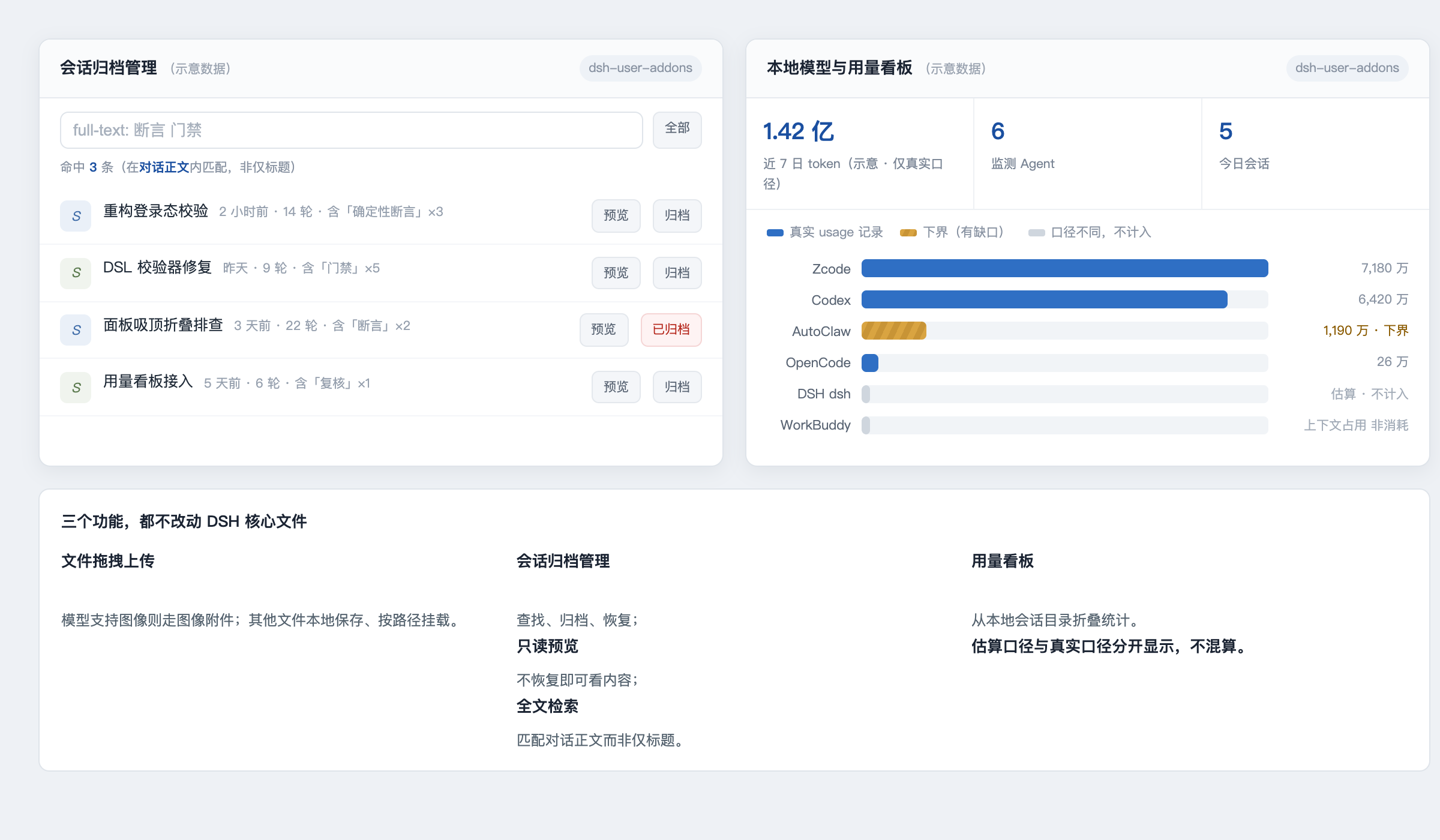
(Interface sketch — layout and colour semantics only; all figures shown are illustrative placeholders, not real measurements.)
Features
- File drop/upload support in the Web composer. Images are attached when the selected model supports image input; other files are saved locally and attached by path.
- An archived-session manager for finding, archiving, restoring — and since 1.3.0, previewing (read-only conversation peek without restoring) and full-text searching (matches inside the decoded conversation log, not just titles) — sessions through DSH's workspace registry.
- A local model and token usage dashboard, folded from
~/.dsh/sessions. - An image-capability endpoint used by the Web client to choose the appropriate attachment behavior.
Requirements
- A DSH Web profile with the client module loader enabled.
- Node.js 22.19 or newer, matching the current DSH development baseline.
Install
This package is not published to npm. There is no @yur0918/dsh-user-addons
on the registry — installing by package name will fail with a 404. It is a
local profile plugin, loaded by symlinking the source directory into the
profile's node_modules and inserting one row into the profile patch layer.
From a clone of this repository:
# 1. symlink the package into the profile's node_modules
ln -s "$PWD" ~/.dsh/profiles/node_modules/dsh-user-addons

# 2. add the loader row to the web profile patch layer
#    (append to ~/.dsh/profiles/web/cordis.patch.yml)
cat >> ~/.dsh/profiles/web/cordis.patch.yml <<'YAML'

- insert:
    - id: user-addons
      name: 'dsh-user-addons'
YAML

# 3. restart the Web profile so it picks up package metadata + lib/client.js
launchctl kickstart -k gui/$(id -u)/com.deepseek.dsh

# 4. verify
curl http://127.0.0.1:3080/addons/health
# → {"ok":true,"addon":"dsh-user-addons","version":"1.3.0"}
Steps 1 and 2 are idempotent: re-running them just recreates the symlink and
appends a duplicate row, so check before re-adding. To uninstall, remove the
symlink and the - id: user-addons row, then restart the profile.
If you use a non-default DSH_HOME, point both paths at that home instead of
~/.dsh.
The package declares its client entry point as:
{
  "dsh": {
    "client": {
      "platform": "web",
      "inject": [
        "@deepseek-ai/dsh-client-locale"
      ]
    }
  }
}
Run the package check with:
npm run check
Local routes
The Host half registers same-origin /addons/* routes:
GET /addons/healthGET /addons/archive/listGET /addons/archive/previewPOST /addons/archive/archivePOST /addons/archive/restoreGET /addons/image-capabilityPOST /addons/uploadGET /addons/usage/summary
Uploads are limited to 100 MiB (UPLOAD_LIMIT_BYTES in lib/index.js) and
filenames are sanitized before being written below the DSH home. Usage data is
read locally from DSH session logs; this plugin does not make network requests.
Development
The browser bundle in lib/client.js is intentionally committed because DSH's Web host serves built client bundles. Keep the Host and Client halves compatible with the DSH version you are using, and run npm run check before publishing.
Please do not commit session logs, uploaded files, credentials, generated task state, or backup files.
License
MIT
Plugins associés
archify (deepseek-harness)
tt-a1i/archify
next-ai-draw-io (dsh-plugin)
dayuanjiang/next-ai-draw-io
WeKnora (dsh-weknora)
tencent/weknora
weknora
tencent/weknora