dsh-power-suite
zephinel/dsh-power-suite
One DSH Web bundle that adds session artifacts with Quick Look, Dynamic Workspaces, prompt history, draft memory, interrupted-session recovery, a synced sidebar width and UI element annotation.
Installer
dsh plugin --profile web add github:zephinel/dsh-power-suiteREADME

DSH Power Suite
English | 中文


One plugin that makes DeepSeek Harness (DSH) show the working session, not only the answer. It augments the native Web shell with a Running & recent panel and activity buckets, a Session artifacts browser, prompt history, draft attachment memory, a multi-image composer gallery, interrupted-session recovery, and point-and-click UI annotation — all as one power-suite plugin row.
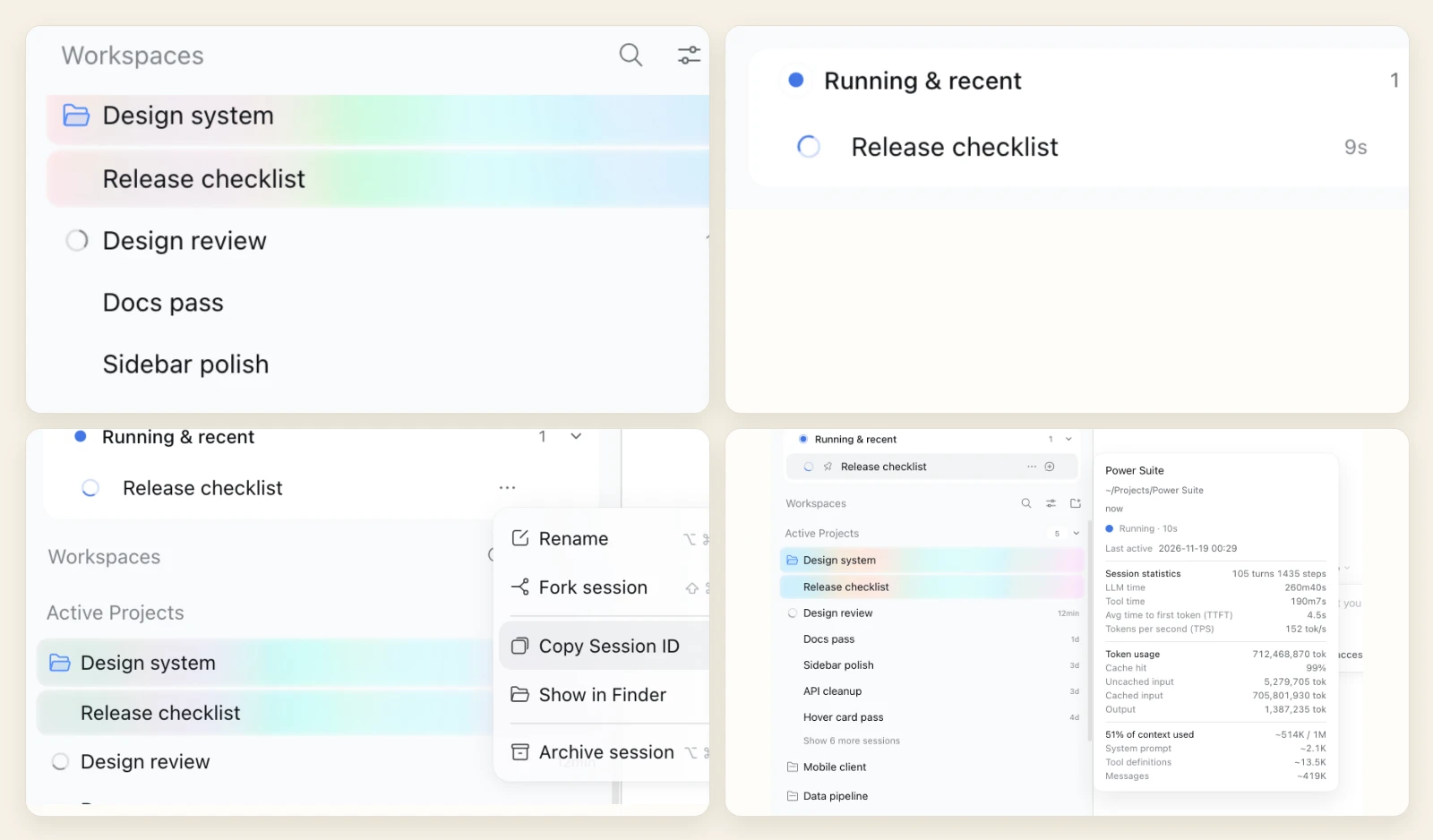
All screenshots come from a temporary, isolated DSH instance with demo Sessions and demo artifacts; no personal content is involved.
Current status:
@zephinel/dsh-power-suite@0.2.1is published on npm (Web platform only); recent visual refinements shown above — including the colored smoke atmosphere and title-colour highlighted icons — are onmainfor the next release. See CHANGELOG.
Install · Overview · Features · Quick start · Documentation · Local development
Install
Install from npm (requires pnpm on PATH), then reload the plugin or restart DSH Web so the Host half loads:
dsh plugin --profile web add @zephinel/dsh-power-suite@0.2.1
dsh web
Or install in the Web UI via Plugins → Add plugin → @zephinel/dsh-power-suite@0.2.1 → Install → Enable now. Local checkout installation (link: dependency) and release steps live in docs/development.md.
Overview
The suite works inside the native shell instead of beside it; unloading the plugin restores the native surface.
- Running & recent, at the top of the sidebar. Lists running and recently finished Sessions, nests delegated subagent rows, marks Sessions waiting on a question, plan review or approval with an amber
flag-fill, and highlights the active row with its colored smoke glow. Hover a row for native Session statistics, Token usage and Context usage. - Native row menus. A top-level card row's "…" menu opens the shell's shared context-menu popup with the native Session actions (Pin is left out): native material, icons and shortcut hints.
- Host-shared state and sidebar width. Read marks, card pins, last-activity times and the dragged left sidebar width are owned by the Host, surviving reloads and syncing across browsers on the same Host.
Read more: Dynamic Workspaces · Sidebar width · Interrupted sessions.
Session artifacts
The right Sidebar's Files pane header carries an Artifacts button opening the current Session's generated files and provided attachments in one list.
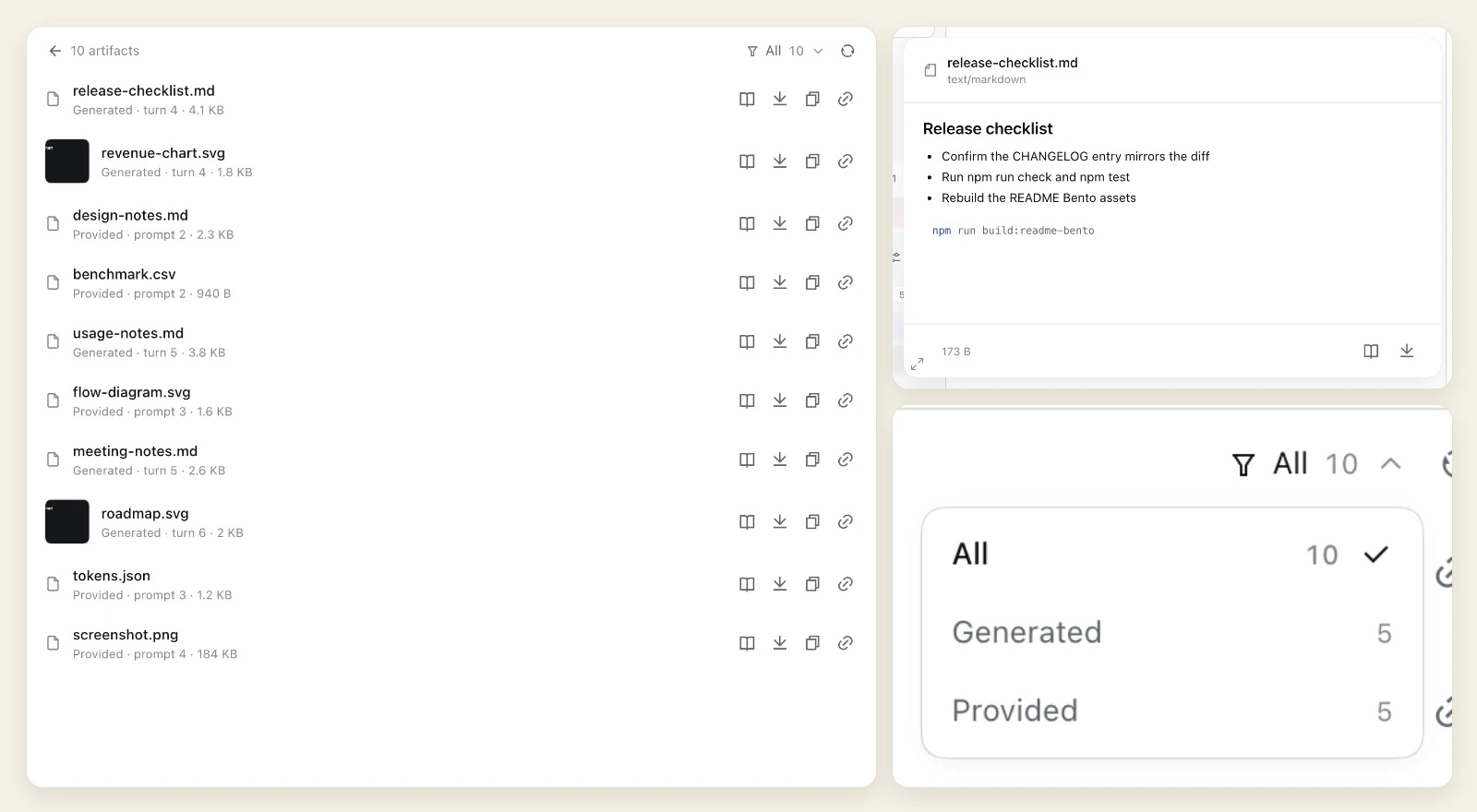
- One list, two sources. Filter All / Generated / Provided with live counts.
- Shared Quick Look. Hover a row (in Artifacts or the native Workspace tree) for a resizable preview of Markdown, highlighted code, images, audio/video, PDF and HTML.
- File actions. Open, download, copy verbatim text or clipboard images (in a secure context), and copy the authenticated LAN link.
Read more: Session artifacts.
Composer: prompt recall, drafts, recovery
The composer keeps the work around the prompt: what you asked before, what you attached, and turns that did not finish.
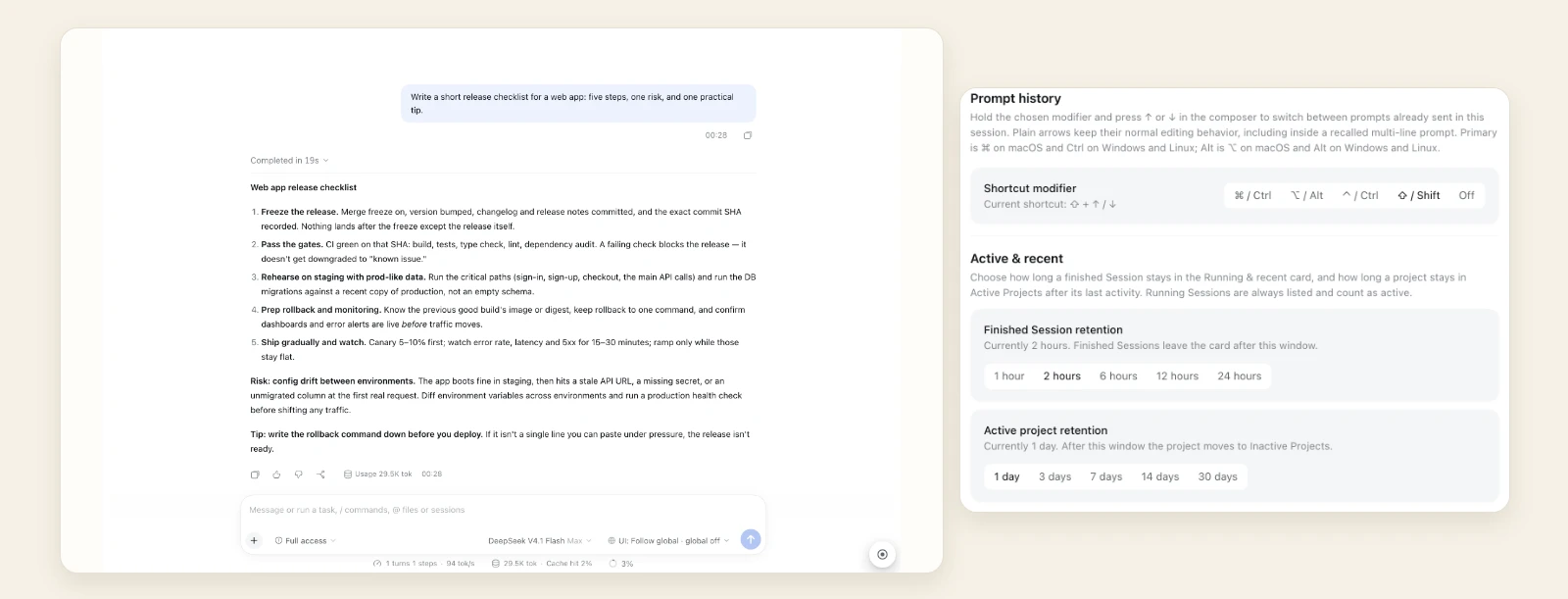
- Prompt history. Modifier + ↑/↓ recalls earlier prompts in this Session while plain arrows stay native. A right-edge rail lists sent prompts oldest-first with timestamps, hover preview, inline search and click-to-copy.
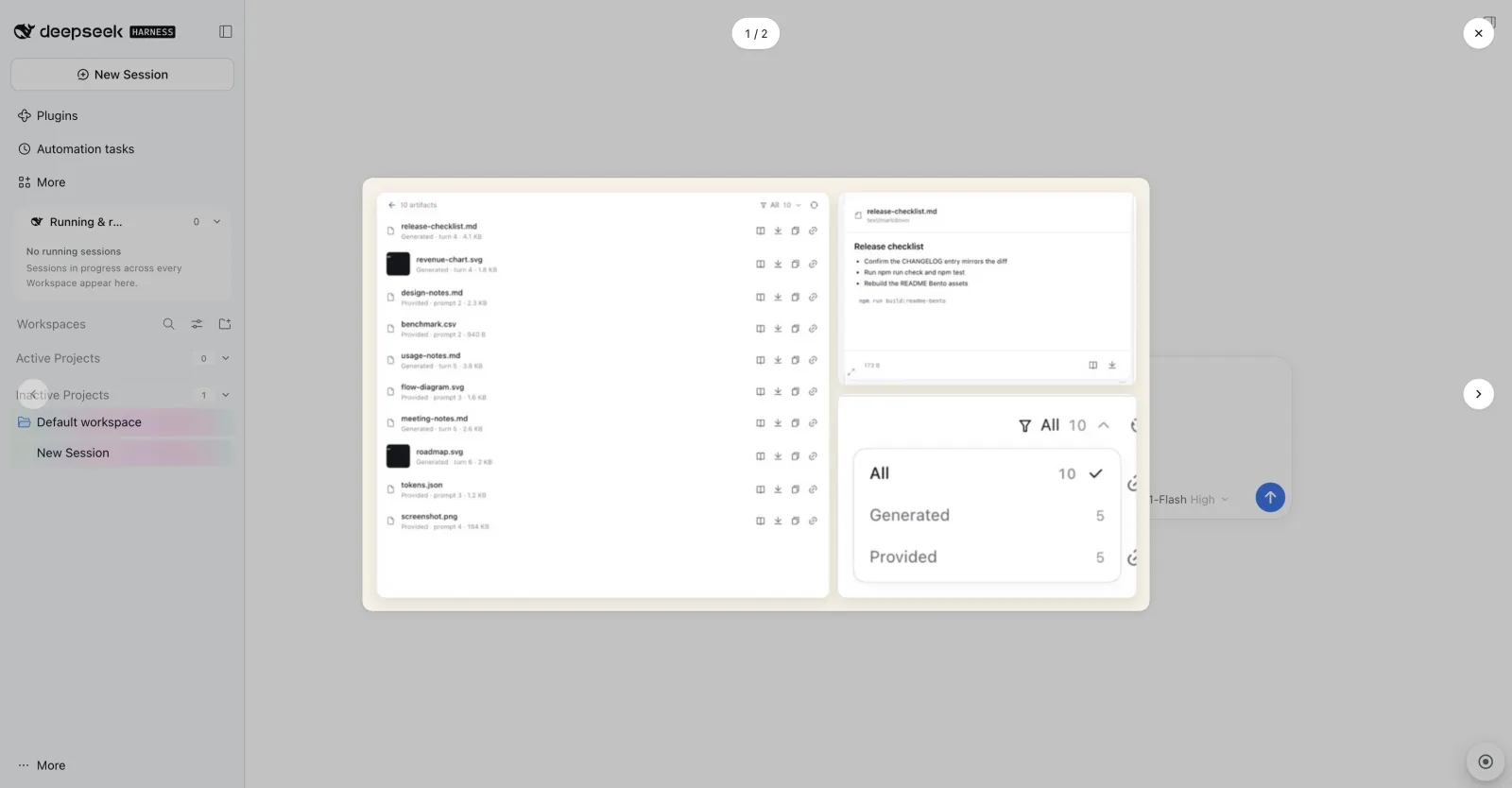
- Draft attachments & multi-image gallery. Pasted, dropped or picked files survive Session switches for the page lifetime; clicking any thumbnail when two or more images are attached opens a continuous
N / Mviewer with arrow/wheel navigation and focus return (single images keep the native lightbox).
- Interrupted-session recovery & settings. Unfinished turns get an amber title mark, hover Continue triangle and play-shaped submit button backed by Host SSE sync. Prompt-history modifier and retention windows live on the bundle's Plugins page.
Read more: Prompt history · Draft attachments · Composer image gallery · Interrupted sessions.
UI element annotation
A round launcher at the bottom-right toggles point-and-click annotation; the page narrows for a right rail instead of being covered.
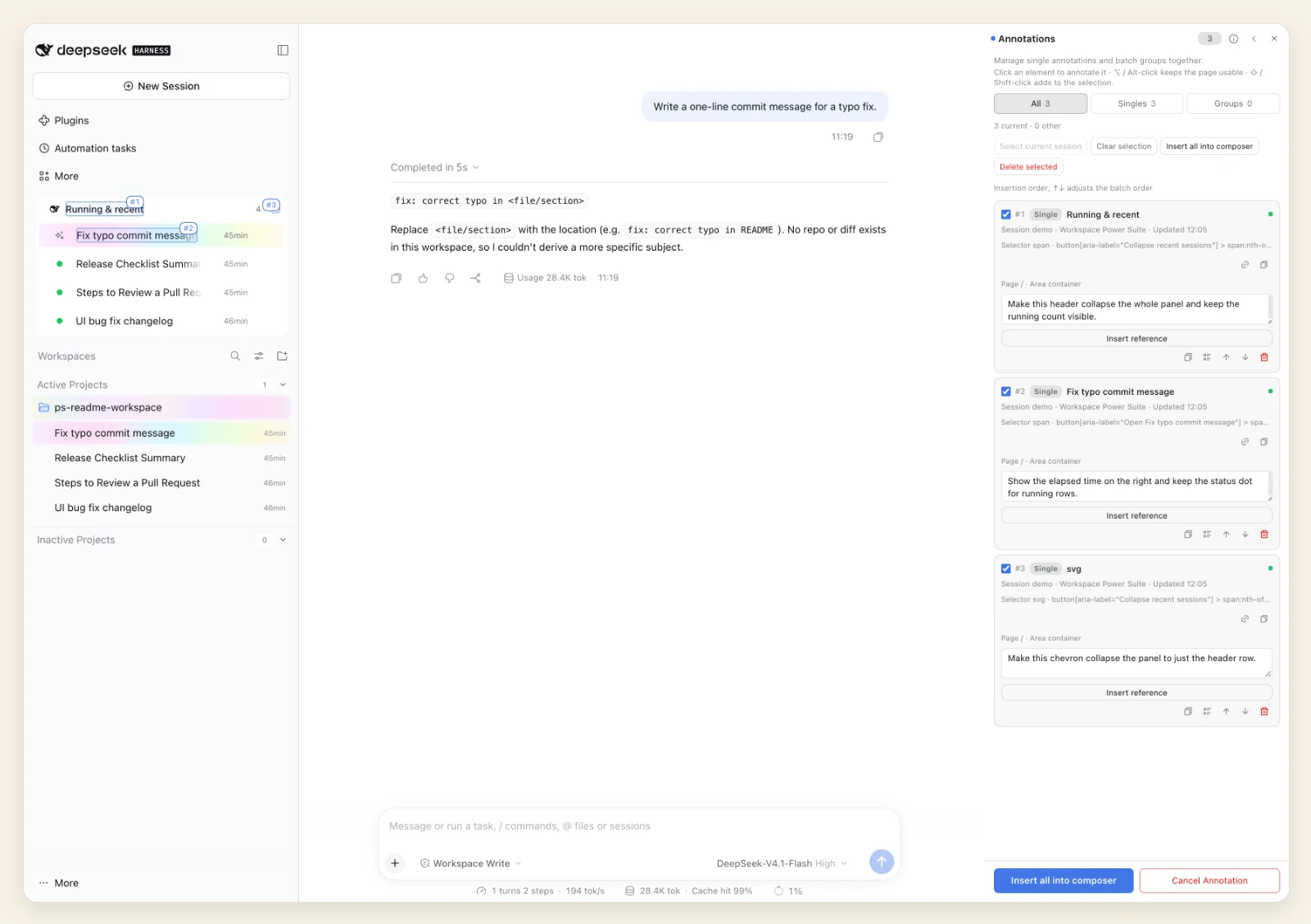
- Point & drill into surfaces. Hover outlines elements including floating hover cards; the popover offers locator summary, parent/child stepping and requirement editing.
- Persisted markers & native chips. Annotations persist as numbered page markers (with edit, relocate, copy locator and 5 s undo) and insert into the composer as native inline reference chips — single or batched — without sending.
Read more: UI element annotation.
Features at a glance
| Feature | Reference |
|---|---|
| Dynamic Workspaces (Active/Inactive buckets, Running & recent, flags, pins, native menu) | docs/dynamic-workspaces.md |
| Session artifacts & shared Quick Look | docs/session-artifacts.md |
| UI element annotation & native composer reference chips | docs/ui-annotation.md |
| Prompt history, draft attachments & composer image gallery | docs/prompt-history.md · docs/draft-attachments.md · docs/usage.md |
| Interrupted-session recovery (Host-owned SSE sync) | docs/interrupted-sessions.md |
| Host-synced sidebar width, workspace default presets, settings & update notice | docs/sidebar-width.md · docs/workspace-default-presets.md · docs/settings.md · docs/update-check.md |
All features ship together in @zephinel/dsh-power-suite (Loader row power-suite, Web platform only).
Quick start
- Expand the left sidebar: Running & recent sits above Workspaces, split into Active Projects and Inactive Projects.
- Open a Session with at least two sent prompts: the prompt-history rail appears on the right edge, and modifier + ↑/↓ recalls earlier prompts.
- Open Files → Artifacts in the right sidebar to browse and Quick Look generated files and provided attachments.
- Click the round bottom-right launcher to annotate elements and insert native reference chips.
- Configure the prompt-history modifier and retention windows under Plugins → DSH Power Suite.
Documentation
All detailed docs ship in docs/ (links use absolute GitHub URLs so they stay clickable on npm):
| Document | What it covers |
|---|---|
| Full documentation index · Usage | Step-by-step UI guide and complete feature-doc directory |
| Architecture · Feature inventory | Host/browser halves, routes, slots, services and feature recipe |
| Development · Browser harness | Local install/reload loop, full command reference, live-GUI browser suites and release flow |
| Limitations | Known bounds and unverified areas |
| Verification · CHANGELOG · Release notes | Automated gates, live evidence, release history and update-notice format |
Get the code and local development
git clone https://github.com/Zephinel/dsh-power-suite.git
cd dsh-power-suite
npm ci
npm run check
Prerequisites: DSH 0.2.2 plugin interface (full browser suites verified on 0.2.2-rc.1; 0.2.2 scroll/hover adaptations verified on DSH 0.2.2 on macOS; later DSH versions unverified), Node.js >= 22.18 (native TypeScript type stripping for npm test; CI runs Node 22 and 24), pnpm (used by dsh plugin add), Git, and optional Google Chrome for the local browser suites (node test/browser/sidebar.e2e.mjs --smoke, annotation.e2e.mjs --smoke, update-prompt.e2e.mjs).
No runtime dependencies and no watch server: rebuild with npm run build (refresh the browser after client changes; reload the plugin or restart dsh web after Host changes). Full command table and deployment/release steps: docs/development.md.
Contributing
- Issues and feature requests: GitHub Issues.
- Run
npm run checkbefore proposing a change; sync feature docs,CHANGELOG.mdanddocs/verification.mdper sync-power-suite-docs. - Releases are published from
v*tags via Trusted Publishing (never runnpm publishlocally; see release-power-suite). Maintainer: @Zephinel.
License
MIT. Third-party notices are in NOTICE: Remix Icon SVG path data inlined in the browser entry (Apache-2.0), and the DeepSeek Harness platform disclaimer.
Plugins associés
dsh-web (dsh-task-board)
zhu1090093659/dsh-web
dsh-web (dsh-web-all)
zhu1090093659/dsh-web
dsh-TUI
ccch1mneyyy/dsh-tui
dsh-web-ui (dsh-task-board)
zhu1090093659/dsh-web-ui