dsh-cockpit
zoe1nan/dsh-cockpit
Console de commande pour DeepSeek Harness : rail de sessions en direct et équipe, tableau de tâches avec validations et actions d’écriture, flux d’activité et capsule HUD de bureau qui suit la conversation active. Seule la capsule HUD est réservée à Windows.
Installer
dsh plugin --profile web add github:zoe1nan/dsh-cockpitREADME
Cockpit · 指挥台

一眼看清一支 AI 编队正在做什么。
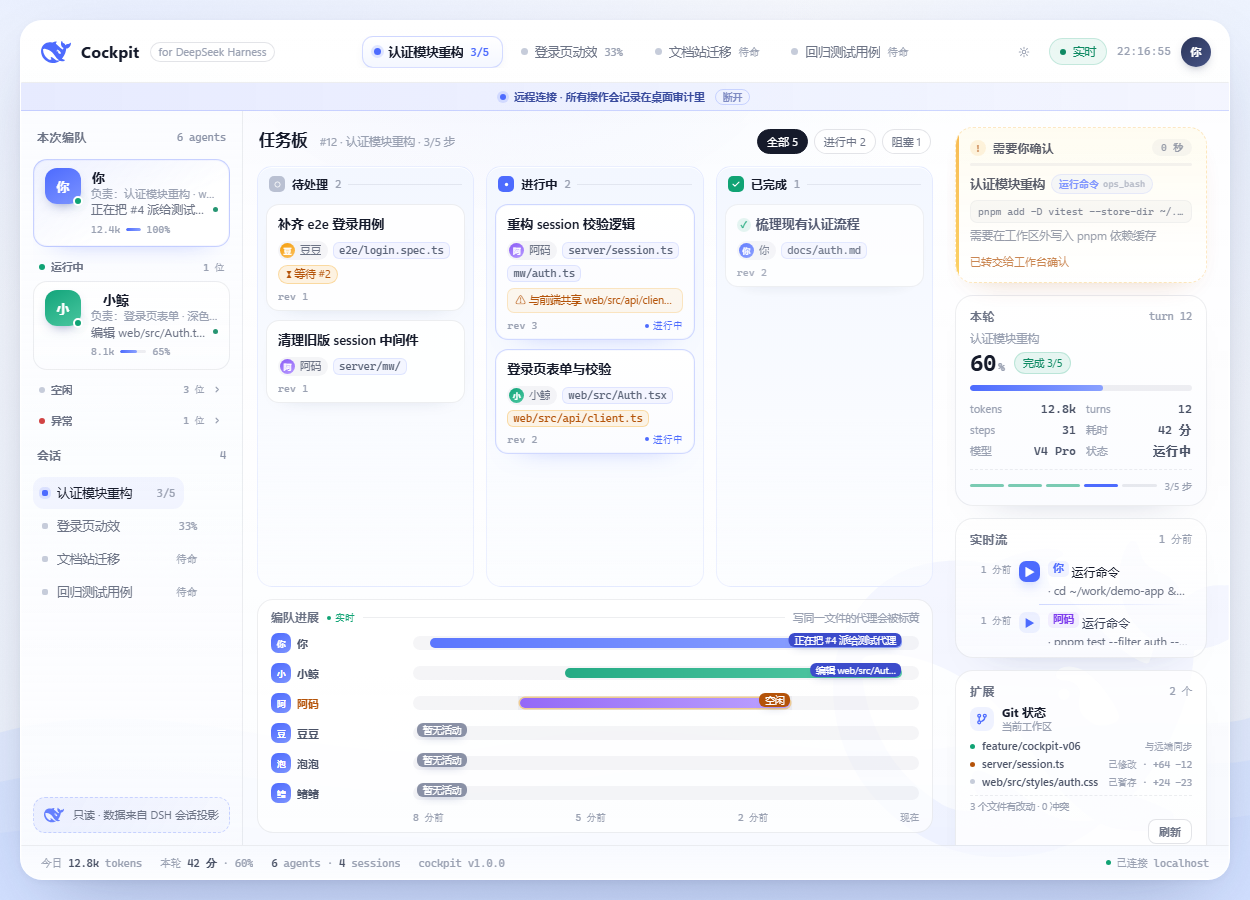
DeepSeek Harness 支持多个 agent 并行干活。但当一支编队跑起来,你会同时面对一串会话、一堆待办、若干子代理的实时动作,以及偶尔撞车的文件写域。Cockpit 把这些收进一块实时面板:编队在干嘛、计划走到第几步、任务板卡在哪、谁刚写了什么文件——并且允许你在同一个界面里做决定:审批、发话、中断。
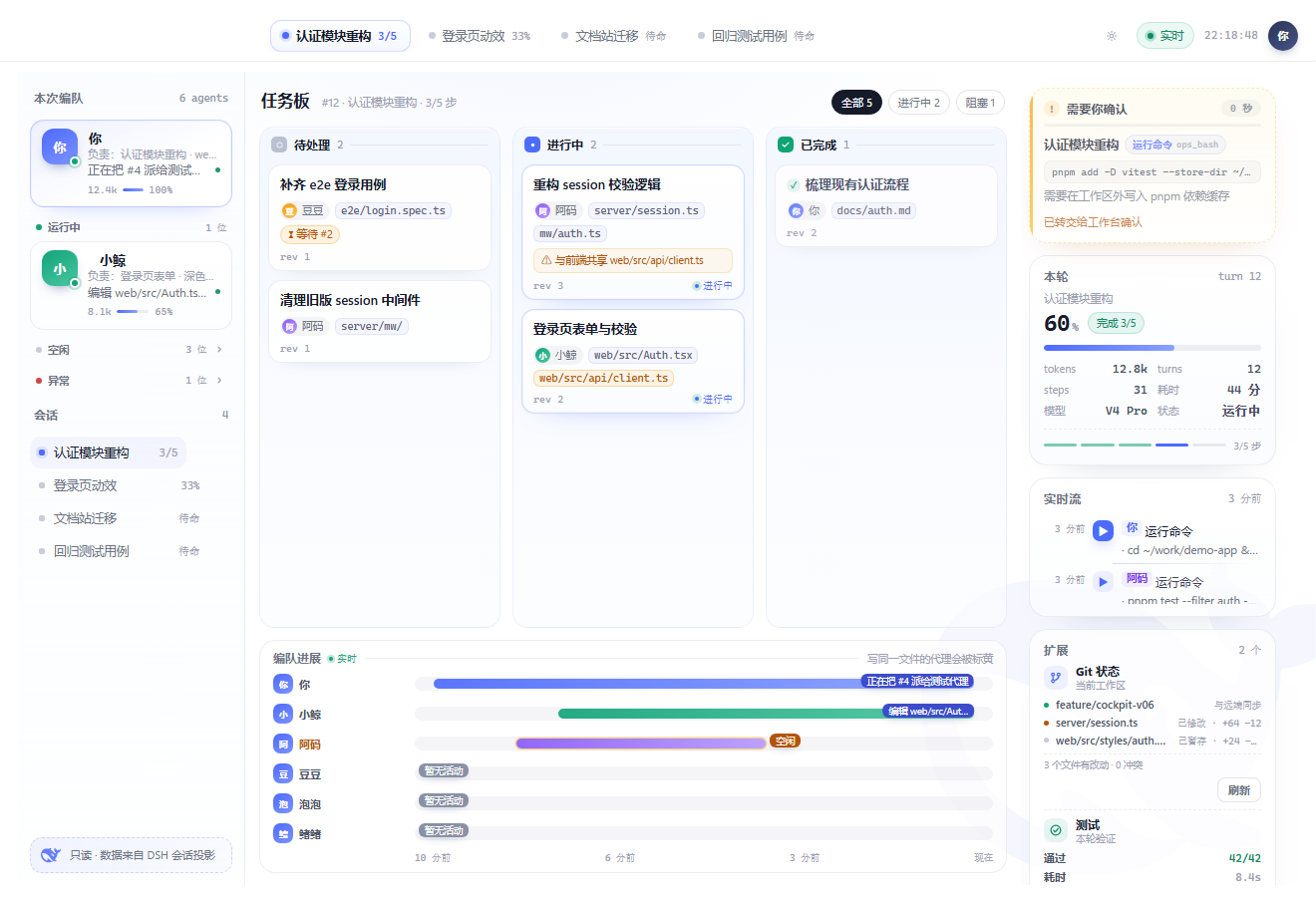
从 v0.2 起它内嵌在 DSH 工作台里:侧栏点一下「Cockpit 指挥台」,页面就在主区打开,不用另开浏览器标签、不用记端口。独立 URL 也保留,方便第二块屏或手机。
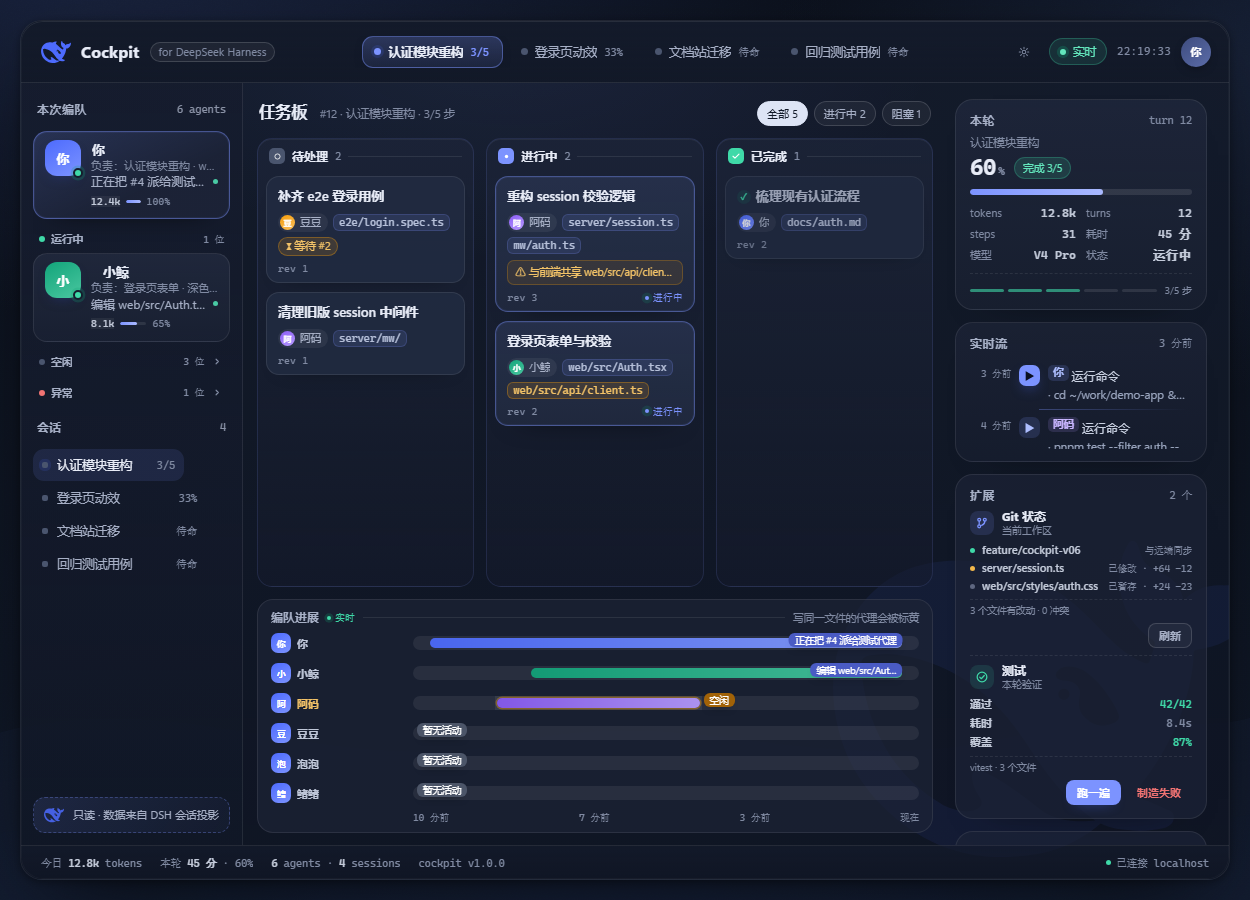
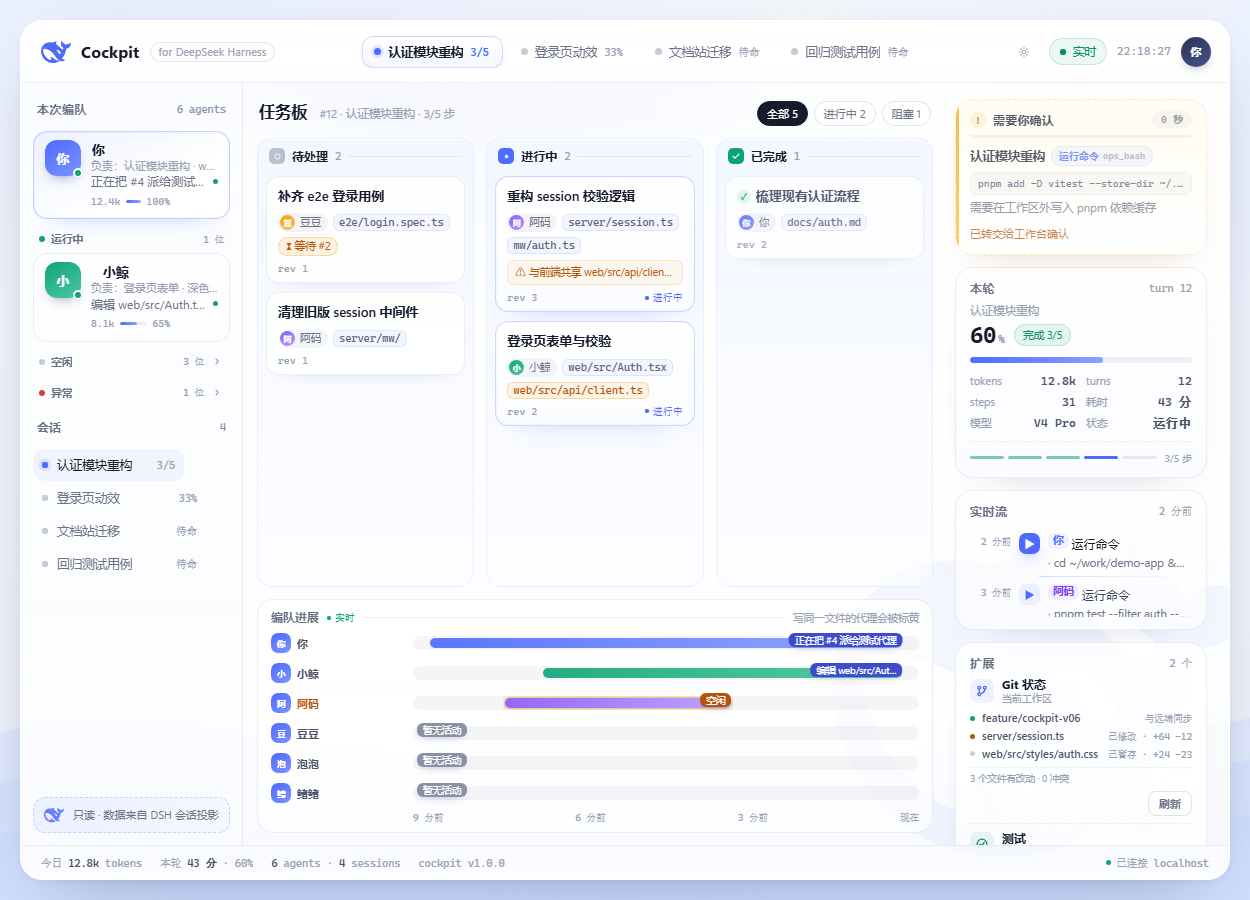
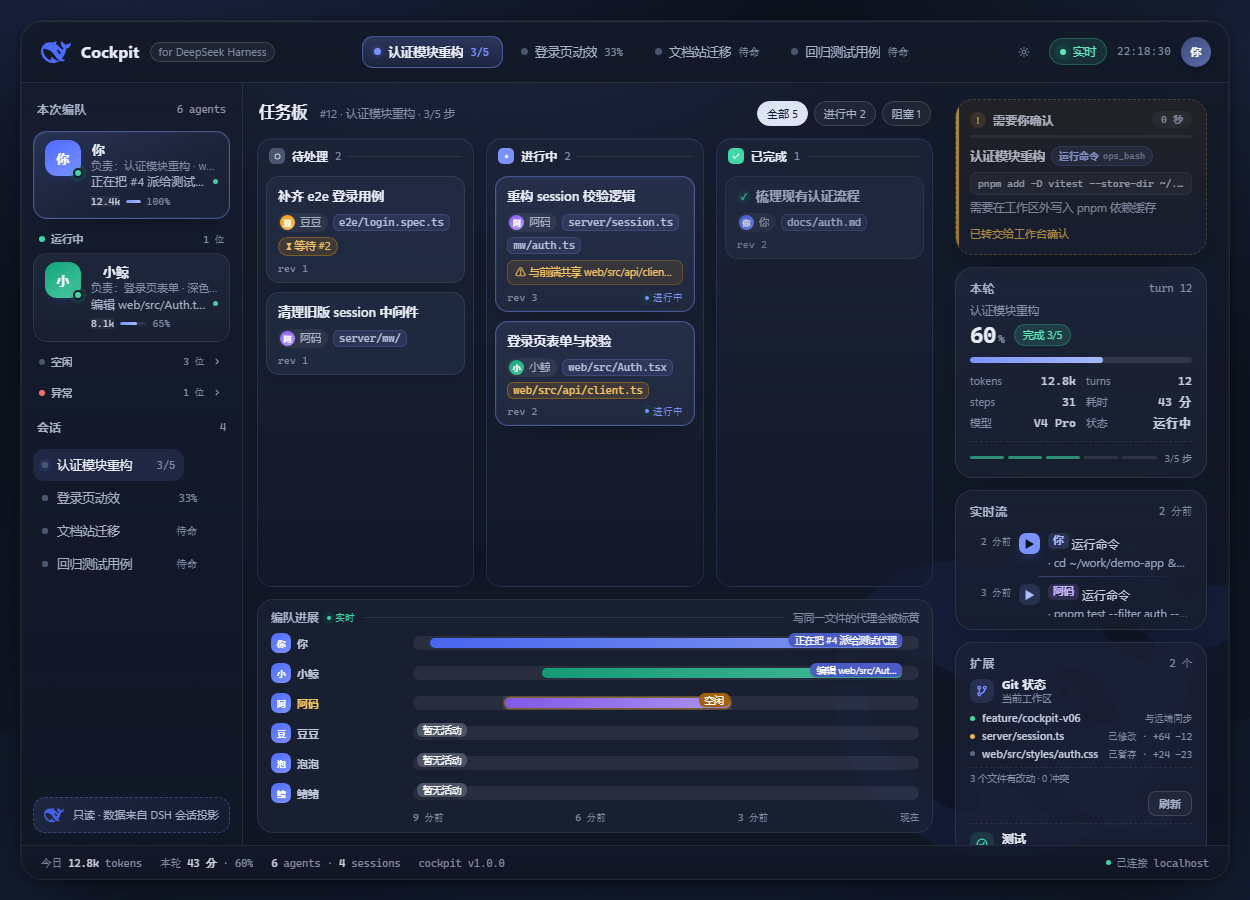
特性(v1.2)
看
- 实时编队:每个成员的模型、真实 token 数、当前动作、负责范围(自动从任务主题/改动文件归纳);按运行中 / 空闲 / 异常分组,运行中永远在前
- 任务板:共享任务、状态列、依赖关系(
blockedBy)、两人的写域重叠会被标成「双写风险」 - 计划兜底:没有共享任务板时,自动用本轮 todo 计划铺满任务板,永远不空
- 实时流:工具调用说人话(
运行命令/编辑文件/搜索内容…),参数一行省略、点击展开 - 本轮数据:进度、token、耗时、步骤、模型、状态,液面进度条随事件实时更新
- 会话切换:点左栏会话或顶部 pill 即切换,每个标签页记住自己的选择;顶栏「复制链接」给出可分享的视图链接,别人打开就落在同一个会话(v1.1)
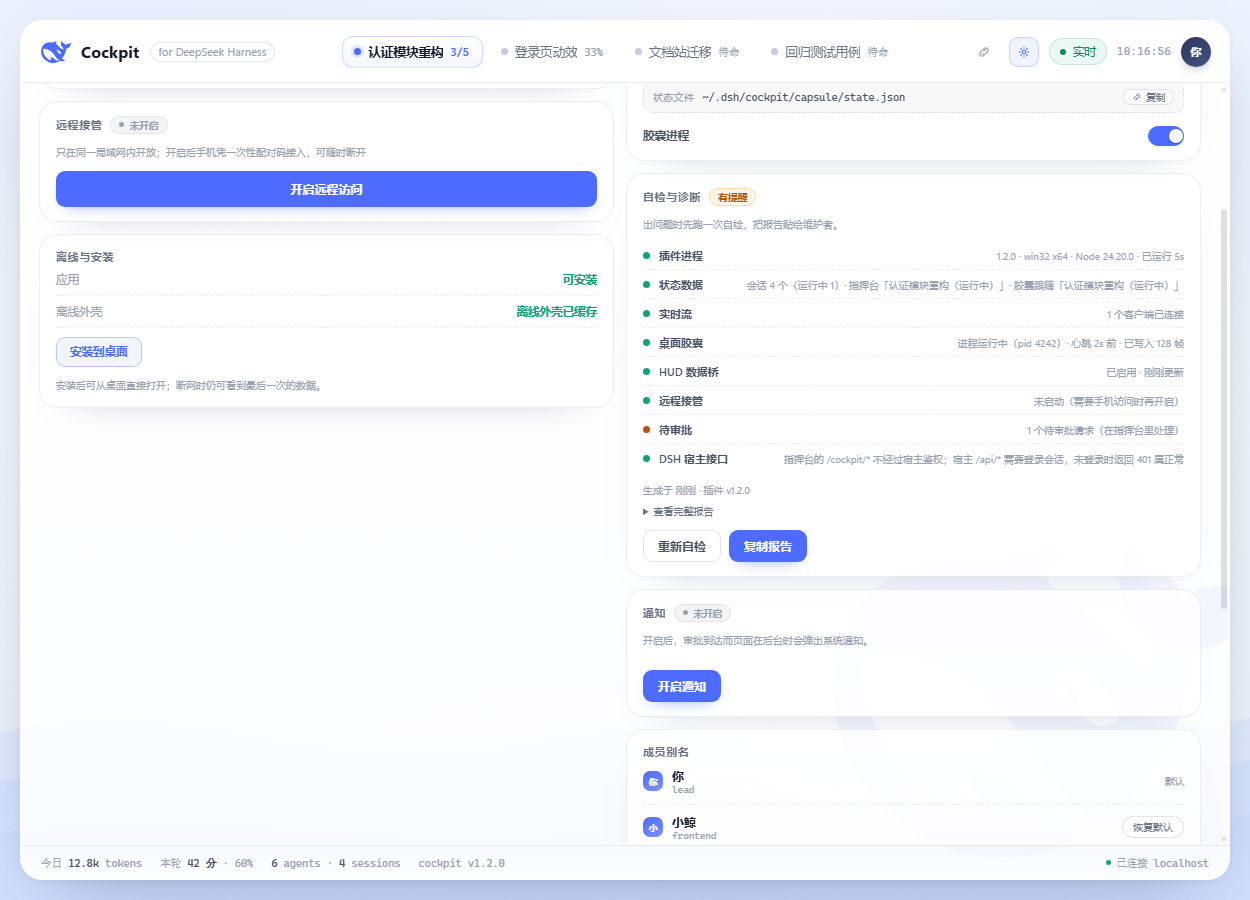
- 自检与诊断:设置页一键自检(插件 / 状态数据 / 实时流 / 胶囊 / HUD 数据桥 / 远程 / 待审批 / 宿主接口),异常一眼可见,可复制完整报告发给维护者(v1.1)
- 设置页重排:连接/设备 → 胶囊 → 自检 → 通知 → 别名 → 关于,卡头与说明统一,窄屏同序(v1.2)
- 反馈一致:成功/提醒/失败用同一套语气与停留时长,失败文案直接给出下一步(v1.2)
- 实时流降噪:连续同类工具调用折叠为「×N」,空参数不再占一行(v1.2)
操作
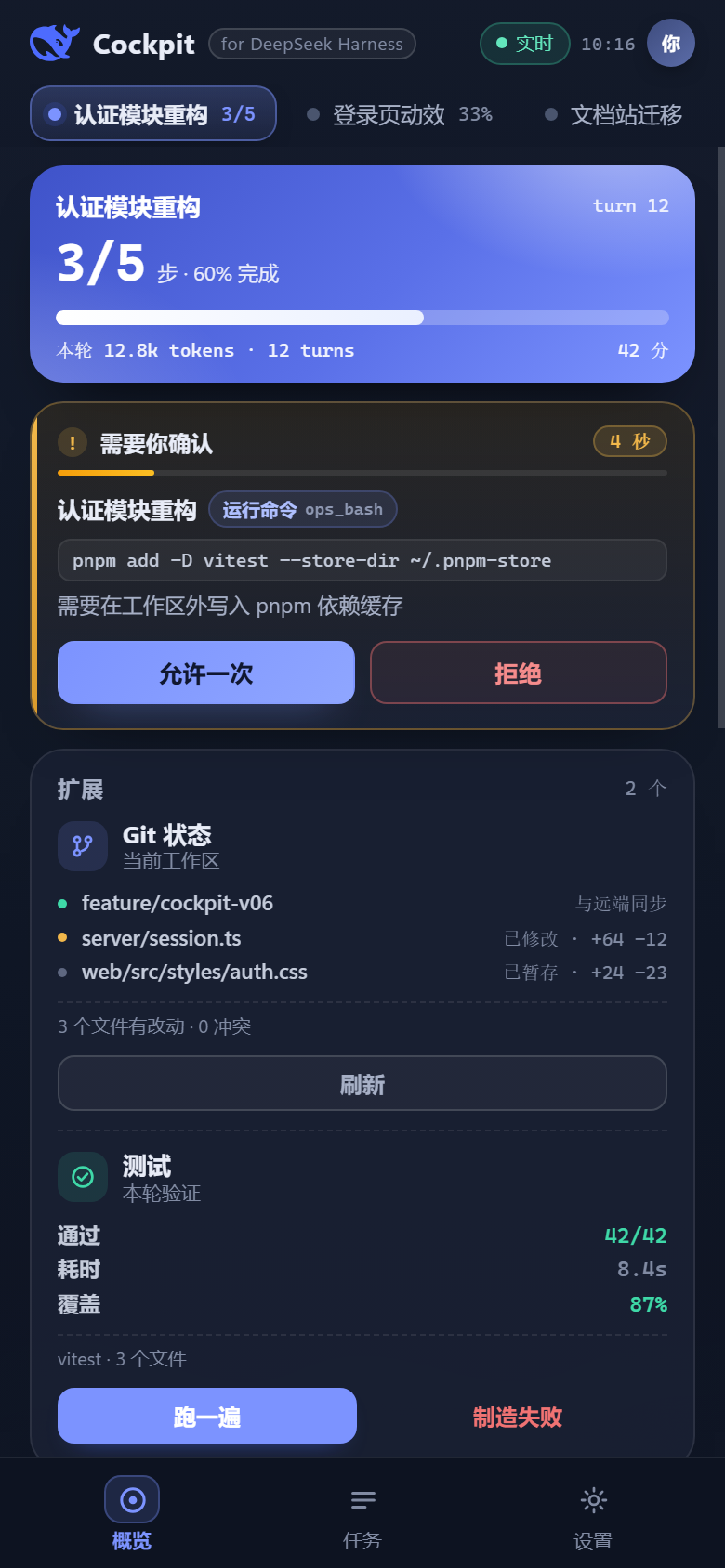
- 审批闸口:审批请求直接出现在指挥台里,允许一次 / 拒绝;25 秒不处理自动交回原生弹窗
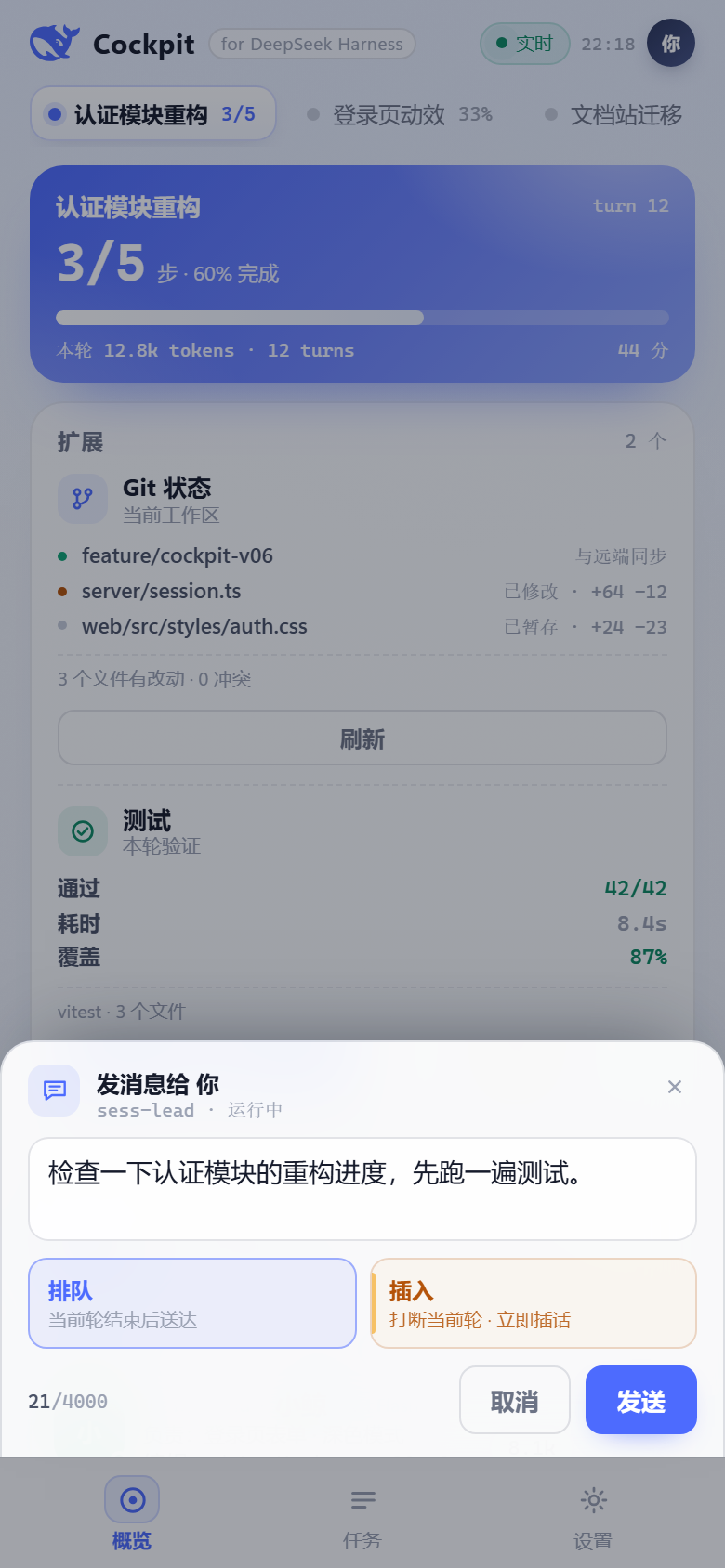
- 发消息:对某个 agent 排队送达,或「插入」打断当前轮立刻插话
- 中断:行内确认后停止正在跑的轮
- 所有写操作:同源校验、失败回滚、本地审计(
~/.dsh/cockpit/audit.jsonl)
桌面胶囊(Windows)
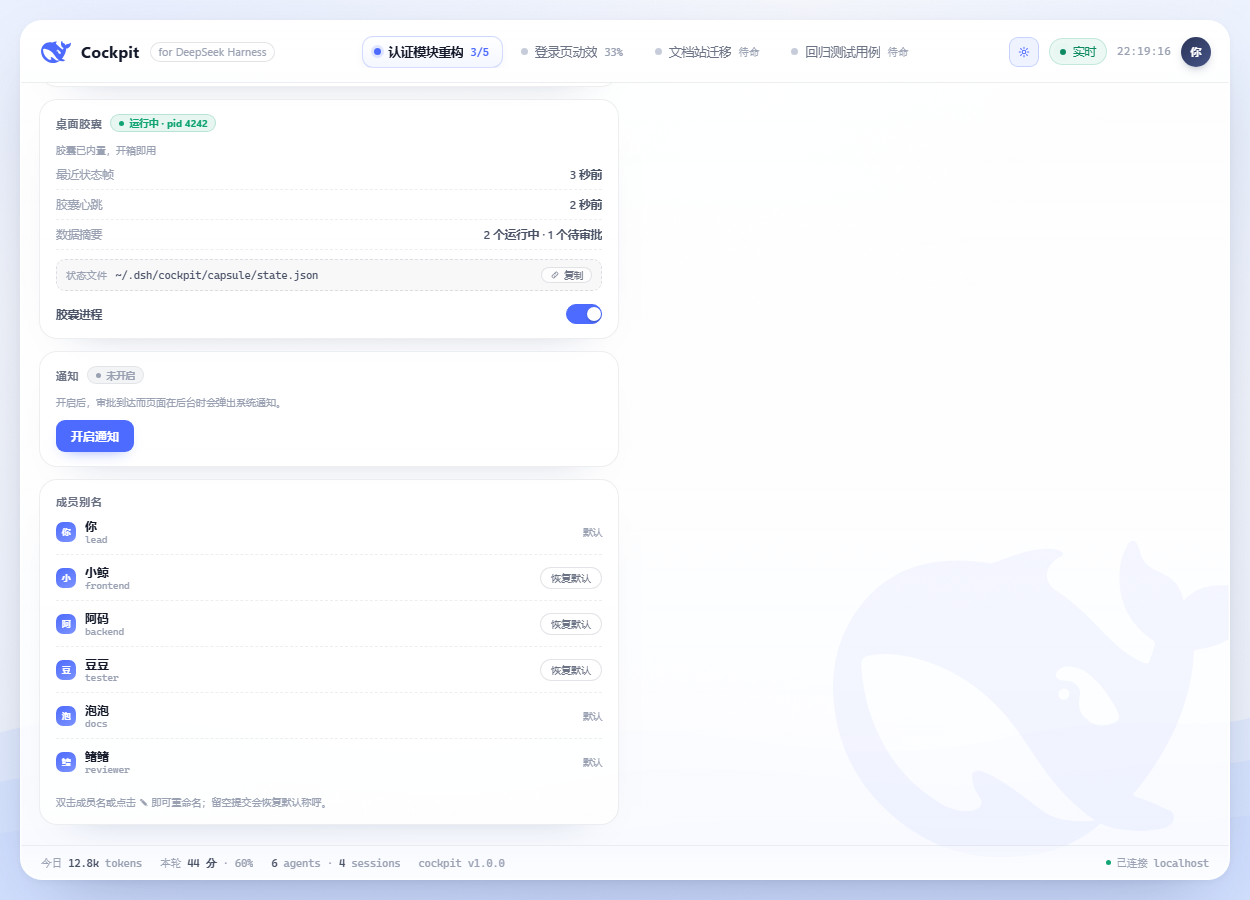
装一个插件就有桌面悬浮胶囊:液体进度条 + 步骤读数 + 「N 跑 · M 批」徽标;点击展开完整卡片,可一键打开指挥台。胶囊跟随任意正在运行的会话(1.0.1 起:谁在干活就显示谁,多个同时运行时跟随你最近输入的那个,空下来回到「待命」),不再只盯着指挥台会话。v1.1 起点击胶囊本体直接打开指挥台(有待审批时直接落在审批区),右上箭头才展开/收起卡片;v1.2 起胶囊 hover 有描边高亮,待审批时描边转琥珀色。胶囊进程由插件托管(自动启动/退出/崩溃重启),设置页可启停。

手机 / 远程
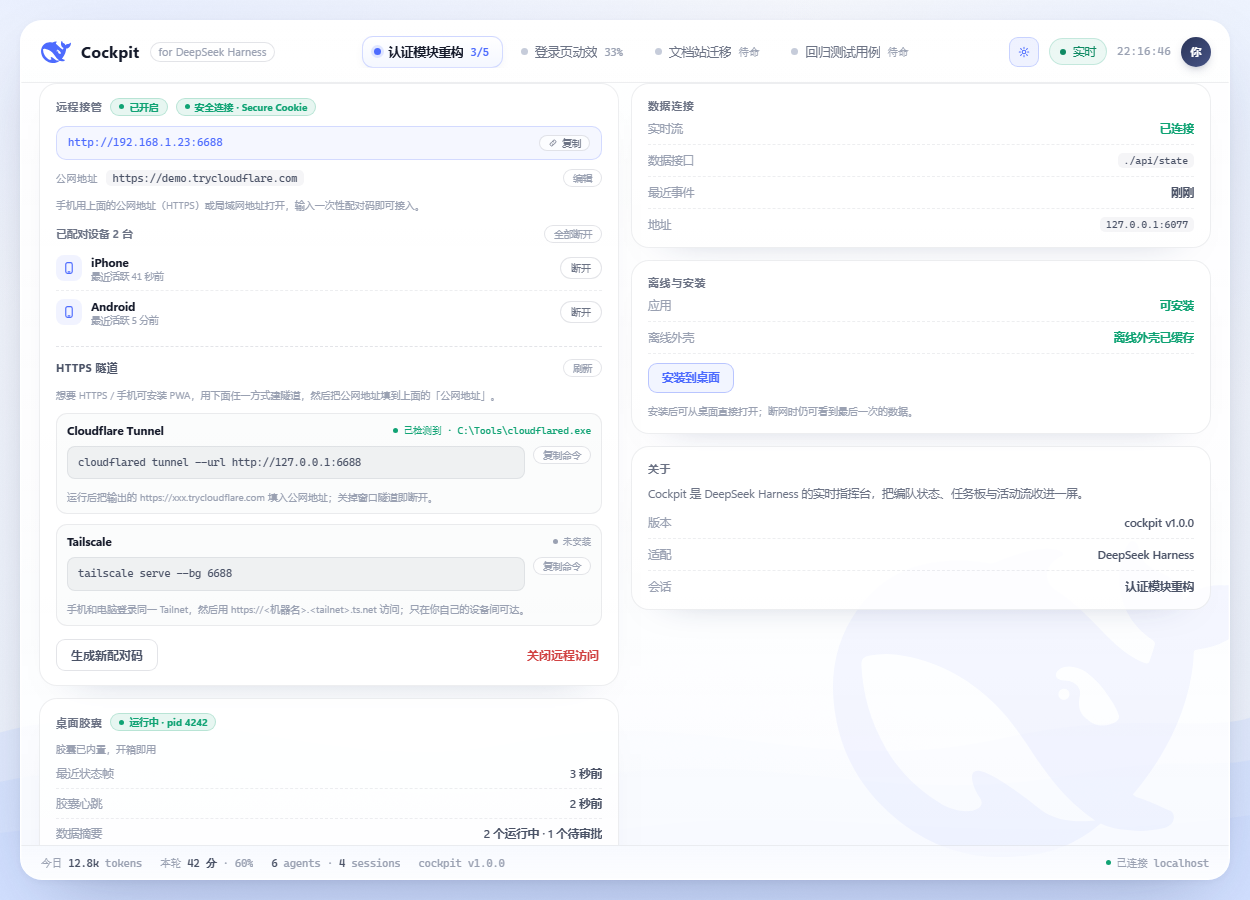
- 局域网一次性配对码(6 位、2 分钟有效、单次使用、错误限速),手机浏览器即可接管
- 需要 HTTPS 时给出隧道向导(检测 cloudflared / Tailscale,只给命令,不替你执行)
- 公网 HTTPS 地址 + Secure Cookie;配对设备可随时撤销
- 审批到达时(页面在后台)可发系统通知
- PWA:可安装、离线外壳、断网提醒
界面
- 内嵌工作台 / 独立页 / 手机单栏三套布局,列宽可拖、双击复位,宽度本地记忆
- 深色模式跟随工作台主题;1250/1000/390 三档适配;reduced-motion 与键盘可达
- 字体统一无衬线栈;数字等宽
安装
前置:DeepSeek Harness(带插件系统与客户端模块)、Node.js ≥ 22;桌面胶囊仅 Windows 10 2004+,其他平台指挥台正常、胶囊自动隐藏。
- 下载
dsh-cockpit-<version>.tgz(Releases 或本地npm pack) - 安装到你的 profile 并重启:
dsh plugin --profile <profile> add /path/to/dsh-cockpit-1.2.2.tgz
- 重启 DSH 后:侧栏出现「Cockpit 指挥台」,点开即用;桌面胶囊随宿主自动启动(Windows)。
独立访问:http://127.0.0.1:<DSH 端口>/cockpit/。
升级:重复 add 新版本 tgz 后重启;设置与别名保存在 ~/.dsh/cockpit/,升级不丢。
卸载:dsh plugin --profile <profile> remove dsh-cockpit,再重启。
安全与隐私
- 本地优先:插件只监听本机 DSH 端口;不向任何服务器上报数据;文档中的截图与示例均为演示数据
- 默认只读:除你点击触发的审批 / 发消息 / 中断外,不派生 agent、不改任务、不自动同意
- 审批:只回答 once 决策,25 秒超时即交回原生弹窗;可用
DSH_COCKPIT_APPROVALS=0完全关闭接管 - 远程:默认关闭;开启后只绑私有网段,只代理
/cockpit/*;6 位一次性配对码、失败限速(重启仍保留)、会话 HttpOnly + SameSite;设备可撤销;所有远程操作带remote:true审计 - 扩展卡:其他插件只能提交纯 JSON 只读内容,宿主做类型 / 长度 / 超时校验
- 环境变量:
DSH_COCKPIT_REMOTE_PORT(默认 6688)、DSH_COCKPIT_REMOTE_SECURE=1(强制 Secure Cookie)、DSH_COCKPIT_APPROVAL_HOLD_MS、DSH_COCKPIT_APPROVALS=0
扩展卡片(给插件作者)
任何插件都可以把自己的只读信息卡注册进指挥台:
export function apply(ctx) {
  ctx.inject(['cockpit'], (ctx) => {
    ctx.cockpit.registerCard({
      id: 'git-status',
      title: 'Git 状态',
      subtitle: '当前工作区',
      order: 10,
      async load() {
        return { kind: 'list', items: [{ label: 'main', value: '与远端同步', tone: 'ok' }] }
      },
      actions: [{ id: 'refresh', label: '刷新', kind: 'primary' }],
      async onAction({ action }) {
        if (action === 'refresh') return { toast: '已刷新' }
      },
    })
  })
}
- 载荷类型:
list/metrics/status/text(纯 JSON,无 HTML) - 宿主负责超时、缓存、数量上限与错误隔离;动作走
POST /cockpit/api/cards/<id>/action(同源) - 完整契约见 docs/STATE.md,可安装示例见 examples/git-card
已知限制
- 桌面胶囊仅 Windows;macOS / Linux 只有指挥台
- PWA 安装与系统通知要求安全上下文(HTTPS 或 localhost);局域网 HTTP 只能当网页用(设置页会提示)
- 后台 Web Push 尚未实现,当前只有前台/系统通知
- DSH 团队模型只增不减:同一会话里 teammate 无法删除,Cockpit 用折叠分组保持界面干净
开发
npm run preview      # http://127.0.0.1:6077/cockpit/ 本地预览(mock 数据 + 假后端)
npm run smoke        # 预览冒烟:起服务抓页面 / state / diagnostics / SSE(CI 同款)
npm run check        # 守卫:overlay.ps1 BOM/编码、app.css 括号、版本一致性、术语混用
目录:
index.js        host 插件:会话投影、写操作、审批、胶囊监管、远程访问、扩展卡
client.js       客户端半:侧栏入口 + 主区面板(iframe)
public/         指挥台前端(原生 ES module,无构建、无 CDN)
capsule/        Windows 桌面胶囊(WPF / PowerShell)
mock/           预览用演示数据
examples/       扩展卡示例
docs/           契约与路线图
契约(state 字段、SSE、端点、审批/动作语义)见 docs/STATE.md;路线图见 docs/ROADMAP.md;术语与文案约定见 docs/TERMS.md。
English
Cockpit is a live command deck for DeepSeek Harness agent teams. It answers one question — what is the team doing right now — and lets you act on it in the same place.
- Embedded in the workspace (sidebar entry) or standalone at
/cockpit/ - Live roster with real per-agent tokens / actions / ownership, task board with dependencies and write-scope conflict warnings, plan fallback when no shared board exists, human-readable activity stream
- Approvals gate, queue / steer messages, interrupt a running turn — all click-driven, with a local audit log
- Shareable view links: the header "copy link" button encodes the conversation on screen, so opening it lands on the same session (v1.1)
- One-click self-check in settings (plugin, state, stream, capsule, HUD bridge, remote, approvals, host API) with a copyable report for bug reports (v1.1)
- Settings page reads top-down (connection/device, capsule, self-check, notifications, aliases, about) with one card chrome, same order on narrow screens (v1.2)
- Unified feedback tone and dwell times (ok 2.4 s / warn 3.6 s / error 4.8 s), one inline alert style, failure copy names the next step (v1.2)
- The activity stream folds back-to-back identical tool calls into a single "×N" row (v1.2)
- Built-in desktop capsule (Windows): liquid progress bar + badges; follows whichever conversation is working (v1.0.1 — most recently used conversation wins among several, returns to standby when idle); clicking the capsule opens the deck, the chevron toggles the card (v1.1); hover adds a ring and pending approvals tint the border amber (v1.2), managed by the plugin, toggle in settings
- Phone access: one-time pairing code, optional HTTPS tunnel wizard, Secure cookies, notifications, installable PWA
- Extension cards: other plugins register read-only JSON cards with actions
- Local-first: no telemetry; only the explicit actions you take write back to DSH
Install: dsh plugin --profile <profile> add /path/to/dsh-cockpit-1.2.2.tgz, restart DSH, then open Cockpit in the sidebar.
Windows capsule requires Windows 10 2004+. PWA install and notifications need a secure context (HTTPS or localhost). Backend Web Push is not implemented yet.
MIT licensed. Not affiliated with DeepSeek.
License
Plugins associés
dsh-web (dsh-task-board)
zhu1090093659/dsh-web
dsh-web (dsh-web-all)
zhu1090093659/dsh-web
dsh-web-ui (dsh-task-board)
zhu1090093659/dsh-web-ui
dsh-web-ui (dsh-web-ui-all)
zhu1090093659/dsh-web-ui