dsh-sidebar-trim
zxncjxzg/dsh-sidebar-trim
Hides the sidebar's global panel navigation (Plugins / Market / Schedules / More) and gives the vertical space back to the session list; three modes, switchable in Settings → Sidebar.
Installer
dsh plugin --profile web add github:zxncjxzg/dsh-sidebar-trimREADME
Sidebar Trim · dsh-sidebar-trim
Hides the sidebar's global panel navigation — Plugins / Market / Schedules / More — and gives the vertical space back to your session list.
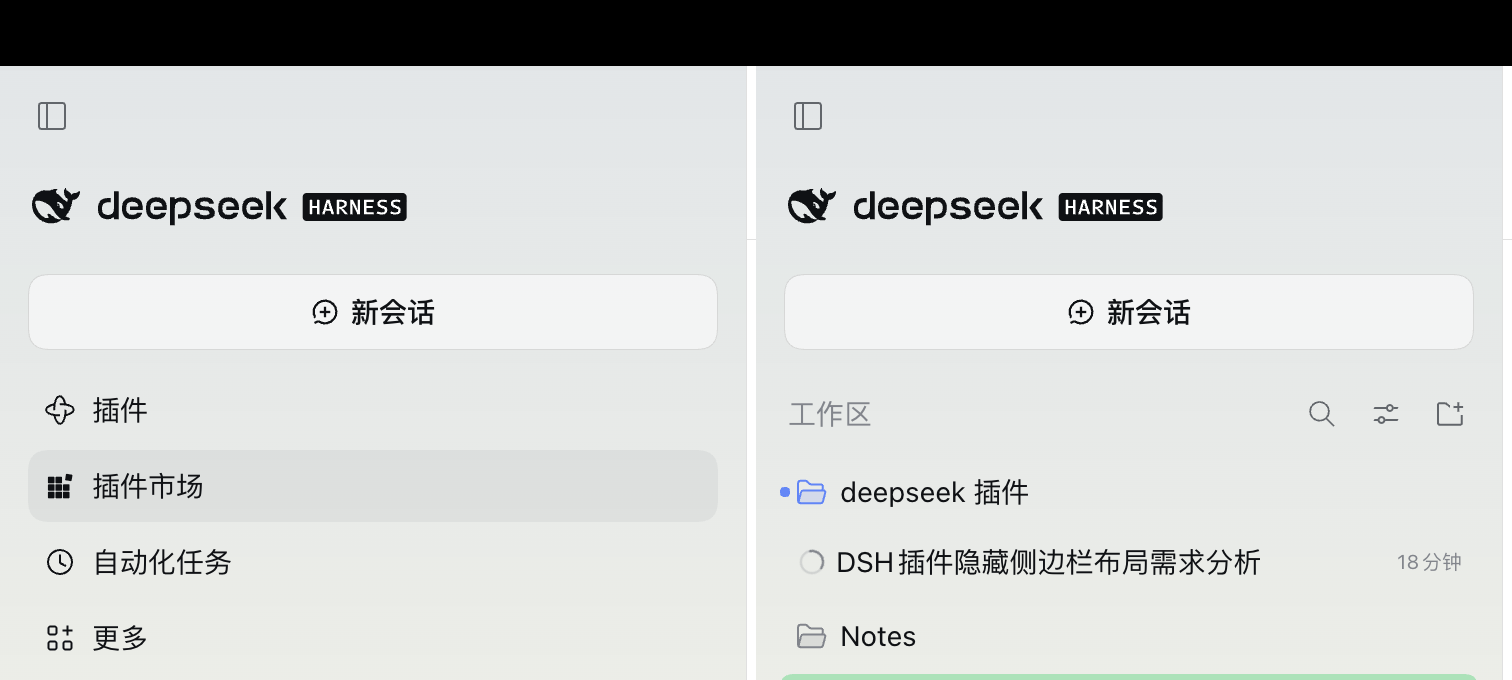
- Expanded sidebar: saves ≈158px (4 × 36px rows plus gaps and the list's bottom margin)
- Collapsed rail / phone drawer: saves ≈192px (wider gaps)
Why it exists
- On a phone the sidebar drawer is short; those four rows cost exactly the height of two or three sessions.
- The Slot API can only add entries, never hide them: once a plugin registers in
sidebar.panellistit owns a row, and the Plugins row is hard-wired to always show (id === "plugins" || !unpinned.includes(id)), so the sidebar's own pin/unpin cannot hide it either. - This plugin does exactly one thing: anchor on the slot contract — the only
navinside[data-slot="sidebar"]— and set it todisplay: none. No hashed class names, no DOM surgery, no fighting other plugins for registrations.
Install
Search dsh-sidebar-trim in the DSH plugin market, or install this directory as a local package into the current profile.
Three modes
Pick one in Settings → Sidebar; the sidebar changes as you pick — no reload, no reinstall.
| Mode | Effect |
|---|---|
| Hide all (default) | Plugins / Market / Schedules / More all collapse |
| Keep “More” | Hide the three rows, keep one More button to reach the collapsed panels |
| Hide nothing | Restore the factory sidebar, for a side-by-side look |
The choice is remembered on this host in a cookie, so it survives a restart even though the harness picks a new port each launch. Another host (a different machine, a tunnel domain), cleared site data, or a private window starts from the default.
Undo
Settings → Sidebar → Hide nothing restores the rows on the spot. To remove the plugin entirely, Settings → Plugins → turn off “Sidebar Trim” — also without a page reload.
With the navigation hidden, Market and Schedules lose their sidebar entry too; reach them from Settings → Plugins when needed.
Compatibility
- Targets DSH 0.2.x (Web and desktop share the same renderer)
- Depends on the
[data-slot="sidebar"]slot anchor and thenavsemantics of the sidebar - If a future release changes the sidebar structure, the plugin fails silently (the UI returns to normal; nothing breaks or blocks startup) and gets a patch release for the selector
License
MIT
Plugins associés
dsh-web (dsh-task-board)
zhu1090093659/dsh-web
dsh-web (dsh-web-all)
zhu1090093659/dsh-web
dsh-TUI
ccch1mneyyy/dsh-tui
dsh-web-ui (dsh-task-board)
zhu1090093659/dsh-web-ui