dsh-cua-pre
aik358/dsh-cua-pre
Automazione desktop Windows per DeepSeek Harness: ciclo observe/act con priorità all'accessibilità e 30 strumenti standard (target elemento/coordinata, instradamento strategia auto/a11y/event), semantica di sicurezza con osservazioni sostituite e senza replay, interruttore di spegnimento persistente, protezione da obsolescenza RuntimeId/rect-drift, schede chat e pannello flottante (operazioni live, muro di frame, impostazioni di auto-rilevamento ambiente), descrizione visione a piastrelle per modelli a bassa risoluzione, registro di audit JSONL e lista di autorizzazione pid. Richiede Windows 10+ e Python 3.9+ con uiautomation e pillow (installabili dalla pagina delle impostazioni).
Installazione
dsh plugin --profile web add github:aik358/dsh-cua-preREADME
🖥️ dsh-cua-pre
Computer Use for DeepSeek Harness — accessibility-first desktop automation DeepSeek Harness 电脑控制插件 — 无障碍优先的桌面自动化





One command install · 一条命令安装
irm https://raw.githubusercontent.com/Aik358/dsh-cua-pre/main/install.ps1 | iex
English | 中文
Feedback & chat: join the community QQ group — Join the dsh-cua-pre group — bug reports, usage tips, and quick responses faster than GitHub issues.
What is this
A self-built computer-use plugin for DeepSeek Harness: an accessibility-first observe → act → verify loop with 30 desktop-automation tools (the same names you'd expect from an industry-standard Computer Use toolset), full safety semantics, reimplemented on a Windows Python worker.
The agent operates your desktop the way a careful human would: it reads the UI Automation tree first (exact, focus-free, resolution-independent) and only falls back to pixel coordinates when the tree cannot express a target. Screenshots are a describing aid, never the operating premise.
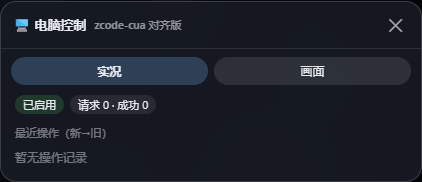
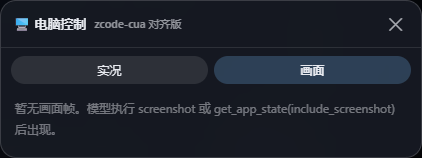
The floating panel: live operation feed (left) and captured frame wall (right). FAB sits at the bottom-right corner, decoupled from any sidebar layout.
Highlights
- 30 tools, standard names —
get_app_state/left_click/type/key/scroll/screenshot/zoom/clipboard… withelement/coordinatedual targets,auto/a11y/eventstrategy routing, andreturn_state. - Safety semantics ported, not improvised — observations are invalidated after every mutation (
superseded+ refresh lock); timeouts mean "may have happened" and are never replayed blindly;stop_computer_controlis a persistent kill switch; element addressing validates RuntimeId / type+name / rect drift and fails closed (stale_tree) instead of clicking the wrong thing. - Presentation layer — tool calls render as chat cards; a fixed floating panel shows the live operation feed and a wall of captured frames; a dedicated settings page with environment auto-detection (Python candidates probed for real, one-click dependency install, bundled worker auto-resolve, vision-model dropdown with heuristic vision flags).
- Tiled vision for small-resolution models — screenshots are grid-tiled (≤768 px per tile, overlap, capped count) so DeepSeek-flash-class models can still read the screen; full-frame and per-tile caches make repeated looks nearly free; images travel as durable attachment refs, never base64 in text.
- Governance — append-only JSONL audit trail of every tool call; pid allowlist (strict/relaxed) with instant effect; loopback-only HTTP surface.
How it works
Browser half (lib/client.js)          Host half (lib/index.js, cordis)
  floating FAB + fixed panel    ──►    30 tools · session state machine
  settings page · chat cards           frame registry · vision tiling · audit
            │                                   │
            └── /api/dsh-cua-pre/* ◄────────────┘
                                                │ stdio JSONL (epoch gate, breaker)
                                                ▼
                                python/worker_cua_v2.py
                        UIA tree · SendInput · PrintWindow · Pillow crop
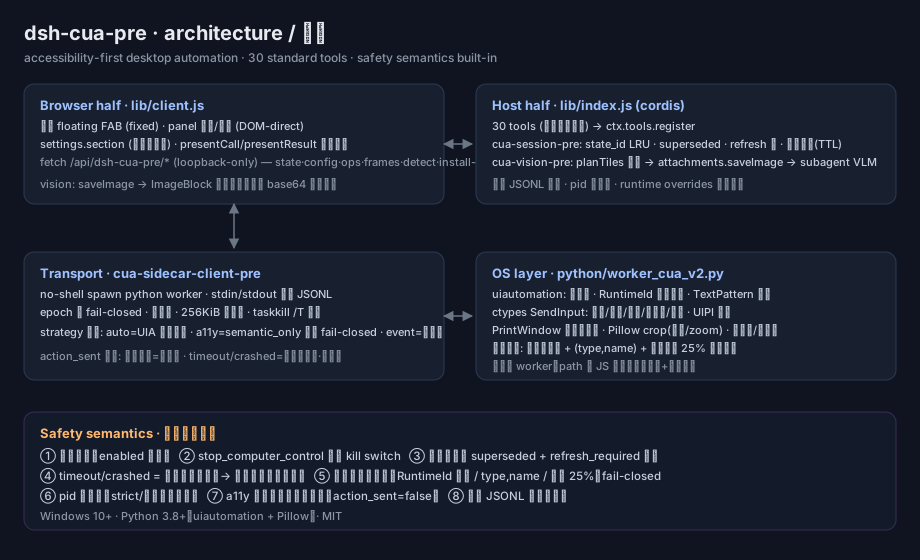
Element addressing records a child-index path at observe time and re-walks it at action time, validating three layers: UIA RuntimeId (with bounded BFS recovery), type+name, and rect-center drift (±25 % tolerance). Any mismatch raises stale_tree — the agent re-observes instead of guessing.
Strategy routing: auto tries a UIA hit-test at the coordinate first and only clicks raw when nothing actionable is found; a11y refuses before any injection when the hit-test misses (action_sent=false); event forces raw input.
Quick start
Prerequisites: Windows 10+, DeepSeek Harness (
dsh web), Python 3.9+ on PATH.
# 1) install into the web profile + patch the bundle roster
irm https://raw.githubusercontent.com/Aik358/dsh-cua-pre/main/install.ps1 | iex

# 2) restart `dsh web` (port 3080 stays a manual, user-owned step)

# 3) enable + (recommended) point the plugin at a venv with worker deps
#    ~/.dsh/cua-pre.json
{ "enabled": true, "pythonExecutable": "C:/path/to/venv/Scripts/python.exe" }
Or pick the interpreter visually: after restart, open Settings → 电脑控制 — the page auto-probes every candidate Python, shows which ones have uiautomation+pillow ready, installs missing deps in one click (official PyPI, Tsinghua mirror fallback), and lets you switch with one click (takes effect immediately, no restart).
Enable vision (optional) / 开启识图(可选)
{ "visionEnabled": true, "visionModel": "" }
visionModel left empty follows the harness default route; the settings dropdown lists every configured provider's models with a heuristic ✔ on likely-vision names (you can override manually). Every screenshot / get_app_state(include_screenshot) then appends a [vision] description built from grid tiles — each tile small enough for low-resolution models to read faithfully.
Install worker deps for the chosen interpreter: pip install uiautomation pillow (or use the settings page button).
Tools — 30 desktop-automation tools
| Group | Tools |
|---|---|
| Observe & resolve | request_access list_apps open_application list_windows get_app_state screenshot zoom list_displays switch_display cursor_position |
| Pointer | left_click double_click triple_click right_click middle_click scroll left_click_drag mouse_move left_mouse_down left_mouse_up |
| Keyboard | type set_value select_text key hold_key |
| Semantic | perform_action |
| Runtime | stop_computer_control wait read_clipboard write_clipboard |
Tool calls render as chat cards in the harness UI, and every completed screenshot can embed itself into its card as an image block (UI-facing only — zero model-context cost).
Safety model
| Mechanism | Behavior |
|---|---|
| Default off | zero Python processes until enabled: true |
| Kill switch | stop_computer_control persists across restarts; restore = remove stoppedByUser from config + restart |
| Write invalidation | any click/type/key supersedes all observations of that window and locks writes until a fresh get_app_state |
| No blind replay | timeout/crash on a mutating call ⇒ "may have happened" ⇒ the agent must re-observe first |
| Fail-closed addressing | stale_tree on RuntimeId/type/name/rect drift; a11y strategy refuses pre-injection |
| UIPI | injection into elevated windows is rejected by Windows with a structured error, never a crash |
| Audit | every tool call appended to artifactsDir/audit/YYYY-MM-DD.jsonl |
| Allowlist | allowedPids restricts which processes may be observed/operated; strict mode also blocks raw coordinates, clipboard and full-screen capture |
For developers
git clone https://github.com/Aik358/dsh-cua-pre && cd dsh-cua-pre
python -m venv .venv && .venv\Scripts\pip install -r python\requirements.txt
node scripts/test-v2-gate.mjs                          # unit: gate/session/frame/tile planner
node scripts/test-v2-live.mjs .venv\Scripts\python.exe # live read-only chain, 22 asserts
node scripts/test-vision.mjs .venv\Scripts\python.exe  # vision pipeline vs fake host services
node scripts/test-m4.mjs .venv\Scripts\python.exe      # card-image/cache/audit/allowlist, 17 asserts
All tests are strictly read-only on the desktop — no test ever injects input.
Notes & honest limitations
- Windows only (UIA + SendInput). macOS/Linux are out of scope for now.
- Frame-bound coordinates are soft-bound: pixels from an expired frame are accepted but flagged
stale(hard rejection needs broker-level occlusion tracking). bundle_id(UWP/AUMID) is not supported — usenameorpid.- Vision is a describe enhancement, never the operating premise — positioning always comes from the accessibility tree, which is exactly why the plugin stays reliable even with vision off.
中文
面向 DeepSeek Harness 的桌面自动化自研插件:30 个标准工具(元素/坐标双目标、auto/a11y/event 策略路由、return_state)、无障碍树优先的观察-动作-验证回路、写后作废与禁重放安全语义、持久急停开关、RuntimeId+矩形漂移双层防错位、对话卡片 + 右下角悬浮面板(实况/画面)+ 环境自动检测设置页、面向低分辨率模型的分块识图(全帧/分块两级缓存)、JSONL 审计落盘与 pid 白名单。
安装与启用见顶部一条命令;仅在 Windows 10+ 可用;默认关闭。安全机制一览见 Safety model。
反馈与交流: 欢迎加入 QQ 交流群 —— 点此加入「电脑控制」交流群 —— 问题反馈、使用技巧、快速答疑,比 GitHub issue 更及时。
License
MIT — see LICENSE.
Plugin correlati
archify (deepseek-harness)
tt-a1i/archify
next-ai-draw-io (dsh-plugin)
dayuanjiang/next-ai-draw-io
WeKnora (dsh-weknora)
tencent/weknora
weknora
tencent/weknora